
FOPETT EK8870 Blue Gradient
FOPETT 2.4GHz Wireless Keyboard and Mouse Set
Instruction Manual
1. Introduction
Thank you for choosing the FOPETT 2.4GHz Wireless Keyboard and Mouse Set. This full-size keyboard and mouse combo is designed for comfortable and efficient use across various devices. This manual provides detailed instructions for setup, operation, maintenance, and troubleshooting to ensure optimal performance.

Image: The FOPETT 2.4GHz Wireless Keyboard and Mouse Set, featuring a blue gradient design on the keyboard and a matching blue mouse, alongside its compact USB receiver.
2. Package Contents
- FOPETT 2.4GHz Wireless Keyboard
- FOPETT Wireless Mouse
- USB Nano Receiver (stored inside the mouse)
- 1 x AA Battery (for mouse)
- 2 x AAA Batteries (for keyboard)
- User Manual (this document)
3. Setup Guide
3.1 Battery Installation
Before first use, install the included batteries into the keyboard and mouse. The keyboard requires two AAA batteries, and the mouse requires one AA battery. Ensure correct polarity when inserting batteries.

Image: The underside of the FOPETT keyboard and mouse, illustrating the battery compartments for two AAA batteries in the keyboard and one AA battery in the mouse. The USB receiver storage slot is also visible on the mouse.
3.2 Connecting the Wireless Receiver
- Locate the USB Nano receiver. It is conveniently stored in the battery compartment at the bottom of the mouse.
- Remove the receiver from its storage slot.
- Insert the USB Nano receiver into an available USB port on your computer, laptop, Smart TV, or other compatible device.
- Wait for your operating system to automatically recognize and install the necessary drivers. This is a plug-and-play device, requiring no additional software installation.
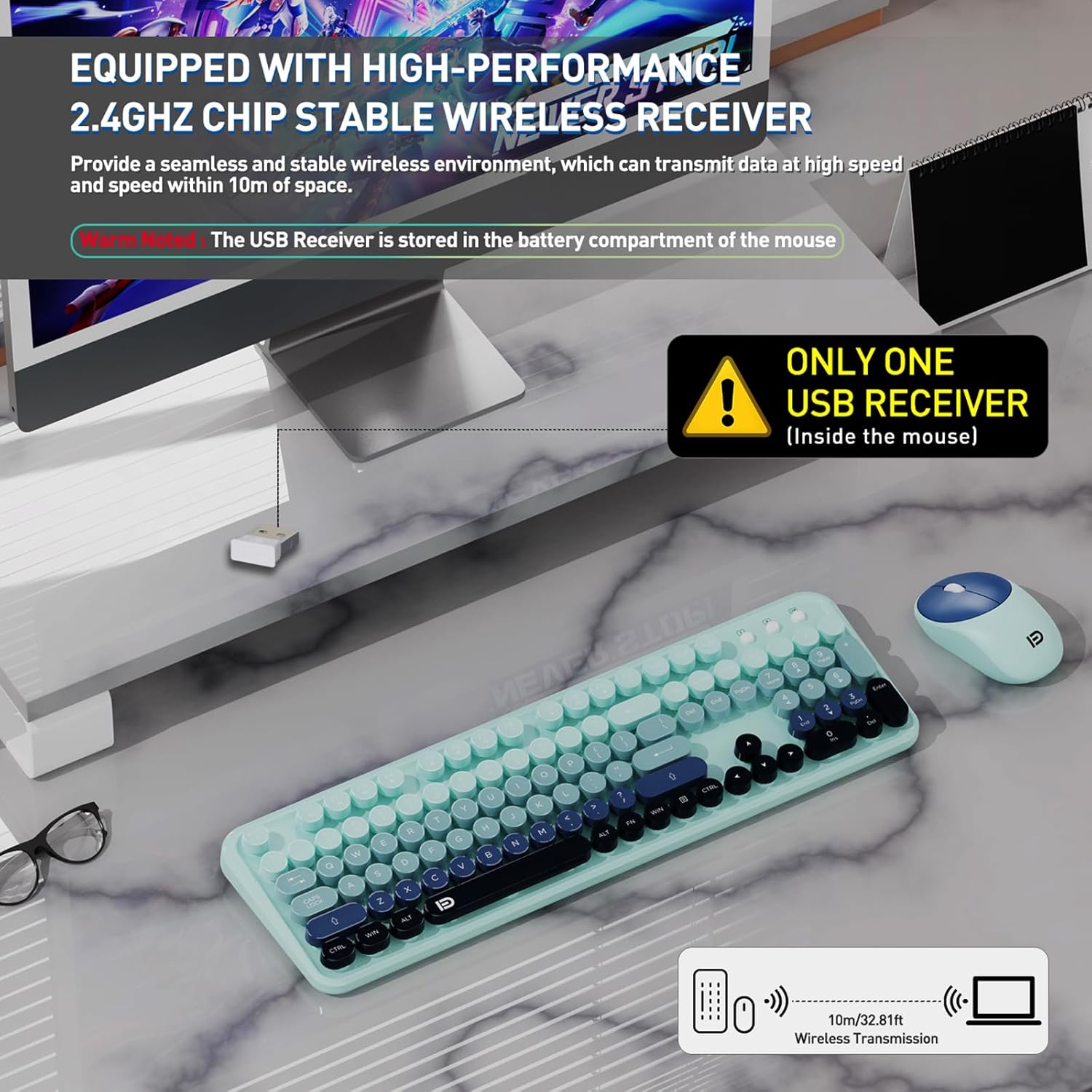
Image: A visual representation of the FOPETT wireless keyboard and mouse setup, highlighting the single USB receiver that connects both devices to a computer, ensuring a stable 2.4GHz wireless transmission up to 10 meters.
4. Operating Instructions
4.1 Power On/Off
Both the keyboard and mouse have separate power switches to conserve battery life. Turn them ON before use and OFF when not in use for extended periods.
4.2 Ergonomic Design for Comfort
The keyboard features a built-in tilt angle for a comfortable typing position, reducing strain during long work sessions. The mouse is designed with a contoured, sweat-resistant, and skin-friendly finish for extended comfortable use.

Image: A close-up of the FOPETT keyboard demonstrating its ergonomic tilt angle of 15 degrees, designed to provide a comfortable typing experience. The image also highlights the anti-slip silicone base.
4.3 Quiet Operation
The mouse utilizes silent micro-motion technology for nearly silent clicks, and the keyboard's noise reduction algorithm minimizes key sound. This ensures a quiet working environment, ideal for shared spaces or late-night use.

Image: The FOPETT keyboard and mouse shown in a quiet setting, emphasizing their whisper-quiet operation due to scissor-switch keys and noiseless mouse buttons, designed to prevent disturbance.
4.4 Function Keys
The keyboard includes 12 function keys (F1-F12) for quick access to various multimedia and system functions such as music control, volume adjustment, and mail. Please note that hotkey compatibility may vary with Mac systems.
5. Maintenance
5.1 Cleaning the Keyboard and Mouse
To maintain cleanliness and performance, regularly clean your keyboard and mouse. The keyboard features removable keycaps for effortless cleaning of dust and debris underneath. Use a soft, dry cloth for general cleaning. For deeper cleaning, gently remove the keycaps and use compressed air or a small brush.
Image: A close-up view of the FOPETT keyboard, demonstrating the ease of removing individual keycaps for thorough cleaning and maintenance.
5.2 Battery Replacement
When the keyboard or mouse performance degrades (e.g., delayed response, connection drops), it may be time to replace the batteries. Refer to Section 3.1 for battery type and installation instructions.
6. Troubleshooting
If you encounter issues with your FOPETT Wireless Keyboard and Mouse Set, please refer to the common solutions below:
- No Connection/Lagging Performance:
Ensure the USB Nano receiver is securely plugged into a working USB port. Check if the keyboard and mouse are powered on. Replace batteries if they are low. The effective wireless range is up to 10 meters; ensure you are within this range. - Mouse Not Responding:
Verify the mouse power switch is ON. Check the AA battery. Remember that the keyboard and mouse share a single USB receiver; ensure it is properly connected. - Keyboard Not Responding:
Verify the keyboard power switch is ON. Check the AAA batteries. Ensure the USB receiver is properly connected. - Automatic Sleep Mode:
The keyboard and mouse are designed to automatically enter sleep mode after 10 minutes of inactivity to conserve power. Simply press any key or click the mouse to reactivate them.

Image: A visual illustrating the auto-sleep and energy-saving features of the FOPETT keyboard and mouse, showing them entering sleep mode after 5 seconds (mouse) and 3 seconds (keyboard) of inactivity to prolong battery life.
If these steps do not resolve your issue, please contact FOPETT customer support for assistance. The FOPETT team provides 24-hour online service.
7. Specifications
| Feature | Detail |
|---|---|
| Product Dimensions | 17.5 x 5.5 x 1.3 inches |
| Item Weight | 2.14 pounds |
| Connectivity Technology | 2.4GHz Wireless (USB Receiver) |
| Keyboard Battery | 2 x AAA batteries (included) |
| Mouse Battery | 1 x AA battery (included) |
| Compatible Devices | Windows XP/ME/Vista/7/8/10/11, PCs, Laptops, MacBooks, Desktops, Chromebooks, Smart TVs (devices with USB slot) |
| Special Feature | Portable, Ergonomic Tilt, Quiet Operation, Removable Keycaps |
8. Warranty and Support
FOPETT offers a three-year worry-free warranty for this keyboard and mouse set. Additionally, a 60-day money-back guarantee or replacement option is available. For any inquiries, concerns, or technical support, please do not hesitate to contact FOPETT customer service. Our team is committed to providing satisfactory solutions and offers 24-hour online service.
Your satisfaction is our top priority.
Ask a question about this manual
Ask about setup, troubleshooting, compatibility, parts, safety, or missing instructions. Manuals+ will review the question and use this page’s manual context to help answer it.