
Introduction
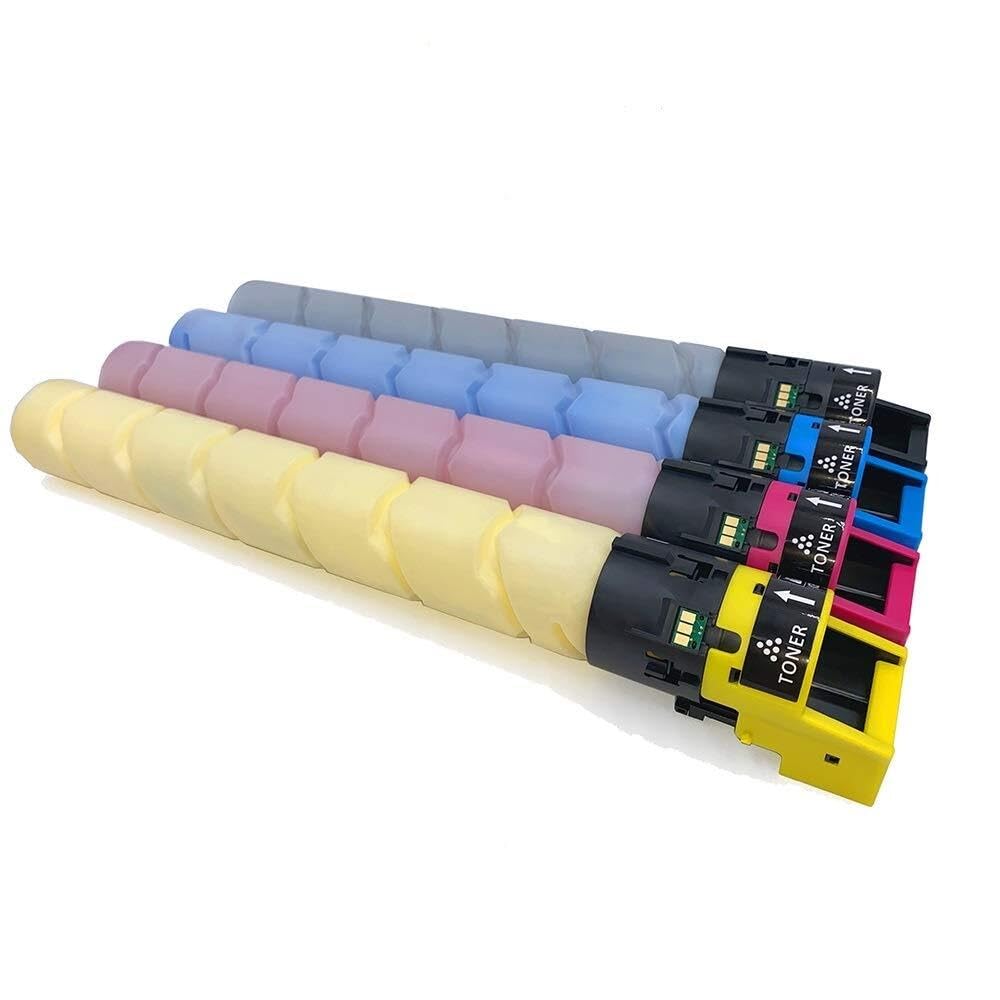
This manual provides essential information for the safe and effective use of your Glintique Compatible High Yield TN-626 Toner Cartridge. Please read these instructions carefully before installation and retain them for future reference. This toner cartridge is designed for use with Konica Minolta Bizhub C450i, C550i, and C650i printer models.
Setup and Installation
Follow these steps to properly install the toner cartridge into your printer.
- Unpack the Cartridge: Carefully remove the new toner cartridge from its packaging. Avoid touching the drum or electrical contacts.
- Prepare the Cartridge: Gently shake the toner cartridge horizontally 5-6 times to distribute the toner evenly inside.
- Remove Protective Seals: Remove any orange or colored protective caps, tapes, or seals from the cartridge as indicated by the packaging. Be careful not to spill any toner.
- Open Printer Access: Open the front cover or toner access door of your Konica Minolta Bizhub printer. Refer to your printer's manual for specific instructions on accessing the toner compartment.
- Remove Old Cartridge: Carefully remove the empty toner cartridge by pulling it straight out.
- Insert New Cartridge: Align the new Glintique TN-626 toner cartridge with the corresponding slot in the printer. Push it firmly until it clicks into place. Ensure it is securely seated.
- Close Printer Access: Close the printer cover or access door. The printer may perform a calibration cycle.
Operating Instructions
Once installed, the Glintique TN-626 toner cartridge operates seamlessly with your compatible Konica Minolta Bizhub printer. No special operating procedures are required beyond standard printer usage.
- Printing: Proceed with your normal printing tasks. The high yield design of these cartridges ensures a large volume of prints before replacement is needed.
- Toner Level Monitoring: Monitor toner levels through your printer's control panel or software utility. The printer will typically alert you when a cartridge is low or empty.
- Print Quality: These cartridges are designed to deliver sharp, crisp prints with consistent results, comparable to OEM standards.
Maintenance and Care
Proper handling and storage can extend the life and performance of your toner cartridges.
- Storage: Store unused toner cartridges in their original sealed packaging in a cool, dry place away from direct sunlight and extreme temperatures.
- Handling: Always handle cartridges by their plastic casing. Avoid touching the imaging drum or electrical contacts, as oils from your skin can affect print quality.
- Disposal: When a cartridge is empty, dispose of it responsibly. Many manufacturers and retailers offer recycling programs for used toner cartridges. Please recycle this package.
Troubleshooting
If you encounter issues, try these common troubleshooting steps:
- Poor Print Quality (Faded, Streaks, Spots):
- Ensure the cartridge was shaken gently before installation to distribute toner.
- Remove the cartridge and re-insert it firmly to ensure proper seating.
- Check your printer's settings to ensure the correct paper type and print quality are selected.
- Perform a printer cleaning cycle or calibration through your printer's control panel or software.
- Cartridge Not Recognized:
- Remove the cartridge and inspect the electrical contacts on both the cartridge and inside the printer. Gently wipe them with a lint-free cloth if dirty.
- Re-insert the cartridge, ensuring it is fully seated.
- Turn the printer off, unplug it for a few minutes, then plug it back in and turn it on. This can reset the printer's memory.
- Toner Leakage:
- Ensure all protective seals and tapes were removed correctly during installation.
- If leakage occurs, carefully remove the cartridge and clean any spilled toner with a dry, lint-free cloth. Do not use water.
If problems persist, refer to your printer's specific user manual or contact customer support.
Specifications
| Brand | Glintique |
| Model Name | Glintique-001 |
| Compatible Printer Models | Konica Minolta Bizhub C450i, C550i, C650i |
| Toner Cartridge Type | Compatible High Yield TN-626 |
| Page Yield | Up to 28,000 pages (per color, at 5% coverage) |
| Color | 4 Color Pack (Black, Cyan, Magenta, Yellow) |
| Product Dimensions | 6.69 x 6.69 x 21.26 inches |
| Item Weight | 1.76 ounces (50 Grams) |
| Included Components | Toner Cartridges |
Warranty and Support
For specific warranty information regarding your Glintique Compatible High Yield TN-626 Toner Cartridge, please refer to the product packaging or the seller's terms and conditions at the point of purchase. If you experience any issues or require technical assistance, please contact the seller or manufacturer directly for support.