
1. Important Safety Information
Warning: Please read all safety instructions carefully before use.
- This product can produce dust and debris which may cause eye injury. Always use appropriate eye protection during operation.
- Keep out of reach of children. This device is not a toy.
- Do not touch the rotating bit or motor during operation to avoid burns or injury.
- Allow the device to cool down completely before handling, cleaning, or storage.
- Ensure the power adapter is compatible with your local voltage before plugging in.
- Do not immerse the device or charging base in water or other liquids.
- Do not use the device if it is damaged or malfunctioning. Contact customer support for assistance.
2. Product Overview
The Lumcrissy Professional Nail Drill (Model US-818) is a high-performance electric nail file machine designed for both professional salon use and personal home manicures and pedicures. Featuring a powerful 65W motor and a 4000mAh rechargeable battery, it offers extended operation and efficient nail care.
2.1 Key Features
- Extended Battery Life: Equipped with a 4000mAh battery, providing up to 12 hours of continuous use on a 2.5-hour charge.
- Efficient Heat Dissipation: Advanced motor, cooling system, and aviation-grade aluminum alloy construction minimize vibration and heat.
- Professional Nail File Kit: Includes 13 durable drill bits (including 2 ceramic bits) suitable for acrylic nails, gel polish, dip powder, and cuticle care.
- Ergonomic & Lightweight Design: Aluminum alloy handpiece offers a comfortable grip and precise control.
- Smart Display: Intuitive LCD screen shows real-time speed adjustments.
2.2 Package Contents
- 1 x Lumcrissy Professional Nail Drill Machine (Main Unit)
- 1 x Handpiece
- 1 x Charging Base
- 13 x Drill Bits (including 2 ceramic drill bits)
- 1 x Nail Brush
- 1 x UL Certified Power Adapter
- 50 x Sanding Bands
- 1 x User Manual (this document)

Figure 2.1: Lumcrissy Professional Nail Drill main unit, handpiece, and various accessories.

Figure 2.2: Detailed view of the complete Professional Nail Drill Set contents.
3. Setup
3.1 Charging the Device
Before first use, fully charge the nail drill. The device features a magnetic charging base for convenience.
- Insert the main nail drill machine unit into the charging dock.
- Connect the UL certified power adapter to the dock port.
- Plug the power adapter into a suitable electrical outlet.
- The LCD screen on the main unit will indicate charging status. A full charge takes approximately 2.5 hours and provides up to 12 hours of working time.
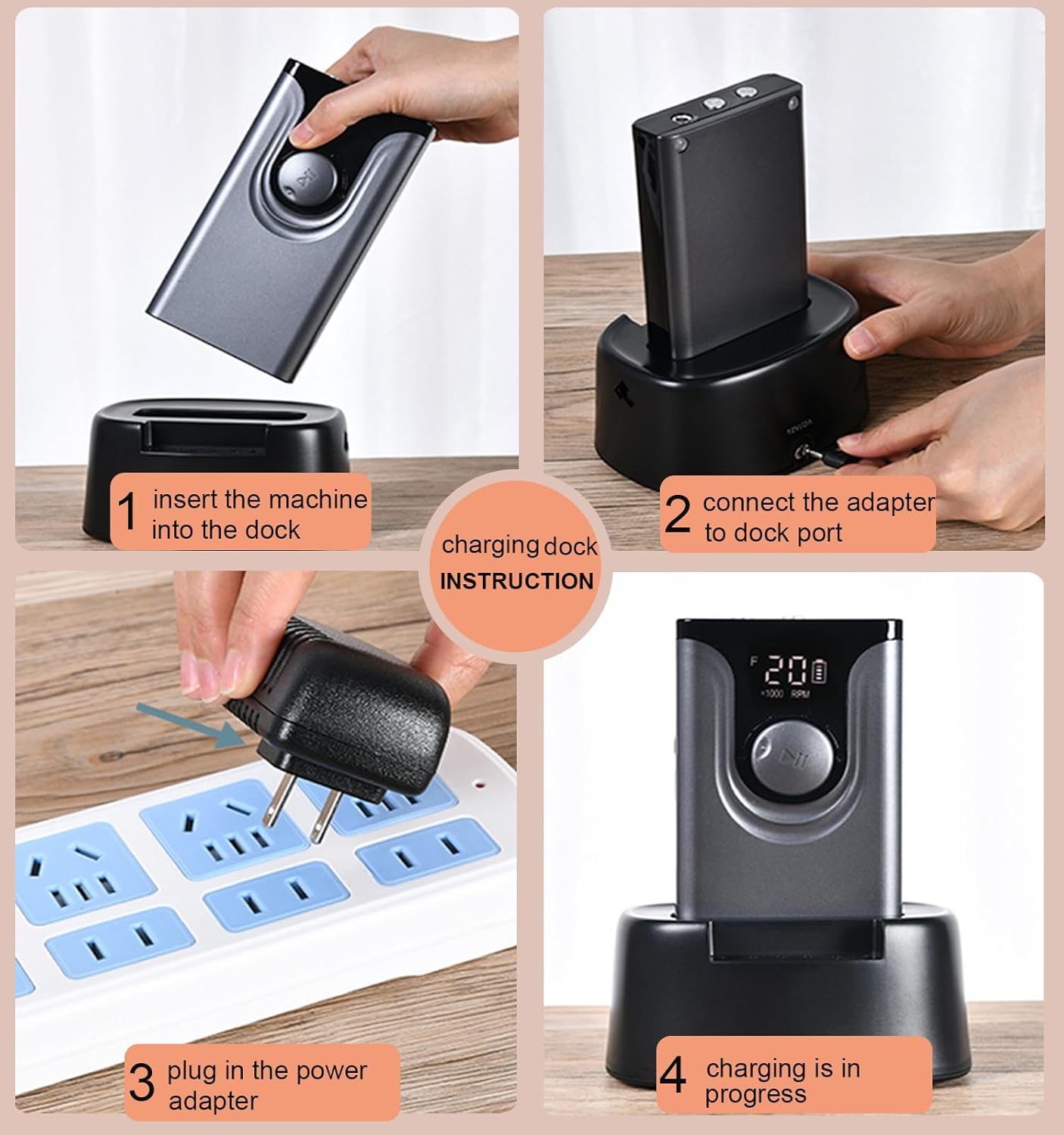
Figure 3.1: Charging dock instructions for the nail drill.

Figure 3.2: Magnetic base charging system and battery life indication.
Video 3.1: Demonstration of charging the Lumcrissy Professional Nail Drill Machine with its charging base.
3.2 Attaching and Replacing Drill Bits
The handpiece allows for easy and secure attachment of various drill bits.
- Ensure the handpiece is powered off and the bit is cool before handling.
- To remove a bit, gently twist the handpiece collar to the left (counter-clockwise) to unlock.
- Pull out the existing drill bit.
- Insert the desired new drill bit firmly into the opening.
- Twist the handpiece collar to the right (clockwise) to lock the bit securely in place.

Figure 3.3: Steps for replacing drill bits in the handpiece.
4. Operating Instructions
4.1 Powering On/Off and Speed Adjustment
- Ensure the handpiece is securely connected to the main unit.
- Press the power button on the main unit to turn the device on. The LCD screen will illuminate.
- Rotate the adjustable knob to increase or decrease the rotation speed (RPM). The speed will be displayed on the LCD screen.
- To pause operation, press the play/pause button. Press again to resume.
- To turn off the device, press and hold the power button until the screen turns off.
4.2 Changing Rotation Direction
The device supports both clockwise (F) and anti-clockwise (R) rotation for versatile use.
- While the device is operating, press the F/R button to switch between forward (F) and reverse (R) rotation.
- The current direction will be indicated on the LCD screen.
Video 4.1: Overview of the Lumcrissy Professional Nail Drill's features, including speed adjustment and rotation direction.
4.3 Usage Tips for Manicure/Pedicure
- Start with a low speed and gradually increase as needed for the task and your comfort level.
- Apply light pressure. The drill's power is sufficient for most tasks without excessive force.
- Move the drill bit continuously over the nail surface to avoid heat buildup in one spot.
- Use appropriate drill bits for specific tasks (e.g., ceramic bits for gel/acrylic removal, finer bits for cuticle work).
- Always ensure proper ventilation when working with nail dust.
5. Maintenance
Proper maintenance ensures the longevity and optimal performance of your nail drill.
- Cleaning: After each use, disconnect the handpiece and use the included nail brush or a soft, dry cloth to remove any dust or debris from the handpiece, bits, and main unit. Do not use harsh chemicals or abrasive cleaners.
- Bit Care: Clean drill bits regularly. For thorough cleaning, some bits can be disinfected according to professional standards. Ensure bits are completely dry before storage.
- Storage: Store the nail drill and its accessories in a clean, dry place away from direct sunlight and extreme temperatures. Utilize the bit holder in the charging base for organized storage of frequently used bits.
- Heat Management: The device is designed with efficient heat dissipation. If the handpiece feels excessively warm during prolonged use, take a short break to allow it to cool down.
6. Troubleshooting
If you encounter any issues with your Lumcrissy Nail Drill, please refer to the following common problems and solutions:
| Problem | Possible Cause | Solution |
|---|---|---|
| Device does not turn on. | Low battery; Power adapter not connected; Device malfunction. | Charge the device fully. Ensure power adapter is securely connected to both the dock and outlet. If issue persists, contact customer support. |
| Handpiece not rotating or rotating weakly. | Handpiece not securely connected; Bit not properly inserted; Speed set too low. | Ensure handpiece cable is fully plugged into the main unit. Re-insert the drill bit securely. Increase the speed using the adjustable knob. |
| Excessive vibration or unusual noise. | Bit not inserted correctly; Damaged bit; Internal issue. | Ensure the bit is fully and correctly inserted and locked. Replace with a new bit if the current one appears damaged or bent. If the issue continues, contact customer support. |
| Device gets hot quickly. | Prolonged continuous use; Blocked ventilation. | Allow the device to cool down. Ensure ventilation openings are not obstructed. Use light pressure during operation. |
If you experience problems not listed here or if the suggested solutions do not resolve the issue, please contact Lumcrissy customer support.
7. Specifications
| Feature | Detail |
|---|---|
| Model Number | US-818 |
| Brand | Lumcrissy |
| Power | 65W |
| Battery Capacity | 4000mAh Lithium Ion |
| Charging Time | Approx. 2.5 hours |
| Working Time | Up to 12 hours |
| Max RPM | 35,000 RPM |
| Voltage | 12 Volts |
| Package Dimensions | 8.39 x 7.13 x 4.76 inches |
| Item Weight | 3 Pounds |
| Country of Origin | China |
8. Warranty and Customer Support
Lumcrissy is committed to providing high-quality products and excellent customer service.
- Warranty: This product comes with a 6-month warranty on the handpiece and a 1-year warranty on other parts from the date of purchase. Please retain your proof of purchase for warranty claims.
- Customer Support: For any questions, concerns, or technical assistance, please contact Lumcrissy customer support. Our dedicated team is ready to ensure a smooth experience with your product.
For more information or to contact support, please visit the official Lumcrissy store or contact your retailer.