
Meliconi Slim Style Extra 900F (48018)
Meliconi Slim Style Extra 900F TV Wall Mount Instruction Manual
Model: Slim Style Extra 900F (48018)
Introduction
The Meliconi Slim Style Extra 900F is a high-quality, fixed TV wall mount designed for large televisions ranging from 65 to 120 inches. Manufactured in Italy, this mount combines advanced technology, modern materials, and innovative design to provide a secure and aesthetically pleasing solution for mounting your TV. It supports VESA patterns from 300x300mm up to 900x900mm and has a maximum load capacity of 100kg (or 50kg when installed on plasterboard walls).
This manual provides detailed instructions for the safe and proper installation, operation, and maintenance of your Meliconi Slim Style Extra 900F TV wall mount. Please read all instructions carefully before beginning installation.
Safety Information
Always prioritize safety during installation and use. Failure to follow these instructions could result in property damage or personal injury.
- Ensure the wall structure can support the combined weight of the mount and your television. Consult a professional if unsure.
- Use appropriate tools and hardware for your specific wall type.
- Do not exceed the maximum weight capacity of 100kg (50kg for plasterboard).
- Keep children and pets away from the installation area.
- Wear appropriate safety gear, including eye protection.
- If installing on plasterboard, ensure the plasterboard thickness is between 12.5mm and 25mm.
Package Contents
Verify that all components are present before beginning installation:
- Wall Plate Assembly
- TV Brackets (2 pieces)
- Mounting Hardware Kit (screws, anchors, washers, spacers)
- EVA Foam Protectors
- Small Spirit Level
- Instruction Manual

Image: Overview of the Meliconi Slim Style Extra 900F TV wall mount components, including the main wall plate and TV brackets.
Setup and Installation
Follow these steps carefully for proper installation.
Step 1: Prepare the TV Brackets
- Attach the two TV brackets to the back of your television using the appropriate screws and spacers from the hardware kit. Ensure the brackets are aligned with the VESA mounting holes on your TV.
- Apply the EVA foam protectors to the back of the TV brackets where they will contact the TV, to prevent scratches.

Image: A large television with the vertical mounting brackets of the Meliconi Slim Style Extra 900F attached to its rear, demonstrating the VESA compatibility.
Step 2: Mark Drilling Locations on the Wall
- Determine the desired height for your TV.
- Hold the wall plate assembly against the wall at the desired height. Use the included spirit level to ensure it is perfectly horizontal.
- Mark the drilling points through the holes on the wall plate.

Image: The Meliconi Slim Style Extra 900F wall plate, showing its horizontal design and the integrated spirit level for accurate installation.
Step 3: Drill Holes and Mount Wall Plate
- Drill holes at the marked locations using an appropriate drill bit for your wall type (concrete, brick, plasterboard).
- Insert wall anchors if necessary (e.g., for concrete or brick walls).
- Secure the wall plate assembly to the wall using the provided screws. Ensure it is firmly attached and level.
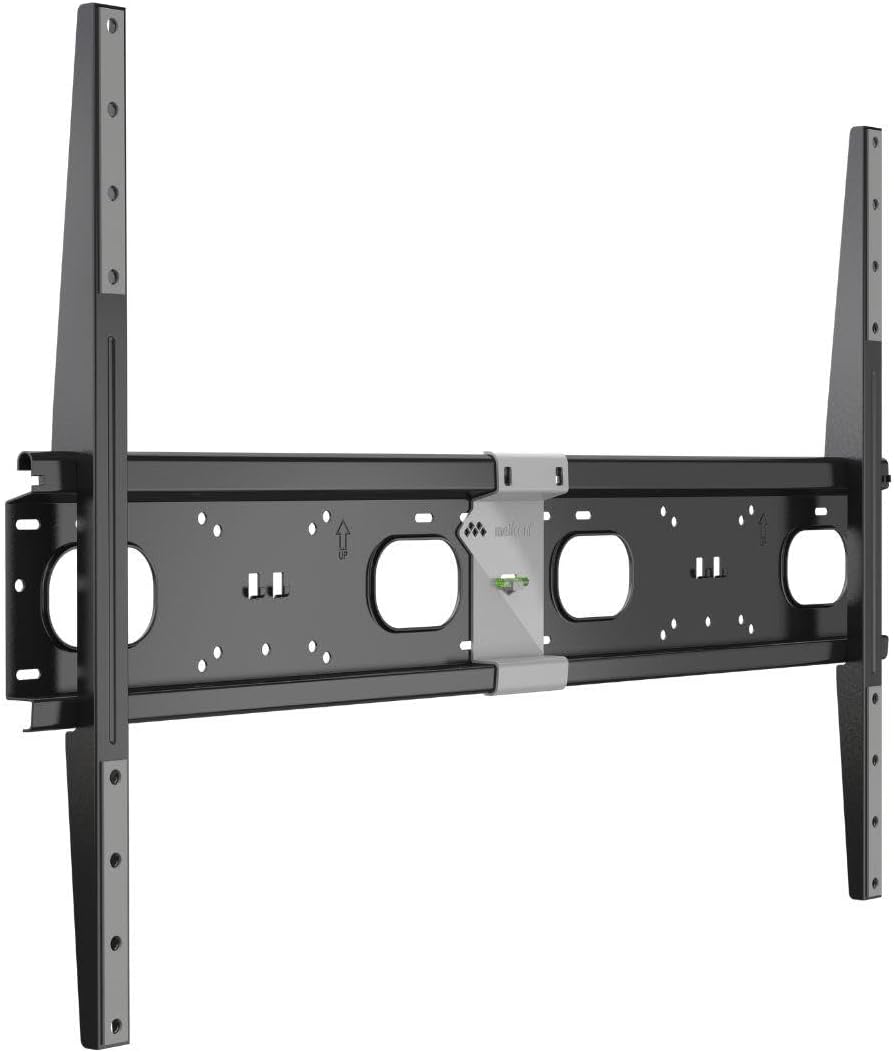
Image: The Meliconi Slim Style Extra 900F wall plate securely mounted on a wall, ready to receive the television.
Step 4: Hang the TV
- Carefully lift the television with the attached brackets. It is recommended to have at least two people for this step, especially for larger TVs.
- Align the TV brackets with the wall plate and gently lower the TV until the brackets hook onto the wall plate.
- Ensure the TV is securely seated on the mount. The Slim Style Extra 900F features a secure locking mechanism to prevent accidental dislodgement.

Image: A side view of the Meliconi Slim Style Extra 900F TV wall mount, highlighting its ultra-slim profile when installed, keeping the TV close to the wall.
Operating Instructions
The Meliconi Slim Style Extra 900F is a fixed wall mount, meaning it does not offer tilt, swivel, or extension capabilities. Once installed, your TV will remain in a static position.
- Fixed Position: The mount provides a secure, flush-to-wall installation for a clean aesthetic.
- Cable Management: Plan your cable routing before installation to ensure a tidy appearance. Cables can be run behind the TV and through the wall if desired and feasible.
Maintenance
Minimal maintenance is required for your TV wall mount.
- Regular Checks: Periodically check all screws and connections to ensure they remain tight and secure.
- Cleaning: Wipe the mount with a soft, dry cloth. Avoid abrasive cleaners or solvents.
- Damage: If any part of the mount appears damaged or worn, do not use it. Contact Meliconi support for assistance.
Troubleshooting
| Problem | Possible Cause | Solution |
|---|---|---|
| TV is not level after installation. | Wall plate not installed level. | Remove TV, loosen wall plate screws, adjust level using spirit level, re-tighten screws, re-hang TV. |
| Mount feels unstable. | Screws not fully tightened; incorrect anchors used; wall not strong enough. | Ensure all screws are tight. Verify correct anchors for wall type. If wall is insufficient, consult a professional for reinforcement. |
| Cannot attach TV to wall plate. | TV brackets not correctly aligned or installed. | Check that TV brackets are securely attached to the TV and correctly oriented to engage with the wall plate. |
Specifications
- Model: Slim Style Extra 900F (48018)
- Brand: Meliconi
- Mount Type: Fixed Wall Mount
- Compatible TV Sizes: 65 - 120 inches
- VESA Compatibility: 300x300mm, 400x400mm, 500x500mm, 600x600mm, 900x600mm (and other combinations up to 900x900mm)
- Maximum Load Capacity: 100 kg (220 lbs)
- Plasterboard Load Capacity: 50 kg (110 lbs) for 12.5mm to 25mm thick plasterboard
- Material: Metal (with EVA foam protectors)
- Manufactured: Italy
Warranty and Support
Meliconi products are manufactured to high standards and come with a warranty against manufacturing defects. For specific warranty details, please refer to the documentation included with your product or visit the official Meliconi website.
For technical support, missing parts, or any questions regarding your Meliconi Slim Style Extra 900F TV wall mount, please contact Meliconi customer service. Contact information can typically be found on the product packaging or the official Meliconi website.
Note: Always retain your proof of purchase for warranty claims.
Related Documents - Slim Style Extra 900F (48018)
 |
SPACE TELEVISION TVARMECPL04 Fixed TV Wall Mount Instruction Manual Instruction manual for the SPACE TELEVISION TVARMECPL04 Fixed TV Wall Mount, designed for 37"-80" screens with VESA compatibility and a 45kg (99lbs) weight capacity. Includes safety warnings and installation steps. |
 |
Wolff Mount TVB-15XL Extra Long Arm Full-Motion TV Wall Mount Installation Manual Detailed installation instructions and parts list for the Wolff Mount TVB-15XL Extra Long Arm Full-Motion TV Wall Mount. Includes VESA compatibility and assembly steps. |
 |
iiglo Fixed Wall Mount Installation Manual LP42-69F Comprehensive installation manual for the iiglo LP42-69F Fixed Wall Mount, detailing safety precautions, assembly steps, and specifications for secure TV mounting. |
 |
Precision Aerobatics Extra 330L: A Comprehensive Guide and Review Explore the history, setup, build, and flight performance of the Precision Aerobatics Extra 330L, a high-performance aerobatic model aircraft. This document details its evolution, construction, and flying characteristics. |
 |
M VESA Wallmount Super Slim Fixed 400 MAX Installation Guide Installation manual for the Multibrackets M VESA Wallmount Super Slim Fixed 400 MAX, providing step-by-step instructions, parts list, and warranty information. |
 |
Kimex 012-1143 Fixed TV Wall Mount for 32-60 Inch Screens - Installation Guide Comprehensive installation manual for the Kimex 012-1143 fixed TV wall mount. Covers safety, parts, and step-by-step assembly for 32-60 inch screens up to 60kg. Supports various VESA patterns. |
Ask a question about this manual
Ask about setup, troubleshooting, compatibility, parts, safety, or missing instructions. Manuals+ will review the question and use this page’s manual context to help answer it.