
1. Introduction
This manual provides detailed instructions for the setup, operation, and maintenance of your Pyle PHSKR33 4-Piece Mini Hi-Fi Bluetooth Stereo System. This versatile audio system is designed to deliver a premium entertainment experience with its comprehensive features and robust sound output. Please read this manual thoroughly before using the product to ensure proper operation and to maximize its performance.
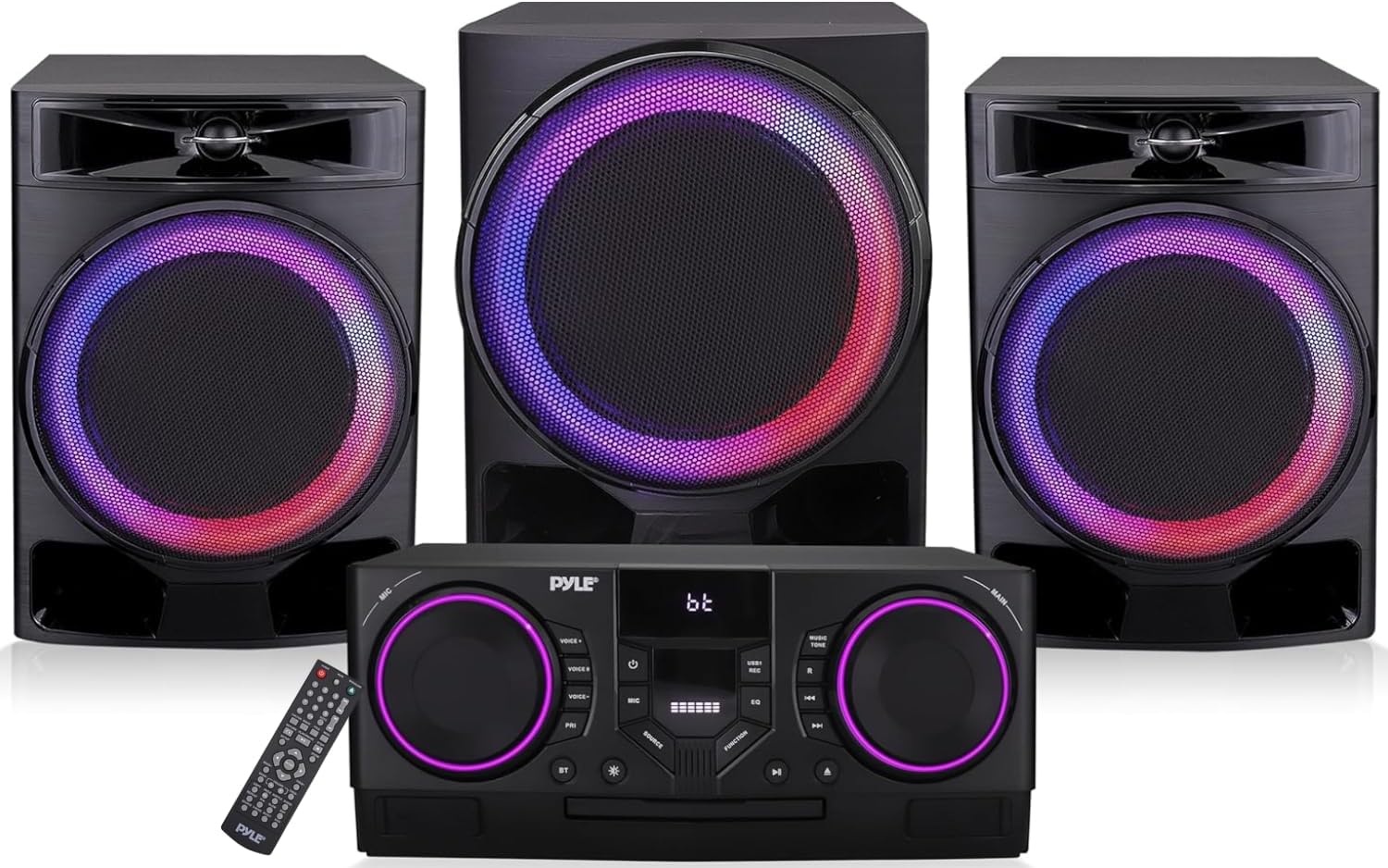
Figure 1.1: Pyle PHSKR33 Stereo System Components
2. Package Contents
Carefully unpack all items and ensure you have received the following components:
- BT Stereo System (Main Unit)
- Remote Control
- AV Connection Cable
- One Wireless Microphone
- Power Cord
- FM Antenna Cable
- Two Stereo Speakers
- One Subwoofer

Figure 2.1: Included Components and Dimensions
3. Product Features
The Pyle PHSKR33 system offers a range of features for a comprehensive audio experience:
- Powerful Audio Output: 1000W digital amplifier for clear and robust sound.
- Bluetooth Connectivity: Built-in Bluetooth 5.0 for wireless audio streaming from compatible devices with a 30+ ft range.
- Multi-Format Playback: Supports DVD, VCD, CD, CD-R, CD-RW, and MP3 formats.
- USB Recording: Dual USB ports for playing media and recording source signals or microphone audio.
- FM Radio: Integrated FM tuner for listening to radio stations.
- Microphone Inputs: Features microphone inputs with adjustable volume, bass, treble, reverb, and echo effects.
- Video Outputs: HDMI and Coaxial outputs for video connectivity.
- LED Indicators: Dynamic LED lights on speakers and main unit for visual enhancement.
- Remote Control: Full-function remote for convenient operation.

Figure 3.1: Wireless Audio Streaming via Bluetooth

Figure 3.2: Tray-Loading CD/DVD Player

Figure 3.3: Microphone Effects and HD Output
4. Controls and Connections
Familiarize yourself with the main unit's front panel controls and rear panel connections for optimal use.

Figure 4.1: Front Panel Controls and Rear Panel Connections
Front Panel Controls:
- MIC Volume: Adjusts microphone input volume.
- Voice Changer: Activates and cycles through microphone voice effects.
- Mic Priority: Prioritizes microphone audio over music.
- Mic Mode: Selects microphone operating mode.
- Power Button: Turns the unit On/Off.
- Equalizer Mode: Cycles through preset equalizer settings.
- Music Tone: Adjusts music bass and treble.
- Main Volume: Adjusts the overall system volume.
- Source Button: Selects input source (DVD, USB1, USB2, FM, BT, AUX).
- Function Mode: Selects various function modes.
- Repeat Button: Repeats current track or playlist.
- Previous/Next: Navigates tracks or radio stations.
- CD/DVD Player: Tray for disc insertion.
- Play/Pause Button: Plays or pauses media.
- Open/Close CD: Opens and closes the CD/DVD tray.
- USB1 Port: For media playback and recording.
- LED Lights: Visual indicators for various functions.
- BT Mode: Activates Bluetooth pairing mode.
Rear Panel Connections:
- USB2 Port: For CD ripping and video playback.
- Aux Input: 3.5mm stereo input for external audio devices.
- FM Antenna: Connects the included FM antenna.
- Line Input: RCA stereo input for external audio devices.
- HD Output: HDMI output for video to a display.
- Optical Input: Digital audio input.
- Coaxial Output: Digital audio output.
- Video Out: RCA video output.
- Audio Out: RCA stereo audio output.
- Speaker/LED Output: Connects to the included speakers and subwoofer.
5. Setup
Follow these steps to set up your Pyle PHSKR33 stereo system:
- Placement: Place the main unit, speakers, and subwoofer on a stable, flat surface. Ensure adequate ventilation around the unit.
- Speaker Connection: Connect the two stereo speakers and the subwoofer to the corresponding Speaker/LED Output terminals on the rear panel of the main unit. Ensure correct polarity (+ to + and - to -) for optimal sound.
- FM Antenna Connection: Connect the supplied FM antenna cable to the FM Antenna input on the rear panel. Extend the antenna for better reception.
- Power Connection: Connect the power cord to the AC IN socket on the rear panel of the main unit, then plug the other end into a standard wall outlet (AC 110-240V, 50/60Hz).
- Initial Power On: Press the Power Button on the front panel or the remote control to turn on the unit.
6. Operation
6.1 Source Selection
Press the Source Button on the front panel or the remote control to cycle through available input sources: DVD, USB1, USB2, FM, BT (Bluetooth), and AUX (Line Input).
6.2 Bluetooth Operation
- Select the BT source using the Source Button. The display will show "BT" and the unit will enter pairing mode.
- On your Bluetooth-enabled device (e.g., smartphone, tablet), enable Bluetooth and search for available devices.
- Select "Pyle PHSKR33" (or similar name) from the list of devices.
- Once paired, the unit will indicate a successful connection. You can now stream audio wirelessly from your device.
6.3 CD/DVD Playback
- Select the DVD source.
- Press the Open/Close CD button to open the disc tray.
- Place a CD or DVD disc gently into the tray with the label side facing up.
- Press the Open/Close CD button again to close the tray. The unit will begin playing automatically or display the disc menu.
- Use the Play/Pause and Previous/Next buttons for control.
6.4 USB Playback
- Insert a USB flash drive into either the USB1 or USB2 port.
- Select the corresponding USB1 or USB2 source.
- The unit will automatically detect and begin playing compatible audio or video files.
- Use the Play/Pause and Previous/Next buttons for control.
6.5 FM Radio Operation
- Select the FM source.
- Press the Previous/Next buttons to manually tune to a station.
- To auto-scan and save stations, refer to the remote control instructions for the specific auto-scan function.
6.6 Microphone Usage
- Connect the wireless microphone (or a wired microphone to the MIC input if applicable).
- Adjust the MIC Volume knob to your desired level.
- Use the Voice Changer and Mic Mode buttons to apply effects or change microphone settings.
- Activate Mic Priority if you want the microphone audio to automatically lower background music.
7. Recording Function
The PHSKR33 allows recording to a USB drive:
- Insert a USB flash drive into the USB1 port.
- Select the desired audio source you wish to record (e.g., FM radio, AUX input, or microphone).
- Press the Record button on the remote control (or front panel if available) to start recording.
- Press the Stop button to end the recording. The recorded file will be saved on the USB drive.
8. Troubleshooting
If you encounter issues with your Pyle PHSKR33 system, refer to the following common problems and solutions:
| Problem | Possible Cause | Solution |
|---|---|---|
| No power | Power cord not connected; Power outlet faulty. | Ensure power cord is securely plugged into the unit and a working outlet. |
| No sound output | Volume too low; Incorrect source selected; Speaker connections loose. | Increase volume; Select correct input source; Check speaker wire connections for proper polarity. |
| Bluetooth not connecting | Unit not in BT mode; Device too far; Device already connected to another unit. | Ensure unit is in BT mode; Move device closer; Disconnect from other devices and try again. |
| CD/DVD skipping or not playing | Disc dirty or scratched; Disc inserted incorrectly; Unsupported disc format. | Clean disc with a soft cloth; Reinsert disc correctly; Ensure disc format is supported (DVD, VCD, CD, CD-R, CD-RW, MP3). |
| Poor FM radio reception | Antenna not properly connected or extended; Interference. | Ensure FM antenna is fully extended and positioned for best reception. Try repositioning the unit. |
| Remote control not working | Batteries depleted; Obstruction between remote and unit. | Replace remote batteries; Remove any obstructions and ensure direct line of sight. |
| Input reverts to DVD on startup | Default system behavior. | This is a known characteristic. Manually select your desired input source after powering on. |
| Volume is low on startup | Default system behavior. | This is a known characteristic. Adjust the volume to your desired level after powering on. |
9. Specifications
Detailed technical specifications for the Pyle PHSKR33 system:
- Model Number: PHSKR33
- Product Dimensions (L x W x H): 15 x 10 x 20 inches (Main Unit and Speakers combined)
- Item Weight: 39 pounds
- Connectivity Technology: Bluetooth, USB
- Color: Black
- Speaker Type: Stereo (with Subwoofer)
- Power Output: 1000W (Peak)
- Supported Media: DVD, VCD, CD, CD-R, CD-RW, MP3
- Radio Tuner: FM
- Inputs: USB (x2), AUX (3.5mm), Line In (RCA), Optical
- Outputs: HDMI, Coaxial, Video Out (RCA), Audio Out (RCA)
10. Maintenance
Proper care and maintenance will ensure the longevity and optimal performance of your stereo system:
- Cleaning: Use a soft, dry cloth to clean the exterior surfaces of the main unit, speakers, and subwoofer. Do not use liquid cleaners or abrasive materials, as they may damage the finish.
- Ventilation: Ensure that the ventilation openings on the unit are not blocked. Proper airflow prevents overheating.
- Disc Care: Handle discs by their edges. Store them in their cases to prevent scratches and dust accumulation. Clean dirty discs with a soft, lint-free cloth wiping from the center outwards.
- Storage: If storing the unit for an extended period, disconnect it from the power outlet and store it in a cool, dry place away from direct sunlight and extreme temperatures.
- Power Cord: Regularly inspect the power cord for any damage. If damaged, discontinue use and replace it with an authorized replacement.
11. Warranty and Support
For warranty information and technical support, please refer to the documentation included with your product or visit the official Pyle website. Keep your purchase receipt as proof of purchase for any warranty claims.


