
Wispeed C8-20
Wispeed C8-20 Electric Scooter User Manual
Model: C8-20
1. Introduction
Thank you for choosing the Wispeed C8-20 Electric Scooter. This manual provides essential information for the safe operation, maintenance, and troubleshooting of your scooter. Please read it thoroughly before your first ride to ensure optimal performance and safety.

Figure 1: Wispeed C8-20 Electric Scooter
2. Safety Information
Your safety is paramount. Always wear a helmet and appropriate protective gear (knee pads, elbow pads) when riding. Adhere to local traffic laws and regulations. Do not ride under the influence of alcohol or drugs. Avoid riding in heavy rain or on slippery surfaces.
- Weight Limit: The maximum load capacity for this scooter is 100 kg (220 lbs). Do not exceed this limit.
- Visibility: The C8-20 is equipped with 2 front turn signals and 6 reflectors to enhance your visibility. Always use turn signals when changing direction.
- Water Resistance: The scooter has an IPX5 rating, meaning it is protected against low-pressure water jets from any direction. Avoid submerging the scooter or exposing it to high-pressure water.
- Braking: Familiarize yourself with the braking system. The scooter features both front electronic and rear mechanical brakes for effective stopping.
3. Product Components and Features
Understanding the different parts of your scooter will help with operation and maintenance.

Figure 2: Handlebar Controls (Brake Lever, Bell, Turn Signal Controls, On/Off Buttons, Digital Control Screen)

Figure 3: Wide Deck (14.7 cm), Kickstand, and Front Electronic Brake

Figure 4: Rear Brake and Integrated Stop Light
4. Setup and Initial Use
4.1 Unfolding the Scooter
Carefully unfold the scooter from its compact state. Ensure the steering column is securely locked into place. Refer to the folding mechanism diagram (if available on the product itself) for precise steps.

Figure 5: Folded Dimensions (Length: 115.5 cm, Height: 50 cm)
4.2 Initial Charging
Before your first ride, fully charge the scooter's battery. The complete charging time is approximately 6 hours. Connect the charger to the charging port and then to a power outlet. The indicator light on the charger will change when charging is complete.
5. Operating Instructions
5.1 Power On/Off
Press and hold the On/Off button on the handlebar to power on the scooter. The LED display will illuminate. To power off, press and hold the same button again.
5.2 Riding the Scooter
Place one foot on the deck and push off with the other foot to gain initial momentum. Once moving, gently press the accelerator lever. Use the brake lever to slow down or stop. The digital display provides real-time riding information.
5.3 Speed Modes
The Wispeed C8-20 offers four speed modes to adapt to different riding conditions:
- Pedestrian Mode: 6 km/h (3.7 mph) - Ideal for crowded areas or walking alongside.
- Eco Mode: 15 km/h (9.3 mph) - For energy-efficient cruising.
- Intermediate Mode: 20 km/h (12.4 mph) - A balanced speed for general use.
- Maximum Mode: 25 km/h (15.5 mph) - For maximum speed where permitted.
Switch between modes using the dedicated button on the handlebar.

Figure 6: Available Speed Modes
5.4 Security Features
The scooter includes a customizable lock code for added security. Refer to the on-screen menu for instructions on setting and changing your code.
6. Maintenance
Regular maintenance ensures the longevity and safe operation of your Wispeed C8-20 scooter.
- Tire Pressure: The 8.5-inch pneumatic tires require regular pressure checks. Maintain recommended pressure for optimal ride comfort and range.
- Cleaning: Wipe down the scooter with a damp cloth. Do not use high-pressure water or abrasive cleaners. Ensure the charging port cover is securely closed when cleaning.
- Battery Care: Charge the battery regularly, even if not in use, to prolong its lifespan. Avoid completely draining the battery. Store the scooter in a cool, dry place.
- Brake Inspection: Periodically check the functionality of both the electronic and mechanical brakes. Adjust or replace components as needed by a qualified technician.
- General Check: Regularly inspect all screws, bolts, and moving parts for tightness and wear.
7. Troubleshooting
If you encounter issues with your Wispeed C8-20, refer to the following common problems and solutions:
| Problem | Possible Cause | Solution |
|---|---|---|
| Scooter does not turn on | Low battery; Loose connection | Charge the battery; Check all cable connections. |
| Reduced range | Low tire pressure; Overload; Cold weather | Inflate tires to recommended pressure; Reduce load; Battery performance decreases in cold. |
| Brakes not effective | Worn brake pads; Loose cable | Inspect and replace brake pads; Adjust brake cable tension. |
| Unusual noises | Loose components; Debris in wheels | Check all fasteners; Inspect wheels for foreign objects. |
If the problem persists, please contact customer support.
8. Specifications
Detailed technical specifications for the Wispeed C8-20 Electric Scooter:
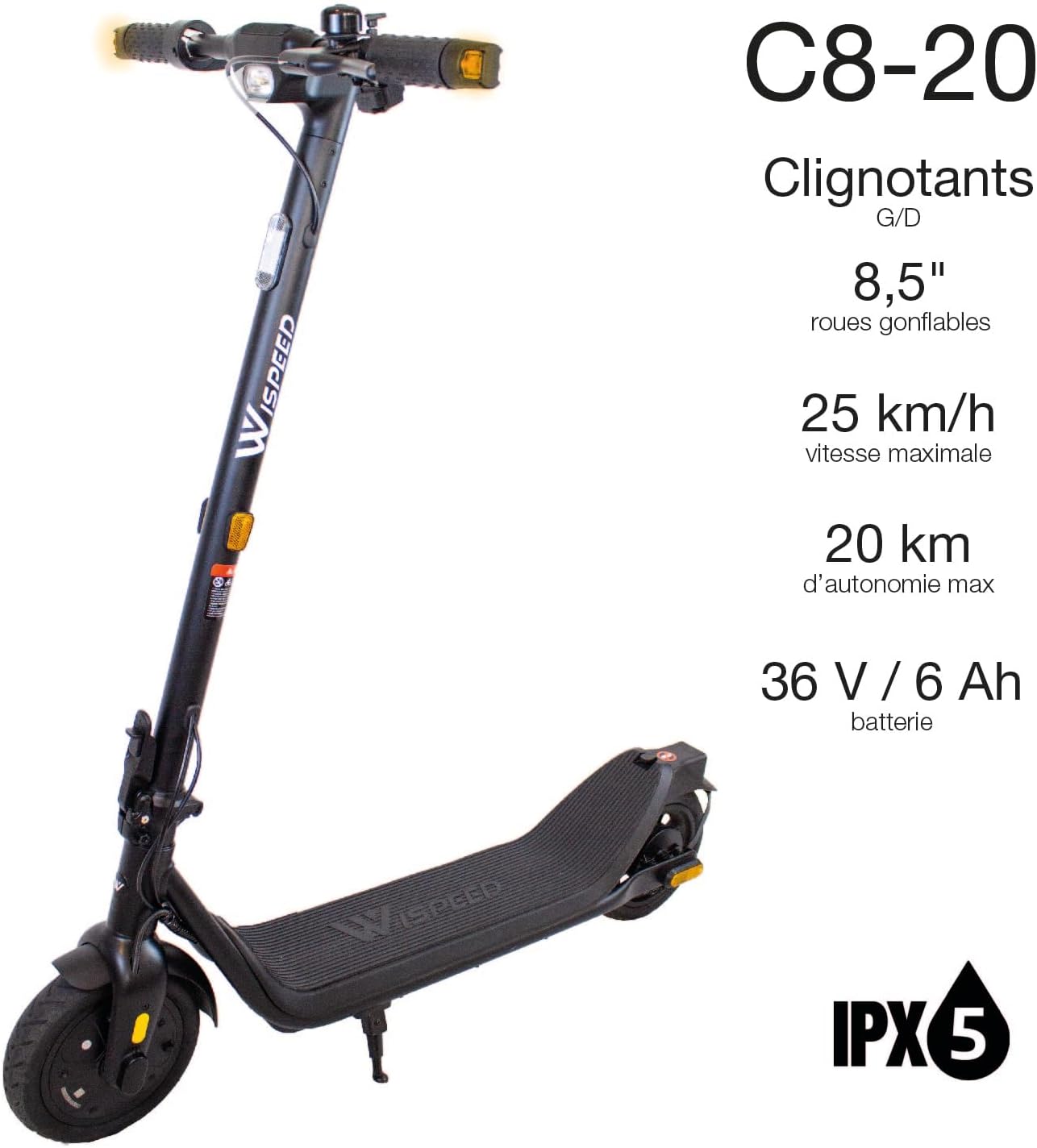
Figure 7: Key Performance Specifications
| Feature | Detail |
|---|---|
| Brand | Wispeed |
| Model Name | C8-20 |
| Color | Black |
| Motor Power (Max) | 550 W |
| Battery | 36V / 6 Ah |
| Max Speed | 25 km/h (15.5 mph) |
| Max Range | 20 km (12.4 miles) |
| Full Charge Time | 6 hours |
| Wheel Size | 8.5 inches |
| Wheel Type | Pneumatic |
| Item Weight | 16.5 Kilograms (36.4 lbs) |
| Weight Limit | 100 Kilograms (220 lbs) |
| Product Dimensions (L x W x H) | 57L x 118W x 111.5H cm (22.4L x 46.5W x 43.9H inches) |
| Special Feature | Digital Display |
| Water Resistance Rating | IPX5 |
9. Warranty and Support
Wispeed is committed to customer satisfaction. If you are not satisfied with our product or encounter any issues, please do not hesitate to contact our After-Sales Service. We will work with you to find a suitable solution to address the situation.
Please retain your proof of purchase for warranty claims. For the most up-to-date contact information and support resources, visit the official Wispeed website or refer to the product packaging.