
Introduction
This manual provides detailed instructions for the installation, operation, and maintenance of your Standard Horizon GX1800G Fixed Mount VHF Marine Radio with integrated GPS. The GX1800G is designed for reliable marine communication and navigation assistance, featuring a built-in 66-channel GPS receiver, Digital Selective Calling (DSC) capabilities, and a robust waterproof construction.
Please read this manual thoroughly before attempting to install or operate the radio to ensure proper functionality and safety.
Setup and Installation
Proper installation is crucial for the optimal performance of your GX1800G VHF radio. Ensure all connections are secure and waterproofed where necessary.
Mounting the Radio
The GX1800G is designed for fixed-mount installation. Select a location that is easily accessible, provides clear visibility of the display, and is protected from direct impact. Ensure sufficient space around the unit for ventilation and cable connections. The radio can be flush-mounted or bracket-mounted.
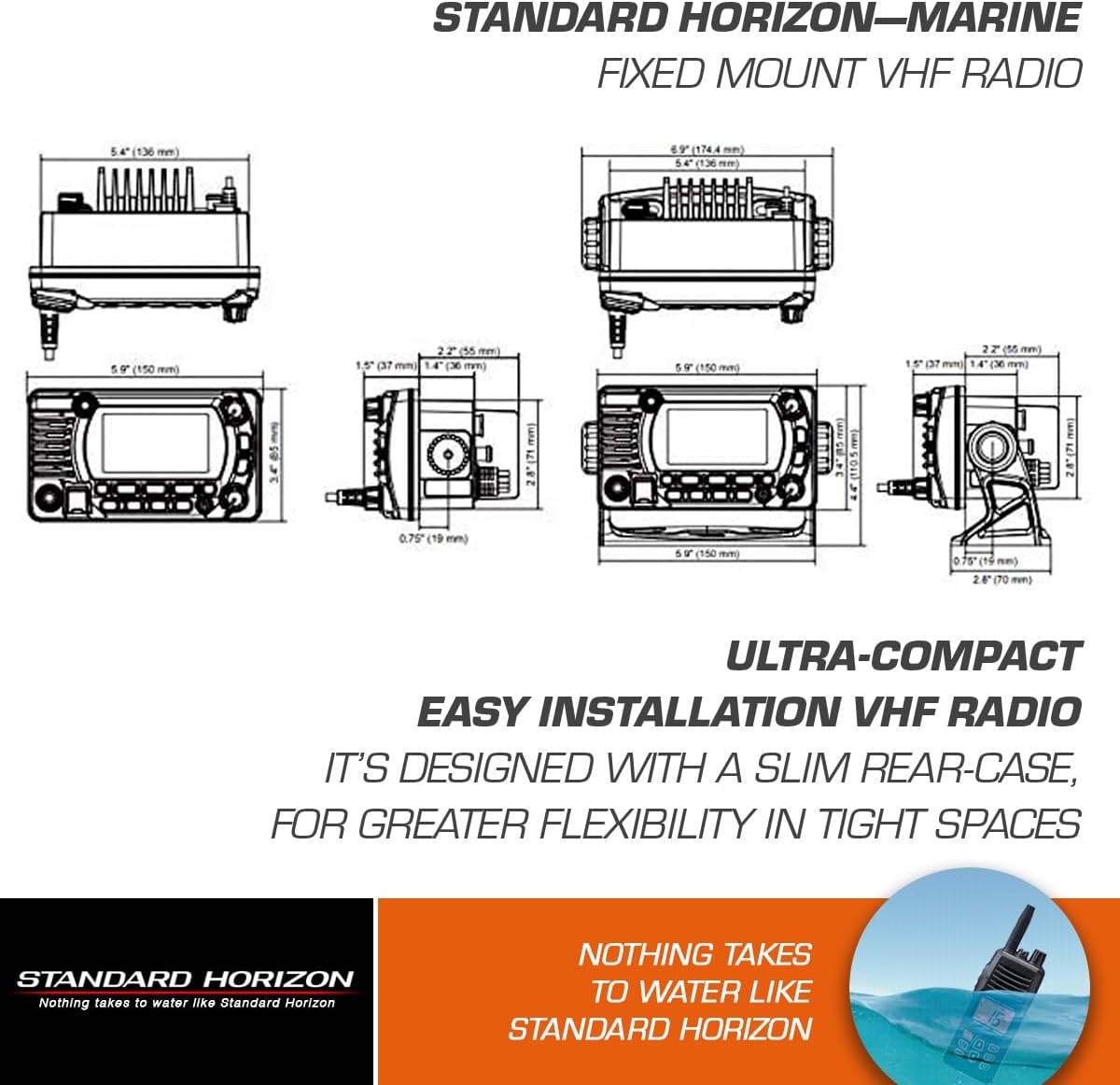
Figure 1: Dimensions of the Standard Horizon GX1800G for installation planning. This diagram illustrates the front, side, and top views with measurements in both inches and millimeters, aiding in precise mounting.
Electrical Connections
- Power Supply: Connect the radio to a 13.8 Volt DC power source. Ensure the wiring is of adequate gauge and protected by an appropriate fuse.
- Antenna Connection: Connect a marine VHF antenna to the antenna connector on the rear of the unit. Use high-quality coaxial cable and ensure the connection is watertight.
- GPS Antenna: The GX1800G features a built-in 66-channel GPS receiver, eliminating the need for an external GPS antenna in most installations. Ensure the radio has a clear view of the sky for optimal GPS signal reception.
- Optional Connections: The radio supports optional connections for an external speaker, NMEA0183/2000 data, and a remote access microphone (e.g., Standard Horizon RAM4 microphone, model SSM-70H).
MMSI Registration
To utilize the Digital Selective Calling (DSC) features, you must obtain and program a Maritime Mobile Service Identity (MMSI) number into your radio. Contact your national telecommunications authority or a relevant boating organization for information on obtaining an MMSI number. Follow the on-screen prompts in the radio's menu to enter your MMSI.
Operating Instructions
The GX1800G is designed for intuitive operation with its E2O Icon/Menu System and programmable keys.
Basic Operation
- Power On/Off: Press and hold the POWER button to turn the radio on or off.
- Volume Control: Rotate the VOL knob to adjust the audio output level.
- Channel Selection: Use the UP/DOWN arrow keys or the channel knob to select the desired VHF channel.
- Transmit: Press the PTT (Push-To-Talk) button on the microphone to transmit. Release to receive.
- Distress Call: In an emergency, lift the red spring-loaded cover and press the DISTRESS button for several seconds to initiate a DSC distress call.

Figure 2: Close-up view of the Standard Horizon GX1800G display, showing channel 16, distress information, and GPS coordinates. The clear, full dot matrix display provides wide and bold information.
Advanced Features
- Digital Selective Calling (DSC): The GX1800G is an ITU-R M.493-15 Class D DSC transceiver, allowing for digital calls to specific vessels or groups, and automatic transmission of distress alerts with your vessel's position.
- GPS Navigation: Utilize the built-in GPS for waypoint navigation, compass display, and viewing GPS status pages directly on the radio's screen.
- Intercom: If a second station (e.g., RAM4 or RAM4X) is connected, the intercom feature allows communication between the main radio and the remote station.
- Night Mode: Activate Night Mode for optimized display visibility in low-light conditions.
Maintenance
Regular maintenance ensures the longevity and reliable performance of your GX1800G radio.
- Cleaning: Clean the radio's exterior with a soft, damp cloth. Do not use abrasive cleaners or solvents. Ensure the display is free of salt residue for clear visibility.
- Waterproof Integrity: The GX1800G is IPX8 submersible, rated for 1.5 meters (4.92 feet) for 30 minutes. While highly water-resistant, ensure all caps and covers (e.g., for optional connections) are securely fastened to maintain its waterproof integrity.
- Connection Checks: Periodically inspect all cable connections for corrosion or damage. Ensure the antenna connection is tight and free of moisture.
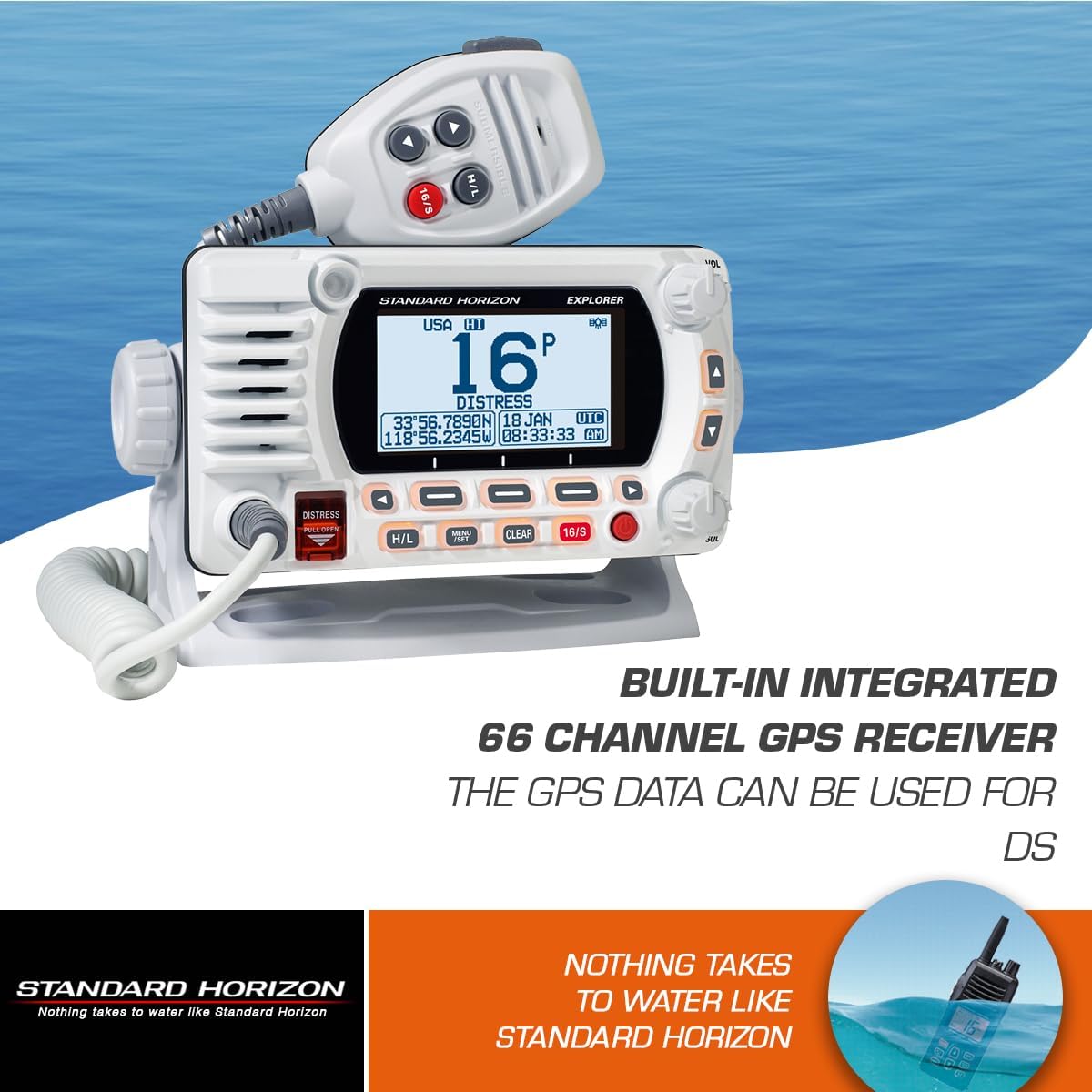
Figure 3: The Standard Horizon GX1800G radio shown in a marine environment, emphasizing its IPX8 submersible and floating construction, designed to withstand water exposure.
Troubleshooting
If you encounter issues with your GX1800G, refer to the following common troubleshooting steps before seeking professional service.
| Problem | Possible Cause | Solution |
|---|---|---|
| Radio does not power on. | No power supply, blown fuse, loose connection. | Check power cable connections. Verify fuse integrity. Ensure battery voltage is sufficient. |
| No audio or distorted audio. | Volume too low, squelch set too high, faulty speaker/microphone. | Adjust volume. Lower squelch level. Check microphone and speaker connections. |
| Cannot transmit or receive. | Antenna issue, incorrect channel, PTT button malfunction. | Check antenna connection and condition. Ensure correct channel is selected. Test PTT button. |
| GPS not acquiring position. | Obstructed view of sky, radio interference. | Ensure the radio has a clear, unobstructed view of the sky. Move away from potential sources of electrical interference. |
Specifications
- Model Number: GX1800GW
- Product Dimensions: 7.5 x 4 x 10 inches (190.5 x 101.6 x 254 mm)
- Item Weight: 3.43 pounds (1.56 kg)
- Color: White
- Number of Channels: 66 (GPS receiver)
- Frequency Range: 156-174 MHz (VHF)
- Talking Range Maximum: 15 Kilometers (approx. 9.3 miles)
- Voltage: 13.8 Volts (DC)
- Water Resistance Level: IPX8 (Submersible 1.5m for 30 minutes)
- Special Features: Waterproof, Built-in GPS, DSC
- Compatible Devices: Standard Horizon RAM4 microphone (model SSM-70H)
- Manufacturer: Standard Horizon
Warranty Information
The Standard Horizon GX1800G Fixed Mount VHF w/GPS radio is covered by a 3-Year Waterproof Warranty. This warranty covers defects in materials and workmanship under normal use. For specific terms and conditions, please refer to the warranty card included with your product or visit the official Standard Horizon website.
Customer Support
For further assistance, technical support, or service inquiries regarding your Standard Horizon GX1800G, please visit the official Standard Horizon website or contact their customer service department. Have your model number and serial number ready when contacting support.
Official Website: www.standardhorizon.com


