
RC-1098
Generic Replacement Remote Control User Manual
For Denon AV Receivers (Models RC-1098, AVR-1609, AVR-1709, AVR-689, RC-1099, AVR-2309CI, AVR-889, AVR-1909, AVR-2309, AVR-789, DHT-789BA, RC-995, RC-1034, AVR-4806)
Introduction
This manual provides instructions for the Generic Replacement Remote Control, designed to operate various Denon AV Receiver models. This remote is an infrared (IR) replacement unit and is intended to function similarly to your original remote control. Please note that while it replaces many core functions, it may not replicate every specific feature of your original Denon remote.
Before use, please verify that your Denon AV Receiver model is listed in the compatibility section to ensure proper functionality. This remote requires two AAA batteries (not included) for operation.
Compatible Models
This replacement remote control is compatible with the following Denon AV Receiver models:
- RC-1098
- AVR-1609
- AVR-1709
- AVR-689
- RC-1099
- AVR-2309CI
- AVR-889
- AVR-1909
- AVR-2309
- AVR-789
- DHT-789BA
- RC-995
- RC-1034
- AVR-4806
If your specific model is not listed, please contact the seller for compatibility confirmation before use.
Setup and Battery Installation
The remote control requires two AAA batteries for operation. Follow these steps to install them:
- Locate the battery compartment on the back of the remote control.
- Slide the battery compartment cover downwards or outwards to open it.
- Insert two new AAA batteries, ensuring the positive (+) and negative (-) terminals align correctly with the markings inside the compartment.
- Slide the battery compartment cover back into place until it clicks securely.
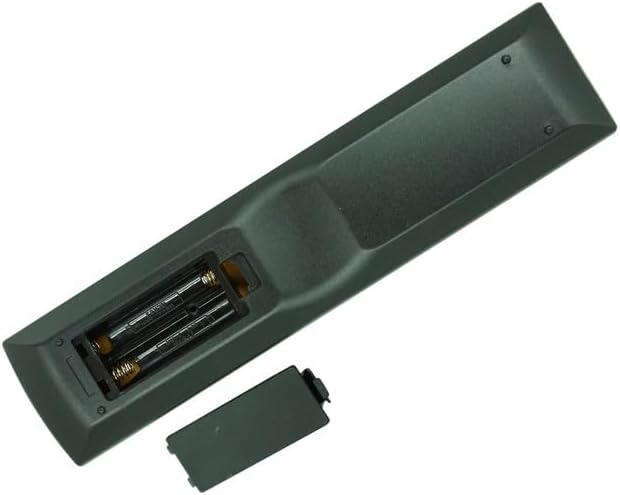
Image: Back of the remote control with the battery cover removed, illustrating the correct orientation for AAA battery insertion.
Once batteries are installed, the remote is ready for use. No additional programming is typically required for this infrared replacement remote; simply point it at your Denon AV Receiver and begin operation.
Operating Instructions
This section outlines the general functions of the buttons on your replacement remote control. Refer to your Denon AV Receiver's original manual for specific functions or advanced settings.
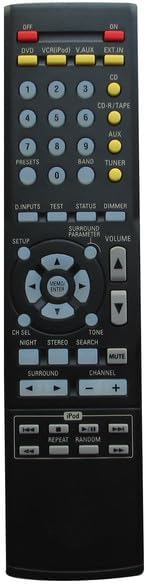
Image: Front view of the replacement remote control, displaying the layout of all buttons.
Key Functions:
| Button | Function |
|---|---|
| ON/OFF | Powers the AV Receiver on or off. |
| DVD, VCR(iPod), V.AUX, EXT.IN, CD, CD-R/TAPE, AUX, TUNER | Selects the corresponding input source on your AV Receiver. |
| Number Buttons (0-9) | Used for direct input selection or channel/preset tuning. |
| VOLUME (+/-) | Adjusts the master volume level. |
| MUTE | Mutes or unmutes the audio output. |
| CHANNEL (+/-) | Changes channels when the Tuner input is selected. |
| SURROUND | Cycles through various surround sound modes. |
| NIGHT | Activates or deactivates Night Mode for reduced dynamic range. |
| STEREO | Switches to stereo audio mode. |
| TONE | Activates tone control adjustments (bass/treble). |
| SEARCH | Used for searching functions, typically with Tuner or media playback. |
| Directional Arrows (Up, Down, Left, Right) & ENTER | Navigates menus and confirms selections on the AV Receiver's display. |
| SETUP | Accesses the AV Receiver's setup menu. |
| D.INPUTS | Cycles through digital audio inputs. |
| TEST | Initiates the speaker test tone for calibration. |
| STATUS | Displays current status information on the AV Receiver. |
| DIMMER | Adjusts the brightness of the AV Receiver's display. |
| SURROUND PARAMETER | Adjusts parameters for selected surround modes. |
| PRESETS (+/-) | Cycles through radio station presets. |
| BAND | Switches between AM/FM bands on the Tuner. |
| iPod Controls (Play/Pause, Stop, Skip, Repeat, Random) | Controls playback for connected iPod devices or compatible media players. |
Note: The functionality of certain buttons may vary slightly depending on your specific Denon AV Receiver model and its features. Some advanced functions or device-specific controls present on your original remote may not be available on this replacement unit.
Maintenance
Battery Replacement:
Replace batteries when the remote's response becomes sluggish or stops working. Always replace both AAA batteries at the same time with new ones. Do not mix old and new batteries, or different types of batteries.
Cleaning:
To clean the remote control, wipe it gently with a soft, dry cloth. Do not use liquid cleaners, sprays, or abrasive materials, as these can damage the remote's surface or internal components.
Troubleshooting
- Remote not responding:
- Ensure batteries are inserted correctly with the correct polarity (+/-).
- Replace old batteries with new AAA batteries.
- Make sure there are no obstructions between the remote and the AV Receiver's IR sensor.
- Ensure you are within the effective range of the AV Receiver's IR sensor.
- Some functions do not work:
- This is a replacement remote; some advanced or model-specific functions of your original Denon remote may not be supported.
- Verify that your AV Receiver model is listed as compatible.
- Remote works intermittently:
- Check battery levels and replace if necessary.
- Ensure the remote's IR emitter is clean and unobstructed.
If you continue to experience issues, please refer to your Denon AV Receiver's original manual or contact the seller for further assistance.
Specifications
- Product Type: Infrared (IR) Replacement Remote Control
- Brand: Generic
- Model Number (Primary): RC-1098
- Color: Black
- Power Source: 2 x AAA Batteries (not included)
- Compatible Devices: Denon Home Theater AV Receivers (specific models listed in Compatibility section)
- Special Feature: Ergonomic design, direct replacement functionality for listed models.
Support and Warranty
As a generic replacement product, specific warranty details may vary. For any questions regarding compatibility, functionality, or troubleshooting beyond this manual, please contact the seller directly through your purchase platform. They will be able to provide the most accurate and up-to-date support information for your specific purchase.
Ask a question about this manual
Ask about setup, troubleshooting, compatibility, parts, safety, or missing instructions. Manuals+ will review the question and use this page’s manual context to help answer it.