
ISUERFY SUER-F36W-UV-10
ISUERFY 36W IP66 Waterproof Black LED Light Bar
User Manual
Model: SUER-F36W-UV-10 | Brand: ISUERFY
1. Introduction
Thank you for choosing the ISUERFY 36W IP66 Waterproof Black LED Light Bar. This product is designed to provide powerful ultraviolet light effects for various applications, including parties, stage lighting, art illumination, and more. Its robust construction ensures durability and reliable performance.
This manual provides essential information for the safe and effective use of your new LED light bar. Please read it thoroughly before installation and operation.

Image 1.1: Overview of the ISUERFY 36W Black LED Light Bars.
2. Setup and Installation
The ISUERFY 36W Black LED Light Bar is designed for easy installation on various surfaces, including walls, floors, or T-bars. Each unit comes with adjustable brackets and a 1.5m (5ft) power cord with an on/off switch for convenient setup.
2.1 Package Contents
- ISUERFY 36W Black LED Light Bar(s)
- Adjustable Mounting Brackets
- Power Cord with On/Off Switch
- Necessary Accessories (screws, wall anchors)
- User Manual
2.2 Installation Steps
- Unpack: Carefully remove the light bar and all accessories from the packaging.
- Choose Location: Select a suitable location for installation, ensuring it is within reach of a power outlet and provides the desired illumination area.
- Attach Brackets: Secure the adjustable mounting brackets to the light bar using the provided screws.
- Mounting:
- Wall/Ceiling Mount: Mark the drilling points on the wall/ceiling using the bracket holes. Drill pilot holes, insert wall anchors (if necessary), and secure the light bar using screws.
- Floor Stand: Position the light bar on a flat, stable surface. The brackets can be rotated to act as a stable base.
- T-Bar Mount: Use appropriate clamps (not included) to attach the brackets to a T-bar or truss system.
- Adjust Angle: Loosen the knobs on the brackets to adjust the light bar to the desired angle (up to 360° rotation), then tighten the knobs to secure it.
- Connect Power: Plug the power cord into a standard 100-240V AC power outlet.
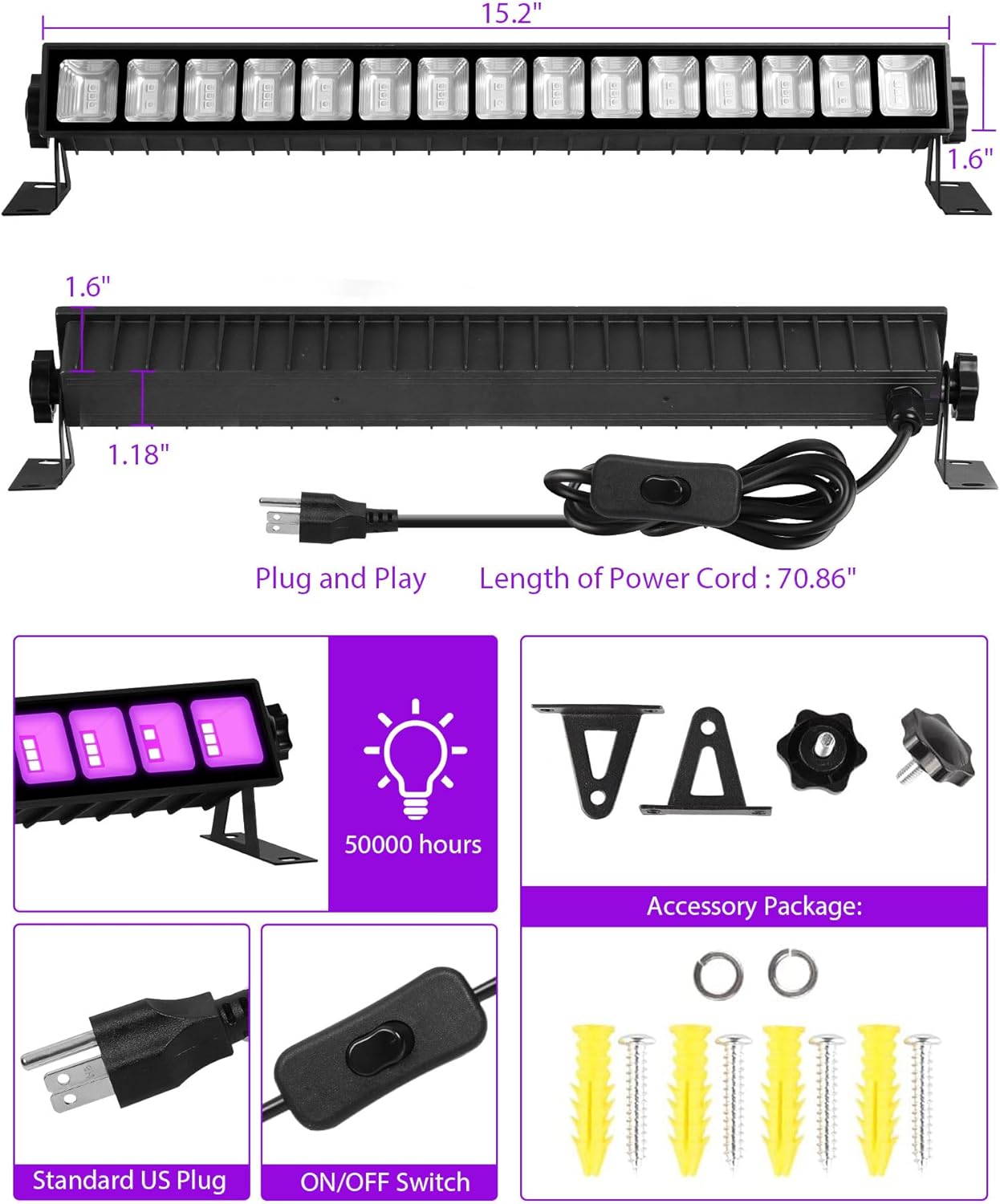
Image 2.1: Product dimensions and accessory package details.

Image 2.2: Key features for installation and heat dissipation.
3. Operating Instructions
Operating the ISUERFY Black LED Light Bar is straightforward due to its simple on/off switch control.
3.1 Basic Operation
- Ensure the light bar is securely installed and plugged into a power outlet.
- Locate the on/off switch on the power cord.
- Flip the switch to the 'ON' position to activate the black light.
- Flip the switch to the 'OFF' position to turn off the light.
3.2 Optimal Usage
For the best black light effect, it is recommended to use the light bar in a dark environment. Turning off other lighting devices in the area will enhance the fluorescent glow of reactive materials.

Image 3.1: Application range and wavelength information.

Image 3.2: Illustration of the 120° irradiation area.

Image 3.3: Examples of the black light bar in various settings.
4. Maintenance
Regular maintenance ensures the longevity and optimal performance of your ISUERFY Black LED Light Bar.
4.1 Cleaning
- Always disconnect the power before cleaning.
- Wipe the light bar's surface with a soft, dry cloth.
- For stubborn dirt, use a slightly damp cloth and then dry thoroughly.
- Do not use abrasive cleaners, solvents, or harsh chemicals, as these can damage the finish or internal components.
4.2 Storage
When not in use for extended periods, store the light bar in a cool, dry place, away from direct sunlight and extreme temperatures. It is advisable to store it in its original packaging or a protective case to prevent damage.
4.3 Waterproofing Note
The light bar itself is rated IP66 waterproof, meaning it is protected against powerful water jets and dust. However, the switch and plug require further waterproofing if used in outdoor or wet environments. Ensure these components are protected from direct water exposure.

Image 4.1: IP66 Waterproof rating and important note.
5. Troubleshooting
If you encounter issues with your ISUERFY Black LED Light Bar, refer to the following common problems and solutions:
| Problem | Possible Cause | Solution |
|---|---|---|
| Light bar does not turn on. | No power supply. Switch is off. Faulty power cord/plug. | Check if the power cord is securely plugged into a live outlet. Ensure the on/off switch is in the 'ON' position. Try a different outlet. If the issue persists, contact customer support. |
| Light is dim or flickering. | Unstable power supply. Product defect. | Ensure the power source is stable. If the problem continues, contact customer support for assistance. |
| Black light effect is weak. | Too much ambient light. Objects are not UV reactive. | Turn off other lights in the area for optimal effect. Ensure the materials you are trying to illuminate are designed to react to UV light. |
If you are unable to resolve the issue using the above steps, please contact ISUERFY customer support.
6. Specifications
Detailed technical specifications for the ISUERFY 36W Black LED Light Bar:
- Model: SUER-F36W-UV-10
- Power: 36 Watts
- Input Voltage: 100-240V AC
- Light Source Type: LED
- Wavelength: 385-400 nm (UV-A)
- Beam Angle: 120°
- Coverage Area (per unit): Approximately 6.4 x 6.4 meters (41 square meters / 441 square feet)
- Power Cord Length: 1.5 meters (approx. 5 feet)
- Material: Graphene + Tempered Glass
- Operating Temperature: -25℃ to 40℃ (-13℉ to 104℉)
- Lifespan: 50,000 hours
- IP Rating: IP66 (Light bar only; switch and plug require additional waterproofing for outdoor use)
- Dimensions (L x W x H): 3.99 x 3 x 18.29 cm (approx. 1.57 x 1.18 x 7.2 inches)
- Weight: 3.75 Kilograms (approx. 8.27 lbs)
- Mounting Type: Wall, Floor, or T-bar Mount (adjustable 360° brackets)
7. Warranty and Support
7.1 Warranty Information
The ISUERFY 36W Black LED Light Bar comes with a 24-month risk-free warranty from the date of purchase. This warranty covers manufacturing defects and issues arising from normal use. It does not cover damage caused by misuse, accidents, unauthorized modifications, or improper installation.
Please retain your proof of purchase for warranty claims.
7.2 Customer Support
For any questions, technical assistance, or warranty claims, please contact ISUERFY customer support through the retailer's platform or the official ISUERFY website. Our support team is available to assist you with any product-related inquiries.
Ask a question about this manual
Ask about setup, troubleshooting, compatibility, parts, safety, or missing instructions. Manuals+ will review the question and use this page’s manual context to help answer it.