
Niceday DE-3609
Niceday Pedal Exerciser DE-3609 User Manual
Model: DE-3609
1. Important Safety Information
Please read all instructions carefully before using the Niceday Pedal Exerciser. Retain this manual for future reference.
- Consult your physician before starting any exercise program, especially if you have pre-existing health conditions.
- Use the exerciser on a flat, stable surface. Ensure adequate space around the unit.
- Keep children and pets away from the exerciser during use.
- Inspect the unit for any loose or damaged parts before each use. Do not use if damaged.
- Wear appropriate footwear during exercise.
- Do not stand on the pedal exerciser. It is designed for seated use only.
- Stop exercising immediately if you feel pain, dizziness, or shortness of breath.
- Maximum user weight is not specified, but ensure the unit is stable and does not shift during use.
2. Package Contents
Verify that all components are present before assembly:
- Niceday Pedal Exerciser Main Unit
- Pedals (2)
- Front Stabilizer Bar
- Rear Stabilizer Bar
- Assembly Tools (Wrench, Screwdriver)
- User Manual (this document)
- AAA Batteries (2) for LCD Monitor
3. Setup and Assembly
The Niceday Pedal Exerciser is designed for quick and easy assembly, typically within 10 minutes. Most of the unit comes pre-assembled.
- Attach Stabilizer Bars: Securely attach the front and rear stabilizer bars to the main unit using the provided screws and tools. Ensure they are firmly tightened to prevent wobbling.
- Attach Pedals: Identify the left (L) and right (R) pedals. The left pedal typically screws counter-clockwise, and the right pedal screws clockwise. Thread them into the crank arms and tighten them securely with the wrench.
- Install Batteries: Open the battery compartment on the LCD monitor and insert 2 AAA batteries, observing the correct polarity. Close the compartment.

Image: Assembly components and process. The unit is largely pre-assembled, requiring attachment of pedals and stabilizer bars using included tools.
4. Operating Instructions
4.1. Placement and Stability
Place the pedal exerciser on a stable, non-slip surface. The unit features extended leg tubes and an anti-slip rubber coating on its sturdy frame to ensure stability during use.

Image: Stability features including extended leg tubes and anti-slip rubber coating.
4.2. Adjusting Resistance
The Niceday Pedal Exerciser features 8 levels of smooth magnetic resistance. To adjust the resistance:
- Locate the resistance knob on the main unit.
- Turn the knob clockwise to increase resistance (for a more challenging workout).
- Turn the knob counter-clockwise to decrease resistance (for an easier workout or rehabilitation).
- Levels 1-4 are generally suitable for elderly users or rehabilitation to improve mobility.
- Levels 5-8 are generally suitable for youth and adults to strengthen muscles and maintain activity.
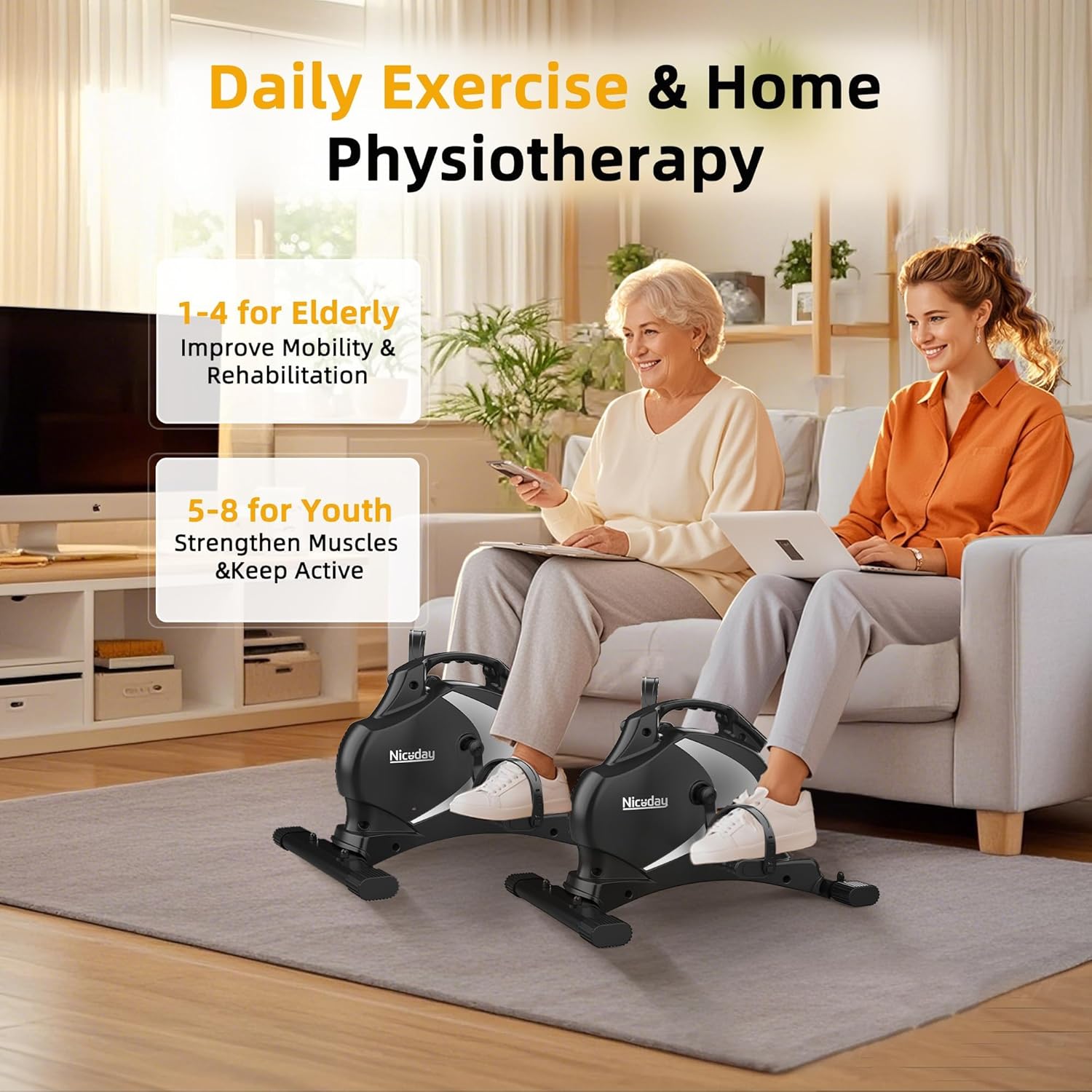
Image: Recommended resistance levels for different user groups.
4.3. Using the LCD Monitor
The integrated LCD monitor tracks your workout data in real-time. It displays the following metrics:
- SCAN: Automatically cycles through all metrics every few seconds.
- TIME: Duration of your current workout session.
- DIST (Distance): Estimated distance covered during your workout.
- RPM (Revolutions Per Minute): Your current pedaling speed.
- CAL (Calories): Estimated calories burned during your workout.
- ODO (Odometer): Total accumulated distance from all workouts.
To operate the monitor:
- The monitor automatically turns on when you start pedaling.
- Press the red button to cycle through the display modes (Time, Distance, RPM, Calories, Odometer, Scan).
- To reset the current workout data (Time, Distance, RPM, Calories), press and hold the red button for a few seconds. The Odometer (ODO) cannot be reset.
- The monitor will automatically turn off after a few minutes of inactivity to conserve battery life.

Image: LCD monitor displaying real-time workout data.
4.4. Silent Operation
The Niceday Pedal Exerciser utilizes an ultra-quiet magnetic resistance system, ensuring minimal noise during operation (typically less than 5dB). This allows for discreet use in various environments, such as offices or shared living spaces, without causing disturbance.

Image: Pedal exerciser in use under a desk, demonstrating silent operation.
5. Maintenance
- Cleaning: Wipe down the unit with a damp cloth after each use. Avoid abrasive cleaners or solvents.
- Inspection: Regularly check all bolts and screws to ensure they are tight. Tighten if necessary.
- Storage: Store the exerciser in a cool, dry place away from direct sunlight and extreme temperatures. Its compact design and portable handle make it easy to store.
- Battery Replacement: Replace the AAA batteries in the LCD monitor when the display becomes dim or stops functioning.

Image: Portable design with handle for easy storage.
6. Troubleshooting
| Problem | Possible Cause | Solution |
|---|---|---|
| LCD monitor not displaying | Dead batteries; Incorrect battery installation; Unit not in use | Replace AAA batteries; Check battery polarity; Start pedaling to activate the monitor |
| Unit wobbles or is unstable | Stabilizer bars not tightened; Uneven surface | Ensure all screws on stabilizer bars are fully tightened; Move unit to a flat, level surface |
| Pedals feel loose or make noise | Pedals not fully tightened | Retighten pedals with the provided wrench. Remember left pedal is reverse threaded. |
| Resistance not changing | Resistance knob not properly engaged or damaged | Ensure the resistance knob is turning freely and engaging. If issue persists, contact customer support. |
7. Specifications
- Model Number: DE-3609
- Brand: Niceday
- Dimensions (L x W x H): 55 cm x 45 cm x 35.5 cm (21.7 in x 17.7 in x 14 in)
- Item Weight: 9.5 kg (20.9 lbs)
- Material: Metal
- Color: Black
- Resistance Type: Magnetic
- Resistance Levels: 8
- Display Type: LCD
- Controls: Button
- Power Source (LCD): 2 x AAA Batteries (included)
- Included Components: Pedal Exerciser, Assembly Tools, User Manual, Batteries
8. Warranty and Support
Niceday products are designed for quality and durability. While specific warranty details are not provided in this manual, Niceday generally offers customer support and stands by its products.
For any questions, concerns, or technical assistance regarding your Niceday Pedal Exerciser DE-3609, please contact Niceday customer support through the retailer where you purchased the product or visit the official Niceday website for contact information.
Please have your model number (DE-3609) and purchase information ready when contacting support.
Related documentsDE-3609

Ask a question about this manual
Ask about setup, troubleshooting, compatibility, parts, safety, or missing instructions. Manuals+ will review the question and use this page’s manual context to help answer it.