
WHEELTOP EDS
Generic Wheeltop EDS OX YQ MTB Wireless Electronic Transmission System User Manual
Model: WHEELTOP EDS
Introduction
This manual provides comprehensive instructions for the installation, operation, and maintenance of your Generic Wheeltop EDS OX YQ MTB Wireless Electronic Transmission system. The EDS system is designed for high-quality, efficient wireless gear shifting, simplifying the riding experience. It features sealed bearings, a precise mechanism for smooth gear changes, and a clutch to minimize chain noise and prevent chain drops. The shifters are engineered for instantaneous gear changes and meet IP67 water and dust proofing standards for reliable performance in various environments.
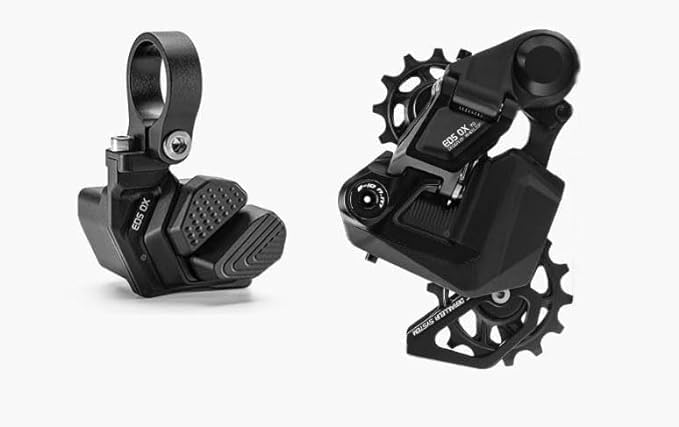
Figure 1: The Wheeltop EDS OX YQ Wireless Electronic Transmission system, featuring the wireless shifter (left) and the rear derailleur (right). Both components are black with visible branding and robust construction.
Product Features
- Supports 7-13 speed cassettes.
- Integrated 800mAH battery for extended use.
- Approximately 20,000 shifts per full charge.
- Available in multiple cage lengths for various freewheel sizes:
- 93mm long cage: Compatible with up to 52T freewheel.
- 75mm middle cage: Compatible with up to 42T freewheel.
- 58mm short cage: Compatible with up to 32T freewheel.
- IP67 water and dust proofing for shifters.
- Sealed bearings and integrated clutch for durability and smooth operation.
Setup and Installation
Proper installation is crucial for optimal performance. It is recommended that installation be performed by a qualified bicycle mechanic if you are unfamiliar with bicycle component installation.
1. Rear Derailleur Installation
- Ensure your bicycle frame has a compatible derailleur hanger.
- Attach the EDS rear derailleur to the derailleur hanger using the mounting bolt. Tighten to the manufacturer's recommended torque specifications (typically 8-10 Nm).
- Install your chain, ensuring it is correctly routed through the derailleur's cage and jockey wheels.
- Adjust the B-tension screw to ensure proper clearance between the upper jockey wheel and the largest cog on your cassette.
- Set the high (H) and low (L) limit screws to prevent the chain from over-shifting off the smallest and largest cogs, respectively.
2. Shifter Installation
The EDS shifter uses a clamp-on mount design.
- Position the shifter on your handlebar in a comfortable and accessible location.
- Secure the shifter using the clamp bolt. Do not overtighten.
3. Pairing the Derailleur and Shifter
Refer to the specific pairing instructions provided with your EDS system. Typically, this involves a sequence of button presses on both the derailleur and shifter to establish a wireless connection.
Operating Instructions
Gear Shifting
The EDS system provides instantaneous gear changes with a single push of the shifter buttons.
- Upshift: Press the designated upshift button to move the chain to a smaller cog (harder gear).
- Downshift: Press the designated downshift button to move the chain to a larger cog (easier gear).
For optimal shifting performance, it is recommended to shift gears while pedaling with moderate pressure. Avoid shifting under heavy load.
Battery Management
The EDS system is powered by an 800mAH battery. Monitor battery levels regularly. When the battery is low, the system may indicate this via an LED indicator on the derailleur or shifter.
- Charging: Use the provided charging cable to recharge the battery. Connect the cable to the charging port on the derailleur.
- Charging Time: Refer to the specific charging time in your product's quick start guide.
- Battery Life: A full charge provides approximately 20,000 shifts.
Maintenance
Regular maintenance ensures the longevity and performance of your EDS system.
- Cleaning: Keep the derailleur and shifter clean. Wipe down components with a damp cloth after rides, especially in dirty or wet conditions. Avoid high-pressure washing directly on electronic components.
- Chain Lubrication: Regularly lubricate your bicycle chain to ensure smooth shifting and reduce wear on the drivetrain components.
- Inspection: Periodically inspect the derailleur hanger for alignment. A bent hanger can cause poor shifting performance. Check all bolts for proper tightness.
- Firmware Updates: Check the manufacturer's website for any available firmware updates for your EDS system. Updates can improve performance and add new features.
Troubleshooting
If you encounter issues with your EDS system, refer to the following common troubleshooting steps:
| Problem | Possible Cause | Solution |
|---|---|---|
| Poor or inconsistent shifting | Bent derailleur hanger, incorrect limit screw adjustment, low battery, chain wear. | Check and align derailleur hanger. Re-adjust limit screws. Charge battery. Inspect and replace worn chain. |
| System not responding | Dead battery, loss of wireless connection, component malfunction. | Charge battery. Re-pair derailleur and shifter. Contact support if issue persists. |
| Excessive chain noise | Insufficient chain lubrication, worn drivetrain components, clutch issue. | Lubricate chain. Inspect chain, cassette, and chainrings for wear. Ensure derailleur clutch is functioning. |
If these steps do not resolve your issue, please contact customer support.
Specifications
| Attribute | Detail |
|---|---|
| Model Name | WHEELTOP EDS |
| Brand | Generic |
| Included Components | Rear Derailleur, Shifter |
| Material | Aluminum |
| Color | Black |
| Mounting Type | Clamp-On Mount (Shifter) |
| Cassette Compatibility | 7-13 speed |
| Battery Capacity | 800mAH |
| Shifts Per Charge | Approx. 20,000 |
| Water/Dust Resistance (Shifter) | IP67 Standard |
Warranty and Support
For warranty information and technical support, please refer to the documentation included with your purchase or visit the official Generic product support website. Keep your proof of purchase for warranty claims.
For further assistance, you may contact the seller or manufacturer directly through the contact information provided at the point of purchase.
Ask a question about this manual
Ask about setup, troubleshooting, compatibility, parts, safety, or missing instructions. Manuals+ will review the question and use this page’s manual context to help answer it.