
1. Introduction and Overview
This manual provides detailed instructions for the VFAN DC-DC Buck Converter Step Down Voltage Regulator, Model P80DD. This module is designed to efficiently convert a higher DC input voltage to a lower, adjustable DC output voltage. It features constant current (CC) and constant voltage (CV) modes, software voltage calibration, and a clear LED display for monitoring input/output voltage, current, and power.
The module is suitable for a wide range of applications including high-precision electronic device power supplies, battery chargers (with diode installation), LED light drivers, and power supplies for robots, drones, and automotive devices. It is also useful in laboratory and educational settings for circuit experiments and electronic device testing.
2. Safety Precautions
Special Precautions:
- When connecting the input power source and the load at the output terminal, this module may generate electrical sparks. Exercise caution.
- Do not use this product in flammable or explosive environments, or in environments with special requirements.
General Precautions:
- Input Voltage: Ensure that the input voltage does not exceed the specified maximum input voltage of the module (DC 35V). Exceeding this limit can damage the module.
- Short Circuits: Prevent accidental short circuits between the input and output terminals or any other connections.
- Thermal Considerations: Depending on power requirements and load conditions, the module may generate heat. For output power exceeding 30W, ensure proper heat dissipation by installing the provided heat sink on the XL4015E1 chip and connecting a fan for cooling.
- Load Compatibility: Verify that the DC-DC module can handle the required load current and voltage. Exceeding the module's rated current (5A) or power (80W max, 100W peak at 20V/5A) can lead to malfunction or damage.
3. Product Features
- Conversion Efficiency: Up to 93%.
- Operating Modes: Constant Current (CC) and Constant Voltage (CV) modes.
- Calibration: Software Voltage calibration for precise output.
- Output: Includes a USB output port.
- Protection: Short-circuit protection, Over-temperature protection, Input reverse connection protection.
- Display: 0.28-inch three-digit LED display for clear visibility of input voltage, output voltage, current, and power.
- Control: ON/OFF display and output control.
- Installation: Compact size and simple screw terminal connections for easy integration.
4. Specifications
| Parameter | Value |
|---|---|
| Input Voltage | DC 8V-35V (Abnormal operation if lower than DC 6.5V) |
| Output Voltage | DC 1.3V-32V (Adjustable) |
| Output Current | 0.1A-5A (Adjustable, Max.) |
| Output Power | 80W (Max.), 100W (Peak at 20V/5A) |
| Conversion Efficiency | Up to 93% |
| Display Accuracy | +/- 0.1V |
| Product Dimensions | 2.2 x 2.2 x 0.8 inches (56.2 x 50.3 x 20.3 mm) |
| Item Weight | 2.12 ounces (60 Grams) |
| Model Number | P80DD |
5. Component Identification
Familiarize yourself with the various components and connection points of the DC-DC Buck Converter module.

Figure 5.1: General top-down view of the VFAN P80DD DC-DC Buck Converter module.

Figure 5.2: Labeled diagram of the VFAN P80DD DC-DC Buck Converter module. Key components include Input+ (DC8-35V), Input-, Output+ (DC1.3-32V), Output-, DC Power Jack (5.5x2.1mm), USB Output (DC4.8-5.1V), Constant Current Adjustable (CC ADJ) potentiometer, Constant Voltage Adjustable (CV ADJ) potentiometer, IN/OUT button (to control display), and ON/OFF button (to control output).

Figure 5.3: Dimensional drawing of the VFAN P80DD module, showing a length of 56.20mm and a width of 50.30mm for the main board, and overall dimensions including connectors of approximately 56.20mm by 50.50mm.
6. Setup and Installation
Follow these steps for proper setup and installation of your DC-DC Buck Converter module.
- Input and Output Voltage Selection: Identify the desired input and output voltage levels for your specific application. Ensure that the DC-DC module supports the required input and output voltage ranges as specified in Section 4.
- Wiring:
- Connect the positive (+) and negative (-) terminals of your input power source to the corresponding "IN+" and "IN-" terminals of the DC-DC module.
- Similarly, connect the positive (+) and negative (-) terminals of your load or output device to the corresponding "OUT+" and "OUT-" terminals of the module.
- Ensure all connections are secure and correct polarity is observed to prevent damage.
- Thermal Management: If your application requires output power exceeding 30W, attach the provided heat sink to the XL4015E1 chip and connect the cooling fan to the designated fan header (DC5.0V) on the module.
- Testing and Verification: Before deploying the system in its intended application, test the DC-DC module under various operating conditions to ensure its stability, efficiency, and compatibility with your load.

Figure 6.1: Example wiring diagram illustrating various DC input sources (battery, power supply, wall adapter) and DC output applications (LED light, circuit board, smartphone charging) for the module.
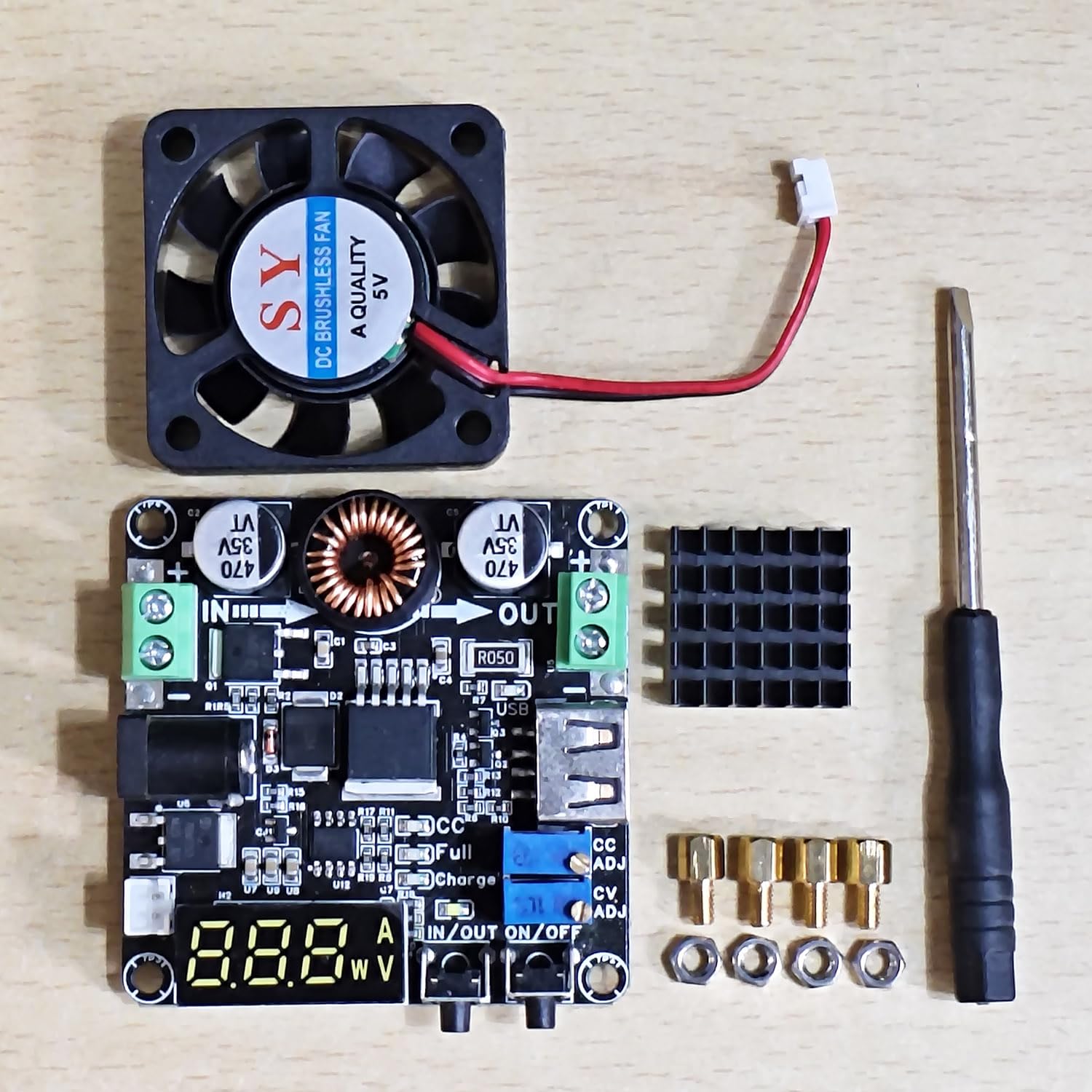
Figure 6.2: Included accessories: DC-DC Buck Converter module, cooling fan, heat sink, mounting hardware, and a small screwdriver for adjustments.
7. Operation
7.1. Input and Output Voltage Calibration
To ensure accurate display readings, perform the following calibration steps:
- Disconnect the input voltage from the module.
- Press and hold the IN/OUT button. While holding the button, power on the module again. Continue holding until the digital display illuminates, then release the button.
- Adjust the input voltage of your power source accurately to 12.00V.
- Adjust the output voltage of the module (using the CV ADJ potentiometer) to 5.00V.
- Briefly press the ON/OFF button to initiate the automatic calibration of the display accuracy for both input and output.
7.2. Button Function Settings
- ON/OFF Button (Long Press): Press and hold the ON/OFF button for 3 seconds to set whether the module will have an output voltage immediately after the input is powered on, or if it will remain off until manually activated. This setting takes effect after the power is reconnected.
- ON/OFF Button (Short Press): A short press of the ON/OFF button will toggle the output voltage on or off.
- IN/OUT Button (Long Press): Press and hold the IN/OUT button to turn off the digital display.
- IN/OUT Button (Short Press): A short press of the IN/OUT button will restore the digital display and cycle through input voltage, output voltage, current, and power readings.

Figure 7.1: The module in operation, connected to an external power supply and providing power to charge a smartphone via its USB output. The display shows the current output parameters.

Figure 7.2: The module during a load test, demonstrating its capability to deliver 80W (20V x 4A). A cooling fan is attached to manage heat dissipation during high-power operation.
8. Applications
The VFAN P80DD DC-DC Buck Converter is versatile and can be used in various applications:
- High Precision Electronic Device Power Supply: Provides stable and adjustable power with high accuracy (±0.03V).
- Battery Charger: Can be used as a battery charger (requires diode installation for proper charging profiles).
- LED Lights Driver: Suitable for driving various LED lighting setups.
- Robot and Drone Power Supply: Provides regulated power for robotic and drone projects.
- Automotive Applications: Used in cars, boats, and other vehicles to power devices such as audio systems and navigation units.
- Laboratory and Educational Environments: Ideal for teaching and research purposes, including circuit experiments and electronic device testing.
9. Maintenance
To ensure the longevity and optimal performance of your DC-DC Buck Converter, consider the following maintenance guidelines:
- Keep Clean: Regularly inspect the module for dust and debris. Use a soft, dry brush or compressed air to gently clean the board, especially around the heat sink and fan (if installed).
- Environmental Conditions: Operate the module within its specified temperature and humidity ranges. Avoid exposure to excessive moisture or corrosive environments.
- Connection Integrity: Periodically check all input and output wiring connections to ensure they are secure and free from corrosion. Loose connections can lead to unstable operation or damage.
- Thermal Management: If using a fan, ensure it is free from obstructions and operating correctly. A malfunctioning fan can lead to overheating.
10. Troubleshooting
This section addresses common issues you might encounter with the DC-DC Buck Converter.
- No Output Voltage / Display Off:
- Check input power supply: Ensure the input voltage is within the specified range (DC 8V-35V) and connected with correct polarity.
- Check ON/OFF button setting: A long press of the ON/OFF button sets the power-on state. A short press toggles output. Ensure it's set to "on" or manually turn it on.
- Check IN/OUT button setting: A long press of the IN/OUT button turns off the display. Short press to restore.
- Inspect wiring: Verify all connections are secure and correct.
- Unstable Output Voltage or Current:
- Load compatibility: Ensure the load does not exceed the module's rated current (5A) or power (80W/100W peak). Overloading can cause instability.
- Input power stability: Verify the input power source is stable and can supply sufficient current.
- Thermal issues: If the module is overheating (especially above 30W output), ensure the heat sink and fan are properly installed and functioning. Over-temperature protection may be activating.
- Display Flashes / Load Not Charging (e.g., Power Bank):
- This can indicate the module is struggling to meet the load's current demand, or the load is drawing more current than the module can safely supply.
- Verify the load's current requirement (e.g., 5V/2A for a power bank) against the module's maximum output current (5A). While 5A is the maximum, sustained high current might require better cooling or a more robust input supply.
- Ensure the output voltage is correctly set for the load.
- Inaccurate Display Readings:
- Perform the Input and Output Voltage Calibration procedure as described in Section 7.1.
11. Warranty and Support
VFAN is committed to providing quality products and customer satisfaction.
If you have any questions, encounter issues, or require technical assistance with your DC-DC Buck Converter module, please feel free to contact us. We aim to provide a satisfactory response and solution within 24 hours.
For additional product information and support, please visit our official store on Amazon.