
1. Introduction
This manual provides essential instructions for the safe and effective operation, maintenance, and troubleshooting of the DAWEIanimed Veterinary IV Infusion Pump, Model AIP100. This device is designed for precise volumetric infusion in veterinary settings, ensuring accurate medication and fluid delivery to animals. Please read this manual thoroughly before initial use.

Figure 1: Front view of the DAWEIanimed AIP100 Infusion Pump, showing the 4.3-inch color touch screen and control buttons.
2. Safety Information
Always follow standard veterinary medical practices and local regulations when using this device. Ensure the pump is used by trained personnel only.
- Do not operate the pump if it appears damaged.
- Use only compatible IV sets.
- Regularly monitor the patient and the infusion process.
- Keep the device away from water and excessive moisture.
- Ensure proper power supply and grounding.
3. Product Components
The DAWEIanimed AIP100 Infusion Pump package typically includes the following items:
- DAWEIanimed AIP100 Infusion Pump
- Power Charger
- Mounting Clamp
- Instruction Manual

Figure 2: The AIP100 Infusion Pump shown with its standard accessories, including the power charger, mounting clamp, and instruction manual.
4. Setup and Installation
- Unpacking: Carefully remove all components from the packaging. Inspect for any visible damage.
- Charging the Battery: The pump contains a Lithium Ion battery. Connect the power charger to the pump and a suitable power outlet to charge the device before first use. A full charge ensures portability and uninterrupted operation.
- Mounting the Pump:
- Attach the provided mounting clamp to the back of the pump.
- Securely fasten the pump to an IV pole or other stable support structure using the clamp. Ensure the pump is at an appropriate height for easy monitoring and operation.
- Connecting IV Set:
- Open the pump door/mechanism as shown in Figure 3.
- Carefully insert the IV tubing into the designated channel of the pump, ensuring it is seated correctly and without kinks.
- Close the pump door/mechanism securely.
- Power On: Press and hold the power button (if applicable, or follow screen prompts) to turn on the device. The 4.3-inch LCD touch screen will illuminate.

Figure 3: Rear view of the AIP100 pump with the infusion mechanism compartment open, illustrating where the IV tubing is inserted.
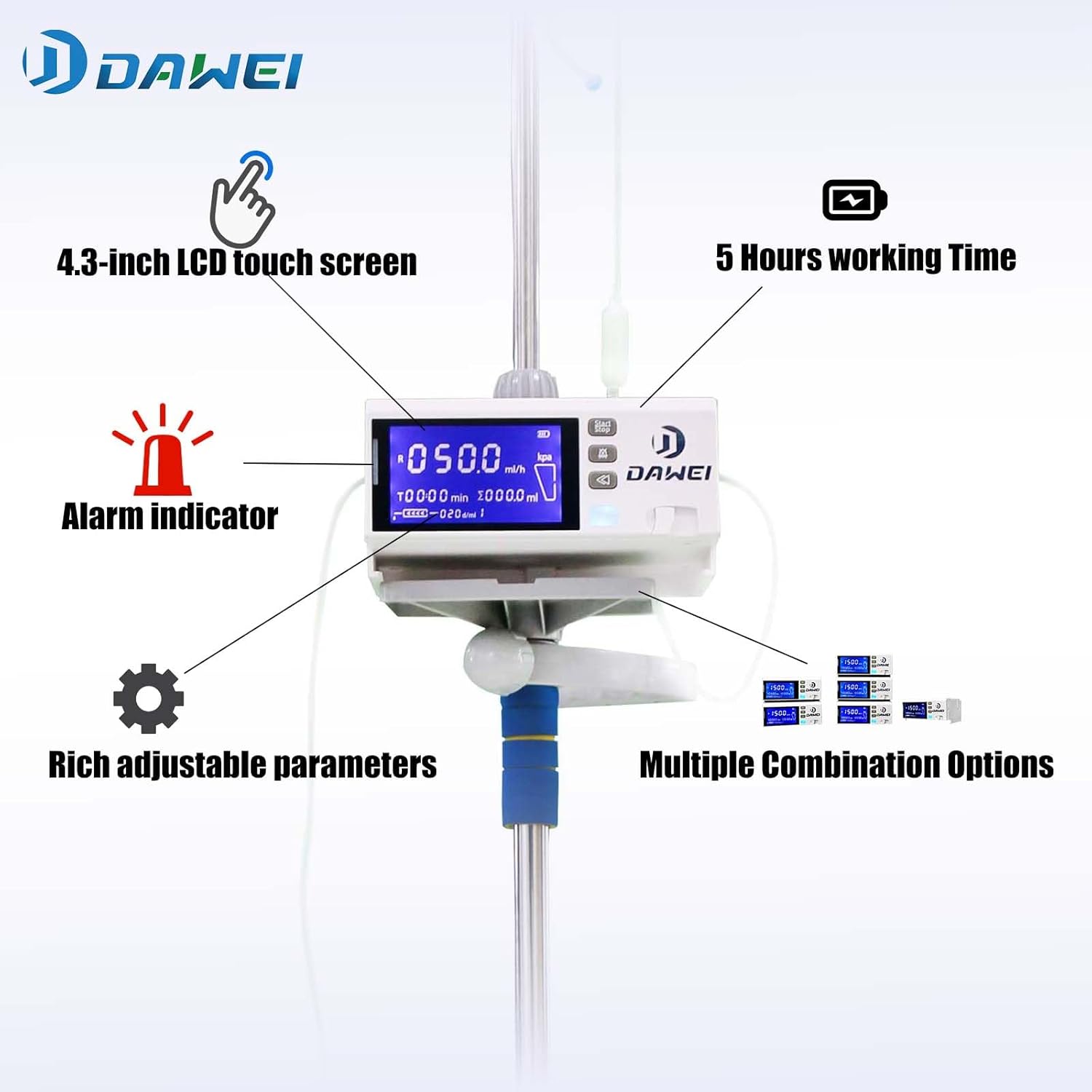
Figure 4: The AIP100 Infusion Pump securely mounted on an IV pole, ready for operation, with key features indicated.
5. Operating Instructions
5.1. User Interface and Navigation
The AIP100 features a 4.3-inch LCD touch screen for intuitive operation. Navigate through menus and settings by touching the screen directly. Physical buttons are also available for common functions like Start/Stop.

Figure 5: Demonstrating the touch screen interface for quick and convenient operation.
5.2. Selecting Infusion Modes
The pump supports multiple infusion modes to suit various clinical requirements. Access the mode selection menu via the touch screen. Available modes include:
- Flow Rate and Volume Mode: Set a specific flow rate (ml/h) and total volume to be infused (ml).
- Flow Rate and Time Mode: Set a specific flow rate (ml/h) and the duration of the infusion (time).
- Drip Mode: Infusion based on drip rate (drops/min).
After selecting a mode, input the required parameters using the touch screen interface.
5.3. Starting and Stopping Infusion
- To Start: After setting all parameters, press the "Start/Stop" button or the corresponding on-screen prompt.
- To Stop/Pause: Press the "Start/Stop" button again. The infusion will pause. To resume, press it once more.
- To End: To terminate an infusion, navigate to the appropriate menu option or hold the "Start/Stop" button (refer to on-screen instructions).
5.4. Alarm System
The AIP100 is equipped with an audio and visual alarm system to alert users to anomalies. Common alarms include:
- Occlusion (high pressure detected)
- Air in line
- Infusion complete
- Low battery
- Door open
- System malfunction
When an alarm sounds, a visual indicator (e.g., red light, on-screen message) will also appear. Address the cause of the alarm promptly.
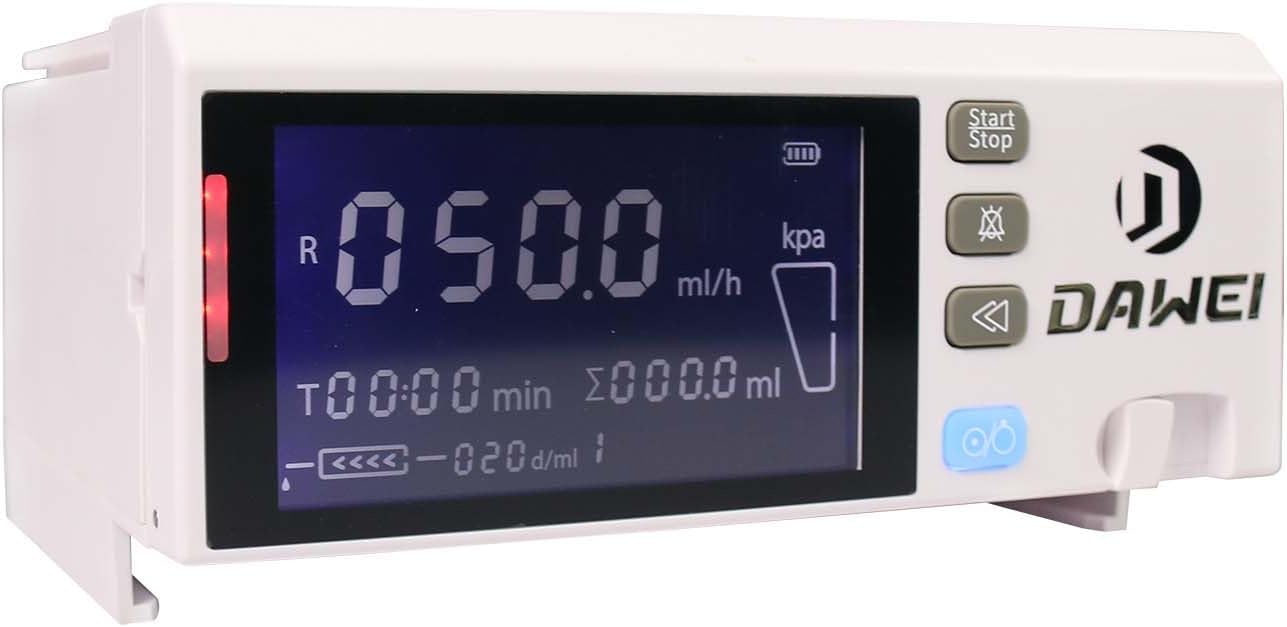
Figure 6: The AIP100 pump indicating an alarm condition with a red warning light.
6. Maintenance and Care
- Cleaning: Wipe the exterior of the pump with a soft, damp cloth. Use a mild disinfectant if necessary. Do not immerse the device in liquid.
- Battery Care: Recharge the battery regularly, even if the pump is not in frequent use, to maintain battery health.
- Storage: Store the pump in a clean, dry environment at room temperature when not in use.
- Inspection: Periodically inspect the pump for any signs of wear or damage, especially the IV tubing insertion mechanism and power connections.
7. Troubleshooting
This section addresses common issues you might encounter. For problems not listed here, contact customer support.
| Problem | Possible Cause | Solution |
|---|---|---|
| Pump not turning on | Low battery or power cable disconnected. | Connect the charger and allow the battery to charge. Ensure the power cable is securely connected. |
| Alarm sounds (e.g., Occlusion) | Kinked tubing, closed clamp, or blockage in the IV line. | Check the entire IV line for kinks or closed clamps. Verify the patency of the catheter. Clear any blockages. |
| Alarm sounds (e.g., Air in Line) | Air bubbles detected in the IV tubing. | Remove air bubbles from the line. Ensure proper priming of the IV set before starting infusion. |
| Error Code E005 | Indicates a pump malfunction, potentially related to the internal pumping mechanism. | This error suggests an internal issue. Attempt to power cycle the device. If the error persists, discontinue use and contact DAWEIanimed customer support for assistance. |
| Inaccurate flow rate | IV set not properly installed, or calibration required. | Ensure the IV tubing is correctly seated in the pump mechanism. If discrepancies persist, consult the full service manual for calibration procedures or contact support. |
8. Specifications
| Feature | Detail |
|---|---|
| Model Name | AIP100 |
| Brand | DAWEIanimed |
| Display | 4.3-inch LCD Touch Screen |
| Infusion Accuracy | High Volumetric Accuracy (typically ±5% as per industry standards, refer to device for exact specification) |
| Infusion Modes | Flow Rate & Volume, Flow Rate & Time, Drip Mode |
| Battery Type | 1 Lithium Ion battery (rechargeable) |
| Working Time (Battery) | Approximately 5 hours (actual time may vary with usage) |
| Item Weight | 4.84 pounds (approx. 2.2 kg) |
| Dimensions (L x W x H) | 10.39 x 9.72 x 8.35 inches (approx. 26.4 x 24.7 x 21.2 cm) |
| Power Supply | AC 100V-240V, 50/60Hz |
| Included Components | Charger, Instruction Manual |
9. Warranty Information
The DAWEIanimed AIP100 Veterinary IV Infusion Pump comes with a 1-year warranty from the date of purchase. This warranty covers manufacturing defects and malfunctions under normal use. It does not cover damage caused by misuse, accidents, unauthorized modifications, or improper maintenance. Please retain your proof of purchase for warranty claims.
10. Customer Support
For technical assistance, warranty claims, or any questions regarding the operation or maintenance of your DAWEIanimed AIP100 Infusion Pump, please contact DAWEIanimed customer support. Refer to the contact information provided with your product packaging or visit the official DAWEIanimed website.