
Philips HD3760/90
Philips Home Draft Beer Machine 5000 Series
User Manual - Model HD3760/90
Your guide to enjoying fresh, cold draft beer at home.
Product Overview
The Philips Home Draft Beer Machine 5000 series, model HD3760/90, is designed to provide a fresh, cold draft beer experience in your home. It keeps 6-liter kegs of your favorite beer fresh and chilled to an optimal 3°C for up to 30 days. This manual provides essential information for the setup, operation, maintenance, and troubleshooting of your machine.

Front view of the Philips Home Draft Beer Machine 5000 series, showcasing its sleek black design and integrated tap system.
Setup
Unpacking:
Carefully remove all packaging materials from the machine. Ensure all components, including the drip tray and tap handle, are present and undamaged.
Placement:
Place the machine on a stable, flat surface with adequate ventilation around it. Avoid direct sunlight or heat sources. The machine dimensions are approximately 49.3 cm (length) x 26.1 cm (width) x 44.3 cm (height).

Diagram showing the dimensions of the Philips Home Draft Beer Machine for proper placement.
Initial Cooling:
Before inserting a keg, plug in the machine. It will begin to cool. For optimal performance, it is recommended to pre-chill your 6-liter kegs in a refrigerator before placing them into the machine. The machine can chill a keg from room temperature to 3°C in approximately 12 hours.
Keg Installation:
Open the double doors on the front of the machine. Carefully insert a 6-liter PerfectDraft compatible keg. Ensure it is seated correctly. Close the doors firmly. The machine will detect the keg and begin cooling it to the ideal temperature.
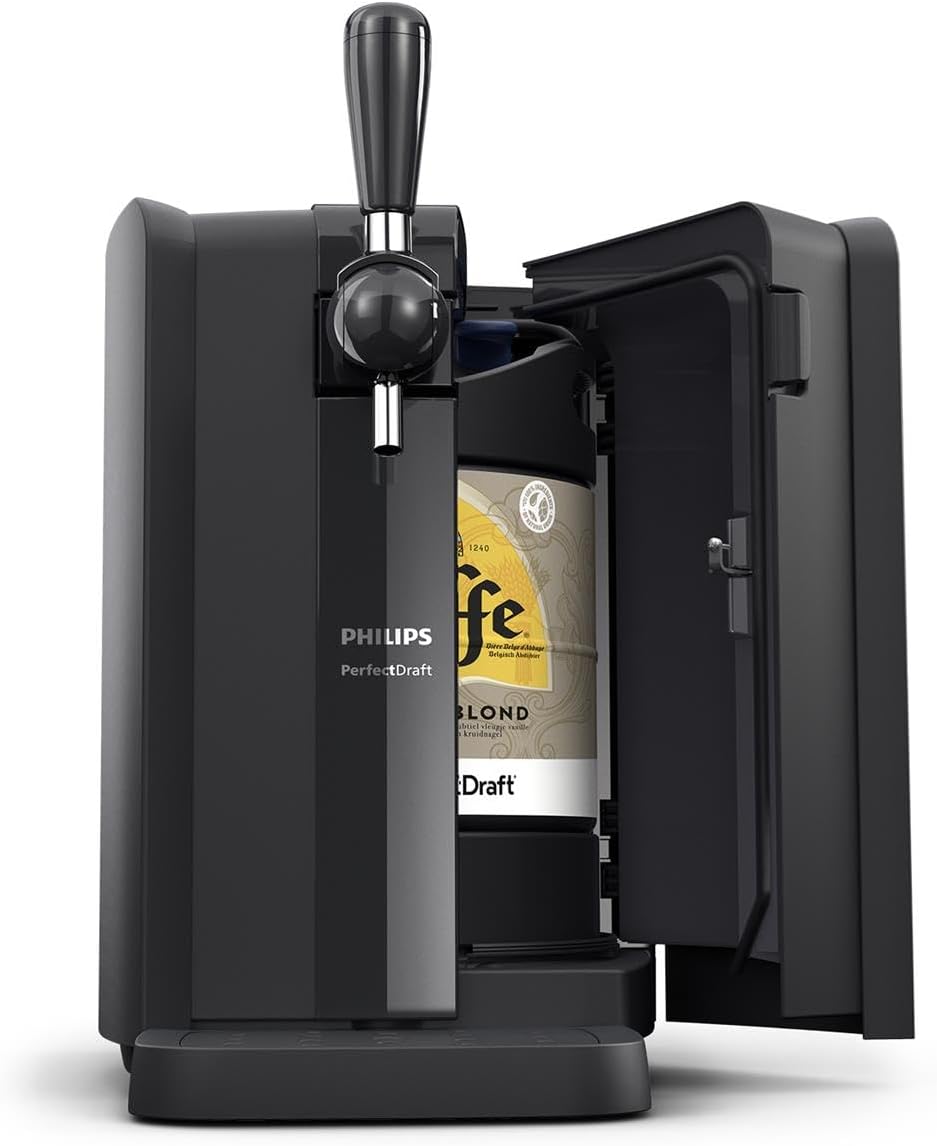
The Philips Home Draft Beer Machine with its front doors open, revealing a 6-liter beer keg inside, ready for installation.
Operating Instructions
Temperature Indicator:
The machine features LED indicators that show when your beer has reached the optimal drinking temperature of 3°C. Wait for the indicator to confirm the ideal temperature before pouring for the best experience.
Pouring Beer:
Place a clean glass under the tap. Pull the tap handle forward to dispense beer. For a perfect pour, tilt the glass at a 45-degree angle initially, then straighten it as it fills. Release the handle to stop the flow. The beer will remain fresh for up to 30 days once the keg is installed.

A person demonstrating the proper technique for pouring beer from the Philips Home Draft Beer Machine into a glass.

A close-up view of beer flowing from the tap of the Philips Home Draft Beer Machine into a glass, illustrating the pouring mechanism.
Maintenance
Drip Tray Cleaning:
Regularly empty and clean the drip tray located at the base of the machine. Remove the tray, wash it with warm soapy water, rinse thoroughly, and dry before replacing.
Tap Handle Cleaning:
The tap handle is easily detachable for convenient cleaning and enhanced child safety. To remove, follow the instructions in your quick start guide. Wash the tap handle with warm soapy water, rinse, and dry. Reattach securely after cleaning.

A hand demonstrating the removal of the tap handle from the Philips Home Draft Beer Machine for cleaning or storage.
Exterior Cleaning:
Wipe the exterior of the machine with a soft, damp cloth. Do not use abrasive cleaners or solvents.
Troubleshooting
| Problem | Possible Cause | Solution |
|---|---|---|
| Machine not cooling. | Not plugged in, poor ventilation, or internal issue. | Ensure power cord is securely plugged in. Check for adequate space around the machine for ventilation. If problem persists, contact customer support. |
| Beer not dispensing. | Keg empty, tap handle not fully engaged, or air pressure issue. | Check if the keg is empty and replace if necessary. Ensure the tap handle is pulled completely forward. Refer to the keg's instructions for proper installation. |
| LED indicator not showing 3°C. | Keg not sufficiently chilled. | Allow more time for the machine to chill the keg. Pre-chilling kegs in a refrigerator can significantly reduce cooling time. |
For issues not listed here, please refer to the full product manual or contact Philips customer support.
Specifications
| Attribute | Detail |
|---|---|
| Brand | Philips |
| Model | HD3760/90 |
| Product Dimensions | 49.3 x 26.1 x 44.3 cm |
| Item Weight | 9.94 kg |
| Capacity | 6 litres (per keg) |
| Voltage | 220 Volts |
| Colour | Black |
| Included Components | Draft Beer Machine |
| Optimal Beer Temperature | 3°C |
| Beer Freshness | Up to 30 days |
| Cooling Time (Room Temp to 3°C) | Approx. 12 hours |
Warranty and Support
For detailed warranty information, please refer to the warranty card included with your product or visit the official Philips website. Philips provides customer support for product inquiries, technical assistance, and service requests.
You can find more information and contact details on the Philips official website.
Related Documents - HD3760/90
 |
Philips PerfectDraft HD3720/HD3610 User Manual Comprehensive user manual for the Philips PerfectDraft beer dispenser, covering setup, operation, and maintenance for models HD3720 and HD3610. Learn how to enjoy fresh, cold draft beer at home. |
 |
Philips PerfectDraft Beer Dispenser User Manual (HD3715, HD3720, HD3760, HD3761, HD3770) Comprehensive user manual for the Philips PerfectDraft beer dispenser, covering installation, operation, pouring tips, cleaning, and troubleshooting for models HD3715, HD3720, HD3760, HD3761, and HD3770. |
 |
Philips HD3770 PerfectDraft Beer Dispenser User Manual User manual for the Philips HD3770 PerfectDraft beer dispenser, providing important safety information, operating instructions, and maintenance guidelines. |
 |
Philips Bodygroom Series 5000 User Manual and Safety Information Comprehensive user manual for the Philips Bodygroom Series 5000, covering safety instructions, usage, maintenance, and troubleshooting for models BG5020, BG3016, BG3015, BG3011, BG3010, BG3006, and BG3005. Includes details on charging, cleaning, and replacing parts. |
 |
Philips 5000 Series Televisions User Manual User manual for Philips 5000 series televisions, covering setup, features, troubleshooting, and specifications for models 65PFL5602, 55PFL5602, 50PFL5602, and 43PFL5602. Available in English, Spanish, and French. |
 |
Philips 40B1U5600 Business Monitor Felhasználói Kézikönyv Ez a dokumentum részletes útmutatást nyújt a Philips 40B1U5600 Business Monitor 5000 Series biztonságos és hatékony használatához. Fedezze fel a telepítési, működtetési, képoptimalizálási és hibaelhárítási lépéseket, valamint a termék specifikációit és támogatási információkat. |