
1. Important Safety Information
Please read and understand all instructions before assembly and use of this product. Keep this manual for future reference.
- Ensure all parts are present and undamaged before assembly. Do not use if any parts are missing or broken.
- Always follow the provided assembly instructions carefully. Improper assembly can lead to instability and potential injury.
- Do not overload the nightstand with heavy items to prevent tipping or damage.
- Place the nightstand on a flat, stable surface. Use the adjustable leveling feet to ensure stability.
- Keep liquids away from the charging station to prevent electrical hazards. The charging station is not waterproof.
- Do not allow children to climb on or play with the nightstand.
- Regularly check all screws and connections to ensure they remain tight.
2. Package Contents
Before beginning assembly, verify that all components listed below are included in your package. Refer to the assembly video for visual identification of parts.
- Metal Frame Components (Parts 3, 4, 5)
- Wooden Boards (Parts 1, 2, 6, 7, 8, 9, 10)
- Fabric Drawers (Part 14)
- Charging Station Unit (Part 12)
- LED Light Strip with Controller (Part H)
- Metal Hooks (Part 15)
- Adjustable Leveling Feet (Part D)
- Screws (Parts A, B, C, E, K)
- Drawer Knobs (Part F)
- LED Light Clips (Part J)
- Assembly Guide
- Installation Tool (Allen wrench, screwdriver)

Figure 2.1: Overview of all included components and their respective labels.
3. Assembly Instructions
Assembly is estimated to take approximately 30 minutes. Follow these steps carefully.
Video 3.1: Detailed assembly guide for the EnHomee Tall Nightstand.
Step 3.1: Assemble the Base Frame
- Attach the adjustable leveling feet (D) to the bottom of the two side frames (3 and 4).
- Connect the two side frames (3 and 4) using the horizontal bars (5). Secure with screws (B). Ensure the direction of the baffles is correct.
Step 3.2: Install the Top Shelf and Charging Station
- Place the main top wooden board (1) onto the assembled frame. Secure it with screws (C).
- Assemble the charging station unit (10) by attaching the metal brackets (11) with screws (E).
- Mount the power strip (12) into the assembled charging station unit (10) and secure it with screws (K).
- Attach the assembled charging station unit to the back of the nightstand frame using screws (E).
Step 3.3: Prepare the LED Lighting
- Peel the adhesive backing from the LED light strip (H) and carefully attach it to the underside of the top wooden board (7).
- Use the provided clips (J) and screws (K) to further secure the LED strip, ensuring it is firmly in place.
Step 3.4: Assemble and Insert Drawers
- For each fabric drawer (14), unfold it and insert the bottom panel to create a sturdy box.
- Attach the drawer knob (F) to the front of each fabric drawer using the provided screw (E).
- Slide the assembled drawers into their respective slots in the nightstand frame.
Step 3.5: Attach Additional Features
- Attach the metal hooks (15) to the side of the top shelf as desired.
4. Operating Instructions
4.1 LED Lighting System
The integrated LED lighting system offers customizable ambiance for your space.
- Power On/Off: Use the power button on the remote control or the touch-sensitive button on the LED strip.
- Color Selection: Use the color buttons on the remote control to select from over 20 different colors.
- Brightness Adjustment: Use the 'BRIGHT+' and 'BRIGHT-' buttons on the remote to increase or decrease the light intensity.
- Mode Selection: The remote offers various modes (e.g., flash, fade, strobe) to create dynamic lighting effects. Use the 'MODE' button to cycle through them.
- Speed Adjustment: In dynamic modes, use 'SPEED+' and 'SPEED-' to adjust the transition speed.

Figure 4.1: LED lighting features and remote control for color and mode selection.
4.2 Charging Station
The built-in charging station provides convenient power access for your electronic devices.
- AC Outlets: The charging station includes two standard AC outlets (125V/12A) for plugging in lamps, laptops, or other electronics.
- USB Ports: Two USB ports (5V/2A) are available for charging smartphones, tablets, and other USB-powered devices.
- Ensure the nightstand's main power cord is securely plugged into a wall outlet for the charging station to function.

Figure 4.2: Detail of the integrated charging station with AC outlets and USB ports.
5. Maintenance and Care
- Cleaning: Wipe the surfaces of the nightstand with a damp cloth. Avoid harsh chemicals or abrasive cleaners that may damage the finish.
- Spills: Immediately wipe up any spills, especially near the charging station, to prevent damage or electrical hazards.
- Drawer Care: The fabric drawers can be spot cleaned with a mild detergent and water. Allow to air dry completely.
- Stability Check: Periodically check all screws and connections to ensure they are tight. Re-tighten if necessary.
6. Troubleshooting
- LED Lights Not Working:
- Ensure the LED strip's USB cable is securely plugged into one of the charging station's USB ports.
- Verify the nightstand's main power cord is plugged into a functional wall outlet.
- Check the remote control battery.
- Charging Station Not Providing Power:
- Confirm the nightstand's main power cord is securely plugged into a functional wall outlet.
- Test the wall outlet with another device to ensure it is working.
- Ensure devices are properly connected to the AC outlets or USB ports.
- Drawers Sticking or Not Sliding Smoothly:
- Ensure the fabric drawers are correctly assembled with the bottom panel fully inserted.
- Check for any obstructions in the drawer slots.
- Nightstand is Wobbly:
- Adjust the leveling feet at the bottom of the frame to stabilize the nightstand on uneven surfaces.
- Check all assembly screws and tighten any that are loose.
7. Specifications
- Brand: EnHomee
- Model Name: LED Nightstand with Charging Station
- Product Dimensions: 15.8"D x 17.8"W x 35"H
- Item Weight: 16.54 Pounds
- Frame Material: Metal and Wood
- Drawer Material: Fabric (with wood-grain front)
- Number of Drawers: 3
- Charging Station: 2 AC Outlets (125V/12A), 2 USB Ports (5V/2A)
- LED Lights: Multi-color (20+ options), adjustable brightness, various modes, remote control/touch control.
- Included Components: Assembly Guide, Installation Tool, Tall Nightstand with LED Lights and Drawers, 4 Hooks.
- Color: Black
- Style: Modern
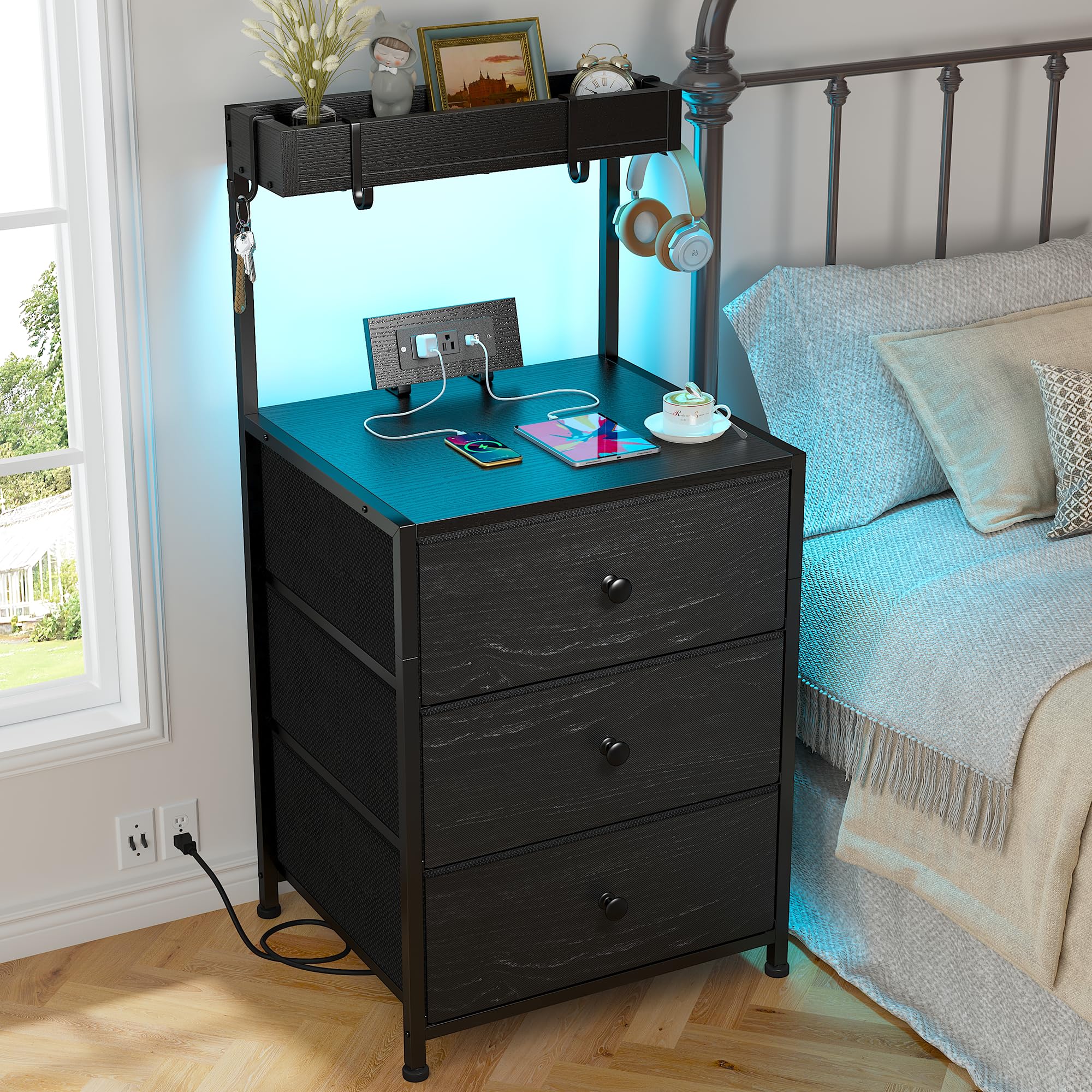
Figure 7.1: Fully assembled EnHomee Tall Nightstand with LED lights activated.
8. Warranty and Support
For warranty information or technical support, please refer to the contact details provided with your purchase or visit the official EnHomee website. Keep your purchase receipt as proof of purchase.