
1. Introduction
This manual provides essential information for the safe and effective use of the CG CHIPS GATE A278LX electronic component. The A278LX is designed for integration into various industrial electrical systems, offering reliable performance. Please read this manual thoroughly before installation and operation to ensure proper handling and to prevent damage or injury.
2. Safety Information
Always observe the following safety precautions to prevent personal injury and damage to the component or associated equipment:
- Qualified Personnel: Installation and maintenance should only be performed by qualified and trained personnel.
- Power Disconnection: Ensure all power is disconnected from the system before installing, removing, or servicing the component.
- Electrostatic Discharge (ESD): Electronic components are sensitive to ESD. Handle the A278LX with appropriate ESD precautions, such as wearing an ESD wrist strap and working on an ESD-safe surface.
- Environmental Conditions: Do not expose the component to moisture, extreme temperatures, or corrosive environments.
- Proper Wiring: Follow all wiring diagrams and local electrical codes. Incorrect wiring can lead to malfunction or electrical hazards.
3. Setup and Installation
Follow these steps for proper installation of the A278LX component:
- Unpacking: Carefully remove the A278LX from its packaging. Inspect for any visible damage during transit.
- ESD Protection: Before handling, ensure you are properly grounded to prevent ESD damage.
- Mounting: Mount the A278LX securely in its designated location within the control panel or enclosure. Ensure adequate ventilation if required.
- Wiring: Connect the necessary power and signal wires according to the system's wiring diagram. Double-check all connections for correctness and tightness.
- Power On: Once installation is complete and verified, apply power to the system. Observe the component for initial operation.
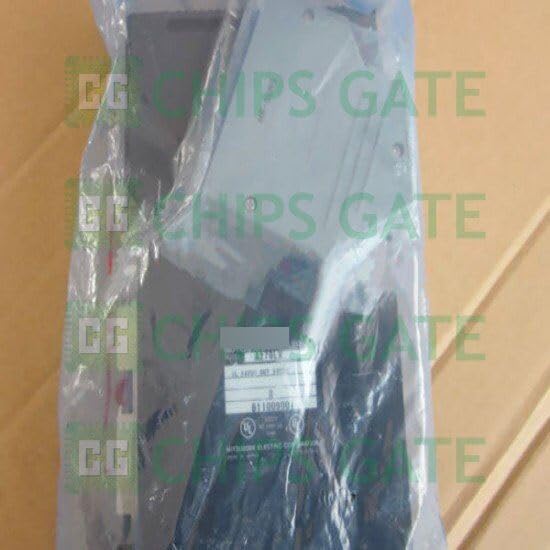
Figure 3.1: The A278LX electronic component as received in its protective packaging.

Figure 3.2: Electronic components are typically packed in anti-static bags to prevent damage from electrostatic discharge during handling and transport.
4. Operating Instructions
The A278LX operates as an integral part of a larger system. Its specific function will depend on the application it is integrated into. Generally, operation involves:
- System Power-Up: Ensure the component receives stable power within its specified voltage range.
- Monitoring: Observe any indicator lights or system feedback to confirm proper functioning.
- Integration: The A278LX is designed to respond to control signals from the main system controller. Refer to the overall system documentation for specific operational sequences.
5. Maintenance
The A278LX is designed for minimal maintenance. However, periodic checks can help ensure longevity and reliable operation:
- Visual Inspection: Periodically inspect the component for any signs of physical damage, loose connections, or overheating (discoloration).
- Cleaning: If dust or debris accumulates, gently clean the exterior of the component using a soft, dry, lint-free cloth. Do not use liquid cleaners or solvents. Ensure power is disconnected before cleaning.
- Connection Checks: Verify that all electrical connections remain secure and free from corrosion.
6. Troubleshooting
If the A278LX component is not functioning as expected, consider the following basic troubleshooting steps:
- No Power:
- Check the power supply to ensure it is active and providing the correct voltage.
- Verify all power connections to the A278LX are secure.
- Incorrect Function:
- Review the system's wiring diagram to confirm correct signal connections.
- Consult the documentation for the overall system to ensure the A278LX is receiving the expected control signals.
- Check for any error codes or diagnostic indicators on the main system.
- Physical Damage: If physical damage is observed, discontinue use and contact support.
If these steps do not resolve the issue, contact technical support for further assistance.
7. Specifications
| Attribute | Detail |
|---|---|
| Manufacturer | CG CHIPS GATE |
| Model Number | A278LX |
| ASIN | B0D41P7VYP |
Note: For detailed electrical characteristics and environmental ratings, please refer to the product datasheet or contact CG CHIPS GATE directly.
8. Warranty Information
The CG CHIPS GATE A278LX component comes with a warranty. For specific terms and conditions, please refer to your purchase documentation or contact CG CHIPS GATE customer service. Generally, the warranty covers defects in materials and workmanship under normal use. Please retain your proof of purchase for warranty claims.
9. Support
For technical assistance, inquiries, or warranty claims regarding your A278LX component, please contact CG CHIPS GATE customer support. You can typically reach support through the platform where the product was purchased or via the manufacturer's official website.
CG CHIPS GATE is committed to providing quality products and support. If you have any questions or require further assistance, do not hesitate to reach out.