
Kanlanth 901SH
Kanlanth 1 Person Infrared Sauna User Manual
Model: 901SH
1. Introduction
Thank you for choosing the Kanlanth 1 Person Infrared Sauna. This manual provides essential information for the safe and effective operation, installation, and maintenance of your new sauna. Please read this manual thoroughly before assembly and use, and retain it for future reference.
This personal infrared sauna is designed for home use, featuring a transparent large glass and hemlock wood construction. It incorporates low EMF FAR infrared heating technology for a comfortable and beneficial sauna experience. The unit is equipped with 7 heating panels, a 1420-watt power output, Bluetooth connectivity, and an LCD display for easy control.

Image: Kanlanth Infrared Sauna with large glass panels, highlighting its design for expansive views during sessions.
2. Safety Information
Adherence to the following safety guidelines is crucial for preventing injury and ensuring proper operation of your sauna:
- Always consult with a healthcare professional before using the sauna, especially if you have pre-existing medical conditions, are pregnant, or are taking medication.
- Do not use the sauna if you are under the influence of alcohol or drugs.
- Stay hydrated by drinking water before, during, and after sauna sessions.
- Limit session duration to recommended times to avoid overheating.
- Ensure proper ventilation in the room where the sauna is installed.
- Keep children and pets away from the sauna during operation.
- Do not place flammable materials inside or near the sauna.
- In case of any electrical malfunction or leakage, the protection device will automatically cut off the power supply. Immediately discontinue use and contact customer support.
- Ensure the sauna is placed on a stable, level surface.
3. Package Contents
Upon receiving your Kanlanth Infrared Sauna, please verify that all components are present and undamaged. The package typically includes:
- Sauna Wall Panels (Front, Back, Side panels)
- Base and Roof Panels
- Tempered Glass Door(s)
- Bench Seat
- Carbon Crystal Far Infrared Heating Panels (7 units)
- LCD Control Panel
- Bluetooth Speaker
- LED Reading Light
- Power Cord
- Assembly Hardware and Connectors
- Instruction Manual
If any parts are missing or damaged, please contact customer support immediately.
4. Setup and Assembly
The Kanlanth Infrared Sauna features a modular design with tongue and groove construction for quick and easy assembly. No specialized tools are typically required. It is recommended to have at least two people for assembly, especially when handling the glass panels and roof.
Assembly Steps:
- Unpacking: Carefully unpack all components and lay them out in the intended assembly area. Inspect for any damage.
- Base Placement: Position the sauna base panel on a flat, stable surface.
- Wall Assembly: Connect the wall panels using the tongue and groove system. Ensure all connections are secure.
- Electrical Connections: Connect the internal electrical wires. These are designed to connect in only one way to prevent incorrect wiring.
- Glass Door Installation: Carefully install the tempered glass door(s). This step may require assistance due to the weight of the glass.
- Roof Placement: Place the roof panel securely on top of the assembled walls.
- Bench Installation: Install the bench seat inside the sauna.
- Final Checks: Ensure all panels are properly aligned and secured.

Image: Visual guide illustrating the modular assembly process of the Kanlanth Infrared Sauna.
For detailed visual instructions, refer to the included assembly diagram and any specific instructions provided in your package.
5. Operating Instructions
Your Kanlanth Infrared Sauna offers convenient control via an LCD panel and a mobile application.
5.1. LCD Control Panel Operation
The LCD control panel allows direct management of sauna functions:
- Power On/Off: Press the ON/OFF button to activate or deactivate the sauna.
- Temperature Setting: Use the TEMP + and TEMP - buttons to adjust the desired temperature. The maximum temperature is 65°C (149°F).
- Time Setting: Use the TIME + and TIME - buttons to set the session duration (0-60 minutes). The default session time is 45 minutes.
- Temperature Unit: Long press the °C/°F button to switch between Celsius and Fahrenheit.
- Reading Light: Short press the light bulb icon to turn the LED reading light on or off.
- Color Light (Chromotherapy): Short press the RGB icon to cycle through or turn off the chromotherapy lights.
- Bluetooth Mode: Short press the BT/USB button to activate Bluetooth mode for audio streaming.
- USB/AUX Mode: Long press the BT/USB button to switch to USB/AUX mode.
- FM Radio: Short press the FM/AUX button to activate FM radio mode.
- Outside Light: Short press the WORK/OFF icon to control the outside light.
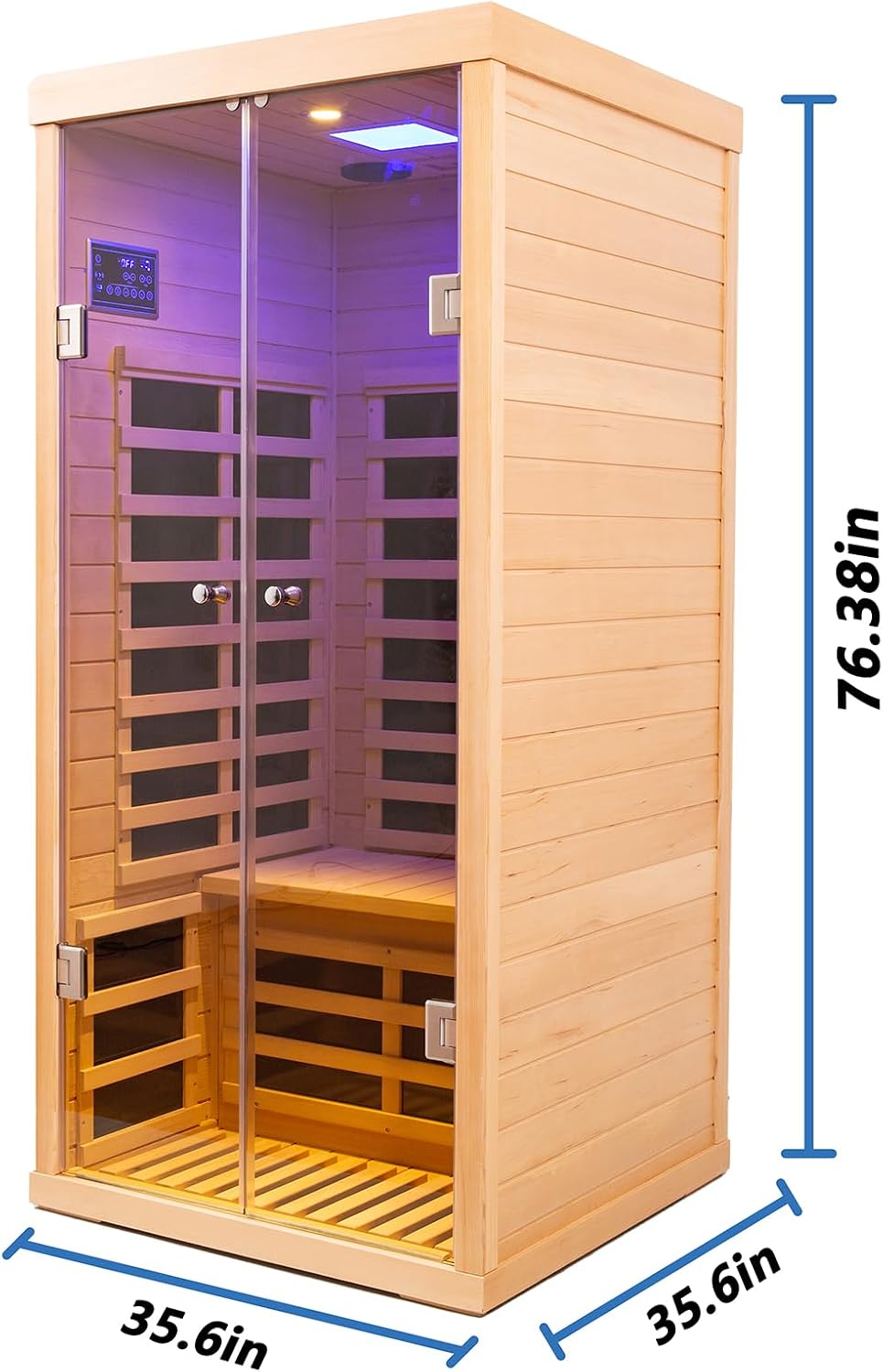
Image: Detailed diagram of the LCD control panel, showing functions for power, temperature, time, lighting, and audio.
5.2. App Control (Bluetooth)
For remote control and enhanced functionality, download the dedicated mobile application. The app allows you to set time and temperature, and view current settings remotely.
- App Download: Scan the QR code provided in the product packaging or search for "SAUNA BT-APP" in your device's app store.
- Bluetooth Connection:
- Ensure Bluetooth is enabled on your mobile device.
- Open the "SAUNA BT-APP".
- Navigate to the settings or device connection section within the app.
- Select "SAUNA BT-APP" from the list of available devices to connect.
- Once connected, you can control the sauna's functions directly from your phone.

Image: Example of the mobile application interface for controlling the sauna via Bluetooth.
5.3. Heating and Features
- The sauna features 7 carbon crystal far infrared low EMF heating plates.
- It has a 1420W power output, allowing for a quick preheat time of 20-30 minutes.
- The maximum temperature achievable is 65°C (149°F).
- Additional features include a Bluetooth speaker for audio and an LED reading light for convenience.
- The sauna includes a heated floor panel and a heated front door panel for comprehensive warmth.

Image: Illustration of the Low EMF Far Infrared Technology, showing the placement of the 7 heating panels and the effective temperature range.
6. Maintenance
Proper maintenance will extend the life and performance of your Kanlanth Infrared Sauna.
- Cleaning:
- Wipe down the interior wood surfaces with a clean, damp cloth after each use. Avoid using harsh chemicals or abrasive cleaners.
- For deeper cleaning, a mild soap solution can be used, followed by wiping with a clean, dry cloth.
- Clean the glass door with a standard glass cleaner.
- Wood Care: The hemlock wood is naturally durable. Avoid excessive moisture exposure to prevent warping or damage. Do not apply wood treatments or sealants unless specifically recommended by the manufacturer.
- Electrical Components: Regularly inspect the power cord and connections for any signs of wear or damage. Do not attempt to repair electrical components yourself.
- Ventilation: Ensure the top ventilation opening remains clear and unobstructed for proper airflow.
- Backrests: It is highly recommended to use wooden backrests to protect the sauna's wood panels from sweat and prolong their lifespan.
7. Troubleshooting
This section addresses common issues you might encounter with your sauna.
| Problem | Possible Cause | Solution |
|---|---|---|
| Sauna does not power on. | Power cord not securely plugged in; circuit breaker tripped; internal safety cut-off activated. | Check power connection. Reset circuit breaker. If internal safety cut-off (due to leakage) is suspected, unplug the unit for 2 minutes, then plug back in. If issue persists, contact support. |
| Sauna not heating sufficiently. | Temperature setting too low; door not fully closed; ambient room temperature too cold. | Increase temperature setting. Ensure door is latched. Allow more preheat time in colder environments. |
| Bluetooth connection issues. | Multiple devices connected; temporary software glitch. | Disconnect other devices from the sauna's Bluetooth. Unplug the sauna from the power outlet for 2 minutes, then plug it back in to reset the Bluetooth module. Reattempt connection. |
| Temperature display seems inaccurate. | Normal operational fluctuation; sensor reading. | The sauna's internal thermostat maintains the set temperature within a range. Minor fluctuations are normal. If the discrepancy is significant, contact support. |
If you encounter a problem not listed here, or if the suggested solutions do not resolve the issue, please contact Kanlanth customer support for assistance.
8. Specifications
| Feature | Detail |
|---|---|
| Product Dimensions (L x W x H) | 35.6 x 35.6 x 76.38 inches |
| Model Number | 901SH |
| Heating Technology | FAR Infrared (Low EMF) |
| Number of Heating Panels | 7 Carbon Crystal Panels |
| Power Output | 1420 watts |
| Max Temperature | 65°C (149°F) |
| Preheat Time | 20-30 minutes |
| Control Interface | LCD Display, Mobile App (Bluetooth) |
| Wood Type | Hemlock Wood |
| Door Type | Dual 6mm Tempered Glass Doors |
| Seating Capacity | 1 Person |
| Weight Seat Load | 660 lbs |
| User Height Range | Ideal for 4.9-6.2 ft users |

Image: Product dimensions of the Kanlanth 1 Person Infrared Sauna.
9. Warranty and Support
Kanlanth is committed to providing quality products and customer satisfaction.
Return Policy:
Cancellations are accepted anytime before shipping. Returns due to non-human damage or natural disasters after the first year may incur fees. For easy returns to our CA warehouse, please retain the original packaging for at least one week after delivery.
Customer Support:
For any questions, concerns, or assistance with your Kanlanth Infrared Sauna, please contact the seller directly. It is recommended to have your model number (901SH) and purchase details ready when contacting support.
For general inquiries or to explore other products, visit the official Kanlanth Store: Kanlanth Store on Amazon.
Ask a question about this manual
Ask about setup, troubleshooting, compatibility, parts, safety, or missing instructions. Manuals+ will review the question and use this page’s manual context to help answer it.