
1. Introduction
Thank you for choosing the Putikeeg Mini CW Trainer. This device is designed to assist in learning and practicing Morse code, offering various modes for both beginners and experienced users. Its compact size and multifunctional capabilities make it an ideal tool for radio enthusiasts, field operations, or indoor practice. This manual provides detailed instructions for setup, operation, and maintenance to ensure optimal performance.
2. Safety Information
- Initial Charge: Upon receiving the device, ensure it is fully charged before its first use.
- Battery Care: Do not expose the device to extreme temperatures or direct sunlight. Avoid puncturing or disassembling the battery.
- Water Resistance: This device is not water-resistant. Avoid exposure to liquids.
- Ventilation: Ensure adequate ventilation when charging or operating the device to prevent overheating.
- Disposal: Dispose of the device and its battery according to local regulations. Do not dispose of in household waste.
3. Package Contents
Verify that all items are present in your package:
- 1 x Putikeeg Mini CW Trainer (CW-Trainer)
- 1 x Type-C Charging Cable
- 1 x Carrying Case

Image: Putikeeg Mini CW Trainer with its accessories, including a Type-C charging cable, a headset, and examples of compatible Morse keys.
4. Product Overview
The Putikeeg Mini CW Trainer is a compact and portable device featuring a 1.3-inch digital display for easy access to practice data. It supports various Morse key types and offers multiple learning modes. The device includes an internal speaker and a 3.5mm headphone jack for private listening.
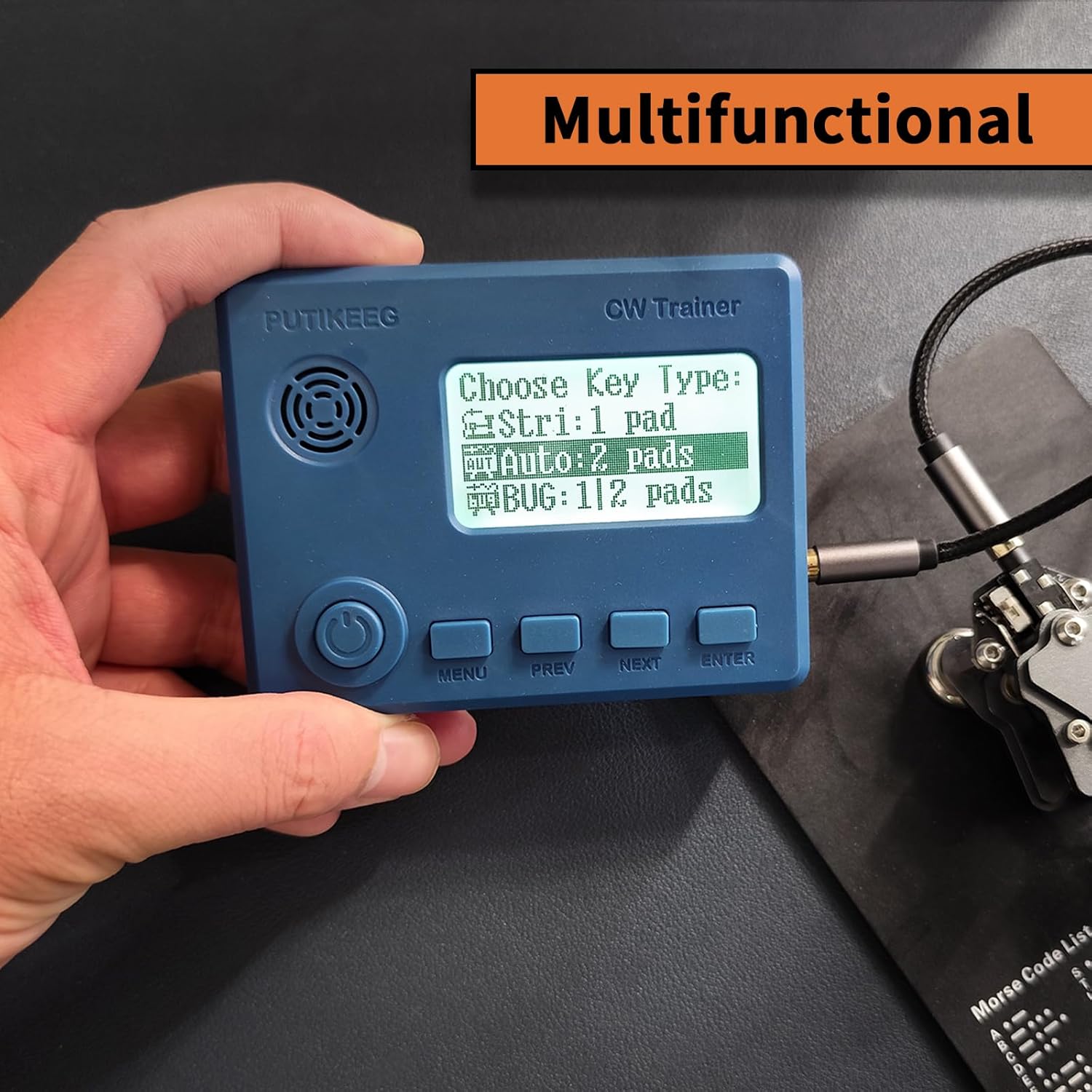
Image: The Putikeeg Mini CW Trainer in hand, displaying the key type selection menu.
Key Features:
- Multifunctional Modes: Includes QCW view, Code view, Listening test, and Free input modes.
- Adjustable Sound: Speaker with adjustable volume, or connect headphones for private practice.
- Portable Design: Compact and lightweight for easy transport.
- Digital Display: 1.3-inch screen for clear information display.
5. Setup
5.1 Initial Charging
- Locate the Type-C charging port on the side of the device.
- Connect the provided Type-C charging cable to the device and a compatible USB power source (e.g., computer USB port, USB wall adapter).
- The device will indicate charging status on the display. Allow the device to fully charge before first use.
5.2 Connecting Accessories
- Morse Key: Connect your Morse key (straight key, iambic paddle, or BUG key) to the 3.5mm KEY input jack on the side of the device.
- Headphones: For private listening, connect standard 3.5mm headphones to the HEADSET output jack.
6. Operating Instructions
6.1 Power On/Off
- Power On: Press and hold the power button (usually located on the front or side) until the display illuminates.
- Power Off: Press and hold the power button again until the device shuts down.
6.2 Navigation and Menu
Use the MENU, PREV, NEXT, and ENTER buttons located below the display to navigate through the device's functions and settings.
- MENU: Access the main menu or go back to the previous screen.
- PREV/NEXT: Scroll through options or adjust values.
- ENTER: Select an option or confirm a setting.

Image: The device display showing the main function introduction screen with various practice modes.
6.3 Key Type Selection
From the main menu, select 'Choose Key Type' to configure the device for your connected Morse key:
- Stri: 1 pad (Straight Key): For single-paddle keys.
- Auto: 2 pads (Iambic Paddle): For dual-paddle iambic keys.
- BUG: 1/2 pads (BUG Key): For semi-automatic BUG keys.
6.4 Practice Modes
The CW Trainer offers several modes to enhance your Morse code learning:
- Free Input: Allows you to practice sending Morse code using your connected key. The device will display the characters you send.
- CW Practice: Practice sending and receiving various sentences and characters.
- Listen Test: This mode generates Morse code for you to listen to and identify. The display may show the next character while the current one is sounding, allowing time for identification.
- QCW View: Query a list of 58 commonly used Q-codes and phrases.
- Code View: Displays a list of common Morse code symbols and their corresponding characters.
6.5 Sound Settings
- Volume Adjustment: Navigate to the sound settings in the menu to adjust the speaker volume or mute it entirely.
- Headphone Use: When headphones are connected, the internal speaker will typically be muted, allowing for private practice.
7. Maintenance
7.1 Cleaning
- Use a soft, dry cloth to clean the device's exterior.
- Do not use liquid cleaners, solvents, or abrasive materials, as these can damage the device.
7.2 Storage
- Store the device in a cool, dry place away from direct sunlight and extreme temperatures.
- If storing for an extended period, ensure the battery is partially charged (around 50%) to prolong its lifespan.
- Use the provided carrying case for protection during transport and storage.
8. Troubleshooting
| Problem | Possible Cause | Solution |
|---|---|---|
| Device does not power on. | Low or depleted battery. | Connect the device to a power source using the Type-C cable and allow it to charge. |
| Display is blank or not working. | Device malfunction or hardware issue. | Attempt a restart by holding the power button. If the issue persists, contact customer support. |
| Missed dits or inaccurate character display during key input. | Inconsistent keying timing; key sensitivity. | Practice consistent timing. Ensure your Morse key is properly connected and functioning. The device's precision may highlight timing inconsistencies. |
| No sound from speaker or headphones. | Volume too low; headphones not properly connected; speaker/headphone jack issue. | Check volume settings. Ensure headphones are fully inserted. Test with different headphones if possible. |
9. Specifications
| Feature | Detail |
|---|---|
| Model Number | CW-Trainer |
| Brand | Putikeeg |
| Item Weight | 7 ounces (0.2 Kilograms) |
| Package Dimensions | 5 x 4.17 x 1.81 inches |
| Color | Blue |
| Number of Channels | 1 |
| Special Feature | Rechargeable |
| Frequency Range | 1.8 MHz to 30 MHz |
| Water Resistance Level | Not Water Resistant |
| Compatible Devices | Headsets, Earpieces |
| International Protection Rating | IP66 |
| Battery Capacity | 1200mAh (3.7V, 4.44Wh) |

Image: A graphic illustrating the technical specifications of the CW Trainer, including battery capacity and supported key types.
10. Warranty Information
Based on available product information, this device does not come with a specified warranty from the manufacturer. Please refer to your retailer's return policy for details on returns or exchanges.
11. Support
For further assistance, technical support, or inquiries regarding your Putikeeg Mini CW Trainer, please contact the retailer or visit the official Putikeeg brand store online. Ensure you have your product model number (CW-Trainer) and purchase details available when seeking support.
You can visit the Putikeeg Store at: Putikeeg Official Store