
NORTH EDGE ALPS
North Edge Sport Adventure Chronograph Digital Watch User Manual
Model: ALPS
Introduction
This manual provides comprehensive instructions for the operation and maintenance of your North Edge Sport Adventure Chronograph Digital Watch, Model ALPS. Designed for outdoor enthusiasts, this watch combines durability with essential navigation and tracking features.
Please read this manual thoroughly to ensure proper use and to maximize the lifespan of your device.
Product Overview
The North Edge ALPS watch is engineered with a lightweight carbon fiber case and a comfortable knit nylon strap, making it an ideal companion for various outdoor activities. It features a digital display with multiple functions to assist you in your adventures.
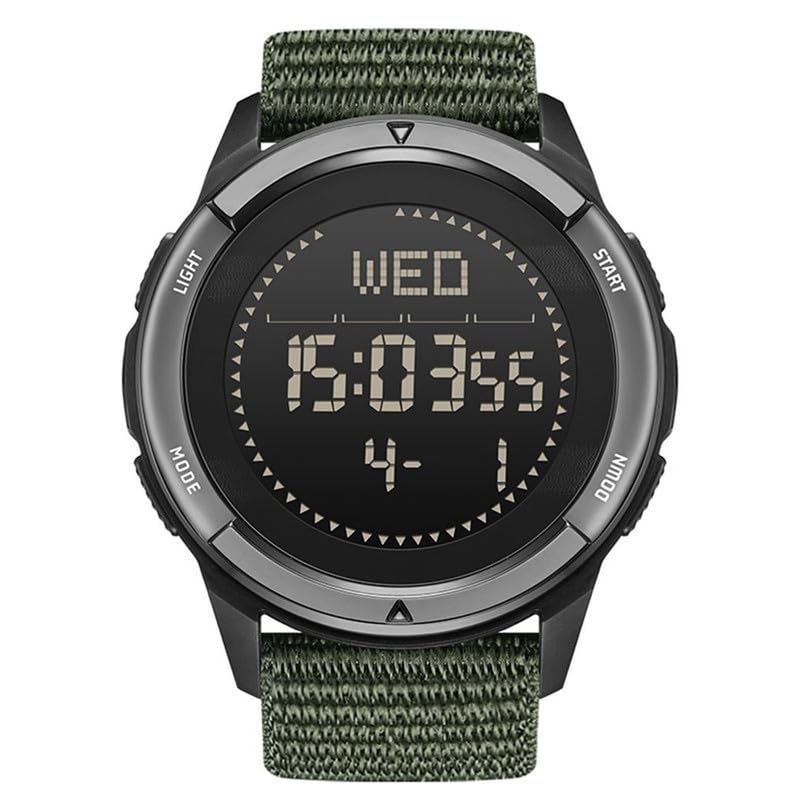
Figure 1: Front view of the North Edge ALPS watch. This image shows the watch face with the digital display, indicating the day of the week, time, and date. The watch has a black case and a green woven nylon strap. Buttons are visible on both sides of the watch case, labeled "LIGHT", "MODE", "START", and "DOWN".
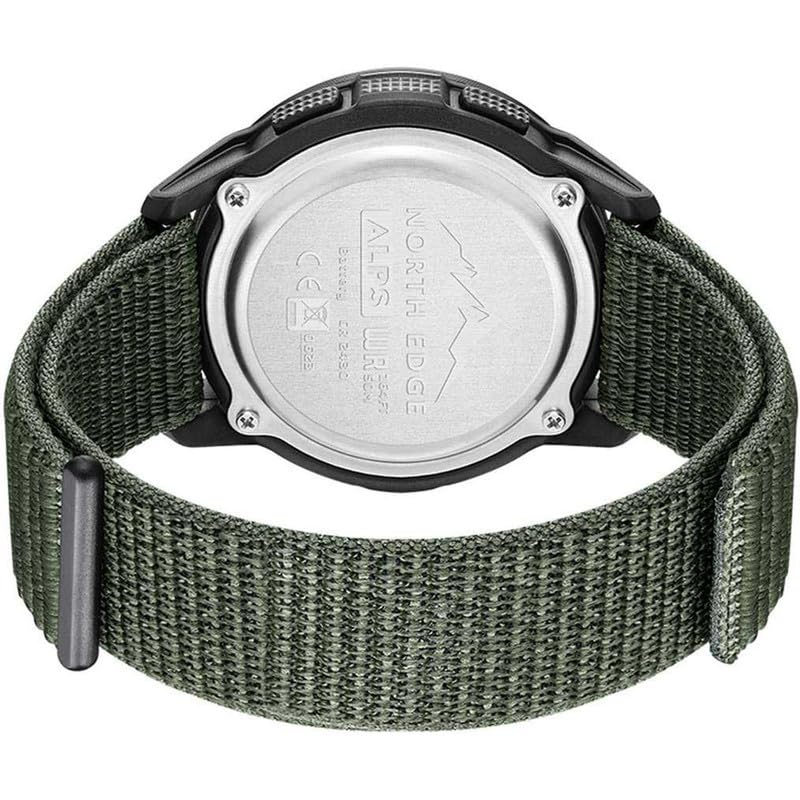
Figure 2: Back view of the North Edge ALPS watch. The stainless steel case back is visible, engraved with "NORTH EDGE", "ALPS WRIST WATCH", "BATTERY CR2430", and regulatory marks. The green nylon strap is also clearly visible.
Setup
Initial Power-On and Time Setting
- Power On: The watch is typically shipped in a low-power state. Press and hold the LIGHT button (top left) for a few seconds to activate the display.
- Enter Time Setting Mode: Press the MODE button (bottom left) repeatedly until the time setting interface appears. Digits to be set will usually flash.
- Adjust Time: Use the START button (top right) to increase the value and the DOWN button (bottom right) to decrease the value.
- Navigate Between Settings: Press the MODE button to move to the next setting (e.g., hours, minutes, seconds, year, month, day).
- Save Settings: Once all settings are adjusted, press the MODE button until you return to the main time display.
Strap Adjustment
The watch features an elastic ultra-light nylon knitted strap designed for comfort. Adjust the strap to fit snugly but comfortably around your wrist. The strap is replaceable and has a width of 24mm.
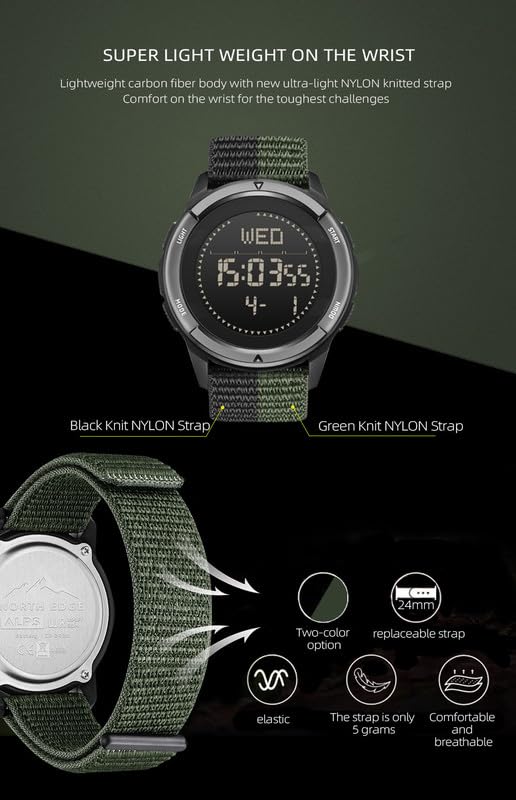
Figure 3: Details of the watch strap. This image highlights that the strap is elastic, weighs only 5 grams, is comfortable and breathable, and is replaceable with a 24mm width. It also shows options for black and green knit nylon straps.
Operating Instructions
Your North Edge ALPS watch is equipped with several functions to assist you in your daily activities and outdoor adventures. Familiarize yourself with the buttons and their corresponding operations.
- LIGHT Button (Top Left): Activates the EL backlight for visibility in low-light conditions. Press briefly to illuminate the display.
- MODE Button (Bottom Left): Cycles through different modes: Time, Chronograph, Pacer, Compass, Perpetual Calendar, Pedometer, Countdown.
- START Button (Top Right): Used to start/stop functions in Chronograph mode, adjust values upwards in setting modes, or confirm selections.
- DOWN Button (Bottom Right): Used to reset functions, adjust values downwards in setting modes, or navigate menus.
Key Functions
- Chronograph: For timing events. Enter Chronograph mode using the MODE button. Use START to begin/pause and DOWN to reset.
- Pacer: Helps maintain a consistent pace. Refer to the on-screen prompts in Pacer mode for specific settings.
- Compass: Provides directional guidance. Ensure you are in an open area away from strong magnetic fields for accurate readings. Calibrate if necessary (refer to troubleshooting).
- Perpetual Calendar: Automatically adjusts for different month lengths and leap years.
- 12/24 H System: Toggle between 12-hour and 24-hour time formats in time setting mode.
- Pedometer: Tracks your steps. Ensure the watch is worn securely on your wrist for accurate step counting.
- Countdown: Set a timer for specific durations.
- Low Battery Reminder: An icon or message will appear on the display when the battery level is low, indicating it's time for replacement.

Figure 4: Visual representation of the watch's functions. This diagram illustrates icons for Chronograph, Pedometer, Pacer, Perpetual Calendar, 12/24 hours, Compass, EL light, Low battery reminder, 50M Waterproof, and Countdown.
Maintenance
Cleaning
To maintain the appearance and functionality of your watch:
- Wipe the watch case and strap regularly with a soft, damp cloth.
- For the nylon strap, mild soap and water can be used, then rinse thoroughly and allow to air dry completely.
- Avoid using harsh chemicals, solvents, or abrasive cleaners, as these can damage the watch's finish or internal components.
Water Resistance
The North Edge ALPS watch is water-resistant up to 50 meters (5 ATM). This means it is suitable for everyday use, showering, and swimming in shallow water. It is not suitable for diving or high-pressure water activities.
- Do not operate buttons while the watch is submerged in water.
- Ensure the crown (if applicable) is fully pushed in before exposing the watch to water.
- After exposure to saltwater, rinse the watch with fresh water and dry it thoroughly.
Battery Replacement
The watch uses a CR2430 battery. When the low battery reminder appears, it is recommended to have the battery replaced by a qualified watch technician to ensure water resistance is maintained.
Troubleshooting
| Problem | Possible Cause | Solution |
|---|---|---|
| Display is blank or dim. | Low battery or watch is in power-saving mode. | Press the LIGHT button to activate. If still dim, replace battery. |
| Time is incorrect. | Time settings need adjustment. | Enter time setting mode using the MODE button and adjust. |
| Compass readings are inaccurate. | Interference from magnetic fields or needs calibration. | Move away from electronic devices or metal objects. Refer to specific compass calibration instructions in the watch's advanced settings (if available). |
| Pedometer not counting steps accurately. | Watch not worn securely or inconsistent arm movement. | Ensure the watch is snug on your wrist. Walk naturally. |
Specifications
| Feature | Detail |
|---|---|
| Model Number | ALPS |
| Case Material | Carbon Fiber Composite |
| Case Diameter | 45 mm |
| Thickness | 12.5 mm |
| Strap Material | Wear-resistant Nylon |
| Strap Width | 24 mm |
| Product Net Weight | 49 g |
| Movement Type | Quartz |
| Water Resistance | 50M (5 ATM) |
| Battery Type | CR2430 |
| Screen Type | FSTN screen |
| Country of Origin | China |
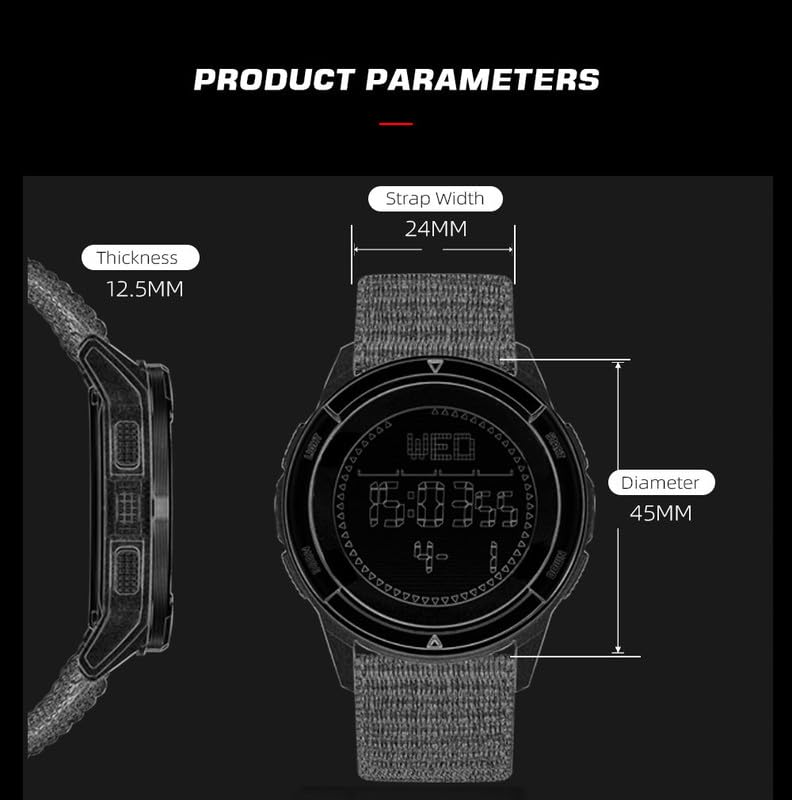
Figure 5: Product dimensions. This image provides a visual reference for the watch's strap width (24mm), thickness (12.5mm), and diameter (45mm).
Warranty Information
The North Edge ALPS watch comes with a warranty. For specific details regarding warranty coverage, duration, and claims, please contact the Seller of Record from whom you purchased the product. Keep your proof of purchase for warranty validation.
Customer Support
For any questions, technical assistance, or support not covered in this manual, please contact North Edge customer service:
- Email: lily@northedgewatch.com
- Manufacturer: Xiamen North Edge Technology Co. Ltd
When contacting support, please have your watch model (ALPS) and purchase details ready.
Ask a question about this manual
Ask about setup, troubleshooting, compatibility, parts, safety, or missing instructions. Manuals+ will review the question and use this page’s manual context to help answer it.