
1. Introduction
The Abestop ATM6301 is a compact and versatile 2-in-1 instrument combining a DC power supply and a high-resolution multimeter. Designed for various applications, it offers precise control over voltage and current output, comprehensive measurement capabilities, and multiple protection features. This manual provides detailed instructions for the safe and efficient operation of your ATM6301 device.
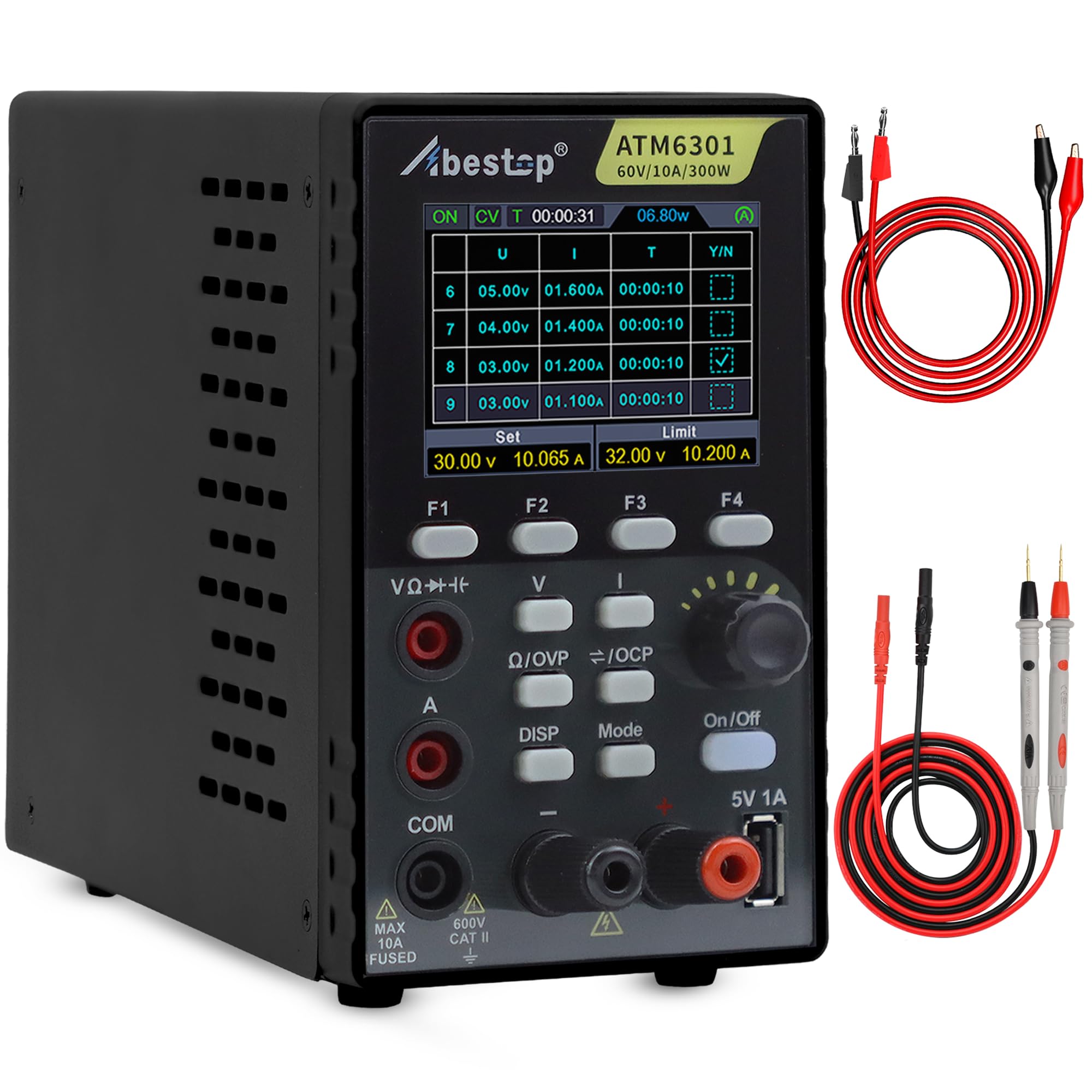
Figure 1: Abestop ATM6301 2-in-1 DC Power Supply and Multimeter with 2.8-inch LCD display, showing power supply and multimeter test modes.
2. Product Overview
2.1 Key Features
- 2-in-1 Functionality: Integrates a DC power supply and a multimeter into a single compact unit.
- DC Power Supply: Offers 0-60V/0-10A/300W output with 10mV/1mA high resolution. Includes a 5V/1A USB host port.
- Multimeter: Features 4 1/2 digit full-scale reading with auto-ranging, supporting measurements for voltage, current, capacitance, resistance, continuity, and diode (0-2V) testing.
- Protection Functions: Equipped with over-voltage (OVP) and over-current (OCP) protection to safeguard circuits.
- Advanced Output Control: Supports editable waveform output lists (10 groups) and 4 groups of memory shortcut parameters for quick output recall.
- Monitoring: Capable of monitoring output voltage and current curves.
- Applications: Suitable for phone and laptop repair, PCB aging tests, battery charging and discharging experiments, and educational programs.
2.2 Components and Controls
Familiarize yourself with the front and rear panels of the ATM6301 to understand its various controls and connections.

Figure 2: Abestop ATM6301 Front and Rear Panel Layout. This image details the 2.8-inch LCD, function buttons (F1-F4), voltage/current adjustment knob, On/Off button, display and mode buttons, 5V/1A USB port, channel output terminals, multimeter jacks, power cable socket, fuse, power switch, and intelligent temperature cooling fan.

Figure 3: Package Contents. The ATM6301 set includes the power supply unit, power cable, multimeter leads, banana to alligator clip cables (optional accessory), USB flash drive (with PC software and manual), grounding wire, and a spare fuse.
3. Safety Instructions
- Always connect the power cord protective grounding conductor to ground to avoid electric shock.
- Do not remove covers. Refer servicing to qualified personnel only.
- Ensure the input voltage matches the specified range on the rear panel.
- Do not operate the device in wet or damp conditions.
- Avoid blocking the ventilation openings to prevent overheating.
- Use only the specified fuse type and rating.
4. Setup
- Unpacking: Carefully remove the ATM6301 and all accessories from the packaging. Verify all components listed in Figure 3 are present.
- Placement: Place the unit on a stable, level surface with adequate ventilation. Ensure no objects obstruct the cooling fan on the rear panel.
- Power Connection: Connect the provided power cable to the AC input socket on the rear panel and then to a grounded power outlet.
- Initial Power On: Flip the power switch on the rear panel to the 'ON' position. The LCD screen should illuminate.
5. Operating Instructions
5.1 General Operation and Display
The ATM6301 features a 2.8-inch LCD for displaying output parameters, measurement results, and settings. Use the function buttons (F1-F4), adjustment knob, and 'DISP'/'Mode' buttons to navigate and configure the device.
Figure 4: Display examples for DC Power Supply Test and Multimeter Test. The display shows real-time voltage, current, power, set limits, and measurement ranges.
5.2 DC Power Supply Functions
The power supply mode allows you to set precise voltage and current outputs. The device supports constant voltage (CV) and constant current (CC) modes for effective circuit protection.
- Setting Voltage and Current: Use the adjustment knob to set the desired voltage and current limits. Press the knob to switch between voltage and current adjustment.
- Output On/Off: Press the 'On/Off' button to enable or disable the output. A long press can activate an automatic output function after 5 seconds of power-on.
- Over-voltage/Over-current Protection (OVP/OCP): Configure OVP and OCP limits to protect your circuit from damage. If the actual current exceeds the preset value, the power supply automatically switches to CC mode to protect the circuit.
- USB Host: The 5V/1A USB host port on the front panel can be used to power or charge external devices.

Figure 5: 5V/1A USB Port Interface. This image shows the USB port being used to power a small fan, illustrating its utility for external devices.
5.3 Multimeter Functions
The integrated multimeter provides accurate measurements for various electrical parameters.
- Measurement Modes: Supports voltage, current, capacitance, resistance, continuity, and diode (0-2V) tests.
- Auto-Ranging: The multimeter automatically selects the appropriate range for measurements, simplifying operation.
- Connecting Test Leads: Use the red and black multimeter jacks on the front panel for measurements. Red is positive, black is negative.

Figure 6: Multimeter Function Display. The display shows capacitance measurement (22.000nF) and the ability to switch between different measurement types.
5.4 Advanced Features
- Editable Waveform Output: Create and store up to 10 groups of editable timed outputs for specific testing sequences.
- Memory Shortcut Parameters: Store and quickly recall up to 4 groups of frequently used output parameters (voltage, current, OVP, OCP) for efficient testing.
- Output Curve Monitoring: Monitor the output voltage and current changes over time, useful for analyzing circuit behavior.
Video 1: Demonstration of a 2-in-1 DC power supply and multimeter (similar to ATM6301). This video showcases the device's interface, protection features, editable output, and various applications, providing a visual guide to its functionality.
6. Maintenance
- Cleaning: Use a soft, dry cloth to clean the exterior of the unit. Do not use abrasive cleaners or solvents.
- Ventilation: Regularly check that the ventilation openings are clear of dust and debris to ensure proper cooling.
- Fuse Replacement: If the fuse blows, replace it with a fuse of the same type and rating (5A). Disconnect the power cable before replacing the fuse.
- Storage: When not in use for extended periods, store the device in a dry, dust-free environment.
7. Troubleshooting
| Problem | Possible Cause | Solution |
|---|---|---|
| Device does not power on. | Power cable not connected, power switch off, blown fuse. | Check power cable connection, ensure power switch is ON, replace fuse if necessary. |
| No output voltage/current. | Output is disabled, OVP/OCP triggered, incorrect settings. | Press 'On/Off' button to enable output, check OVP/OCP settings, verify voltage/current settings. |
| Inaccurate multimeter readings. | Incorrect test lead connection, wrong measurement mode, faulty leads. | Ensure leads are correctly connected, select appropriate measurement mode, try different test leads. |
| Device overheats. | Blocked ventilation, prolonged high load. | Clear ventilation openings, reduce load if operating continuously at maximum capacity. |
8. Specifications
| Parameter | Value |
|---|---|
| Model Number | ATM6301 |
| Output Voltage | 0-60 VDC |
| Output Current | 0-10 Ampere |
| Maximum Power | 300 Watt |
| Resolution | 10mV / 1mA |
| USB Host Output | 5V / 1A |
| Multimeter Display | 4 1/2 digits |
| Product Dimensions (L x W x H) | 14 x 20 x 9 cm |
| Item Weight | 1.5 Kilograms |
| Material | Plastic |
| Color | Black |
| Compliance | CE, RoHS |
| Country of Origin | China |
9. Warranty and Support
For warranty information and technical support, please refer to the documentation included with your product or contact Abestop customer service. Details can typically be found on the manufacturer's official website or through your point of purchase.