
Introduction
This manual provides detailed instructions for the assembly, operation, and maintenance of your FITUEYES Rolling TV Stand, model FT-S1611MB. This mobile TV stand is designed to accommodate televisions ranging from 32 to 75 inches, with a maximum weight capacity of 88 lbs (40 kg) and VESA compatibility from 200x200mm to 400x600mm. Key features include landscape to portrait rotation, height adjustment, an integrated power outlet, and lockable wheels for easy mobility.
Safety Information
- Ensure all components are securely fastened before use.
- Do not exceed the maximum weight capacity of 88 lbs (40 kg).
- Verify your TV's VESA pattern is within the supported range (200x200mm to 400x600mm).
- Always lock the wheels when the stand is in a stationary position to prevent accidental movement.
- Keep children and pets away from the stand during assembly and movement.
- Avoid placing the stand on uneven surfaces.
Package Contents
Please ensure all parts are present before beginning assembly. Refer to the included parts list in your packaging for specific component identification.
Setup and Assembly
The FITUEYES Rolling TV Stand is designed for straightforward assembly without the need for drilling. Follow the clear instructions provided in the separate packaging of parts.
- Base Assembly: Attach the four lockable wheels to the base of the stand.
- Column Attachment: Secure the main support column to the assembled base using the provided hardware.
- TV Bracket Installation: Mount the TV bracket arms to the main support column. Ensure they are aligned with your TV's VESA mounting holes.
- TV Mounting: Carefully attach your television to the installed TV bracket arms.
Video: This video demonstrates the assembly process and key features of the FITUEYES Rolling TV Stand, including its rotation capabilities.
Video: This video provides an overview of the assembly and benefits of choosing the FITUEYES Rolling TV Stand.
Operating Instructions
Adjusting TV Height
The TV stand allows for height adjustment to optimize your viewing experience. Locate the height adjustment mechanism on the main column and follow the instructions to raise or lower your television to the desired level.

Image: The TV stand's height can be adjusted to suit various viewing preferences.
Rotating TV (Landscape to Portrait)
This stand supports rotation from landscape to portrait orientation. To rotate your TV, carefully loosen the locking mechanism behind the TV mount, adjust the screen to the desired orientation, and then re-secure the mechanism.

Image: The TV stand supports both vertical and horizontal screen orientations for diverse viewing needs.
Swiveling the TV
The TV can be swiveled up to ±20 degrees left and right. Gently push the TV to the desired angle. No locking mechanism is required for swiveling within this range.

Image: The TV stand allows for a ±20 degree swivel to achieve optimal viewing angles.
Moving the Stand
The stand is equipped with four lockable wheels for easy mobility. To move the stand, unlock all four wheels. To secure the stand in place, engage the locking mechanism on each wheel.
Video: This video highlights the mobility and various features of the FITUEYES Rolling TV Stand.
Using the Integrated Power Outlet
A power strip with three AC outlets (120V/12A) is integrated into the back of the stand. This feature helps manage cables and provides convenient power access for your TV and other devices. Ensure the main power cord is securely plugged into a wall outlet.
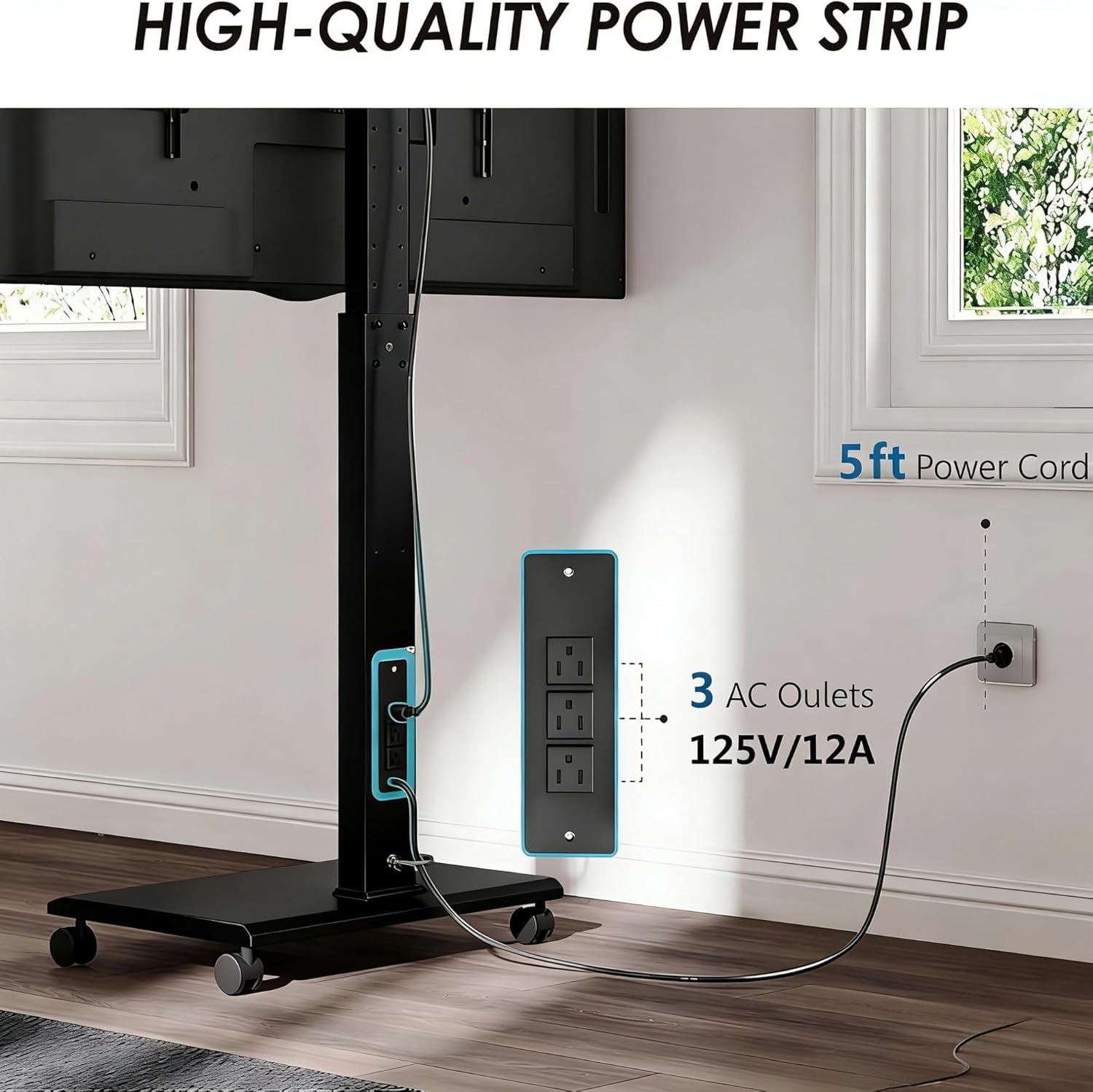
Image: The integrated power strip provides convenient access to three AC outlets.
Maintenance
- Cleaning: Use a soft, dry cloth to clean the stand. Avoid abrasive cleaners or solvents that may damage the finish.
- Inspections: Periodically check all screws and connections to ensure they remain tight and secure.
- Wheel Care: Keep the wheels free of debris to ensure smooth movement.
Troubleshooting
- TV not stable: Ensure all mounting screws are tightened and the stand is on a level surface. Verify the TV weight and VESA pattern are within specifications.
- Wheels not moving smoothly: Check for any obstructions or debris in the wheels. Ensure the wheel locks are disengaged.
- Power outlet not working: Confirm the stand's main power cord is securely plugged into a functional wall outlet. Check for any tripped circuit breakers.
Specifications
| Feature | Detail |
|---|---|
| Brand | FITUEYES |
| Model Number | FT-S1611MB |
| Compatible TV Sizes | 32 - 75 inches |
| Maximum Load Capacity | 88 lbs (40 kg) |
| VESA Compatibility | 200x200mm to 400x600mm |
| Product Dimensions | 23.6 x 15.7 x 62.3 inches |
| Item Weight | 28.6 pounds |
| Color | Black |
| Material | Iron |
| Movement Type | Rotate, Swivel |
| Mounting Type | Floor Mount |
| Power Outlet | 3 AC outlets (120V/12A) |

Image: Detailed dimensions and VESA compatibility for the TV stand.

Image: Examples of various TV sizes compatible with the stand, along with a VESA compatibility chart.
Warranty and Support
FITUEYES offers up to a 10-year warranty on this product. For any inquiries, technical assistance, or warranty claims, please contact FITUEYES customer support. We provide 24-hour global service to assist you.
For further support, please visit the official FITUEYES website or refer to the contact information provided in your product packaging.