
Introduction
Thank you for purchasing the Dewould G-Type Wireless Charging Speaker, Clock Alarm, and LED Desk Lamp. This all-in-one device combines multiple functionalities to enhance your living or working space. Please read this manual carefully before using the product to ensure proper operation and to maximize its features.

Figure 1: Dewould G-Type Wireless Charging Speaker and LED Desk Lamp, showcasing its unique G-shaped design with integrated LED lighting and a top wireless charging pad.
Product Overview
Key Features:
- Wireless Charging: 15W wireless charging for compatible smartphones.
- Bluetooth Speaker: High-quality wireless audio transmission with a range of up to 33 feet (10 meters).
- LED Desk Lamp: Built-in colorful LED lights with 13 different colors and 4 modes (dynamic, single color, slow fade, camping light).
- Digital Clock & Alarm: Displays time and date, with a gentle alarm or buzzer option.
- Multi-functional: Supports FM radio, USB, TF card, and AUX input.
- Compact Design: Lightweight and portable, suitable for various environments.
Components and Controls:
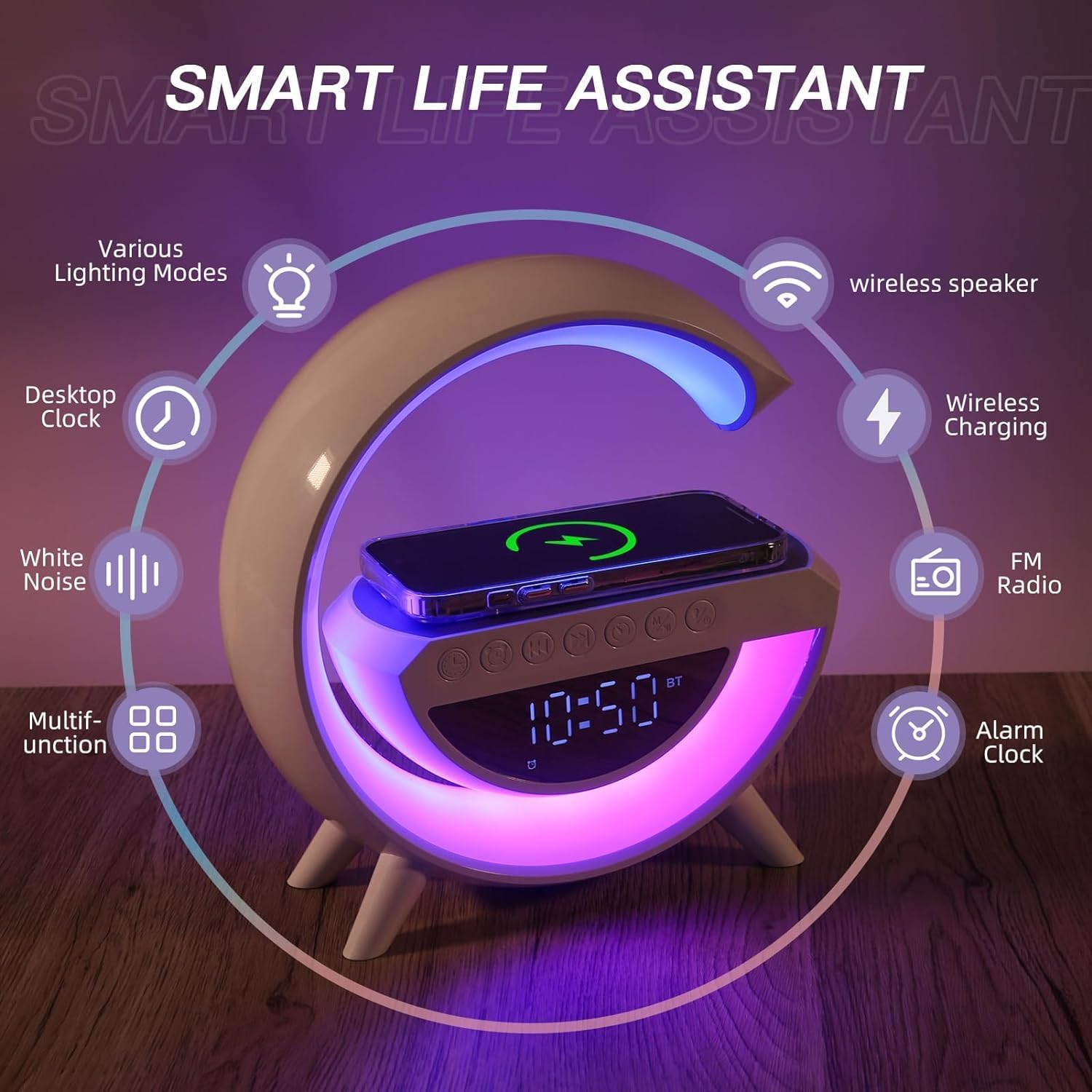
Figure 2: Overview of the G-Type lamp's smart features, including various lighting modes, desktop clock, white noise, wireless speaker, wireless charging, FM radio, and alarm clock.
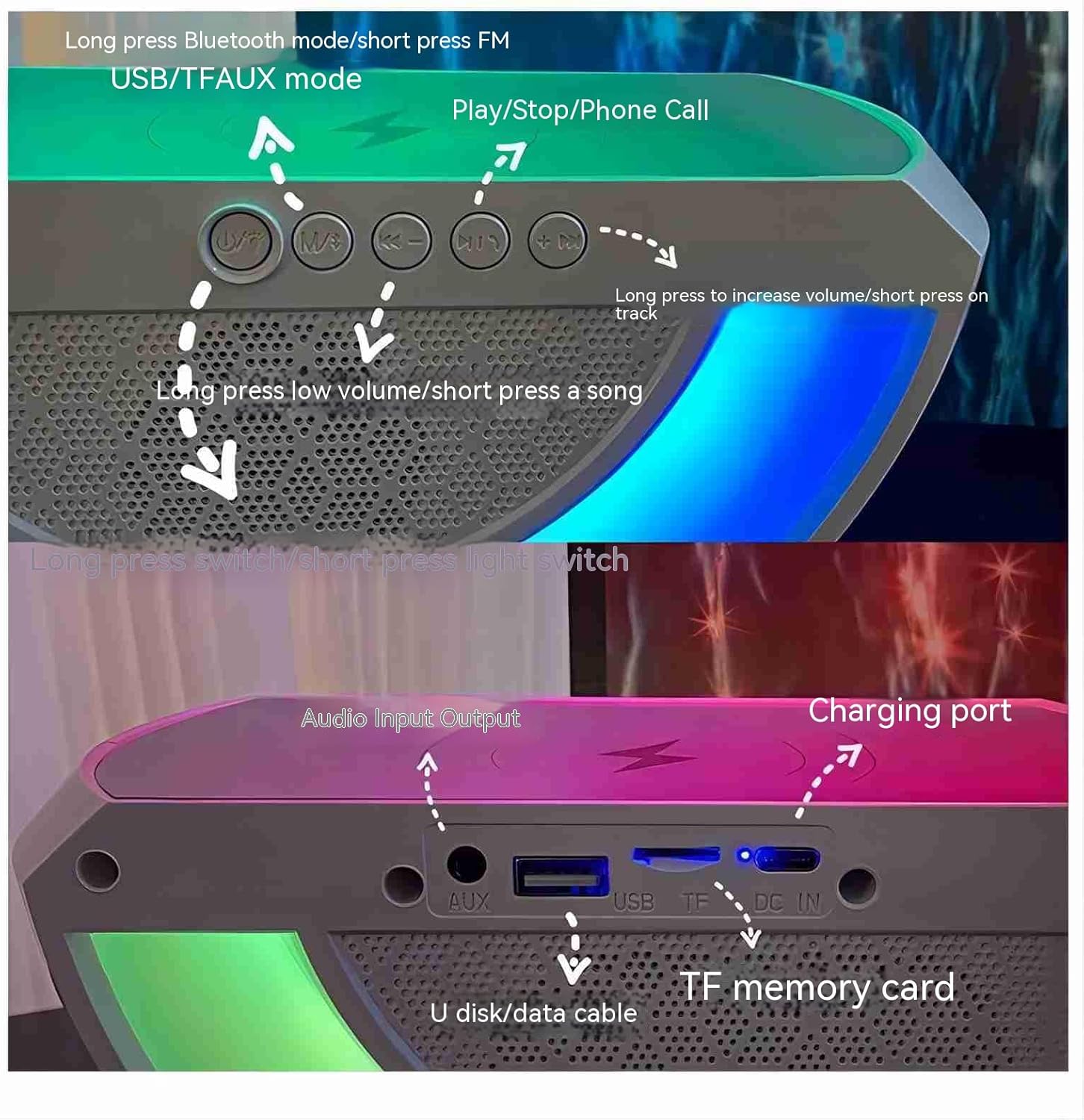
Figure 3: Detailed view of the control buttons and input/output ports. Top row shows buttons for Bluetooth/FM, previous track/volume down, play/pause/phone call, next track/volume up, and power/light switch. Bottom row shows AUX, USB, TF card, and DC IN charging ports.
The device features an intuitive control panel on the top surface, including buttons for mode selection, volume control, track navigation, play/pause, and power/light functions. The rear panel houses various input ports for versatile connectivity.
Setup
1. Power Connection:
- Locate the DC IN port on the back of the device.
- Connect the provided power adapter to the DC IN port.
- Plug the power adapter into a standard wall outlet. The device will power on and the digital display will illuminate.
2. Initial Clock Setup:
Upon first power-on or after a power interruption, you may need to set the time. Refer to the "Operating Instructions - Clock & Alarm" section for detailed steps on setting the time and date.
Operating Instructions
Wireless Charging:
The G-Type lamp features a 15W wireless charging pad on its top surface, compatible with Qi-enabled smartphones.
- Ensure the device is powered on.
- Place your Qi-compatible smartphone directly onto the charging pad.
- The charging indicator on your phone should activate, confirming that charging has begun.
- For optimal charging, ensure the phone is centered on the pad and remove any thick cases that might interfere with charging.
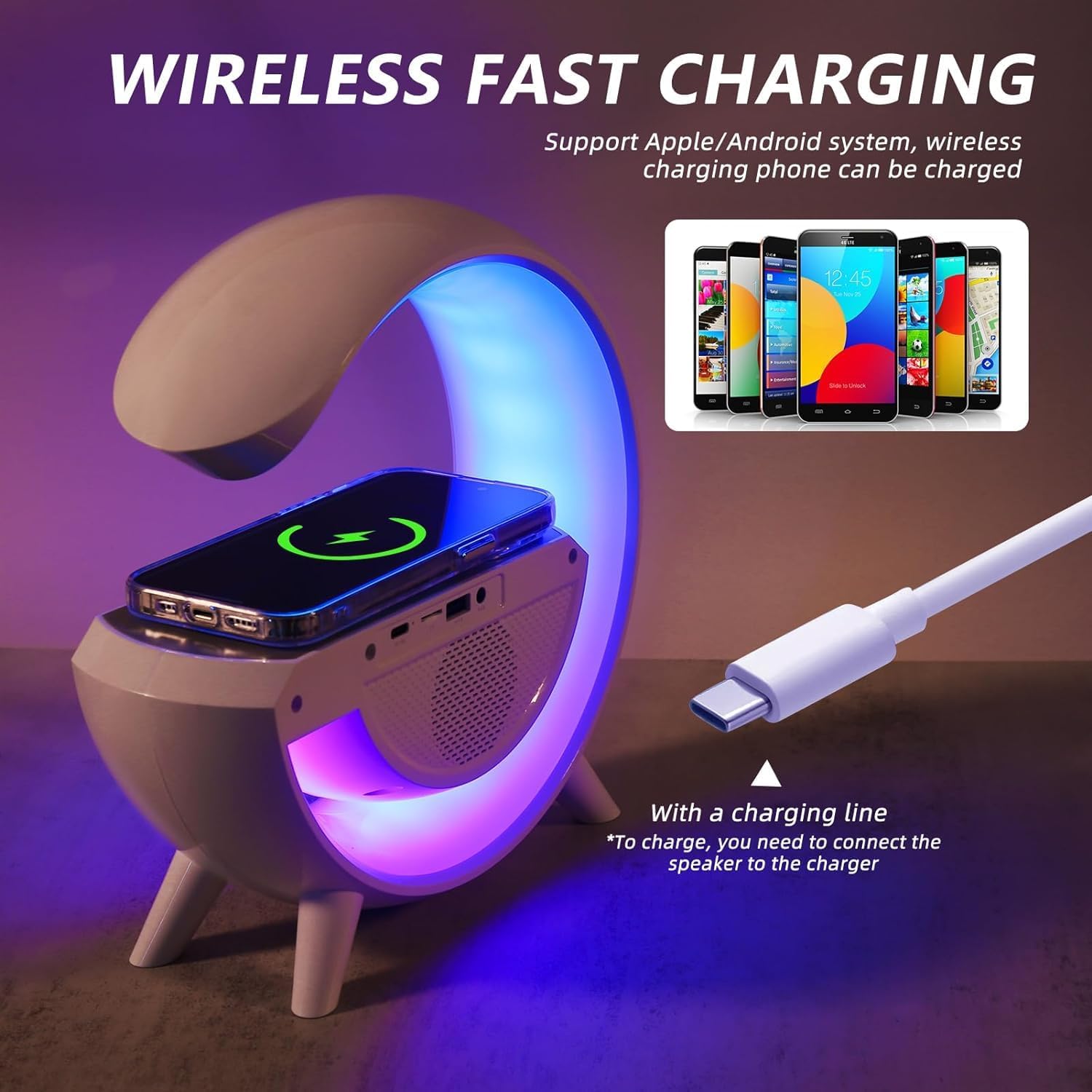
Figure 4: Illustration of the wireless fast charging function, showing a smartphone placed on the charging pad and a USB-C cable for connecting the speaker to power.
Bluetooth Speaker:
Connect your smartphone, tablet, or other Bluetooth-enabled devices to play audio wirelessly.
- Press the "Mode" button (often labeled with a Bluetooth icon or "M") on the device until "BT" appears on the digital display, indicating Bluetooth pairing mode.
- On your mobile device, enable Bluetooth and search for available devices.
- Select "G-Type Speaker" (or similar name) from the list to pair.
- Once paired, you can play audio from your device through the G-Type speaker.
- The Bluetooth range is up to 10 meters (33 feet).

Figure 5: Depiction of the 10-meter Bluetooth distance and stable signal reception, showing a smartphone connecting to the G-Type lamp.
Lighting Modes:
The integrated LED lights offer a variety of colors and modes to create different atmospheres.
- Press the "Light" button (often combined with the power button) to cycle through the 13 different colors and 4 modes.
- The modes include:
- Dynamic Light Mode: Cycles through colors.
- Single Color Mode: Stays on a chosen color.
- Slow Fade Mode: Gradually transitions between colors.
- Camping Light Mode: Provides a steady, warm light.
- Press and hold the "Light" button to turn the LED lights off.
Clock & Alarm:
The digital display shows the current time and date, and an alarm function is available.

Figure 6: Close-up of the mirror LED clock display, showing the time and various indicators.
- Setting Time:
- Press the "Clock" button (or similar icon) to enter time setting mode.
- Use the "Previous/Volume Down" and "Next/Volume Up" buttons to adjust hours and minutes.
- Press the "Clock" button again to confirm and move to the next setting (e.g., 12/24 hour format, date).
- Setting Alarm:
- Press the "Alarm" button (or similar icon) to enter alarm setting mode.
- Adjust the alarm time using the "Previous/Volume Down" and "Next/Volume Up" buttons.
- Press the "Alarm" button again to confirm and activate the alarm.
- To snooze or turn off the alarm, refer to the specific button functions on your device (often the Play/Pause button or a dedicated snooze button).
FM Radio / USB / TF AUX Mode:
The device supports multiple audio input options.
- FM Radio: Press the "Mode" button to switch to FM radio. Use the track navigation buttons to scan for stations.
- USB/TF Card: Insert a USB drive or TF (microSD) card into the respective port. The device will automatically switch to USB/TF mode and begin playing supported audio files.
- AUX Input: Connect an external audio device (e.g., MP3 player) to the AUX port using a 3.5mm audio cable. Press the "Mode" button to switch to AUX mode.
Maintenance
- Cleaning: Use a soft, dry cloth to wipe the surface of the device. Do not use abrasive cleaners or solvents.
- Storage: When not in use for extended periods, store the device in a cool, dry place away from direct sunlight and extreme temperatures.
- Avoid Water: This device is not waterproof. Keep it away from water and high humidity.
- Power Off: Always unplug the device from the power source before cleaning or if it will not be used for a long time.
Troubleshooting
| Problem | Possible Cause | Solution |
|---|---|---|
| Device does not power on. | Not properly connected to power; power outlet issue. | Ensure power adapter is securely plugged into the device and a working wall outlet. Try a different outlet. |
| Wireless charging not working. | Phone not Qi-compatible; phone not centered; thick phone case. | Verify phone supports Qi wireless charging. Reposition phone on the pad. Remove phone case. |
| Bluetooth speaker not pairing. | Device not in pairing mode; Bluetooth disabled on phone; too far from device. | Ensure device is in Bluetooth pairing mode ("BT" displayed). Enable Bluetooth on your phone. Move phone closer to the speaker (within 10m). |
| No sound from speaker. | Volume too low; incorrect mode selected; audio source issue. | Increase volume on both the speaker and your connected device. Ensure correct mode (Bluetooth, AUX, USB/TF) is selected. Check audio source playback. |
| LED lights not changing colors/modes. | Incorrect button press. | Press the "Light" button repeatedly to cycle through modes. Ensure the device is powered on. |
Specifications
| Feature | Detail |
|---|---|
| Brand | Dewould |
| Model Number | 3401 |
| Product Dimensions | 9.25 inches (H) x 9.25 inches (L) x 3.14 inches (W) (approx. 23.5cm x 23.5cm x 8cm) |
| Item Weight | 1.34 pounds (approx. 30 ounces) |
| Material | ABS + PC (Acrylonitrile Butadiene Styrene, Polycarbonate) |
| Wireless Charging Output | 15W |
| Speaker Output Power | 5W |
| Battery Capacity | 3.7V/1200MAH |
| Charging Time | Approx. 3 hours |
| Usage Time (Battery) | Approx. 4 hours |
| Bluetooth Version | 5.2 |
| Bluetooth Range | Up to 10 meters (33 feet) |
| LED Light Modes | 13 colors, 4 modes (Dynamic, Single Color, Slow Fade, Camping Light) |
| Power Source | Corded Electric |
| UPC | 731052165378 |

Figure 7: Diagram illustrating the product dimensions: 23.5cm/9.25 inches in height and length, and 8cm/3.14 inches in width.
Warranty and Support
This product comes with a standard manufacturer's warranty. Please refer to the product packaging or contact the retailer for specific warranty terms and conditions. For technical support or further assistance, please contact Dewould customer service through the contact information provided with your purchase or on the official Dewould website.
Please retain your purchase receipt as proof of purchase for warranty claims.