
Introduction
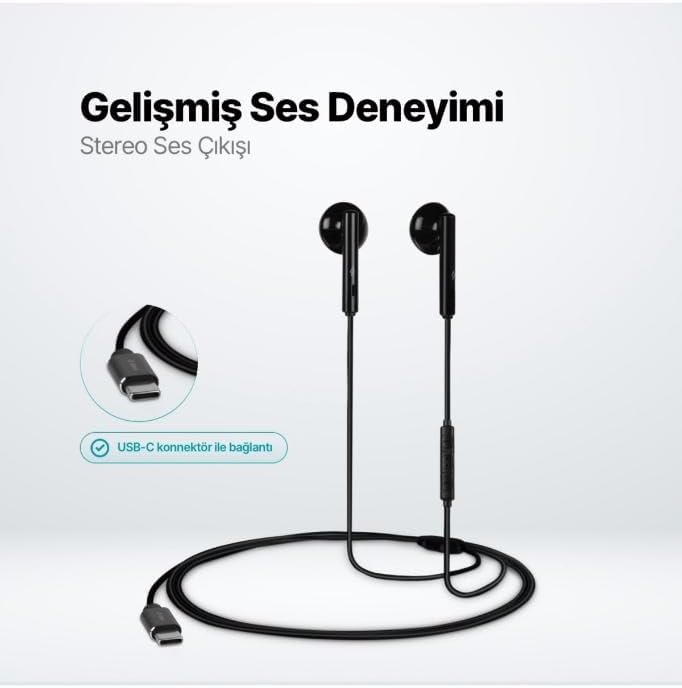
The TTEC Rio 2 Stereo USB-C Headset with Microphone is designed to provide a high-quality audio experience for music and calls. Its comfortable, lightweight design ensures a perfect fit and effective ambient noise isolation, allowing for hands-free communication and entertainment.
Key Features:
- Advanced stereo sound output for an immersive audio experience.
- Integrated microphone for clear phone calls.
- Smart inline controller for easy management of volume, calls, and music playback.
- Lightweight and ergonomic design for extended comfort.
- Universal USB-C connection.
Setup
To begin using your TTEC Rio 2 headset, follow these simple steps:
- Connect the Headset: Locate the USB-C port on your device (smartphone, tablet, laptop, etc.). Insert the USB-C connector of the TTEC Rio 2 headset firmly into the device's USB-C port.
- Device Recognition: Your device should automatically recognize the headset. If prompted, select the TTEC Rio 2 as the audio output and input device.
- Adjust Fit: Place the earbuds comfortably in your ears. The ergonomic design ensures a snug fit for optimal sound quality and noise isolation.
Operating Instructions
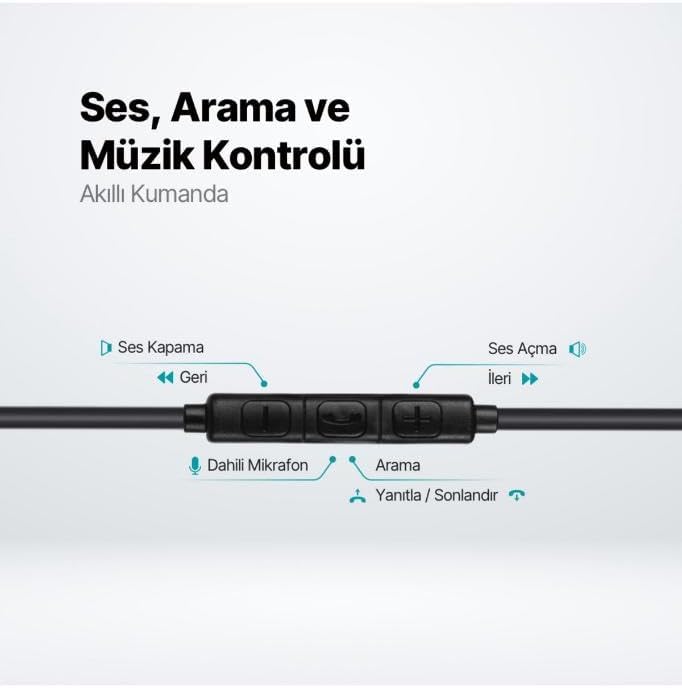
The TTEC Rio 2 headset features an inline smart controller for convenient management of your audio and calls.
Inline Controller Functions:
- Volume Up (+): Press to increase audio volume.
- Volume Down (-): Press to decrease audio volume.
- Play/Pause/Answer/End Call (Center Button):
- Single press to play or pause music.
- Single press to answer an incoming call.
- Single press to end an active call.
- Long press to reject an incoming call.
- Next Track (Forward Button): Press to skip to the next song.
- Previous Track (Backward Button): Press to go back to the beginning of the current song or to the previous song.
- Built-in Microphone: Located on the inline controller, it captures your voice for calls and voice commands.
Maintenance
Proper care will extend the life and performance of your TTEC Rio 2 headset.
- Cleaning: Gently wipe the earbuds and cable with a soft, dry cloth. Do not use harsh chemicals or abrasive materials.
- Storage: When not in use, store the headset in a clean, dry place. Avoid extreme temperatures. The included cable organizer clip can help prevent tangling.
- Avoid Moisture: Do not expose the headset to water or excessive moisture.
- Handle with Care: Avoid pulling on the cable or applying excessive force to the connectors.

Troubleshooting
If you encounter issues with your TTEC Rio 2 headset, refer to the following common solutions:
| Problem | Possible Solution |
|---|---|
| No sound from headset. |
|
| Microphone not working. |
|
| Sound quality is poor or distorted. |
|
| Hissing or static noise. |
|
Specifications
| Feature | Detail |
|---|---|
| Brand | TTEC |
| Model Number | 2KMM14S |
| Connectivity | USB-C |
| Headphones Form Factor | In-Ear |
| Ear Placement | In-Ear |
| Microphone | Built-in |
| Package Dimensions | 19.8 x 8.5 x 3.1 cm |
| Item Weight | 40 grams |
| ASIN | B0D3XJ5SP7 |
Warranty and Support
For warranty information and customer support, please refer to the documentation included with your purchase or visit the official TTEC website. Keep your proof of purchase for any warranty claims.