
Introduction
Thank you for purchasing the Targa TG260B Single Din Bluetooth MP3 Media Player. This manual provides essential information for the proper installation, operation, and maintenance of your new car audio system. Please read this manual thoroughly before using the product to ensure optimal performance and safety.
Product Overview
The Targa TG260B is a versatile single DIN media player designed for in-car entertainment. It features Bluetooth connectivity for wireless audio streaming and hands-free calling, as well as MP3 playback from USB drives and TF (microSD) cards. The unit also includes an FM radio tuner.
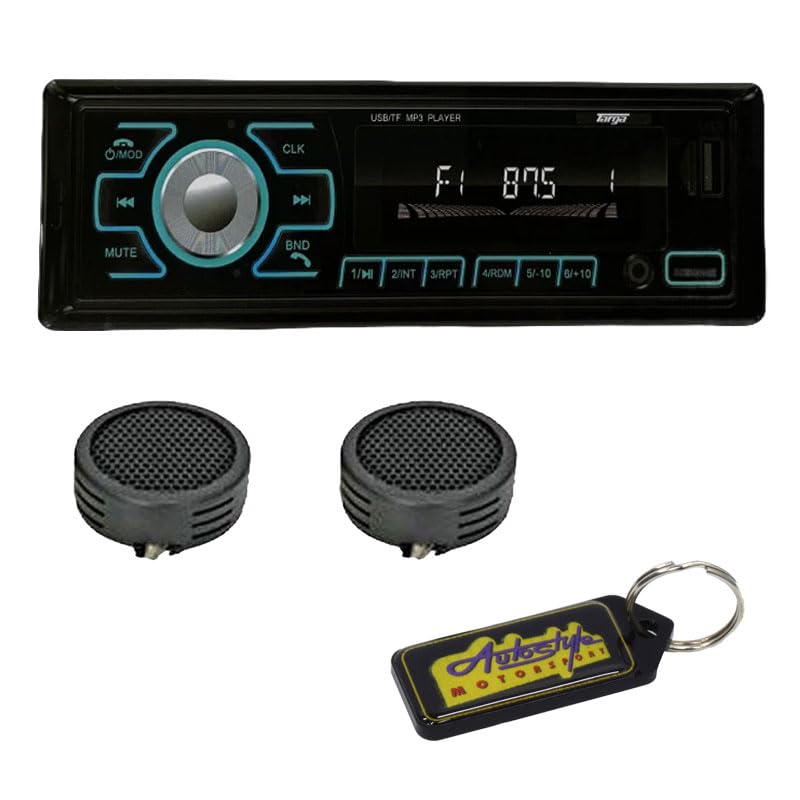
Figure 1: Front panel of the Targa TG260B Media Player.
Front Panel Controls
- O/MOD Button: Power On/Off and Mode selection (Radio, USB, TF, Bluetooth).
- CLK Button: Displays and sets the clock.
- MUTE Button: Mutes or unmutes the audio output.
- BND Button: Selects radio bands (FM1, FM2, FM3) and answers/ends calls in Bluetooth mode.
- Volume Knob: Adjusts the audio volume. Pressing it may access audio settings.
- Previous/Next Track Buttons (◀◀ / ▶▶): Skips tracks or tunes radio frequencies.
- 1/►II Button: Play/Pause for media playback, or preset 1 for radio.
- 2/INT Button: Intro scan for media playback, or preset 2 for radio.
- 3/RPT Button: Repeat playback mode, or preset 3 for radio.
- 4/RDM Button: Random playback mode, or preset 4 for radio.
- 5/-10 Button: Skips back 10 tracks, or preset 5 for radio.
- 6/+10 Button: Skips forward 10 tracks, or preset 6 for radio.
- USB Port: Connects USB flash drives for MP3 playback.
- TF Card Slot: Inserts TF (microSD) cards for MP3 playback.
Setup and Installation
Professional installation is recommended for this product. Incorrect wiring can cause damage to the unit or your vehicle's electrical system. Always disconnect the vehicle's battery negative terminal before starting installation.
Wiring Connections
- Yellow Wire (Constant +12V): Connect to a constant +12V power source.
- Red Wire (Accessory +12V): Connect to a switched +12V power source (ignition).
- Black Wire (Ground): Connect to a good chassis ground point.
- Blue Wire (Antenna/Amp Remote): Connect to power antenna or amplifier remote turn-on lead.
- Speaker Wires: Connect to vehicle speakers, ensuring correct polarity (e.g., White/White-Black for Left Front, Grey/Grey-Black for Right Front, Green/Green-Black for Left Rear, Purple/Purple-Black for Right Rear).
After all connections are made, reconnect the vehicle's battery negative terminal and test the unit.
Operating Instructions
Power On/Off
- Press the O/MOD button to turn the unit on.
- Press and hold the O/MOD button to turn the unit off.
Mode Selection
- Press the O/MOD button repeatedly to cycle through available modes: FM Radio, USB, TF Card, Bluetooth, AUX (if available).
Radio Operation
- Band Selection: In FM mode, press the BND button to switch between FM1, FM2, and FM3 bands.
- Manual Tuning: Press the ◀◀ or ▶▶ buttons briefly to fine-tune the frequency.
- Automatic Seek: Press and hold the ◀◀ or ▶▶ buttons to automatically seek the next strong station.
- Storing Presets: Tune to a desired station, then press and hold one of the numeric preset buttons (1-6) until you hear a beep. The station is now stored.
- Recalling Presets: Briefly press one of the numeric preset buttons (1-6) to recall a stored station.
Bluetooth Operation
- Pairing:
- Switch the unit to Bluetooth mode. The display will show "BT" or similar, and it will be discoverable.
- On your mobile device, enable Bluetooth and search for available devices.
- Select "TG260B" (or similar name) from the list. If prompted for a PIN, enter "0000".
- Once paired, the unit will confirm connection.
- Audio Streaming: Play audio from your paired device. Use the ◀◀ and ▶▶ buttons to skip tracks, and 1/►II to play/pause.
- Hands-Free Calling:
- Answer Call: Press the BND button.
- End Call: Press the BND button again.
- Reject Call: Press and hold the BND button.
USB/TF Card Playback
- Insert a USB flash drive into the USB port or a TF card into the TF card slot. The unit will automatically switch to USB/TF mode and begin playback.
- Play/Pause: Press the 1/►II button.
- Next/Previous Track: Press the ▶▶ or ◀◀ buttons.
- Fast Forward/Rewind: Press and hold the ▶▶ or ◀◀ buttons.
- Repeat: Press the 3/RPT button to cycle through repeat modes (e.g., Repeat One, Repeat All).
- Random Play: Press the 4/RDM button to enable/disable random playback.
- Skip 10 Tracks: Use the 5/-10 and 6/+10 buttons to jump backward or forward by 10 tracks.
Audio Settings
- Volume Control: Rotate the volume knob to increase or decrease the volume.
- Mute: Press the MUTE button to silence the audio. Press again to restore.
- Clock Setting: Press the CLK button to display the time. Press and hold CLK, then use the volume knob or track buttons to adjust hours and minutes. Press CLK again to confirm.
Maintenance
To ensure the longevity and optimal performance of your Targa TG260B media player, follow these maintenance guidelines:
- Cleaning: Use a soft, dry cloth to wipe the front panel. Do not use abrasive cleaners, waxes, or solvents.
- Avoid Liquids: Keep the unit away from water and other liquids.
- Temperature: Avoid exposing the unit to extreme temperatures or direct sunlight for extended periods.
- Media Care: Ensure USB drives and TF cards are clean and free of debris before insertion.
Troubleshooting
If you encounter issues with your media player, refer to the following common problems and solutions:
| Problem | Possible Cause | Solution |
|---|---|---|
| No power | Incorrect wiring; Blown fuse; Vehicle battery issue. | Check wiring connections; Replace fuse; Check vehicle battery. |
| No sound | Volume too low; Mute activated; Speaker wiring issue. | Increase volume; Deactivate mute; Check speaker connections. |
| Bluetooth not connecting | Unit not in pairing mode; Device not discoverable; Interference. | Ensure unit is in BT mode; Make device discoverable; Re-pair device; Move closer to unit. |
| USB/TF card not playing | Unsupported file format; Corrupted media; Incorrect insertion. | Ensure MP3 format; Try another media; Reinsert correctly. |
If the problem persists after trying these solutions, please contact customer support.
Specifications
- Model: TG-260B
- Type: Single Din Media Player
- Connectivity: Bluetooth, USB, TF Card
- Media Playback: MP3
- Tuner: FM Radio
- Power Supply: DC 12V (vehicle battery)
Warranty Information
This Targa TG260B media player comes with a 6-month warranty from the date of purchase. This warranty covers manufacturing defects under normal use. It does not cover damage caused by improper installation, misuse, accidents, or unauthorized modifications. Please retain your proof of purchase for warranty claims.
Customer Support
For further assistance, technical support, or warranty inquiries, please refer to the contact information provided by your retailer or the product manufacturer. Always provide your product model number (TG260B) and proof of purchase when seeking support.