
1. Introduction
Thank you for choosing the Korfile 47 Inch L-Shaped Gaming Desk. This manual provides detailed instructions for assembly, operation, maintenance, and troubleshooting to ensure optimal use of your new desk. Please read this manual thoroughly before assembly and retain it for future reference.
2. Important Safety Information
Please observe the following safety guidelines to prevent injury or damage to the product:
- Always ensure the desk is stable and not overloaded. Do not place heavy items on the desk that could cause it to tip over.
- When using the power outlets and USB ports, do not overload them. Be cautious when plugging in and unplugging devices to prevent electrical hazards.
- Keep all electrical components away from liquids.
- Ensure all screws and fasteners are securely tightened during assembly and periodically check for looseness.
- Keep small parts out of reach of children during assembly.
3. Package Contents
Before beginning assembly, please verify that all components listed below are present and undamaged. If any parts are missing or damaged, please contact customer support.
- Desk Panels (Carbon Fiber Black)
- Metal Frame Components
- Monitor Stand
- Built-in Power Outlet Strip (3 AC outlets, 2 USB ports)
- Cup Holder
- Headphone Hook
- RGB LED Light Strip with Remote Control
- Assembly Hardware (screws, bolts, etc.)
- Assembly Tools
- Instruction Manual
4. Assembly Instructions
Assembly of the Korfile Gaming Desk is designed to be straightforward. Please follow the step-by-step instructions provided in the included assembly guide. All parts are clearly labeled to assist with identification.
4.1. Preparation
- Clear a spacious area for assembly.
- Unpack all components and lay them out, checking against the package contents list.
- Ensure you have the provided assembly tools readily available.
4.2. Step-by-Step Assembly
Refer to the detailed diagrams in your separate assembly guide for specific steps. Key aspects include:
- Frame Assembly: Connect the metal frame components using the provided hardware. Ensure all connections are secure.
- Desk Panel Attachment: Secure the carbon fiber textured desk panels to the assembled frame.
- Monitor Stand Installation: Attach the full desktop monitor stand to the main desk surface. This stand is designed to accommodate two monitors and promote ergonomic viewing.
- Storage Shelves: Install the two additional shelves on the desktop and the two shelves underneath as per the instructions.
- Power Outlet Integration: Mount the built-in power strip (3 AC outlets, 2 USB charging ports) in its designated location.
- Accessory Attachment: Install the reversible cup holder and headphone hook as desired.
- LED Light Strip: Adhere the RGB LED light strip to the designated area on the desk.

Figure 4.1: Desk Dimensions. This diagram illustrates the overall dimensions and key measurements of the 47-inch L-shaped gaming desk, aiding in space planning and assembly.

Figure 4.2: Reversible Layout Options. This image demonstrates the flexibility of the L-shaped design, allowing the side extension to be configured on either the left or right side to suit your room layout.
5. Operating Instructions
5.1. RGB LED Lights
The integrated RGB LED light strip enhances your gaming or work environment. It can be controlled via a remote control or a dedicated smartphone application.
- Power On/Off: Use the designated button on the remote or app.
- Color Selection: Choose from over 60,000 colors to match your mood or setup.
- Brightness Adjustment: Adjust the intensity of the lights.
- Music Sync: The built-in microphone allows the lights to react to audio, creating a dynamic visual experience.
- Timing Function: Set schedules for the lights to turn on or off automatically.

Figure 5.1: RGB LED Light Features. This image displays the various control options for the LED lights, including remote and app control, color selection, music synchronization, and timing functions.
5.2. Built-in Power Outlets and USB Ports
The desk includes a convenient power strip for charging and powering your devices.
- AC Outlets: Three (3) 125V/12A AC outlets are available for powering monitors, computers, or other electronics.
- USB Charging Ports: Two (2) 5V/2A USB ports are provided for charging mobile phones, tablets, and other USB-powered devices.
- Power Cord: The integrated power cord is 6.6 feet long.
Caution: Do not exceed the maximum electrical load for the outlets. Always ensure devices are properly plugged in.
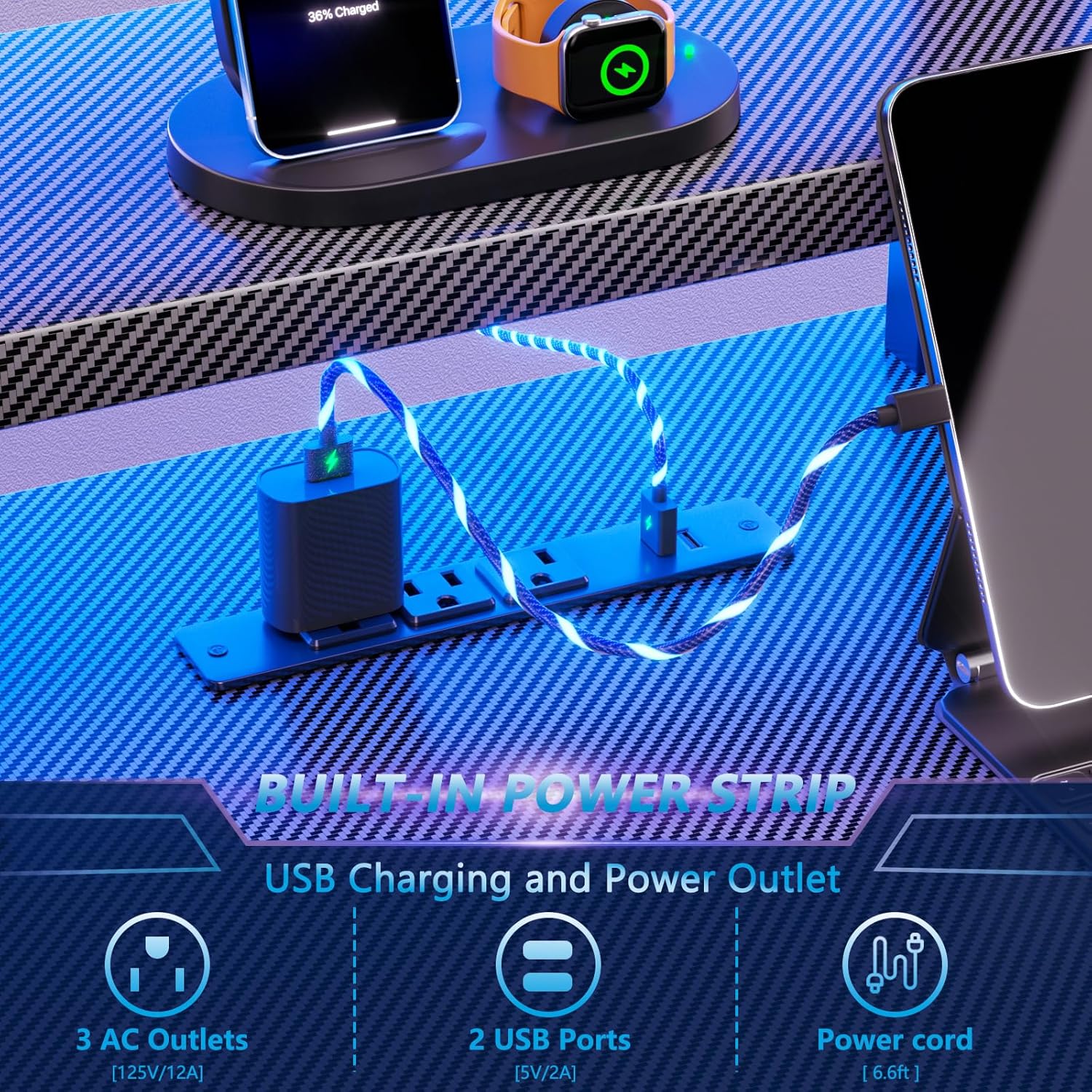
Figure 5.2: Integrated Power Strip. A close-up view of the power strip, highlighting the three AC outlets and two USB charging ports for convenient device connectivity.
5.3. Monitor Stand
The full desktop monitor stand is designed to elevate your display(s) to an ergonomic height, promoting better posture and reducing neck strain during long sessions. It can easily accommodate two computer monitors.

Figure 5.3: Ergonomic Monitor Stand. This image illustrates a user maintaining proper sitting posture while using the elevated monitor stand, demonstrating its ergonomic benefits.
5.4. Cup Holder and Headphone Hook
The desk includes a convenient cup holder and headphone hook, which can be installed on either side of the desk to suit your preference. These accessories help keep your desktop organized and prevent spills.

Figure 5.4: Integrated Accessories. This image highlights the practical cup holder and headphone hook, designed to keep your essentials within easy reach and your workspace tidy.
6. Maintenance
Proper care will extend the life and appearance of your Korfile Gaming Desk.
- Cleaning: For general cleaning, wipe the desk surfaces with a damp cloth. For a thorough clean, follow with a dry cloth to prevent water spots.
- Avoid Harsh Chemicals: Do not use abrasive cleaners or harsh chemicals, as these can damage the carbon fiber textured surface or the finish.
- Regular Checks: Periodically check all screws and fasteners to ensure they remain tight. Re-tighten if necessary to maintain stability.
- LED Lights: The LED strip is designed for durability. If issues arise, refer to the troubleshooting section.
7. Troubleshooting
If you encounter any issues with your Korfile Gaming Desk, please refer to the following common problems and solutions:
- Desk is Unstable/Wobbly:
- Ensure all assembly screws and bolts are fully tightened.
- Check that the desk is on a level surface. Adjust any leveling feet if present.
- LED Lights Not Working:
- Verify the LED light strip is properly connected to its power source.
- Check the remote control battery.
- Ensure the power outlet supplying the LED lights is functional.
- Power Outlets/USB Ports Not Functioning:
- Ensure the desk's main power cord is securely plugged into a working wall outlet.
- Check if the circuit breaker for the wall outlet has tripped.
- Avoid overloading the power strip with too many high-power devices.
- Missing or Damaged Parts:
- If you received damaged, scratched, or missing parts, please contact Korfile customer support immediately for assistance.
8. Specifications
| Feature | Detail |
|---|---|
| Brand | Korfile |
| Model Number | HK-GD-002-CL-47-1-CFB |
| Product Dimensions | 18.9"D x 47.2"W x 42.1"H |
| Color | Carbon Fiber Black |
| Style | Modern |
| Base Material | Metal |
| Top Material Type | Engineered Wood (Carbon Fibre Texture) |
| Special Features | RGB LED Lights, Built-in Power Outlet (3 AC, 2 USB), Monitor Stand, Cup Holder, Headphone Hook, Reversible L-Shape |
| Recommended Uses | Gaming, Working, Writing |
| Item Weight | 38 Pounds |
| Number of Shelves | 5 (including desktop shelves) |
| Required Assembly | Yes |
| Includes All Assembly Tools | Yes |
9. Warranty and Customer Support
Korfile is committed to providing high-quality products. While specific warranty details are not provided in this manual, if your items received are damaged, scratched, or missing parts, please contact our customer service team. We aim to provide satisfactory solutions within 24 hours.
For support, please refer to the contact information provided with your purchase or visit the official Korfile website.
10. Product Videos
No official product videos from the seller were available with specific URLs and metadata for embedding in this manual. Please refer to the product page for any available video content.


