1. Product Overview
This replacement remote control is designed for use with various Pioneer Smart 4K LCD LED HDTV models. It is pre-programmed and requires no additional setup or coding. Simply insert batteries, and it is ready for immediate use.
Package Contents:
- 1 x Replacement Remote Control
Note: Batteries and a separate instruction manual are not included in the package.
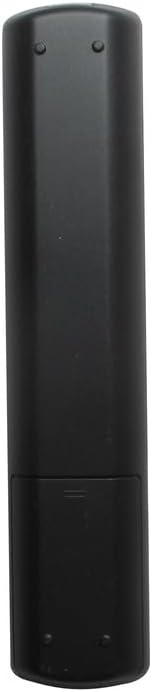
Image 1.1: Front view of the Generic replacement remote control. This image displays the full layout of the remote's buttons, including power, channel, volume, navigation, and smart TV function buttons.
2. Setup and Battery Installation
This remote control is designed for immediate use without any programming. The only setup required is the installation of batteries.
- Obtain Batteries: Purchase two (2) new AAA batteries from a local retailer. These are not included with the remote control.
- Open Battery Compartment: Locate the battery compartment cover on the back of the remote control. Gently slide the cover downwards or press the latch (if present) to open it.
- Insert Batteries: Insert the two AAA batteries into the compartment, ensuring that the positive (+) and negative (-) terminals align correctly with the markings inside the compartment. Incorrect insertion can prevent the remote from functioning.
- Close Battery Compartment: Slide the battery compartment cover back into place until it clicks securely.
- Test Remote: Point the remote control towards your Pioneer TV and press the Power button. The TV should respond. If not, recheck battery orientation or replace with new batteries.
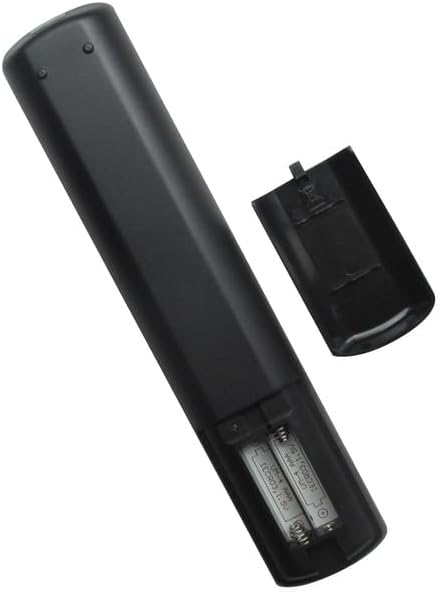
Image 2.1: Back view of the remote control with the battery compartment open. This image illustrates the correct placement of AAA batteries within the remote's battery compartment.
3. Operating Instructions
Once batteries are installed, the remote control is ready to operate your compatible Pioneer TV. Point the remote directly at the TV's infrared receiver for optimal performance.
Basic Functions:
- Power Button: Turns the TV on or off.
- Channel Buttons (CH+/CH-): Changes the TV channel up or down.
- Volume Buttons (VOL+/VOL-): Increases or decreases the TV volume.
- Mute Button: Mutes or unmutes the TV audio.
- Input/Source Button: Cycles through available input sources (HDMI, AV, etc.).
- Navigation Buttons (Up, Down, Left, Right, OK/Enter): Used to navigate menus and select options on the TV screen.
- Menu Button: Opens the TV's main menu.
- Exit/Back Button: Closes menus or returns to the previous screen.
- Number Buttons (0-9): Directly enters channel numbers.
For specific advanced functions or smart TV features, refer to your Pioneer TV's original user manual, as button labels and functions may vary slightly depending on the TV model.
4. Maintenance
Battery Replacement:
- Replace batteries when the remote's response becomes sluggish or stops working.
- Always replace both batteries at the same time with new AAA batteries.
- Do not mix old and new batteries, or different types of batteries.
- Remove batteries if the remote will not be used for an extended period to prevent leakage.
Cleaning:
- Wipe the remote control with a soft, dry cloth.
- Do not use liquid cleaners, sprays, or abrasive materials, as these can damage the remote's surface or internal components.
5. Troubleshooting
-
Remote not working:
- Ensure batteries are inserted correctly with the correct polarity (+/-).
- Replace old batteries with new AAA batteries.
- Check for any obstructions between the remote and the TV's infrared receiver.
- Ensure you are within a reasonable range and pointing the remote directly at the TV.
-
Certain buttons not responding:
- This remote is a generic replacement. While it supports primary functions, some highly specific or advanced smart TV features might require the original TV remote.
- Clean the remote's surface, especially around the unresponsive buttons, to remove any dirt or debris.
6. Specifications
| Brand | Generic |
| Manufacturer | Generic |
| Compatible Devices | Pioneer Television models: PLE-43S05FHD, PLE-55S05FHD, PLE-43S07FHD, PLE-2405HD, PLE-55S06UHD |
| Max Number of Supported Devices | 1 (One Television) |
| Special Feature | No Programming Required |
| Power Source | 2 x AAA Batteries (Not Included) |
7. Warranty and Support
No specific warranty information is provided for this generic replacement remote control. For any issues or inquiries, please refer to the retailer from whom the product was purchased.
As this is a generic replacement, direct manufacturer support may not be available. Please consult your TV's original manual for detailed information regarding your television's functions.


