
Introduction
The TONGYOR DP5 is a high-resolution lossless network music player designed for an exceptional audio experience. It features an integrated ES9038PRO DAC chip, delivering a high Signal-to-Noise Ratio (SNR) and minimal distortion, ensuring clear, crisp, and quiet audio reproduction. This manual provides essential information for setting up, operating, and maintaining your DP5 player.
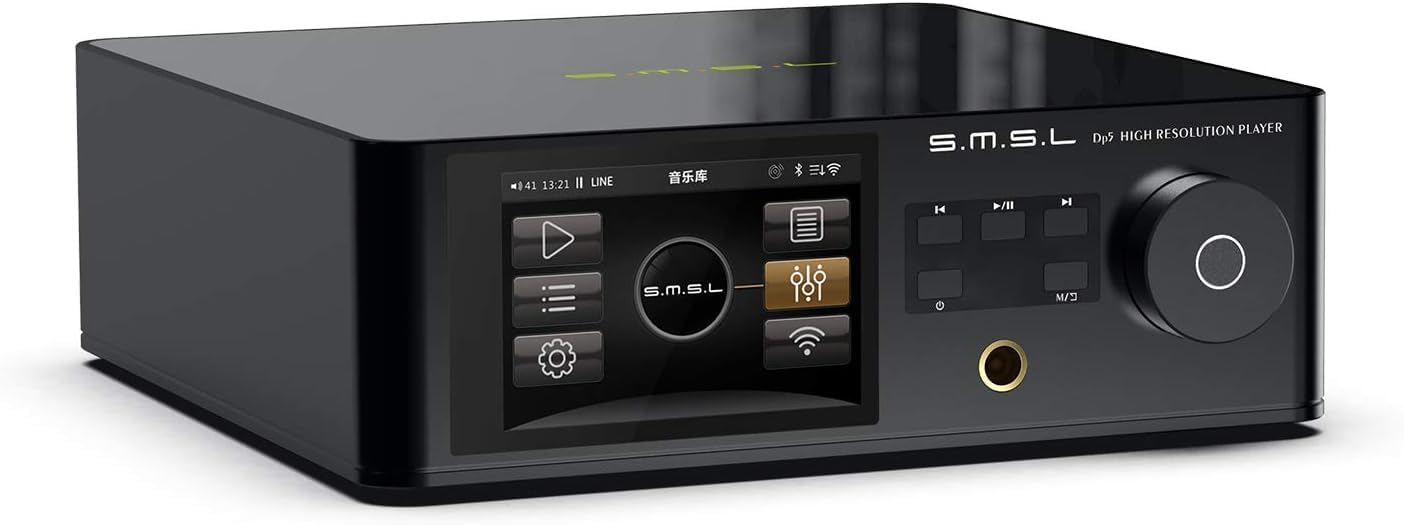
Image: Angled front view of the TONGYOR DP5 HiFi Network Music Player, showcasing its sleek black design and display screen.
Setup Guide
Unpacking and Initial Inspection
Carefully remove the DP5 player and all accessories from the packaging. Verify that all components are present, including the player, power cable, and any included documentation. Inspect the device for any signs of damage during transit.
Connecting the Device
Refer to the rear panel diagram for proper connection of power, audio outputs, and network cables.
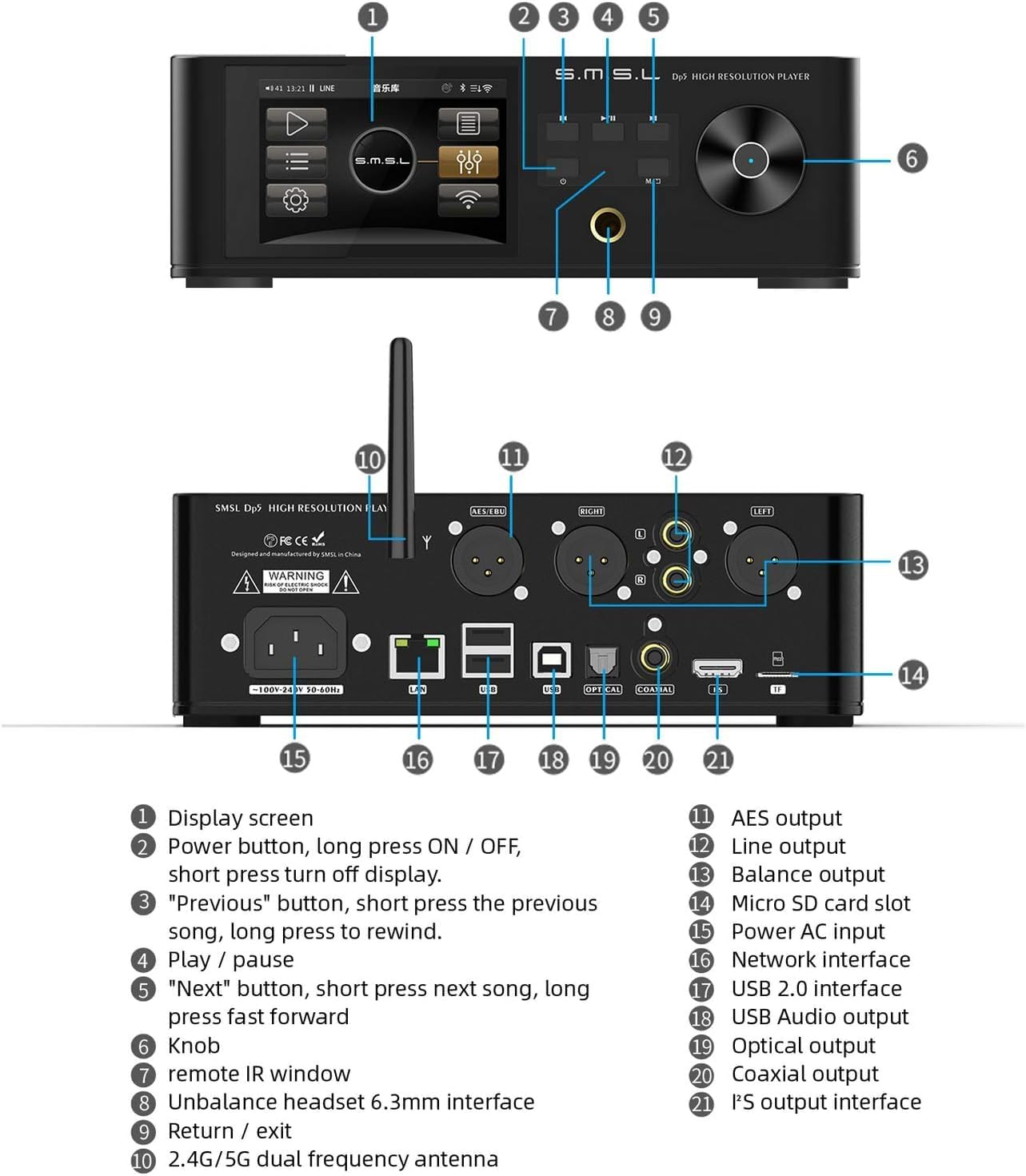
Image: Detailed view of the TONGYOR DP5's front and rear panels with numbered labels indicating each component and port.
Rear Panel Connections:
- 15. Power AC Input: Connect the provided AC power cable here. Ensure the voltage matches your region's power supply.
- 16. Network Interface (LAN): Connect an Ethernet cable for wired network access.
- 17. USB 2.0 Interface: For connecting external USB storage devices (e.g., USB drives, external hard drives up to 4TB, supporting NTFS/FAT32 formats).
- 18. USB Audio Output: Connect to a USB DAC or other USB audio input device.
- 19. Optical Output: Connect to an optical input on an amplifier or DAC.
- 20. Coaxial Output: Connect to a coaxial input on an amplifier or DAC.
- 21. I2S Output Interface: Connect to an I2S compatible DAC for high-fidelity digital audio transmission.
- 11. AES Output: Connect to an AES/EBU input on professional audio equipment.
- 12. Line Output (RCA): Connect to the analog RCA inputs of an amplifier or receiver.
- 13. Balanced Output (XLR): Connect to the balanced XLR inputs of an amplifier or receiver for improved signal integrity.
- 14. Micro SD Card Slot: Insert a Micro SD card for local music playback.
- 10. 2.4G/5G Dual Frequency Antenna: Attach the included Wi-Fi antenna for wireless network connectivity.
Powering On
After all connections are secure, press and hold the Power button (2) on the front panel to turn on the device. The display screen (1) will illuminate.
Operating Instructions
Front Panel Controls

Image: Front view of the TONGYOR DP5, highlighting the display, control buttons, and headphone jack.
- 1. Display Screen: Shows playback information, menus, and settings.
- 2. Power Button: Long press to turn ON/OFF. Short press to turn the display off.
- 3. Previous Button: Short press for the previous track. Long press to rewind.
- 4. Play/Pause Button: Controls playback.
- 5. Next Button: Short press for the next track. Long press for fast forward.
- 6. Knob: Used for navigation, volume control, and selection within menus.
- 7. Remote IR Window: For receiving signals from the remote control.
- 8. Unbalanced Headset 6.3mm Interface: Connect headphones for private listening.
- 9. Return/Exit Button: Navigates back in menus or exits current function.
Network Connectivity
The DP5 supports both wired (LAN) and wireless (Wi-Fi 2.4G/5G) network connections. Connect an Ethernet cable to the LAN port (16) for wired access, or attach the Wi-Fi antenna (10) and configure Wi-Fi settings through the on-screen menu for wireless connectivity.
The device supports DLNA and Airplay streaming, allowing you to play music from compatible devices on your network.
Supported Audio Formats and Sources
The DP5 supports a wide range of audio formats, including native DSD, WAV, APE, FLAC, AIFF, and MP3. Music can be played from various sources:
- Network Attached Storage (NAS): Wirelessly or wired.
- USB Drives/External Hard Drives: Connect via USB 2.0 interface (17). Supports up to 4TB, NTFS/FAT32 formats.
- Micro SD Card: Insert into the Micro SD card slot (14).
- PC/Mobile Phone: Via USB connection or Bluetooth.
Audio Output Modes
The DP5 offers multiple audio output options to connect to your amplifier or DAC:
- Analog Signal Output (RCA Line Out 12, XLR Balanced Out 13)
- Digital USB Audio Output (18)
- I2S Output (21)
- AES Output (11)
- Coaxial Output (20)
- Optical Output (19)
- Headphone Output (6.3mm Unbalanced 8)
Maintenance
Cleaning
To clean the device, use a soft, dry cloth. Do not use liquid cleaners or aerosols, as they may damage the finish or internal components. Avoid abrasive materials.
Storage
When not in use for extended periods, store the DP5 in a cool, dry place away from direct sunlight and extreme temperatures. Disconnect the power cable.
Troubleshooting
No Power
- Ensure the power cable is securely connected to the device and a working power outlet.
- Verify the power outlet is active.
- Confirm the power button (2) has been pressed and held sufficiently to turn on the unit.
No Sound Output
- Check all audio cable connections (RCA, XLR, USB, Optical, Coaxial, I2S) to your amplifier or DAC.
- Ensure the correct input source is selected on your connected amplifier or DAC.
- Verify the volume level on the DP5 and your connected audio equipment.
- If using headphones, ensure they are properly plugged into the 6.3mm jack (8).
Network Connection Issues
- For wired connections, ensure the Ethernet cable is properly connected to the LAN port (16) and your router.
- For Wi-Fi, ensure the antenna (10) is attached and correctly configured in the device settings.
- Restart your router and the DP5.
External Storage Not Recognized
- Ensure the USB drive or Micro SD card is properly inserted.
- Verify the storage device is formatted to NTFS or FAT32.
- Check if the storage capacity exceeds 4TB for USB drives.
Specifications
| Feature | Detail |
|---|---|
| Brand | TONGYOR |
| Model Number | DP5 |
| Manufacturer | SMSL |
| Connectivity Technology | Bluetooth, Wi-Fi, USB, LAN |
| Compatible Devices | Music Player, Amplifiers, DACs, Headphones |
| Connector Type | USB, I2S, AES, Coaxial, Optical, RCA, XLR, 6.3mm Headphone Jack |
| Audio Output Mode | Stereo |
| Surround Sound Channel Configuration | 5.1 (Note: This may refer to internal processing or compatibility, primary output is stereo) |
| Output Power | 50 Watts (Likely for headphone amplifier or internal power) |
| Number of Channels | 5 (Likely related to internal processing or compatibility, primary output is stereo) |
| Audio Output Type | Headphone, Line Out, Digital |
| Digital Media Format Support | DSD, WAV, APE, FLAC, AIFF, MP3, etc. |
| External Storage Support | USB drives up to 4TB (NTFS/FAT32), Micro SD card |
| Box Contents | Quick Start Guide (and player, power cable, antenna) |
| Dimensions (Approximate) | 228mm (Depth) x 210mm (Width) x 71mm (Height) |

Image: Diagram showing the approximate dimensions of the TONGYOR DP5 player: 228mm depth, 210mm width, and 71mm height.
Warranty and Support
Specific warranty information is typically provided with your purchase documentation or on the manufacturer's official website. Please refer to these resources for details regarding warranty coverage and duration.
For technical support or service inquiries, please contact the retailer or manufacturer directly. Keep your purchase receipt and model number (DP5) readily available when seeking assistance.