
1. Introduction
This manual provides detailed instructions for the safe and effective use of your Canon Sure Shot 85 Zoom 35mm Film Camera. Please read this manual thoroughly before using the camera and keep it for future reference. The Canon Sure Shot 85 Zoom is a compact point-and-shoot camera featuring a 38-85mm zoom lens, built-in flash, and automatic film handling, designed for ease of use.
2. Safety Precautions
- Do not expose the camera to extreme temperatures, humidity, or direct sunlight for extended periods.
- Avoid dropping the camera or subjecting it to strong impacts.
- Keep the camera away from strong magnetic fields.
- Do not attempt to disassemble or modify the camera. Repairs should only be performed by qualified service personnel.
- Keep batteries out of reach of children. If swallowed, seek immediate medical attention.
- Dispose of batteries and film cartridges according to local regulations.
3. Camera Overview
Familiarize yourself with the main components of your Canon Sure Shot 85 Zoom camera.
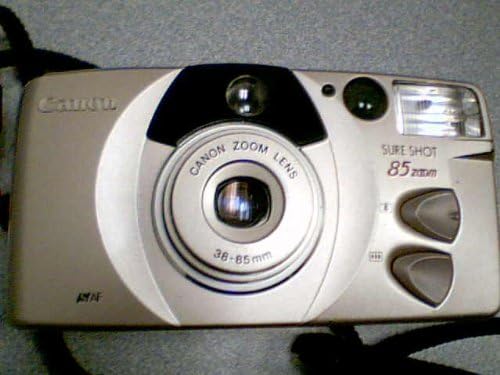
Figure 1: Front View of Camera
This image displays the front of the Canon Sure Shot 85 Zoom camera. Visible components include the Canon Zoom Lens (38-85mm), the built-in flash unit, the viewfinder window, and the two zoom control buttons on the right side. The camera body is silver-toned with black accents.

Figure 2: Detailed Front View
A closer look at the camera's front, highlighting the Canon Zoom Lens with its 38-85mm focal length marking. The flash unit is visible on the upper right, and the two grey oval buttons for zoom control are clearly shown on the right side of the camera body. The "SURE SHOT 85 zoom" branding is also prominent.
- Lens: Canon Zoom Lens 38-85mm.
- Flash: Built-in flash unit for low-light conditions.
- Viewfinder: For composing your shots.
- Zoom Buttons: Control the focal length of the lens.
- Shutter Button: To capture images. (Not visible in front view, but standard).
- Film Compartment: Located on the back/side for loading 35mm film. (Not visible in front view).
4. Setup
4.1 Battery Installation
- Locate the battery compartment cover, typically on the bottom or side of the camera.
- Slide or lift the cover to open it.
- Insert the required batteries (e.g., CR123A or AA, refer to compartment markings) according to the polarity indicators (+/-).
- Close the battery compartment cover securely until it clicks into place.
Note: Always use fresh batteries for optimal camera performance. Remove batteries if the camera will not be used for an extended period.
4.2 Film Loading
- Open the camera back cover by sliding the latch, usually located on the side.
- Place a new 35mm film cartridge into the film chamber on the left side.
- Pull the film leader across to the film take-up spool on the right, ensuring it aligns with the red or orange mark.
- Close the camera back cover firmly until it latches. The camera will automatically advance the film to the first frame. The frame counter should display '1'.
- If the frame counter does not display '1' or an error indicator appears, reopen the back cover and re-load the film.
5. Operating the Camera
5.1 Power On/Off
To power on the camera, slide the lens barrier open or press the power button (location varies by specific model variant, typically near the shutter button). To power off, close the lens barrier or press the power button again.
5.2 Taking a Picture
- Look through the viewfinder to compose your shot.
- Use the zoom buttons to adjust the focal length (38mm for wide-angle, 85mm for telephoto).
- Gently press the shutter button halfway down to activate the autofocus and exposure system. A green light in the viewfinder typically indicates focus lock.
- Press the shutter button fully down to take the picture. The camera will automatically advance the film to the next frame.
5.3 Flash Modes
The built-in flash will typically fire automatically in low-light conditions. Some models may offer additional flash modes (e.g., Red-eye Reduction, Flash On, Flash Off) accessible via a mode button. Consult the camera's display or specific markings for available options.
5.4 Unloading Film
Once all frames on the film roll have been exposed, the camera will automatically rewind the film back into its cartridge. You may hear a whirring sound during this process. Once rewinding is complete, open the camera back cover and remove the film cartridge for development.
6. Maintenance
- Cleaning the Lens: Use a soft, lint-free cloth or a lens brush to gently remove dust and smudges. Do not use abrasive cleaners.
- Cleaning the Camera Body: Wipe the camera body with a soft, dry cloth. For stubborn dirt, slightly dampen the cloth with water, then wipe dry.
- Storage: When not in use, store the camera in a cool, dry place, away from dust and direct sunlight. It is recommended to remove batteries during long-term storage.
7. Troubleshooting
| Problem | Possible Cause / Solution |
|---|---|
| Camera does not power on. | Check battery installation and ensure batteries are fresh. Replace if necessary. |
| Film does not advance. | Ensure film is loaded correctly and the camera back is securely closed. Check if the film leader is properly engaged. |
| Flash does not fire. | Flash may be set to "Flash Off" mode, or batteries may be low. Allow time for flash to charge. |
| Pictures are blurry. | Ensure the camera is held steady. Check if the autofocus system is locking onto the subject (half-press shutter). Clean the lens if smudged. |
If problems persist, contact Canon customer support or a qualified camera technician.
8. Specifications
| Feature | Detail |
|---|---|
| Model Name | Sure Shot 85 Zoom (Autoboy Luna 85 / Prima Zoom 85) |
| Film Format Type | 35mm |
| Lens | Canon Zoom Lens 38-85mm |
| Autofocus | Yes |
| Built-in Flash | Yes |
| Film Motor Drive | Yes (Auto loading, advancing, and rewinding) |
| Shutter Type | Mechanical |
| Viewfinder Magnification | 0.5x |
| Item Weight | 9.2 ounces (approx. 260 grams) |
| Package Dimensions | 5 x 3 x 2 inches (approx. 12.7 x 7.6 x 5.1 cm) |
9. Warranty and Support
For warranty information, please refer to the documentation provided at the time of purchase. As this product may be a renewed item, specific warranty terms may vary. For technical support or service inquiries, please contact Canon customer service or the retailer from whom the camera was purchased.
You can often find support resources, FAQs, and contact information on the official Canon website.