
ACEMAGICIAN ACE-AM06PRO
ACEMAGICIAN AM06Pro Mini PC User Manual
Model: ACE-AM06PRO
1. Introduction
Thank you for choosing the ACEMAGICIAN AM06Pro Mini PC. This compact yet powerful computer is designed for a wide range of applications, from daily office tasks and data processing to graphic editing, video rendering, and even gaming. Featuring an AMD Ryzen 7 5800U processor, ample memory, and versatile connectivity, the AM06Pro delivers exceptional performance in a small form factor.
This manual provides detailed instructions on setting up, operating, maintaining, and troubleshooting your new Mini PC to ensure optimal performance and longevity.
2. Product Overview
2.1 Package Contents
- ACEMAGICIAN AM06Pro Mini PC
- Power Adapter
- HDMI Cable
- User Manual
- VESA Mount (optional, may vary by package)
2.2 Physical Features and Ports
The ACEMAGICIAN AM06Pro Mini PC is designed with a sleek, compact chassis and strategically placed ports for easy access and connectivity.

Figure 2.1: Front and side view of the ACEMAGICIAN AM06Pro Mini PC.

Figure 2.2: Detailed view of the Mini PC's ports and interfaces.
Front Panel:
- Audio Jack (HP&MIC): For connecting headphones or a microphone.
- USB 3.0 Ports (x2): High-speed data transfer for peripherals.
- Type-C Port (Data & Video): Versatile port for data, video output, and power delivery (if supported by connected device).
Rear Panel:
- DC Port: For connecting the power adapter.
- 1G RJ45 Port: Standard Gigabit Ethernet port for wired network connection.
- 2.5G RJ45 Port: High-speed 2.5 Gigabit Ethernet port for faster wired network connection.
- HDMI Port: For connecting to a display (monitor, TV) with HDMI input.
- DP Port: DisplayPort for connecting to a display with DisplayPort input.
- USB 2.0 Ports (x2): For connecting standard USB devices like keyboard and mouse.
3. Setup
3.1 Initial Connection
- Connect Display: Connect your monitor or TV to the Mini PC using an HDMI, DisplayPort, or Type-C cable. The AM06Pro supports triple 4K display output simultaneously.
- Connect Peripherals: Plug in your keyboard, mouse, and any other USB devices into the available USB ports.
- Connect Power: Insert the power adapter cable into the DC port on the rear panel of the Mini PC, then plug the adapter into a power outlet.
- Network Connection: For wired internet, connect an Ethernet cable to either the 1G or 2.5G RJ45 port. For wireless internet, ensure your Wi-Fi network is available; you will configure it after booting the system.
3.2 Powering On
Press the power button located on the front panel of the Mini PC. The power indicator light will illuminate, and the system will begin to boot up.
3.3 Operating System Setup
Your ACEMAGICIAN AM06Pro Mini PC comes with a pre-installed operating system. Follow the on-screen instructions to complete the initial setup, including language selection, network configuration, and user account creation.
3.4 VESA Mount Installation (Optional)
The Mini PC supports VESA mounting, allowing you to attach it to the back of a compatible monitor or TV for a clutter-free workspace. Refer to the VESA mount kit instructions for detailed installation steps.
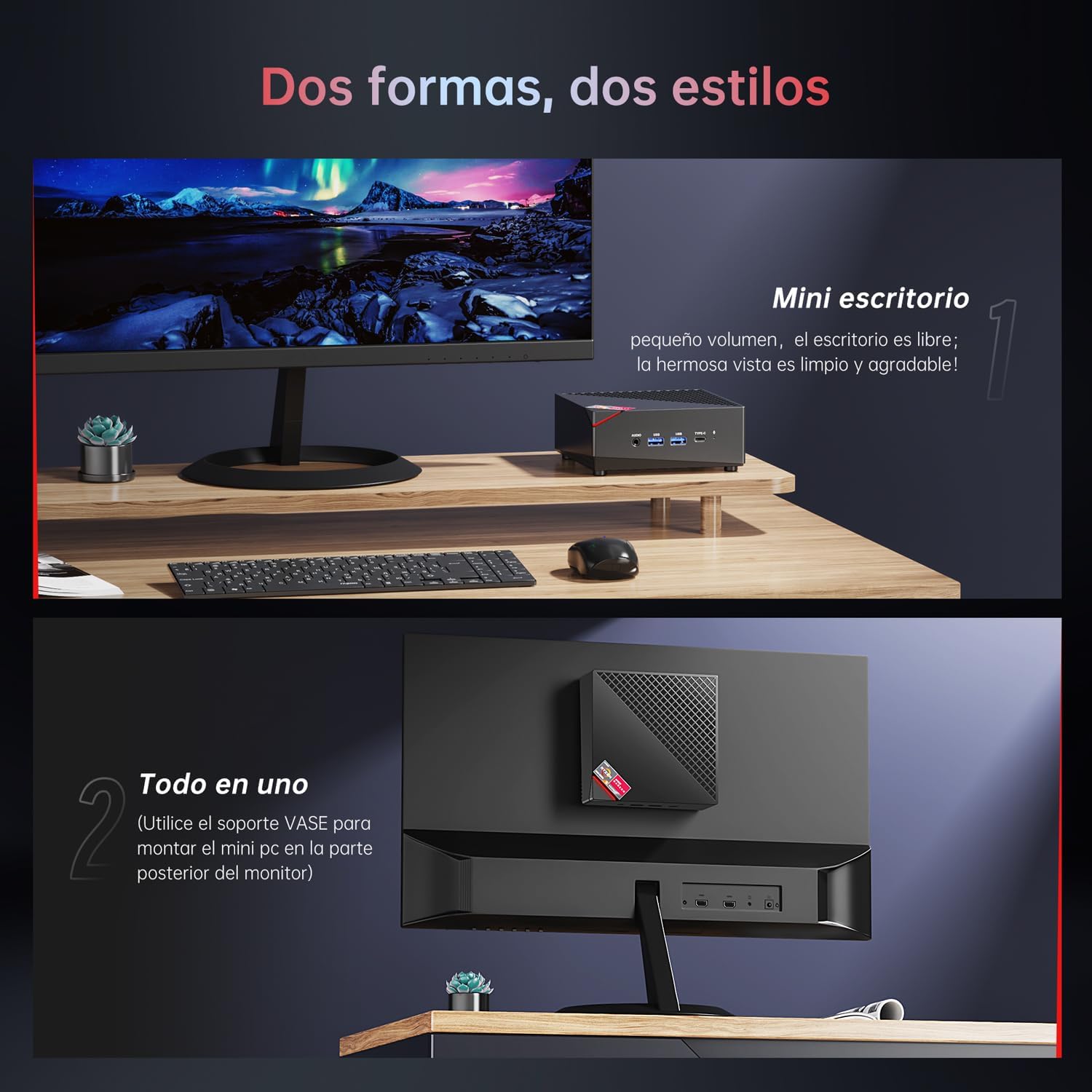
Figure 3.1: The Mini PC can be used on a desktop or mounted behind a monitor.
4. Operating Your Mini PC
4.1 Basic Operation
- Power On: Press the power button on the front panel.
- Power Off: Use the operating system's shutdown function. Avoid direct power disconnection to prevent data loss.
- Restart: Use the operating system's restart function.
- Sleep Mode: Use the operating system's sleep function to put the PC into a low-power state.
4.2 Connectivity
- Wi-Fi 6: Connect to high-speed wireless networks for seamless internet access.
- Bluetooth 5.2: Pair with Bluetooth-enabled devices such as wireless keyboards, mice, headphones, and speakers.
- Dual Ethernet: Utilize the 1G or 2.5G RJ45 ports for stable and fast wired network connections, ideal for demanding network tasks or soft routing applications.
4.3 Multi-Display Support
The AM06Pro supports up to three 4K displays simultaneously via its HDMI, DisplayPort, and Type-C video outputs. This feature is ideal for multitasking, professional work, or an immersive entertainment experience.

Figure 4.1: Experience 4K resolution at 60Hz with multiple display outputs.
4.4 Performance and Usage
Equipped with an AMD Ryzen 7 5800U processor and integrated AMD Radeon Vega8 Graphics, the AM06Pro handles various tasks efficiently:
- Office Productivity: Smooth performance for word processing, spreadsheets, presentations, and video conferencing.
- Media Consumption: Enjoy 4K video playback and streaming with ease.
- Content Creation: Capable of graphic design, photo editing, and light video editing.
- Gaming: Supports casual and some demanding games at suitable settings.

Figure 4.2: The Mini PC handles multitasking with various applications efficiently.
5. Maintenance
5.1 Cooling System
The AM06Pro features an efficient cooling solution with smart fans and copper heat pipes to ensure stable performance and effective heat dissipation, even under heavy loads. The AMD SenseMI technology dynamically adjusts CPU operation for optimal efficiency.
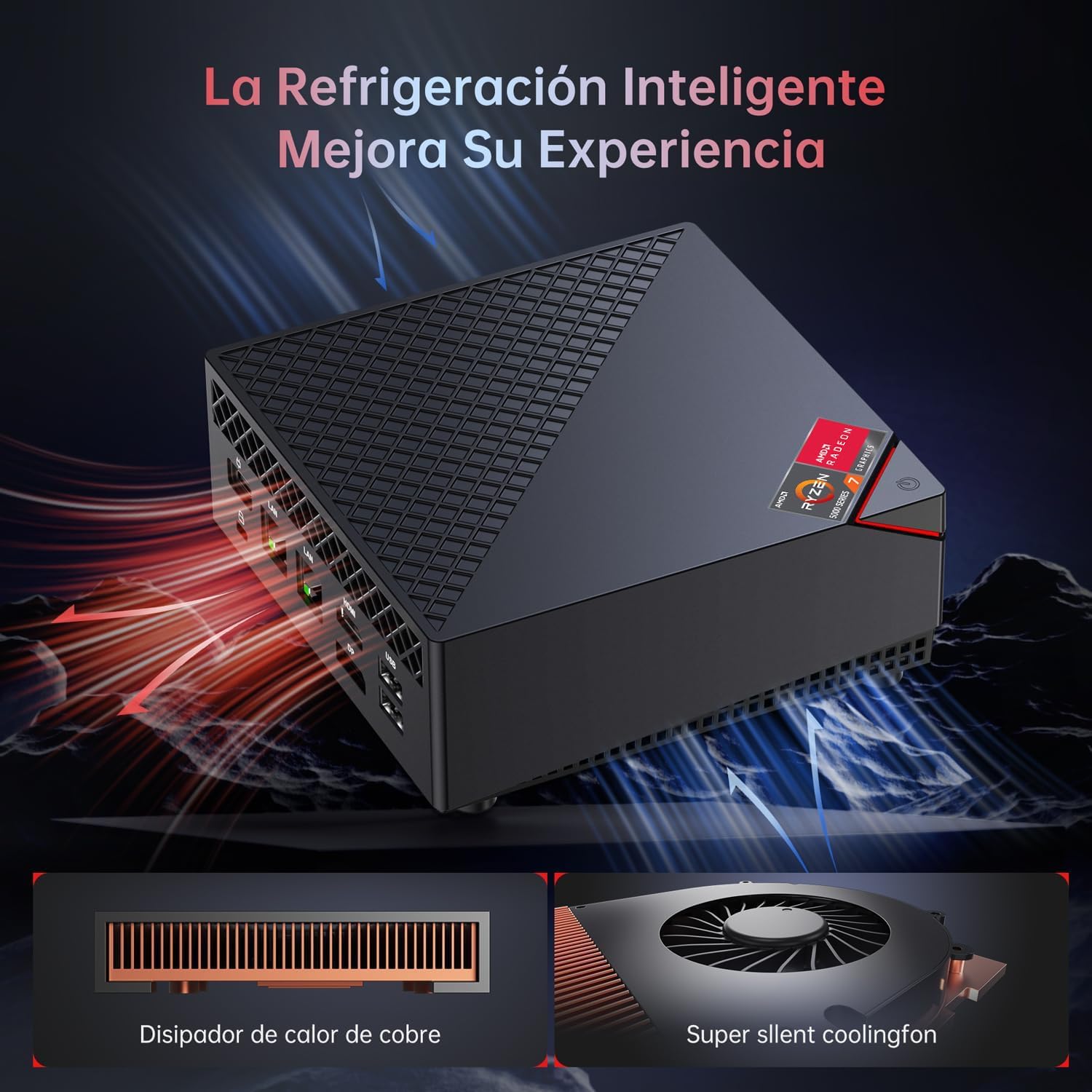
Figure 5.1: Intelligent cooling system with copper heat sink and silent fan.
5.2 Storage and Memory Expansion
The Mini PC comes with a 512GB M.2 SSD. It supports expansion with an additional 2.5-inch SSD/HDD up to 2TB. The 32GB DDR4 RAM can be upgraded to 64GB (2x32GB) via its dual-channel memory design.
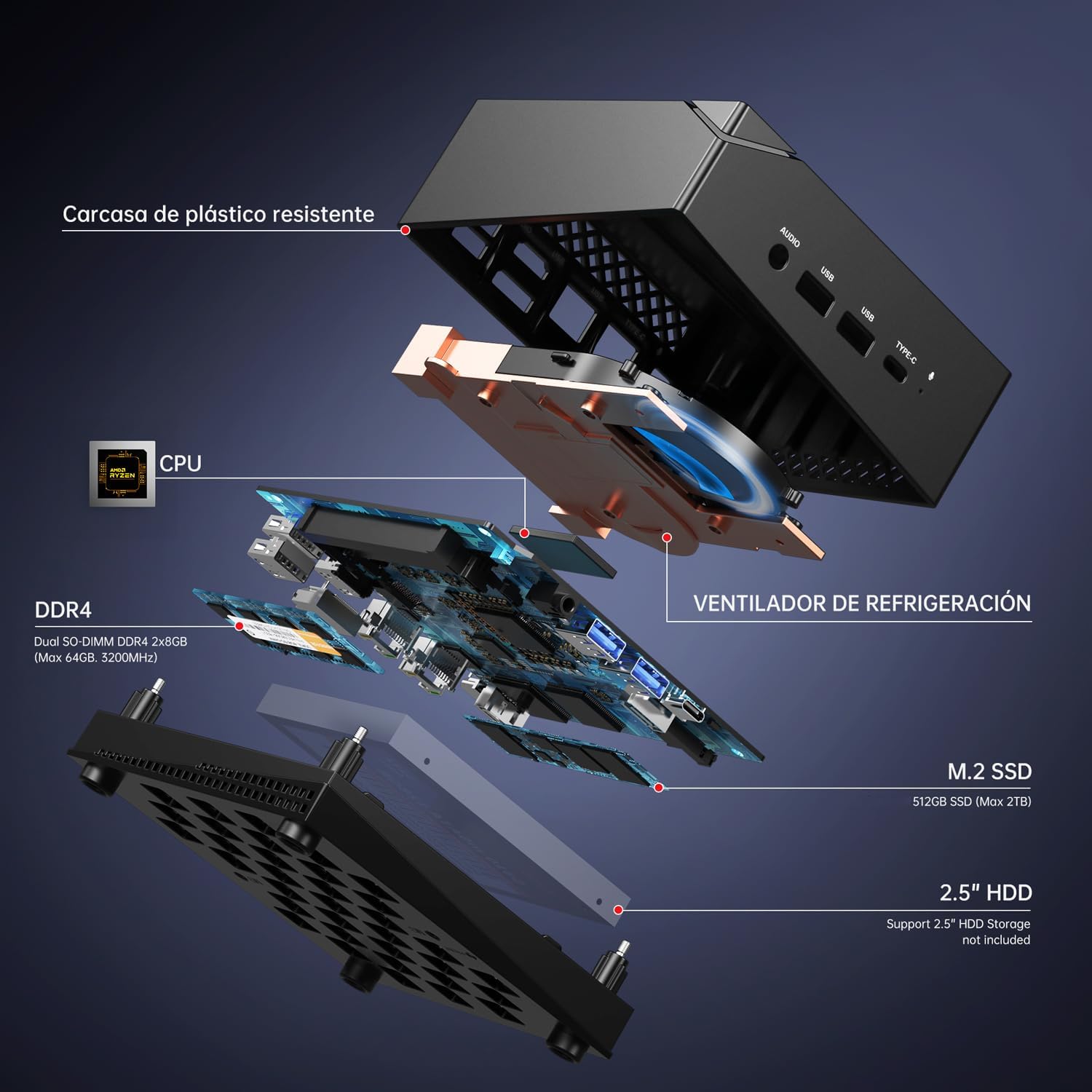
Figure 5.2: Exploded view showing CPU, DDR4 RAM, M.2 SSD, and 2.5" HDD slot.
5.3 Cleaning and Care
- Keep the Mini PC in a clean, dust-free environment.
- Use a soft, dry cloth to clean the exterior.
- Ensure ventilation openings are not blocked to maintain proper airflow.
6. Troubleshooting
If you encounter issues with your ACEMAGICIAN AM06Pro Mini PC, please refer to the following common troubleshooting tips:
- No Power: Ensure the power adapter is securely connected to both the Mini PC and a working power outlet. Try a different outlet.
- No Display: Check all display cable connections (HDMI, DP, Type-C) to the monitor and the Mini PC. Ensure the monitor is powered on and set to the correct input source.
- No Internet Connection: For wired connections, check the Ethernet cable and router. For Wi-Fi, ensure Wi-Fi is enabled in the operating system and you are connected to the correct network with the correct password.
- Slow Performance: Close unnecessary applications. Check for background processes consuming high resources. Ensure sufficient free storage space. Consider upgrading RAM if frequently running memory-intensive tasks.
- Peripherals Not Working: Try connecting the peripheral to a different USB port. Ensure drivers are installed if required by the peripheral.
For persistent issues or advanced troubleshooting, please contact ACEMAGICIAN customer support.
7. Specifications
| Feature | Specification |
|---|---|
| Brand | ACEMAGICIAN |
| Model Number | ACE-AM06PRO |
| Color | Black |
| Operating System | OS (Windows 11 compatible) |
| Processor | AMD Ryzen 7 5800U (8 Cores, 16 Threads, up to 4.4 GHz) |
| Base Processor Speed | 1.9 GHz |
| L3 Cache | 16 MB |
| RAM | 32 GB DDR4 (Dual Channel, upgradable to 64 GB) |
| Storage | 512 GB M.2 SSD (Supports up to 2TB 2.5" SSD/HDD expansion) |
| Graphics | Integrated AMD Radeon Vega8 Graphics |
| Display Resolution | Up to 3840 x 2160 (4K) |
| Wireless Connectivity | Wi-Fi 6, Bluetooth 5.2 |
| Ports | 1x HDMI, 1x Type-C, 1x DP, 1x DC, 1x 2.5G RJ45, 1x 1G RJ45, 2x USB 3.0, 2x USB 2.0, 1x Audio Jack (HP&MIC) |
| Dimensions (L x W x H) | Approx. 13.3 x 13.3 x 5 cm (5 x 5 x 2 inches) |
8. Warranty and Support
8.1 Warranty Information
ACEMAGICIAN provides a 12-month quality guarantee for the AM06Pro Mini PC from the date of purchase. This warranty covers manufacturing defects and malfunctions under normal use. Please retain your proof of purchase for warranty claims.
8.2 Customer Support
For any questions, technical assistance, or support inquiries regarding your ACEMAGICIAN AM06Pro Mini PC, please do not hesitate to contact our dedicated customer service team. We offer human customer service and lifetime technical support.

Figure 8.1: ACEMAGICIAN Support Information.
Contact Information:
- Email Support: service@acemagicians.com
- Phone Support: +39800959185
- Amazon Account: Access your Amazon buyer account, find your order, and click "Request help."