
1. Introduction
Thank you for choosing the Merax Carry-On Luggage with Cup Holder and USB Port. This 2-piece set is designed for convenience and durability, featuring smart functionalities to enhance your travel experience. This manual provides essential information for the proper use and care of your luggage.
2. Components Included
- 1 x 20-inch Carry-On Luggage
- 1 x Cosmetic Carry On Bag
3. Key Features
3.1. Durable and Lightweight Construction
Crafted from high-quality ABS material, the luggage combines durability with a lightweight design. The hard shell protects your belongings, and the smooth surface is easy to clean.
3.2. Integrated Cup Holder and Side Hooks
The carry-on luggage features a convenient built-in cup holder for easy access to beverages. Additionally, side hooks provide a practical solution for hanging accessories or small bags, keeping your essentials organized and accessible.

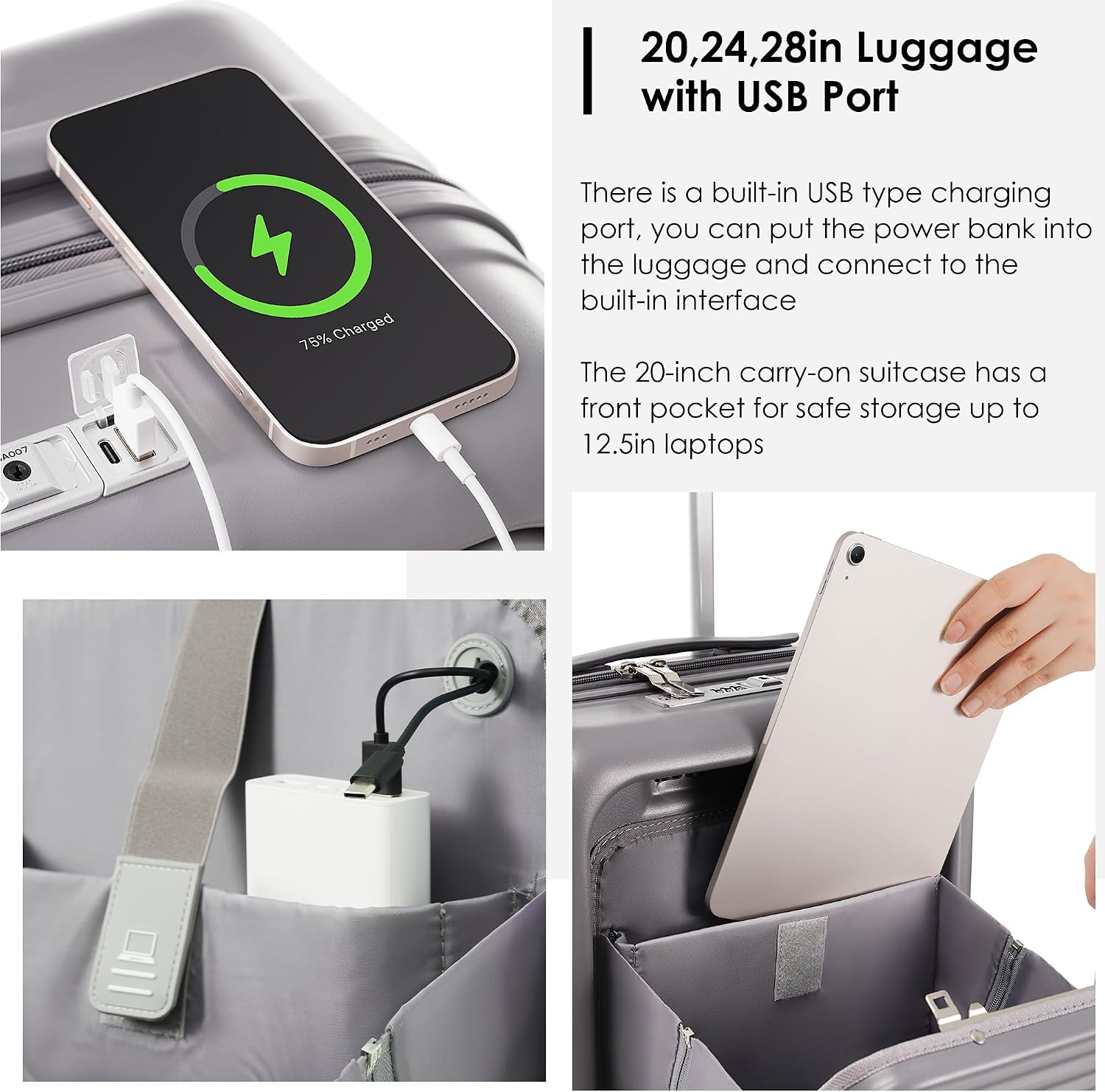
3.3. Built-in USB Charging Port
Stay connected on the go with the built-in USB port. Simply connect your own power bank (not included) inside the luggage to charge your devices conveniently.
3.4. Effortless Maneuverability
The luggage is equipped with 360-degree silent spinner double wheels, ensuring smooth and quiet movement in any direction. Navigate busy terminals with ease.
3.5. Secure TSA Combination Lock
Protect your belongings with the integrated TSA-approved combination lock. This provides security while allowing TSA agents to inspect your luggage without damage.
3.6. Functional and Organized Interior
The interior features multiple compartments, including a front pocket for laptops up to 12.5 inches, and elastic fixation buckles to secure your clothes. The cosmetic bag also offers additional organized storage.

3.7. Expandable Design
The luggage features an expansion layer, allowing for additional packing space when needed.

3.8. Airline Approved Dimensions
The 20-inch carry-on size is designed to fit in most overhead bins, and the cosmetic tote fits under the seat, making it ideal for short trips.

4. Setup & First Use
4.1. Setting the TSA Combination Lock
- The lock is preset to 0-0-0.
- Press the reset button (usually a small button or lever next to the dials) with a pen or pointed object until you hear a click.
- Set your desired 3-digit combination by turning the dials.
- Push the release button/lever in the direction of the arrow until you hear a click. Your new combination is now set.
4.2. Connecting a Power Bank for USB Charging
- Locate the internal USB cable inside the luggage, usually within a zippered pocket near the external USB port.
- Connect your fully charged power bank (not included) to this internal USB cable.
- The external USB port is now active and ready to charge your devices.
5. Operating Instructions
5.1. Using the Telescopic Handle
Press the button on the top of the handle to extend or retract it to your desired height. Ensure it clicks securely into place.
5.2. Utilizing the Cup Holder and Side Hooks
To use the cup holder, gently push the designated tab or button on the back of the luggage to release it. Extend the holder fully. To retract, push it back into its flush position. Use the side hooks to hang small bags or travel accessories.
5.3. Expanding the Luggage
Locate the secondary zipper around the perimeter of the main compartment. Unzip this to expand the luggage, providing additional packing capacity.
5.4. Packing the Cosmetic Carry On Bag
The cosmetic bag features inner open pockets and an inside waterproof pocket for organized storage of toiletries and small items. It can be easily attached to the telescopic handle of the carry-on luggage for convenient transport.
6. Maintenance
6.1. Cleaning the Hard Shell
Wipe the ABS hard shell with a soft, damp cloth and mild soap. Avoid abrasive cleaners that may scratch the surface.
6.2. Wheel Maintenance
Periodically check the spinner wheels for any debris. Clean them gently to ensure smooth rolling. Avoid exposing wheels to excessive dirt or sand.
6.3. Interior Care
Spot clean the interior lining with a damp cloth and mild detergent. Allow to air dry completely before closing the luggage.
7. Troubleshooting
7.1. Telescopic Handle is Stuck
Ensure the release button is fully depressed. Check for any obstructions in the handle mechanism. Do not force the handle.
7.2. USB Port Not Charging
Verify that your power bank is fully charged and correctly connected to the internal USB cable. Ensure the external charging cable is securely plugged into your device and the luggage port.
7.3. Combination Lock Issues
If you forget your combination, contact Merax customer support for assistance. Do not attempt to force the lock open.
8. Specifications
- Product Dimensions (Excluding Wheels): 21.6 x 14.9 x 8.6 inches
- Overall Dimensions (Before Expansion): 18.7 x 14 x 8.6 inches
- Item Weight: 6.7 pounds
- Travel Days: 1-5 days
- Material: ABS Hard Shell
- Model Number: JT-009
9. Warranty & Support
For warranty information, product support, or to purchase replacement parts, please visit the official Merax website or contact their customer service department. Keep your purchase receipt for warranty claims.
10. Product Videos
10.1. Merax Luggage Features Overview
Video: This video provides a comprehensive overview of the Merax luggage features, including the hands-free cup holder, front and side hooks for hanging bags, lockable spinner wheels, 3-section telescopic handle, TPU elastic handle, secure TSA lock, smooth YKK zippers, and internal organization with a USB interface for charging. It also demonstrates packing and the expansion layer.
10.2. Merax Carry-On Luggage with USB Port and Front Pocket
Video: This video highlights the smart design of the Merax carry-on luggage, focusing on the front pocket for laptops and tablets, the internal power bank connection, and the external USB charging port. It also shows the internal organization and the overall compact yet spacious design.
10.3. Merax Carry-On Luggage for Travel
Video: This video showcases the Merax carry-on luggage in a travel setting, emphasizing its ease of use and convenient features like the cup holder and smooth-rolling wheels. It demonstrates how the luggage can be effortlessly maneuvered through an airport environment.