

1. Introduction
This manual provides detailed instructions for the operation and maintenance of your ZHIWHIS ZWS-603 Portable Multi-function Digital Radio. This device features FM/AM/SW/Wide FM reception, Bluetooth connectivity, MP3 playback from MicroSD cards, and recording capabilities. Please read this manual thoroughly before use to ensure proper operation and to maximize your enjoyment of the product.
2. Product Overview
The ZHIWHIS ZWS-603 is a compact and versatile digital radio designed for portability and ease of use. It features a clear Japanese-compatible LCD display and a robust set of functions for various audio needs.
2.1. Package Contents
Upon unboxing, please ensure all items listed below are present:
- 1 x ZWS-603 Portable Multi-function PLL Digital Radio Unit
- 1 x BL-5C Lithium-ion Battery
- 1 x USB-C Data/Charging Cable
- 1 x Audio Cable
- 1 x Stand with Strap
- 1 x Velvet Storage Bag
- 1 x Japanese Instruction Manual & Warranty Card
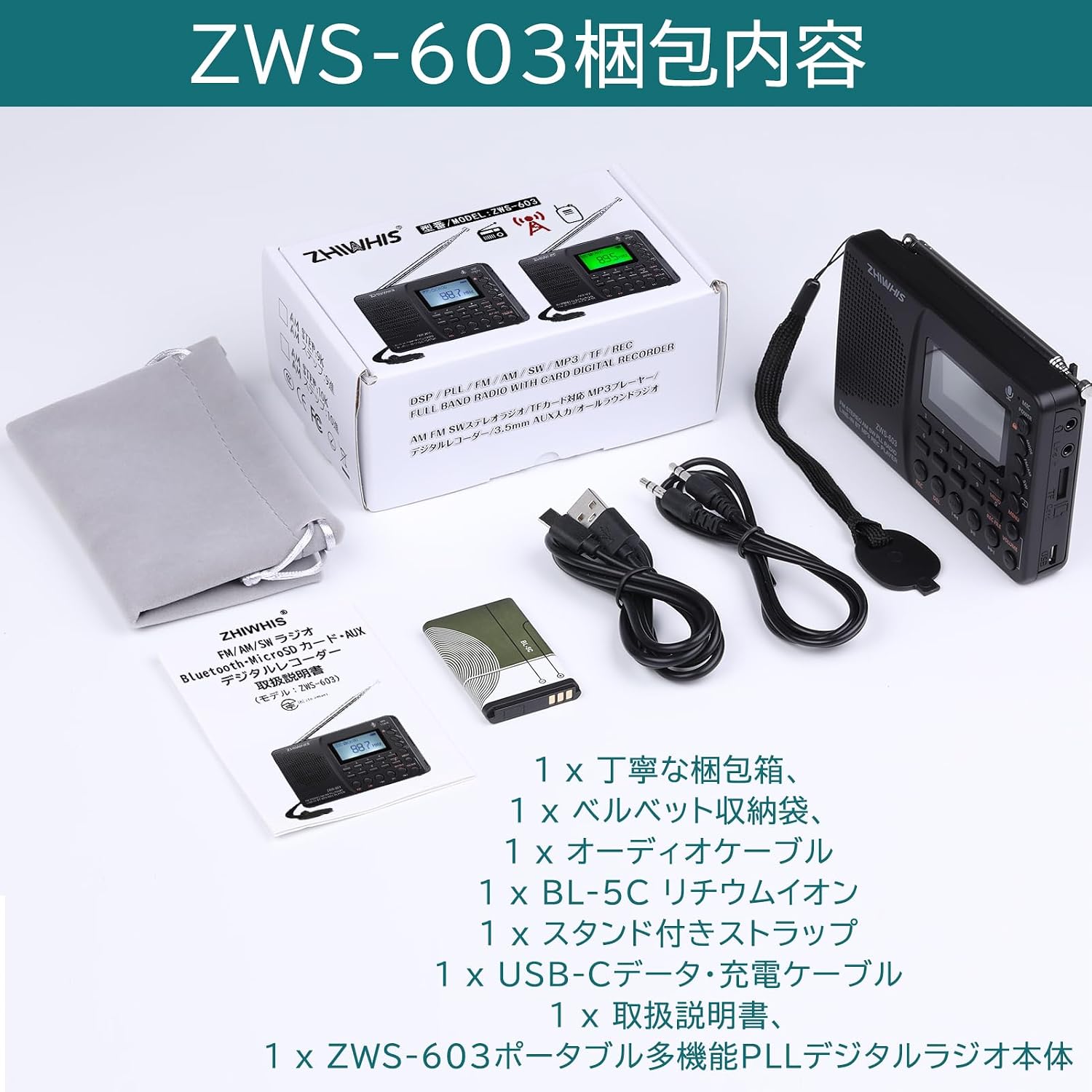
Image: ZWS-603 Package Contents. Shows the radio unit, battery, USB-C cable, audio cable, strap, and velvet bag.
2.2. Device Layout and Controls
Familiarize yourself with the various parts and controls of your ZWS-603 radio:

Image: Detailed diagram of the ZWS-603 radio's front panel, side ports, and telescopic antenna. Labels include LCD display, power switch, microphone, mode button, FM/AM/SW buttons, numeric keypad, REC/DEL buttons, playback controls, volume, and various ports.
- Telescopic Rod Antenna: 7-section, extends up to 50 cm for FM/SW/Wide FM reception.
- LCD Display: Dot-matrix display showing frequency, time, battery status, and other information. Contrast and backlight duration are adjustable.
- Speaker: Built-in mono speaker with passive radiator for enhanced bass.
- Microphone: For built-in microphone recording.
- Power Switch: Turns the device on/off.
- Mode Button: Switches between radio, Bluetooth, MP3, and Line-in modes.
- FM/AM/SW Buttons: Selects the desired radio band.
- Numeric Keypad (0-9): For direct frequency input and channel selection.
- REC Button: Initiates recording.
- DEL Button: Deletes recorded files or saved channels.
- Playback Controls: Play/Pause, Previous/Next track, Fast forward/rewind.
- Volume Control: Adjusts audio output level.
- USB-C Port: For charging and data transfer (MicroSD card reader function).
- MicroSD Card Slot: Supports MicroSD cards up to 32GB for MP3 playback and recording storage.
- AUX (Line-in) Port: 3.5mm input for external audio sources.
- Headphone Jack: 3.5mm stereo output for private listening.

Image: ZWS-603 showing dimensions (120mm length, 79mm height, 23mm thickness) and key features like Japanese UI, timer, contrast, backlight, language, recording, and FM settings.

Image: Rear view of the ZWS-603, showing the battery compartment, 1000mAh lithium-ion battery, passive radiator for bass, and the attached wrist strap.

Image: Close-up of the side ports on the ZWS-603, including the Type-C charging jack, USB audio input terminal, MicroSD card slot, 3.5mm external audio input (AUX), and 3.5mm headphone jack.
3. Setup
3.1. Battery Installation
- Open the battery compartment cover on the back of the radio.
- Insert the provided BL-5C lithium-ion battery, ensuring the correct polarity.
- Close the battery compartment cover securely.
3.2. Charging the Battery
The ZWS-603 uses a 1000mAh lithium-ion battery and is charged via a USB-C port.
- Connect the included USB-C cable to the USB-C port on the side of the radio.
- Connect the other end of the USB-C cable to a USB power adapter (not included) or a computer's USB port.
- The battery indicator on the LCD display will show charging status. A full charge takes approximately 4 hours.
3.3. Initial Power On and Language Settings
- Slide the Power switch to the 'ON' position.
- The device will power on and display the default language.
- To change the language (e.g., to Japanese), press and hold the 'MENU' button to enter system settings. Navigate to 'Language Settings' and select your preferred language.
4. Operating Instructions
4.1. Power On/Off
To power on the device, slide the power switch located on the top right side to the 'ON' position. To power off, slide it to the 'OFF' position.
4.2. Radio Mode (FM/AM/SW/Wide FM)
The ZWS-603 supports FM (64-108 MHz), AM (520-1710 KHz), SW (4.75-21.85 MHz), and Wide FM bands.
- Select Band: Press the 'FM/AM' or 'SW' button to cycle through the available radio bands.
- Extend Antenna: For optimal FM/SW/Wide FM reception, fully extend the telescopic rod antenna. For AM, the internal bar antenna is used.
- Tuning Methods:
- Automatic Scan (ATS): Press and hold the 'MENU' button to initiate an automatic scan. The radio will scan all frequencies within the current band and save strong signals to presets.
- Preset Tuning: Use the numeric keypad (1-9) to directly select a saved preset channel.
- Direct Frequency Input: Use the numeric keypad to enter the desired frequency directly. For example, to tune to 89.5 MHz, press 8, 9, 5, then press the Play/Pause button to confirm.
- Manual Up/Down Tuning: Use the 'Previous' and 'Next' buttons (◀◀ / ▶▶) for fine-tuning frequencies.
- Saving/Deleting Presets:
- Manual Save: Tune to the desired frequency, then press and hold the 'MEMO' button. Use the numeric keypad to select a preset number (1-440) and press 'MEMO' again to confirm.
- Delete Preset: Select the preset you wish to delete, then press and hold the 'DEL' button.

Image: ZWS-603 demonstrating various tuning methods: automatic tuning, preset tuning, direct frequency input, and up/down tuning using the keypad and navigation buttons.
4.3. Bluetooth Mode
- Press the 'MODE' button until 'Bluetooth' mode is displayed on the LCD. The Bluetooth icon will flash, indicating it's ready for pairing.
- On your smartphone or other Bluetooth device, search for available devices and select 'ZWS-603'.
- Once paired, the Bluetooth icon will stop flashing, and you can play audio from your connected device.
- Use the radio's playback controls (Play/Pause, Previous/Next) or your connected device to manage playback.
4.4. MP3 Player Mode (MicroSD Card)
The ZWS-603 supports MP3, WMA, WAV, APE, and FLAC formats from MicroSD cards up to 32GB.
- Insert a MicroSD card with audio files into the MicroSD card slot on the side of the radio.
- Press the 'MODE' button until 'MP3' or 'Card Playback' mode is displayed.
- Use the playback controls (Play/Pause, Previous/Next) to manage your music.
- EQ Sound Effects: In MicroSD card playback mode, the product supports 7 EQ sound effects. Access these through the system settings (press and hold 'MENU') to customize your audio experience.
4.5. Line-in Mode
- Connect an external audio source (e.g., smartphone, computer) to the 'AUX' (Line-in) port using the provided audio cable.
- Press the 'MODE' button until 'Line-in' mode is displayed.
- Play audio from your external device. The radio will output the sound.
4.6. Recording Function
The ZWS-603 can record audio from various sources, saving them as MP3 files on a MicroSD card. Scheduled recording is not supported.
- Ensure a MicroSD card is inserted.
- Select the desired recording source: Radio, Built-in Microphone, Line-in, or Bluetooth.
- Press the 'REC' button to start recording. The recording indicator will appear on the display.
- Press the 'REC' button again to stop recording.
- Recording Quality: You can set the recording resolution (MP3 encoding) to 64kbps, 96kbps, or 128kbps via system settings (press and hold 'MENU'). Higher resolution results in better quality but larger file sizes.
- Accessing Recorded Files: Press the 'REC FILE' button to browse and play your recorded audio files.

Image: ZWS-603 demonstrating various recording modes (built-in mic, line-in, radio, Bluetooth) and options for recording quality (64kbps, 96kbps, 128kbps).
4.7. Sleep Timer Function
The sleep timer allows you to set a duration after which the radio will automatically turn off, preventing it from playing all night.
- Press and hold the 'MENU' button to enter system settings.
- Navigate to 'Sleep Timer' settings.
- Set the desired duration (up to 90 minutes).
- Confirm your selection. The radio will automatically power off after the set time.
4.8. Key Lock Function
To prevent accidental button presses, you can activate the key lock function.
- While the device is powered on, press and hold the 'LOCK' button (often integrated with another function, refer to the control diagram).
- The key lock icon will appear on the display.
- To unlock, press and hold the 'LOCK' button again.
4.9. Display Settings
You can adjust the display contrast and backlight duration to suit your environment.
- Press and hold the 'MENU' button to enter system settings.
- Navigate to 'Contrast' or 'Backlight Time' settings.
- Adjust the values as desired.
- Confirm your selection.
5. Maintenance
- Cleaning: Use a soft, dry cloth to clean the exterior of the radio. Do not use liquid cleaners or abrasive materials.
- Storage: When not in use for extended periods, store the radio in a cool, dry place, away from direct sunlight and extreme temperatures. It is recommended to remove the battery if storing for a very long time.
- Battery Care: Avoid fully discharging the battery frequently. Charge the battery regularly, even if the device is not in use, to maintain its lifespan.
6. Troubleshooting
| Problem | Possible Cause | Solution |
|---|---|---|
| No power | Battery is depleted or not installed correctly. | Charge the battery. Ensure the battery is inserted with correct polarity. |
| Poor radio reception | Antenna not extended, weak signal, interference. | Fully extend the telescopic antenna. Adjust the antenna direction. Move to an area with better signal. |
| Bluetooth not pairing | Device not in pairing mode, Bluetooth disabled on external device. | Ensure the radio is in Bluetooth pairing mode. Enable Bluetooth on your external device and search for 'ZWS-603'. |
| MicroSD card not recognized | Card inserted incorrectly, unsupported format, card corrupted. | Reinsert the MicroSD card. Ensure it is formatted correctly (FAT32) and contains supported audio files. Try a different MicroSD card. |
| Recording not working | No MicroSD card, card full, recording source not selected. | Insert a MicroSD card. Check available space on the card. Ensure the correct recording source (Radio, Mic, Line-in, Bluetooth) is active. |
7. Specifications
| Feature | Detail |
|---|---|
| Model Number | ZWS-603 |
| Brand | ZHIWHIS |
| Tuner Type | FM/AM/SW/Wide FM compatible |
| FM Frequency Range | 64-108 MHz |
| AM Frequency Range | 520-1710 KHz |
| SW Frequency Range | 4.75-21.85 MHz |
| Display Type | LCD |
| Connectivity | AUX, Bluetooth, USB |
| Battery | 1000mAh Lithium-ion (BL-5C) |
| Charging Port | USB-C |
| Charging Time | Approx. 4 hours |
| Playback Time (Speaker) | Approx. 13 hours |
| Playback Time (Headphones) | Approx. 23 hours |
| MicroSD Card Support | Up to 32GB (MP3, WMA, WAV, APE, FLAC) |
| Recording Formats | MP3 (64kbps, 96kbps, 128kbps) |
| Product Dimensions | 12 cm (L) x 2.3 cm (W) x 8 cm (H) |
| Product Weight | 150 grams |
| Certifications | TELEC Certified |
8. Warranty and Support
ZHIWHIS is committed to providing a reliable shopping experience. If you have any questions or concerns regarding your purchased product, please do not hesitate to contact us.
- Warranty: This product comes with a 1-year warranty from the date of purchase. If any issues or malfunctions occur within this period, please contact us for support.
- Contact Support: For any inquiries or assistance, please reach out to our customer support team. We continuously strive to improve and optimize our products based on customer feedback.


