
1. Introduction
The JYSONGHU HFD-CO01D Carbon Monoxide Detector is designed to provide reliable and accurate detection of carbon monoxide (CO) gas in your home. Featuring an advanced electrochemical CO sensor and a digital LCD display, this alarm continuously monitors CO levels to ensure the safety of your family. It is easy to install and powered by replaceable batteries, offering protection even during power outages.
Key Features:
- Advanced Electrochemical CO Sensor for fast and accurate detection.
- Digital LCD Display for real-time CO concentration readings.
- Loud 85-decibel alarm with LED indicators.
- Test/Reset button for easy functional checks.
- Low battery indication.
- Battery-powered (2 x AA batteries, not included) for portable and continuous operation.
2. Product Overview
Familiarize yourself with the main components of your carbon monoxide detector:

This diagram illustrates the key components of the carbon monoxide detector, including the sound speaker for alarms, LED indicators for status, the digital LCD screen displaying CO levels, the test button for functional checks, and the air intake hole for gas detection.
3. Setup and Installation
Follow these steps to set up and install your carbon monoxide detector:
- Battery Installation: Peel off the back cover of the carbon monoxide alarm product. Insert two AA Size 1.5V batteries (not included) into the battery compartment, ensuring correct polarity.
- Initial Test: After inserting batteries, the product will emit a "beep" alarm sound and then enter standby state. Press the Test/Reset button to verify proper function. The green light will flash once every 60 seconds during normal standby operation.
- Mounting: The detector can be mounted on a wall or ceiling. Use the included screws and anchors to securely fix the unit. Carbon monoxide is slightly lighter than air and will rise, so install the detector fairly high on the wall, away from where children can tamper with it. Avoid placing it directly next to the ceiling but ensure it is high enough to detect rising CO.

Installation steps: 1. Rotate the back cover to open. 2. Insert two AA batteries (not included). 3. Press the test button to verify proper function. 4. Fix the unit on the wall or ceiling using the provided screws and anchors.
Recommended Placement: For complete protection, place one detector on each level of your home and in each bedroom. Avoid placing near combustion appliances, in direct sunlight, or in areas with high humidity.

For optimal safety, it is recommended to install carbon monoxide detectors in key areas of the home, such as bedrooms, living rooms, kitchens, and attics, to ensure comprehensive coverage.
4. Operating the Detector
The detector continuously monitors carbon monoxide levels. The digital LCD display shows the current CO concentration in parts per million (PPM).
Alarm Standards and Indicators:
- Normal Operation: Green LED flashes every 60 seconds. LCD displays '000' or current low CO levels.
- 30ppm: The display shows the concentration. This is a warning level, indicating the presence of CO.
- 50ppm: Alert within 60 to 90 minutes. The red LED will flash, and a loud alarm pattern will sound.
- 100ppm: Alert within 10 to 40 minutes. The red LED will flash, and a loud alarm pattern will sound.
- 300ppm: Alert within 0 to 3 minutes. The red LED will flash, and a loud alarm pattern will sound.
When a dangerous level of carbon monoxide is detected, the red LED will flash, and a loud 85-decibel alarm will sound. This alarm will continue until the CO level drops to a safe concentration or the unit is reset.
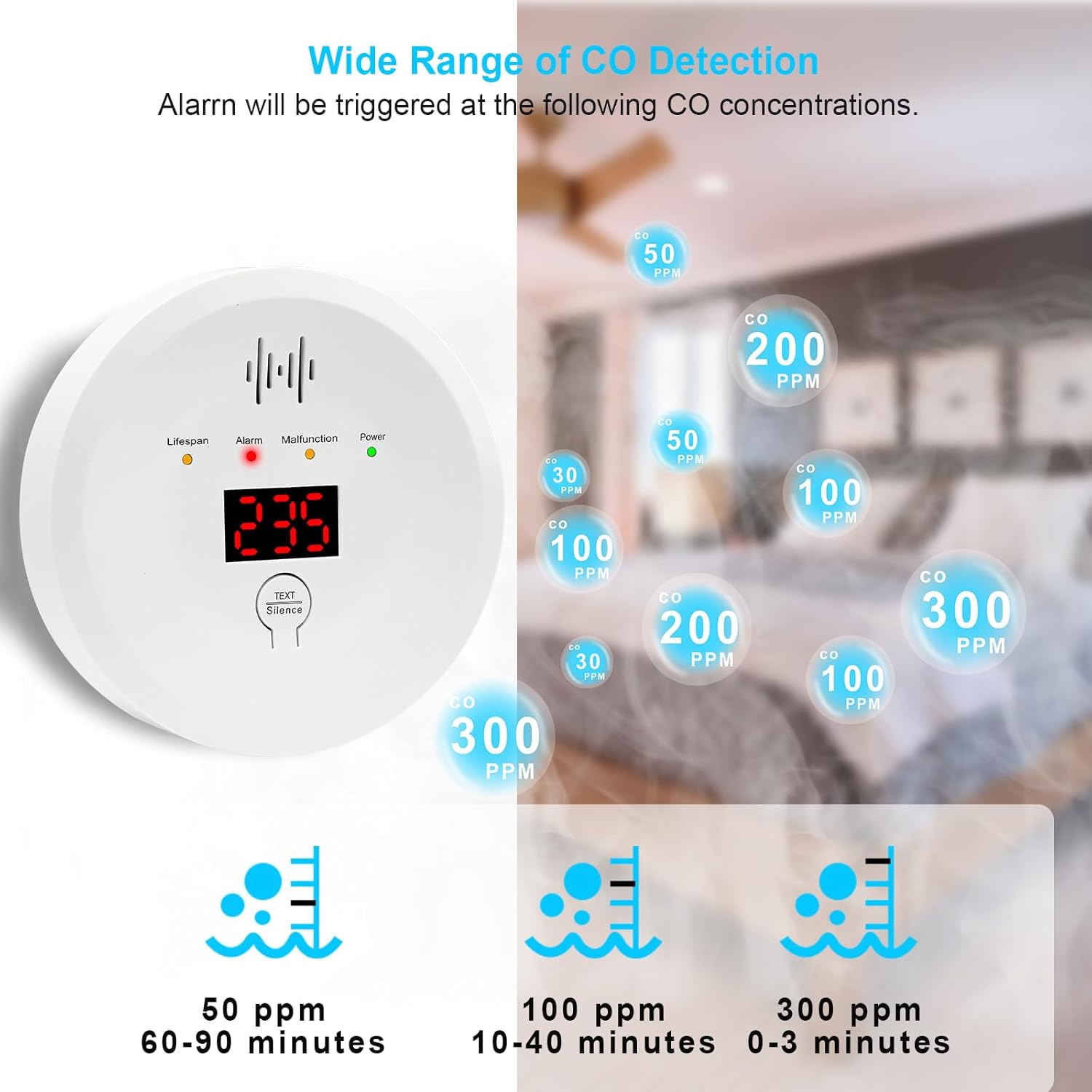
This chart details the Carbon Monoxide (CO) concentration levels and the corresponding alarm triggers: 30ppm (display shows concentration), 50ppm (alert within 60-90 minutes), 100ppm (alert within 10-40 minutes), and 300ppm (alert within 0-3 minutes).
5. Maintenance
Regular maintenance ensures the optimal performance and longevity of your CO detector.
- Battery Replacement: When the detector indicates a low battery, replace both AA batteries immediately. It is recommended to replace batteries at least once a year, similar to smoke detector batteries.
- Testing: Press the Test/Reset button weekly to ensure the alarm and digital display are functioning correctly. The unit should emit an alarm sound and flash its LEDs.
- Cleaning: Gently clean the exterior of the detector with a soft, damp cloth. Do not use harsh chemicals or abrasive cleaners. Do not block the air intake holes.
6. Troubleshooting
If your carbon monoxide detector is not functioning as expected, consider the following:
- Alarm Sounds Without Visible CO Source: Ensure proper ventilation. Check for potential hidden sources of CO (e.g., malfunctioning appliances, vehicle exhaust from outside). If the alarm persists, evacuate the premises and contact emergency services.
- Low Battery Indication: Replace batteries promptly. The detector will alert you when batteries are low.
- No Display/No Power: Check battery installation and ensure batteries are fresh.
- Detector Malfunction: If the detector consistently shows errors or fails self-tests, it may need replacement.
Important Note: The carbon monoxide alarm is designed to detect carbon monoxide gas only. It is not suitable for smoke detection or any other gas detection.
7. Specifications
| Feature | Detail |
|---|---|
| Power Supply | 2 x AA Size 1.5V batteries (not included) |
| Sensor Type | Electrochemical CO sensor |
| Standby Current | <70uA (with LCD) |
| Alarm Current | <35mA |
| Alarm Tone | 85 decibels |
| Operating Temperature | -10~50°C |
| Relative Humidity | 25~85%R.H |
| Detecting Level Range | 000-999PPM |
| Error | +/-10% |
| Product Dimensions | 3.937" (inch) x 3.937" (inch) x 1.378" (inch) |
| Item Weight | 160g (0.35 lbs) |
8. Warranty and Support
Your JYSONGHU Carbon Monoxide Detector comes with a warranty. If you encounter any quality issues with your CO alarms, please contact us via Amazon question message. We are committed to providing good service and experience for all our customers.
For further assistance or inquiries, please refer to the contact information provided with your purchase or through the Amazon platform.