
Introduction
Thank you for choosing the Yoobure Night Stand with Charging Station and LED Lights. This manual provides detailed instructions for assembly, operation, maintenance, and troubleshooting to ensure safe and efficient use of your product. Please read this manual thoroughly before beginning assembly or operation.
Safety Information
- Use the nightstand according to the specified weight capacity guidelines to prevent tipping or collapse. The tabletop can hold up to 35 lbs, and each fabric drawer can bear 6.6 lbs.
- The built-in charging station is certified by FCC and ETL for safety and reliability. Do not overload the power outlets.
- Keep all electrical components away from water or excessive moisture.
- Ensure all connections are secure before plugging the unit into a power source.
Setup and Assembly
This nightstand is designed for easy assembly. All necessary tools and labeled parts are included. Follow the step-by-step instructions provided in the manual for quick and efficient setup.
Included Components
- Power Strip
- 3 Fabric Drawers
- LED lights strip
- Frame components (Engineered Wood, Steel)
- Assembly Hardware
Tools Recommended for Assembly
- Screwdriver (included)
Assembly Instructions
Refer to the detailed directions and labeled parts included in your package. Ensure all screws are tightened securely, but do not overtighten. The adjustable feet should be set to ensure stability on uneven surfaces.

Figure 1: Fully assembled Yoobure Night Stand.

Figure 2: Illustrative view of nightstand components during assembly.
Video 1: Assembly guide for a similar Yoobure dresser. Note: This video shows a 5-drawer model, but the frame assembly steps are generally applicable.

Figure 3: Adjustable feet and X-bar for enhanced stability.
Operating Instructions
LED Lights Operation
The nightstand features 16 RGB colors and 22 dynamic modes. The LED lights can be adjusted for color and brightness using the included remote control or a compatible mobile application. Ensure the LED strip is properly connected to the power source.

Figure 4: LED light features, remote control, and mobile app interface.
Charging Station Usage
The integrated charging station includes 2 USB ports (5V/3A) and 2 AC outlets (125V/12A) with a 6.6-foot power cord. It is designed for convenient charging of your electronic devices such as phones and tablets. The built-in outlet is upgraded for a user-friendly layout to minimize cable clutter.

Figure 5: Detailed view of the recessed power strip with USB ports and AC outlets.
Drawer Storage
The nightstand is equipped with three fabric storage drawers, providing ample space for organizing personal items like remotes, keys, glasses, books, or other small essentials. The drawers are lightweight yet durable.

Figure 6: Ample storage space provided by the three fabric drawers.
Video 2: Overview of the Yoobure dresser, demonstrating storage and LED features.
Maintenance
To maintain the appearance and functionality of your Yoobure Night Stand, follow these simple guidelines:
- Cleaning: Wipe surfaces with a soft, damp cloth. Avoid harsh chemicals or abrasive cleaners that may damage the finish.
- Dusting: Regularly dust the nightstand with a dry, soft cloth.
- Drawer Care: The fabric drawers can be spot cleaned with a mild detergent and water. Allow to air dry completely before reinserting.
- Electrical Components: Ensure the charging station and LED lights are unplugged before cleaning. Do not immerse electrical components in water.
Troubleshooting
If you encounter any issues with your nightstand, refer to the following common problems and solutions:
| Problem | Possible Cause | Solution |
|---|---|---|
| LED lights not turning on or functioning incorrectly. | Loose connection, remote battery low, LED strip damage. | Check all cable connections. Replace remote control battery. Contact customer support if the LED strip is damaged. |
| Charging ports (USB/AC) not working. | Power strip unplugged, device not compatible, power surge. | Ensure the nightstand is plugged into a working wall outlet. Test with a different device. If issues persist, contact customer support. |
| Drawers are difficult to open/close or are unstable. | Improper assembly, overloaded drawer, uneven floor. | Verify drawers are correctly inserted. Do not exceed the 6.6 lbs weight limit per drawer. Adjust the nightstand's feet to ensure it is level. |
| Nightstand wobbles. | Uneven floor, loose frame connections. | Adjust the leveling feet at the bottom of the nightstand. Check and tighten all frame screws. |
Specifications
| Feature | Detail |
|---|---|
| Brand | Yoobure |
| Model Number | B0D3Q7ZPQ2 |
| Product Dimensions (D x W x H) | 11.8" x 15.4" x 25.7" |
| Maximum Weight Recommendation (Tabletop) | 35 Pounds |
| Maximum Weight Recommendation (Each Drawer) | 6.6 Pounds |
| Frame Material | Engineered Wood, Steel |
| Number of Drawers | 3 |
| LED Lights | 16 Colors, 22 Dynamic Modes (Remote/APP controlled) |
| Charging Station | 2 USB Ports (5V/3A), 2 AC Outlets (125V/12A) |
| Power Cord Length | 6.6 Foot |
| Certifications | FCC, ETL |
| Assembly Required | Yes (Tools included) |
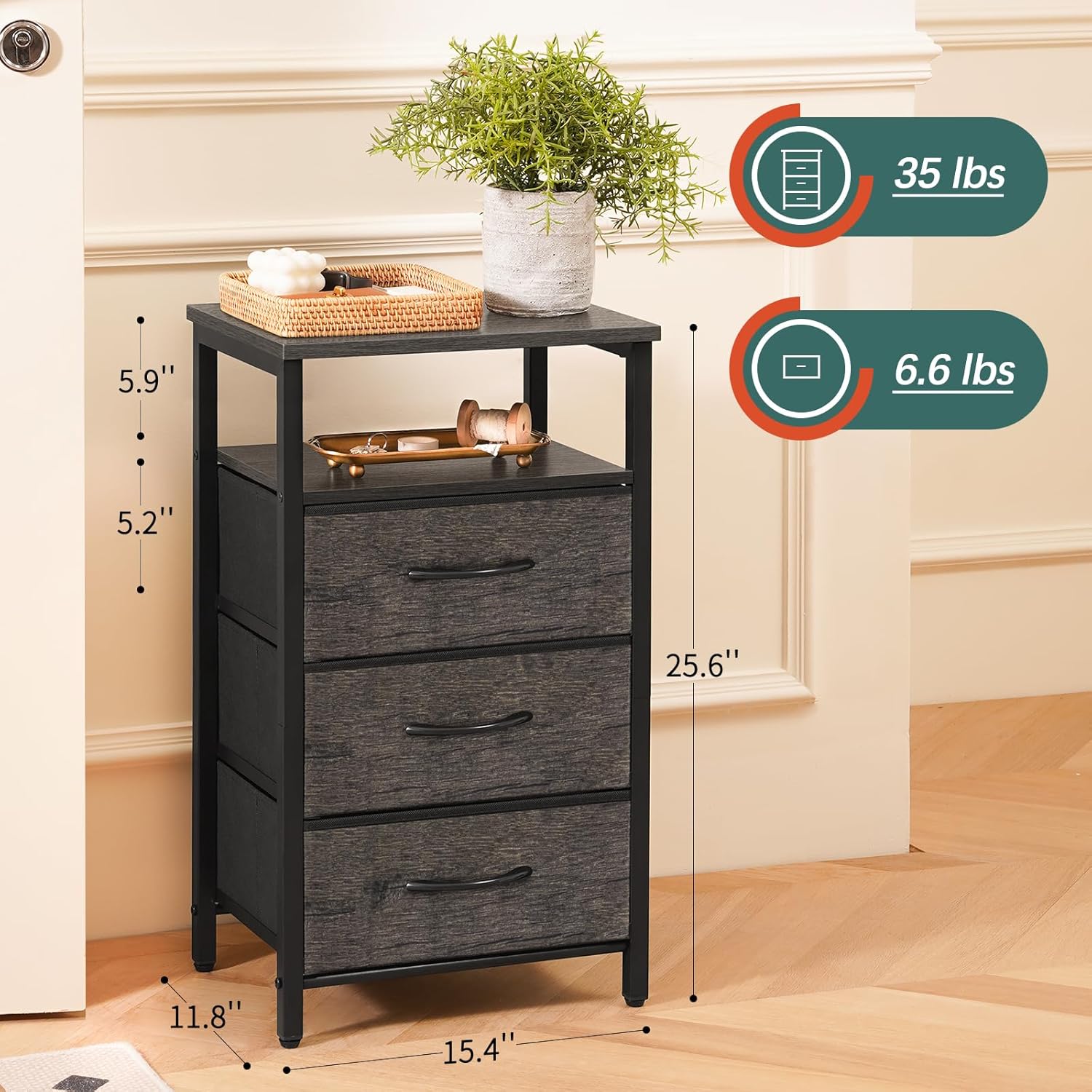
Figure 7: Product dimensions and weight capacities.
Warranty and Support
The Yoobure Night Stand comes with a limited warranty. For specific details regarding your warranty coverage, please refer to the documentation included with your purchase.
If you have any questions, require assistance with assembly, or need to report a problem, please do not hesitate to contact our service team. We are committed to providing satisfactory service and will respond to emails within 12 hours.
Contact Information:
- Refer to your purchase documentation for the most current contact details.
- Visit the official Yoobure store on Amazon for support resources: Yoobure Store