1. Introduction
Thank you for choosing Fosi Audio. This manual provides detailed instructions for the Fosi Audio SK01 Headphone Amplifier Equalizer Preamp and the Fosi Audio ZA3 Balanced Stereo Amplifier. These two components are designed to work together or independently to enhance your audio experience, offering versatile connectivity and powerful performance for home audio systems.
The ZA3 is a dual-mode amplifier capable of both stereo and mono operation, providing significant power output. The SK01 is a versatile headphone amplifier, preamp, and equalizer, offering precise tone control and high power output for headphones.
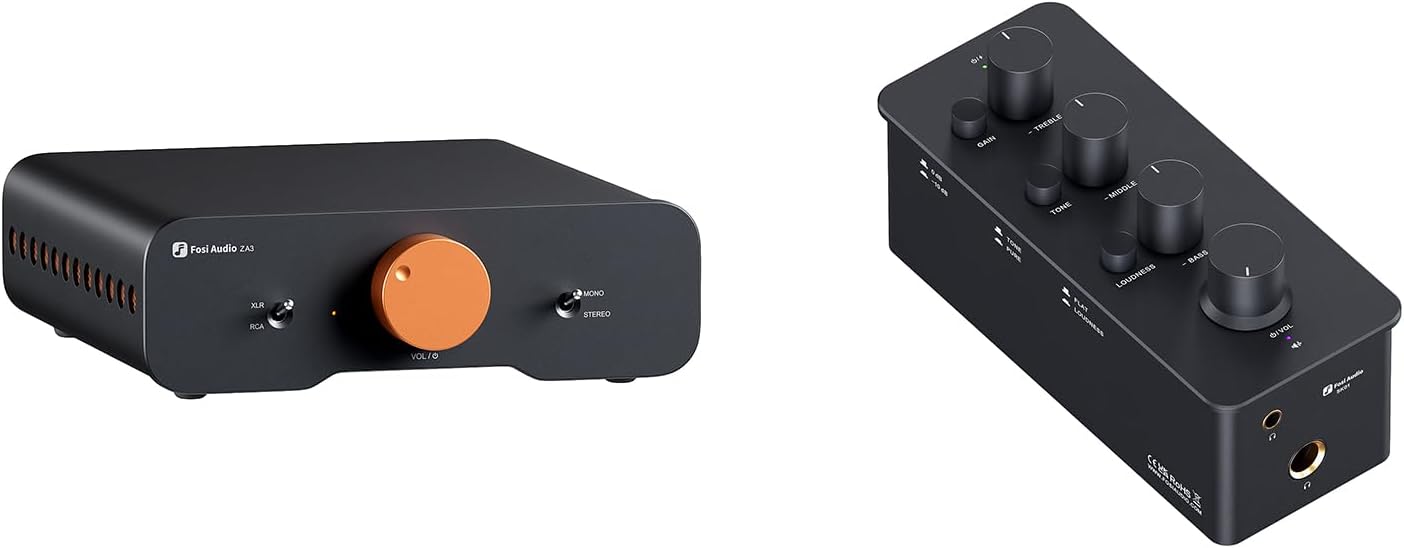
Image 1.1: Fosi Audio SK01 and ZA3 units.
2. Key Features
- ZA3: Dual-Mode Innovation: Offers both stereo and mono modes with seamless switching. Delivers up to 180W in stereo and 235W in mono. Two ZA3 units can be paired for a powerful mono configuration.
- ZA3: Richer Connectivity: Features balanced input (XLR and 1/4" TRS combo jacks) to minimize interference and noise. Includes a 12V trigger-in connector for synchronized power control with other devices.
- SK01: Combo Design: Functions as a powerful headphone amplifier, a customizable analog preamp, or an acoustic equalizer.
- SK01: Tri-Band Control: Adjustable treble, midrange, and bass controls with central detents for tone-defeating. Provides up to 2400mW power in high impedance mode.
- What You'll Get: Fosi Audio SK01 Headphone Amp x1, Fosi Audio ZA3 Stereo Amplifier x1, User Manual x2, 2-in-1 USB Type-A/C to Type-C Cable x1, 48V power adapter x1, AC Cord x1.
3. Setup Guide
3.1. Fosi Audio ZA3 Amplifier Setup
Follow these steps to set up your ZA3 amplifier:
- Power Connection: Connect the provided 48V power adapter to the ZA3's DC input and then to a power outlet.
- Speaker Connection: Connect your passive speakers to the 'Speaker Out' terminals on the rear panel. Ensure correct polarity (+ to + and - to -).
- Audio Input (RCA): For unbalanced sources, connect your audio source (e.g., CD player, DAC) to the 'RCA In' jacks using RCA cables.
- Audio Input (XLR/TRS Balanced): For balanced sources, connect your audio source to the 'XLR In' combo jacks. This input supports both XLR and 1/4" TRS plugs for reduced noise.
- Subwoofer Output: If using a subwoofer, connect it to the 'Sub Out' RCA jack.
- 12V Trigger (Optional): Connect a 12V trigger cable from a compatible device to the 'Trigger In' port for synchronized power on/off.

Image 3.1: ZA3 Balanced Stereo/Mono Amplifier in a home audio system setup.

Image 3.2: Close-up of ZA3's rear panel showing XLR/TRS and RCA inputs.
3.2. Fosi Audio SK01 Headphone Amplifier Setup
Follow these steps to set up your SK01 headphone amplifier:
- Power Connection: Connect the provided USB Type-C cable to the 'USB-C Power In' port on the SK01 and to a suitable USB power source (e.g., computer, USB wall adapter).
- Audio Input (Line In): Connect your audio source (e.g., phone, computer, DAC) to the 'Line In' RCA jacks.
- Audio Output (Line Out - Preamp Mode): If using the SK01 as a preamp, connect the 'Line Out' RCA jacks to the input of another amplifier or active speakers.
- Headphone Connection: Connect your headphones to either the 3.5mm or 6.35mm headphone jack on the front panel.

Image 3.3: Diagram of SK01's front and rear interfaces and controls.
4. Operating Instructions
4.1. Fosi Audio ZA3 Amplifier Operation
The ZA3 offers flexible operation modes:
- Power On/Off: Use the power switch on the front panel to turn the unit on or off.
- Volume Control: Adjust the large rotary knob on the front panel to control the output volume.
- Stereo/Mono Mode Switch: Use the toggle switch on the front panel to select between 'Stereo' and 'Mono' modes. In mono mode, the amplifier combines both channels for higher power output, ideal for driving a single speaker or when pairing two ZA3 units for a monoblock setup.
- Input Selection: The ZA3 automatically detects the active input (XLR/TRS or RCA). Ensure only one input source is active at a time for optimal performance.

Image 4.1: Two ZA3 units configured for PBTL Mono Mode.
4.2. Fosi Audio SK01 Headphone Amplifier Operation
The SK01 provides comprehensive control over your audio:
- Power Indicator: The LED on the front panel indicates power status.
- Volume Control: The large 'O/VOL' rotary knob controls the overall output volume.
- Gain Switch: The 'High/Low Gain' switch adjusts the amplification level to match your headphones' impedance and sensitivity.
- Tone Controls:
- Treble Adjustment: Adjusts high frequencies.
- Middle Adjustment: Adjusts mid-range frequencies.
- Bass Adjustment: Adjusts low frequencies.
- Tone-Defeating Button: Press the 'TONE' button to bypass the tone control circuit, providing a flat frequency response.
- Loudness Switch: The 'LOUDNESS' switch applies a contour to boost bass and treble at lower listening levels. The 'Over-Loudness Indicator' illuminates if the loudness boost is excessive.

Image 4.2: SK01 with tri-band tone controls and tone-defeating function.

Image 4.3: SK01 connected to a laptop and headphones, highlighting its versatility.

Image 4.4: SK01 demonstrating its use as a headphone amp, pre-amplifier, and equalizer.
5. Maintenance
To ensure the longevity and optimal performance of your Fosi Audio devices, follow these maintenance guidelines:
- Cleaning: Use a soft, dry cloth to wipe down the exterior of the units. Avoid using liquid cleaners, aerosols, or abrasive materials, as they may damage the finish or internal components.
- Ventilation: Ensure adequate airflow around both units. Do not block ventilation openings. Avoid placing them in enclosed spaces or on soft surfaces that may impede airflow.
- Environment: Keep the units away from direct sunlight, heat sources, excessive dust, moisture, and strong electromagnetic fields.
- Power Off When Not in Use: If the units will not be used for an extended period, it is advisable to disconnect them from the power supply.
6. Troubleshooting
If you encounter issues with your Fosi Audio SK01 or ZA3, refer to the following common problems and solutions:
- No Sound Output:
- Check all cable connections (power, input, output, speakers/headphones) to ensure they are secure.
- Verify that the correct input source is selected and active.
- Ensure the volume knob is turned up on both the amplifier/headphone amp and your audio source.
- For ZA3, check the Stereo/Mono switch position.
- For SK01, ensure headphones are fully inserted into the jack.
- Distorted Sound:
- Reduce the volume level on both the amplifier/headphone amp and the audio source.
- Check for loose or damaged cables.
- Ensure speaker impedance matches the amplifier's specifications.
- For SK01, try adjusting the gain switch or tone controls. If tone controls are engaged, try pressing the 'TONE' button to bypass them.
- Humming or Hissing Noise:
- Ensure all connections are secure and properly shielded.
- Try using balanced XLR/TRS inputs on the ZA3 if your source supports it, as this can reduce noise.
- Move the units away from other electronic devices that may cause interference.
- Try a different power outlet.
- Unit Not Powering On:
- Verify the power adapter is correctly connected to the unit and the wall outlet.
- Ensure the power outlet is functional.
- For ZA3, check the power switch position. For SK01, ensure the USB-C power cable is connected to a working USB power source.
If the problem persists after trying these solutions, please contact Fosi Audio customer service for further assistance.
7. Specifications
7.1. Fosi Audio ZA3 Amplifier Specifications
| Feature | Value |
|---|---|
| Model Number | ZA3 |
| Output Power (Stereo) | Up to 180W |
| Output Power (Mono) | Up to 235W |
| Number of Channels | 2 (Stereo) / 1 (Mono) |
| Input Voltage | 48 Volts (DC) |
| Inputs | Balanced XLR/TRS Combo, RCA |
| Outputs | Speaker Out, Sub Out |
| Special Features | 12V Trigger In |
| Manufacturer | Fosi Audio |

Image 7.1: Internal audiophile-grade components used in Fosi Audio products.
7.2. Fosi Audio SK01 Headphone Amplifier Specifications
| Feature | Value |
|---|---|
| Model Number | SK01 |
| Max Power Output | Up to 2400mW (High Impedance Mode) |
| Headphone Impedance | 16-300Ω |
| SNR | 108 dB |
| THD | ≤ 0.001% |
| Inputs | RCA Line In, USB-C Power In |
| Outputs | 3.5mm Headphone Jack, 6.35mm Headphone Jack, RCA Line Out |
| Controls | Volume, Gain, Treble, Middle, Bass, Tone-Defeating, Loudness |
8. Warranty and Support
Fosi Audio provides a 24-month worry-free warranty for the SK01 Headphone Amplifier and ZA3 Stereo Amplifier. This warranty covers defects in materials and workmanship under normal use.
For technical support, troubleshooting assistance, or warranty claims, please contact Fosi Audio customer service. Our responsive customer service team is ready to help you with any questions or issues you may have.
You can find more information and contact details on the official Fosi Audio store: Visit the Fosi Audio Store on Amazon