
TOPMEDA GS201
TOPMEDA Gun Safe with LCD Display User Manual
Brand: TOPMEDA | Model: GS201
1. Introduction
The TOPMEDA GS201 Gun Safe provides secure storage for handguns and valuables, featuring multiple access methods including advanced biometric fingerprint recognition, a customizable keypad, and traditional key access. Designed for quick and reliable entry, it also includes an LCD display for real-time environmental monitoring and battery status.
Key Features:
- Advanced Biometric Technology: Utilizes 650 DPI semiconductor fingerprint sensors for fast and secure verification, supporting up to 100 fingerprints.
- Unbreakable Construction: Features a patented anti-pry design with curved sides and internal blocking plates, crafted from thick solid steel capable of bearing up to 2000 pounds.
- User-Friendly Design: Includes LED interior lighting, 360° sponge wrap to prevent scratches, and a silent mode for discreet operation.
- LCD Display: Provides real-time internal temperature, humidity, and battery level readings.
- Emergency Access: Equipped with an emergency USB-C port for power and backup keys to prevent lockout.
- Large Capacity: Accommodates 2 to 4 handguns and other important items like jewelry, passports, and cash.

Figure 1: TOPMEDA GS201 Gun Safe with interior view, displaying multiple handguns and the LCD screen.
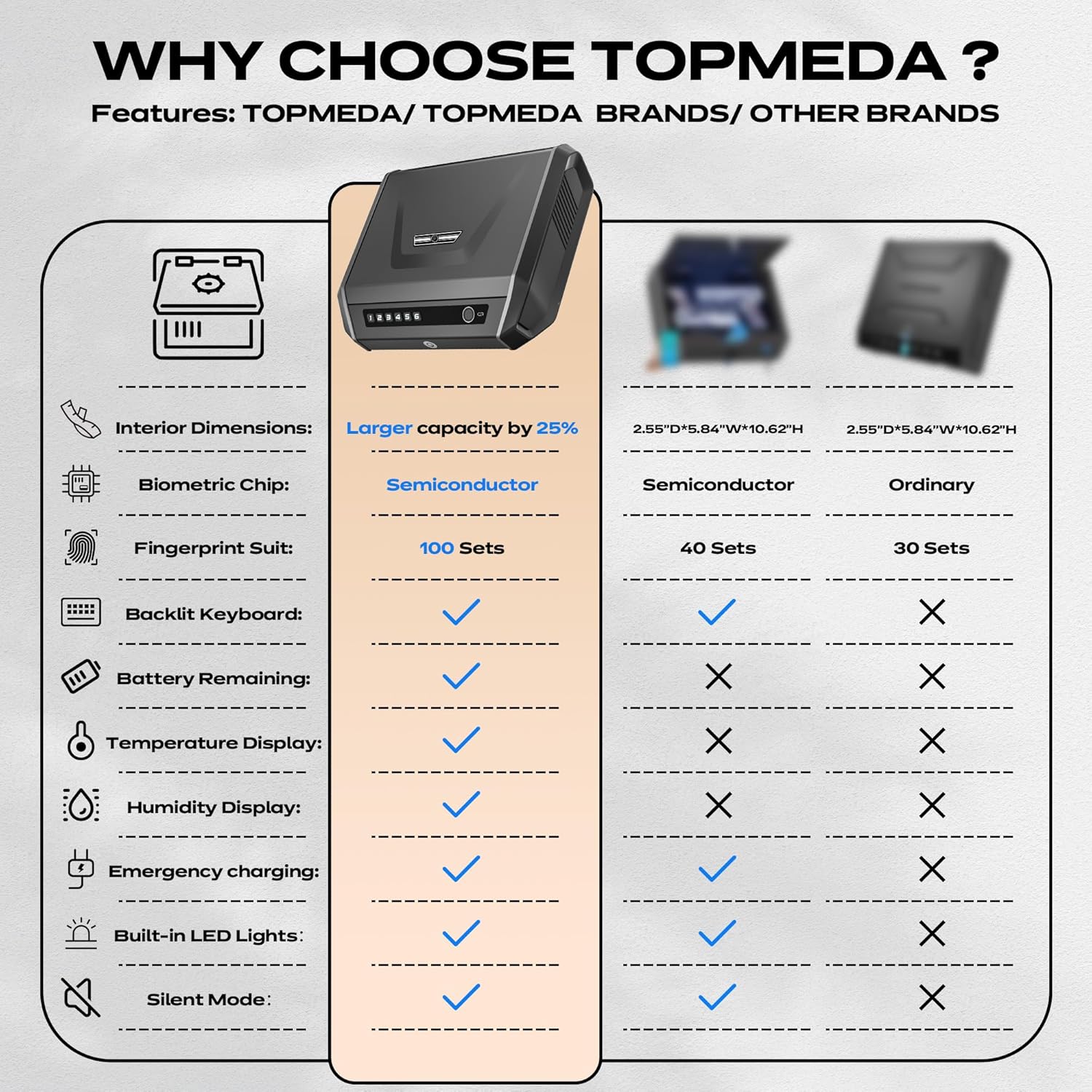
Figure 2: Feature comparison of TOPMEDA GS201 with other brands, emphasizing its advanced capabilities.
Video 1: Unboxing and initial overview of the TOPMEDA Gun Safe, demonstrating its three access methods (fingerprint, keypad, key) and internal features.
2. What's Included
The TOPMEDA GS201 Gun Safe package includes the following components:
- Safe x 1
- AA Batteries x 4
- Sponge x 1
- Security cable x 1
- Screws x 4
- Keys x 2
- Instruction Manual x 1

Figure 3: All components included in the TOPMEDA GS201 package.
3. Setup Guide
3.1. Battery Installation
The safe requires 4 AA batteries for operation. These batteries are installed inside the safe. If the batteries are depleted, the safe can be powered via the emergency USB-C port or opened with the backup keys.
- Use one of the provided backup keys to open the safe. The keyhole is located on the front panel.
- Locate the battery compartment inside the safe. It may be covered by a lid.
- Carefully open the battery compartment lid. A small tool like a mail opener may be helpful.
- Insert 4 AA batteries, ensuring correct polarity. Note: The battery diagram in some manuals may be incorrect. Ensure the bottom two batteries are inserted with the negative (-) end first, and the top two batteries with the positive (+) end first.
- Close the battery compartment lid securely.

Figure 4: Correct battery installation within the safe's internal compartment.
3.2. Setting Passcode and Fingerprints
The safe allows for setting a custom 6-digit passcode and registering multiple fingerprints (up to 100). The reset buttons for these functions are located inside the safe.
- With the safe open, locate the "Password" and "Fingerprint" buttons on the internal panel.
- To set a new passcode: Press the "Password" button. Enter the default code (usually 123456, refer to your specific manual for confirmation). Then, enter your desired new 6-digit passcode and confirm.
- To register fingerprints: Press the "Fingerprint" button. Follow the voice prompts (if silent mode is off) or visual cues on the LCD to scan your finger multiple times from different angles until registration is complete. Repeat for additional fingerprints.

Figure 5: Internal control panel for setting access methods and silent mode.
3.3. Emergency Charging
In case of battery depletion, the safe can be temporarily powered using a USB-C cable (not included) connected to the emergency USB-C port on the front panel. This allows you to open the safe and replace the batteries.

Figure 6: LCD display and emergency USB-C charging feature.
4. Operating Instructions
4.1. Access Methods
The TOPMEDA GS201 offers three primary ways to access your safe:
- Fingerprint Unlock: Place your registered finger on the biometric sensor for quick access (≤0.1s).
- Keypad Unlock: Enter your programmed 6-digit passcode using the illuminated keypad.
- Key Unlock: Use one of the provided backup keys in the keyhole on the front panel for manual access.

Figure 7: Various methods for unlocking the safe.

Figure 8: High-speed biometric fingerprint recognition.

Figure 9: Backlit keypad for visibility in low light conditions.

Figure 10: Backup keys for manual access.
4.2. Silent Mode
For discreet operation, especially in bedside or sensitive environments, the safe features a silent mode. This can be toggled on or off using the internal controls (refer to Figure 5).
4.3. LCD Display Information
The integrated LCD display provides crucial information at a glance:
- Temperature: Real-time internal temperature in Fahrenheit.
- Humidity: Real-time internal humidity percentage.
- Battery Level: Indicates the current battery charge, prompting timely replacement.
Figure 11: LCD display showing environmental and battery status.
4.4. Capacity and Placement
The safe is designed to accommodate 2 to 4 handguns, depending on their size and attachments, along with other small valuables. Its compact design allows for versatile placement.
- Nightstand: Ideal for quick access beside your bed.
- Drawer: Fits neatly into most standard drawers.
- Vehicle: Can be secured in a car using the provided security cable.
- Desk: Suitable for office or home desk placement.

Figure 12: Interior capacity and examples of handgun storage.

Figure 13: Versatile placement options for the safe.
5. Maintenance
- Battery Replacement: Monitor the battery level on the LCD display. Replace all four AA batteries when the indicator shows low power to ensure continuous operation. Always keep backup keys accessible.
- Cleaning: Wipe the exterior with a soft, damp cloth. Avoid abrasive cleaners or solvents that could damage the finish or electronic components.
- Interior Care: The 360° sponge wrap helps protect contents. Periodically check for debris and ensure the foam is intact.
- Environmental Conditions: The LCD display provides temperature and humidity readings. Store the safe in an environment that minimizes extreme fluctuations to protect contents.
6. Troubleshooting
6.1. Safe Not Opening
- Check Batteries: Verify the battery level on the LCD. If low or dead, replace the AA batteries or use the emergency USB-C port for temporary power.
- Incorrect Fingerprint/Passcode: Ensure your finger is clean and placed correctly on the sensor. Double-check the passcode entry. Try re-registering your fingerprint if issues persist.
- Use Backup Key: Always use the physical backup keys as a primary troubleshooting step if electronic access fails.
6.2. Difficulty Setting Up Passcode/Fingerprint
- Follow Manual Closely: Refer to the "Setup Guide" section (3.2) and the included instruction manual for precise steps.
- Reset Function: Use the internal reset buttons for password and fingerprint if you encounter persistent issues during setup.
- Multiple Fingerprint Scans: When registering fingerprints, ensure you scan your finger from various angles and positions to improve recognition accuracy.
6.3. LCD Display Issues
- No Display: Check battery level. If batteries are dead, use the emergency USB-C port.
- Incorrect Readings: Ensure the safe is not exposed to extreme temperatures or humidity that could affect sensor accuracy.
7. Specifications
| Feature | Detail |
|---|---|
| Brand | TOPMEDA |
| Model Name | GS201 |
| Product Dimensions | 12.6"D x 10.5"W x 3.2"H |
| Lock Type | Biometric, Mechanical Code Lock, Key |
| Color | Black |
| Capacity | 8.8 Pounds (weight capacity) / 2-4 Pistols (storage capacity) |
| Material | Alloy Steel |
| Special Feature | Biometric Fingerprint, Combination Lock, Anti-Theft, LCD Display (Temp, Hum, Battery), Silent Mode, LED Interior Light, Emergency USB-C Port |
| Mounting Type | Desktop Mount, Wall Mount |
| Control Type | Biometric |
| Item Weight | 8.8 Pounds |
| Alarm | Anti-theft |
| Water Resistance Level | Not Water Resistant |
| Chamber Dimensions | 11.02 Inches (Depth) x 6.7 Inches (Width) x 2.76 Inches (Height) |
8. Warranty and Support
TOPMEDA stands behind its products with a 1-year service warranty for all gun safe series. For any questions, technical support, or warranty claims, please contact TOPMEDA customer service through the official TOPMEDA Store on Amazon or via the contact information provided in your product packaging.
Visit the official TOPMEDA Store for more information: TOPMEDA Store
Related Documents - GS201
 |
ABB S200 Series Terminal Distribution Protection Products: MCBs, RCDs, and Accessories Overview Explore the ABB S200 series, a comprehensive range of miniature circuit breakers (MCBs), residual current devices (RCDs), and RCBOs designed for residential, commercial, and industrial applications. Learn about their advanced features, installation benefits, and certifications. |
Ask a question about this manual
Ask about setup, troubleshooting, compatibility, parts, safety, or missing instructions. Manuals+ will review the question and use this page’s manual context to help answer it.