
Introduction
This manual provides essential information for the proper setup, operation, maintenance, and troubleshooting of your SAMSUNG QN77S90DAFXZA 77 Inch 4K OLED Smart TV. Please read these instructions carefully before using your television to ensure optimal performance and safety.
Setup Guide
1. Unpacking
Carefully remove the television and all accessories from the packaging. Ensure all components listed in the packing list are present. It is recommended to retain the original packaging for future transport or service needs.

Image: Front view of the SAMSUNG QN77S90DAFXZA 77 Inch 4K OLED Smart TV, including the Amber Protection Plan packaging.
2. Physical Installation
Place the TV on a stable, level surface or mount it on a wall using a compatible VESA mount (400 x 300 VESA). If using the included stand, ensure it is securely attached according to the separate stand installation guide. The TV features a Space Titan Simple Plus Blade Stand.

Image: Side profile of the SAMSUNG QN77S90DAFXZA OLED TV, showcasing its slim design and stand.
3. Connecting Peripherals
Connect your external devices such as cable boxes, gaming consoles, or sound systems to the appropriate ports on the back of the TV. The TV includes 4 HDMI ports (one with eARC support), a LAN port, USB ports, and an optical audio output.
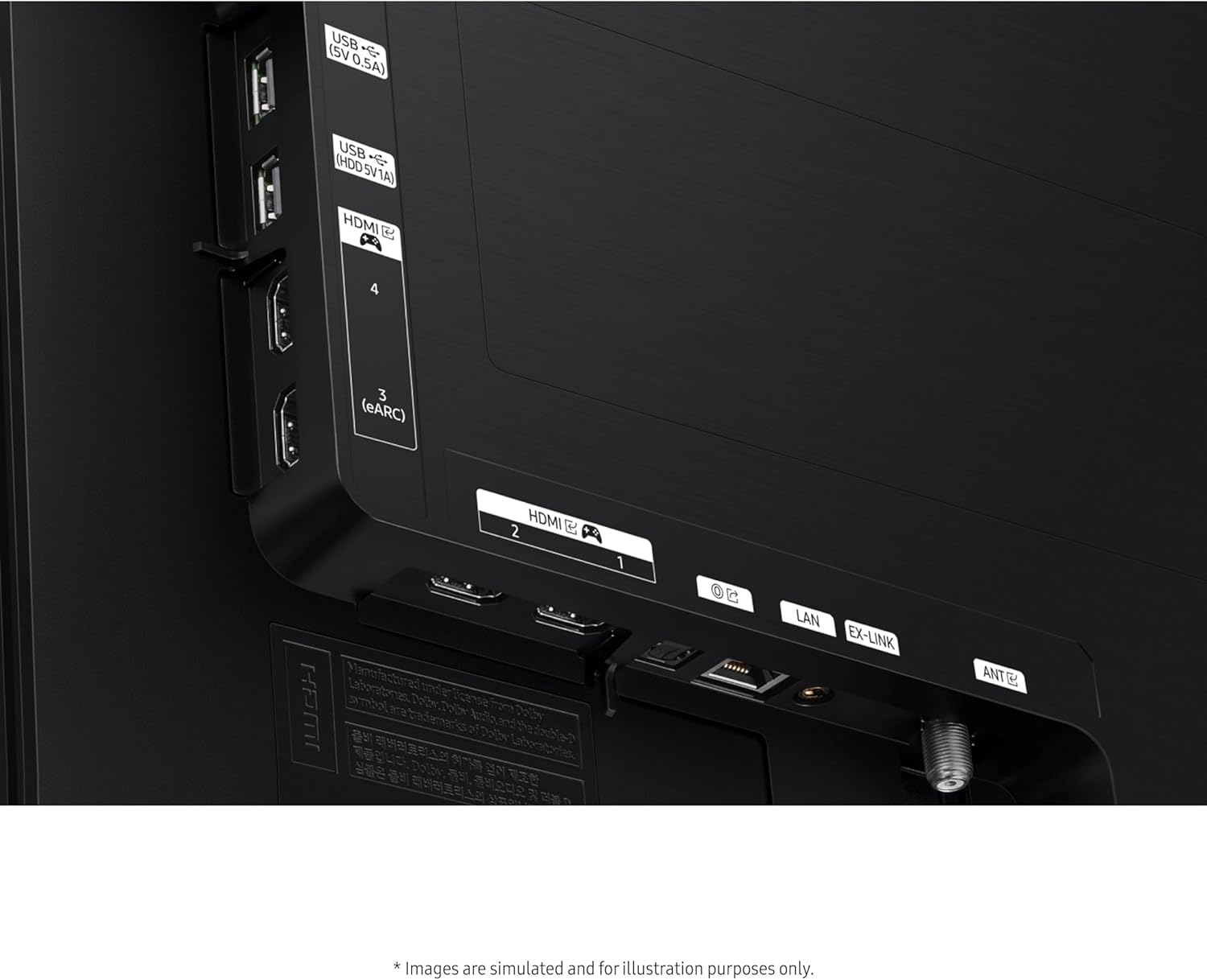
Image: Close-up view of the rear panel of the SAMSUNG QN77S90DAFXZA TV, showing HDMI, USB, LAN, and other connectivity ports.
4. Initial Power-On and Network Connection
Plug the power cord into an electrical outlet. Follow the on-screen instructions to complete the initial setup, including connecting to your Wi-Fi network or using the LAN port for a wired connection. This process will guide you through setting up your Samsung account and accessing Smart TV features.
Operating Instructions
1. Basic Controls and Navigation
Use the provided remote control to navigate the TV's interface. The Samsung Tizen OS offers a user-friendly Smart Hub for accessing apps, live TV, and connected devices. Familiarize yourself with the remote's buttons for power, volume, channel, and smart features.
2. Picture Settings
Your OLED TV delivers exceptional picture quality. Adjust settings to your preference:
- OLED Technology: Experience pure blacks and vibrant colors.
- OLED HDR+: Enhances brightness and contrast for a dynamic viewing experience.
- Real Depth Enhancer: Automatically adjusts foreground contrast to create a sense of depth.

Image: A scene on the SAMSUNG OLED TV demonstrating bold contrast and vibrant colors, highlighting the OLED HDR+ feature.
3. Sound Settings
The TV features advanced audio technologies:
- Dolby Atmos: Provides immersive, multi-dimensional sound.
- Object Tracking Sound Lite: Sound moves with the action on screen.
- Q-Symphony: Synchronizes TV speakers with compatible Samsung soundbars for enhanced audio.
- Active Voice Amplifier Pro & Adaptive Sound Pro: Optimize sound based on room acoustics and content.
4. Smart Features and Gaming
Explore the Samsung Smart Hub for various applications. The built-in voice assistant allows for hands-free control. For gamers, the TV offers:
- Motion Xcelerator 144Hz: Ensures ultra-smooth motion and minimal lag for gaming. Requires a compatible gaming PC supporting 4K resolution.
- Samsung Gaming Hub: Access cloud gaming services directly from your TV.

Image: A high-speed racing game displayed on the SAMSUNG OLED TV, illustrating the smooth motion provided by Motion Xcelerator 144Hz.
Maintenance and Care
1. Screen Cleaning
To clean the screen, use the provided Walts HDTV Screen Cleaner Kit. Apply the non-ammonia and alcohol-free solution to a soft, lint-free cloth, then gently wipe the screen. Avoid spraying directly onto the screen. This solution effectively removes dust, dirt, and fingerprints without streaking or leaving residue.

Image: Walts HDTV Screen Cleaner Kit, including a spray bottle of cleaning solution and a microfiber cloth, designed for safe screen cleaning.
2. General Care
Keep the TV in a well-ventilated area. Avoid exposing it to direct sunlight, extreme temperatures, or high humidity. Do not block ventilation openings. Regularly dust the TV's exterior with a soft, dry cloth.
Troubleshooting
If you encounter issues with your TV, refer to the following common problems and solutions:
- TV Not Turning On:
Ensure the power cord is securely plugged into both the TV and a working electrical outlet. Try plugging another device into the same outlet to confirm power availability. If the issue persists, contact customer support. - No Picture or Poor Picture Quality:
Check all cable connections to external devices. Ensure the correct input source is selected. Adjust picture settings (brightness, contrast, color) in the TV menu. If using an antenna, check its connection and position. - No Sound or Poor Sound Quality:
Verify the volume is not muted or set too low. Check audio cable connections to external sound systems. If using internal speakers, ensure external audio output is not selected. - Remote Control Not Working:
Replace the batteries in the remote control. Ensure there are no obstructions between the remote and the TV's sensor. - Smart TV Features Not Responding:
Check your internet connection (Wi-Fi or LAN). Restart the TV by unplugging it from the power outlet for a few minutes, then plugging it back in.
Technical Specifications
| Feature | Specification |
|---|---|
| Model Number | QN77S90DAFXZA |
| Screen Size | 77 Inches (196 cm) |
| Display Technology | OLED |
| Resolution | 4K (3840 x 2160) |
| Refresh Rate | 120 Hz (Motion Xcelerator 144Hz for compatible PCs) |
| Product Dimensions (D x W x H) | 14.1" x 67.7" x 41.7" |
| Item Weight | 80.7 Pounds |
| Connectivity | 4 HDMI (1 eARC), LAN, Wi-Fi, Bluetooth, USB, Optical |
| Operating System | Samsung Tizen OS |
| Audio Features | Dolby Atmos, Object Tracking Sound Lite, Q-Symphony |
| Special Features | Ambient Mode+, Built-in Voice Assistant, Samsung Smart Hub, Multi-View, SmartThings Compatible, Samsung Gaming Hub |
| VESA Compatibility | 400 x 300 |
| Energy Efficiency | Energy Star Compliant |
Warranty and Support
1. Manufacturer's Warranty
Your SAMSUNG QN77S90DAFXZA TV comes with a full 1-year manufacturer's warranty covering defects in materials and workmanship from the date of purchase. Please refer to the warranty card included with your product for detailed terms and conditions.
2. Amber Protection Plan
This product includes a 2-Year Amber Protection Plan, which extends coverage beyond the manufacturer's warranty. This plan typically covers mechanical and electrical failures and power surge protection. Coverage begins from the date of purchase. For specific details regarding your Amber Protection Plan, please consult the documentation provided with the plan.

Image: Details of Extended Protection Features & Benefits, outlining coverage for mechanical/electrical failures and power surge protection.
3. Customer Support
For technical assistance, warranty claims, or general inquiries, please contact Samsung Customer Support. You can find contact information on the official Samsung website or in your product documentation. When contacting support, please have your model number (QN77S90DAFXZA) and serial number ready.
For additional support and resources, visit the official Samsung Store.


