
1. Introduction
This manual provides detailed instructions for the installation, operation, and maintenance of your Losuudy XV20 Magnetic Rear View Backup Camera System. This system is designed to enhance safety and convenience when backing up vehicles, particularly large ones like RVs or trucks, by providing a clear view of the rear surroundings. The camera features IR night vision and IP68 waterproofing for reliable performance in various conditions.
2. What's in the Box
Your Losuudy XV20 Camera System package includes the following components:
- Solar Magnetic Wireless Backup Camera (1 unit)
- 5-inch 1080p LCD Monitor
- Charging Cable (USB-C)
- Cigarette Lighter Charger
- Monitor Bracket
- Suction Cup Bracket
- Antennas (2 units)
- User Manual
3. Setup
Follow these steps to set up your Losuudy XV20 Backup Camera System:
3.1. Charge the Camera
Before initial use, fully charge the wireless backup camera. Connect the provided USB-C charging cable to the camera's charging port and to a power source. The camera also features a solar panel for continuous charging when exposed to sunlight.
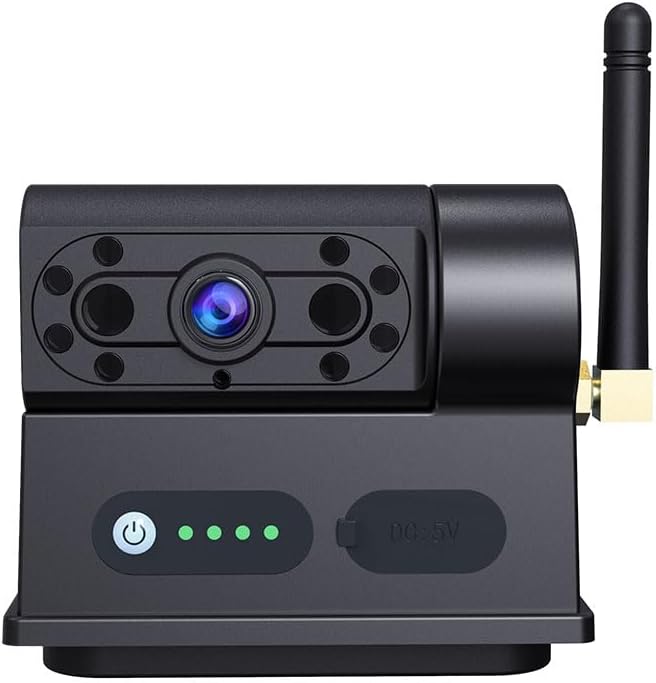
Image 1: The Losuudy XV20 wireless backup camera unit, showing the camera lens, IR lights, power button, battery indicator lights, USB-C charging port, and antenna connection point. The top surface is a solar panel.
3.2. Install Antennas
Carefully screw one of the provided antennas onto the designated port on the wireless camera unit. Screw the second antenna onto the monitor unit.
3.3. Mount the Monitor
Attach the monitor to the monitor bracket, then use the suction cup bracket to secure the monitor to your vehicle's windshield or dashboard. Ensure the mounting surface is clean and dry for optimal adhesion. Connect the cigarette lighter charger to your vehicle's 12V power socket and to the monitor to provide power.
3.4. Attach the Camera
The camera features a strong magnetic base. Attach the camera securely to a flat, ferrous-metal surface at the rear of your vehicle, such as the bumper or tailgate. Ensure it is properly aligned to capture the desired view. The magnetic attachment is designed to be very strong to prevent detachment during travel.
4. Operating Instructions
4.1. Power On/Off
To turn on the camera, press the power button located on the camera unit. The battery indicator lights will illuminate. To turn off, press and hold the power button for 5-10 seconds. The monitor will power on automatically when connected to the cigarette lighter charger and receiving a signal from the camera.
4.2. Viewing the Feed
Once both the camera and monitor are powered on and paired, the live video feed from the camera will be displayed on the monitor. The monitor provides a clear 1080p resolution view of the rear of your vehicle.
4.3. Adjusting Parking Lines
The monitor may feature adjustable parking guide lines. Refer to the monitor's specific buttons (e.g., M, +, -, OK) to navigate the menu and adjust the width, horizontal, and vertical position of these lines to suit your vehicle and preferences. This feature is particularly useful for precise backing up and hitching.
4.4. Night Vision
The Losuudy XV20 camera is equipped with IR night vision, allowing for clear visibility in low-light conditions or complete darkness. This feature activates automatically when light levels are insufficient.
5. Maintenance
5.1. Charging
The camera's internal Lithium Ion batteries are charged via the integrated solar panel or the provided USB-C cable. Ensure the solar panel is clean and unobstructed for efficient charging. For optimal battery life, fully charge the camera for approximately two hours before its first use or after extended periods of inactivity.
5.2. Cleaning
Regularly clean the camera lens and solar panel with a soft, damp cloth to ensure clear image quality and efficient solar charging. Avoid using abrasive cleaners or solvents that could damage the surfaces.
5.3. Storage
When not in use for extended periods, store the camera and monitor in a cool, dry place. Ensure the camera is fully charged before storage to maintain battery health.
6. Troubleshooting
- No Signal on Monitor:
- Ensure both the camera and monitor are powered on.
- Check that antennas are securely attached to both units.
- Verify that the camera battery is charged.
- Ensure there are no major obstructions between the camera and monitor that could interfere with the wireless signal.
- Poor Image Quality:
- Clean the camera lens.
- Ensure the camera is securely mounted and not vibrating.
- Check for strong wireless interference from other devices.
- Camera Not Charging via Solar:
- Ensure the solar panel is clean and free from dirt or debris.
- Position the camera in direct sunlight for optimal charging.
7. Specifications
| Brand Name | Losuudy |
| Item Model Number | L-XV-C1 |
| Item Weight | 1.59 pounds |
| Product Dimensions | 5.9 x 5.8 x 3.3 inches |
| Batteries | 2 Lithium Ion batteries required (included) |
| Special Features | Night Vision, Waterproof (IP68) |
| Photo Sensor Technology | CMOS |
| Video Capture Resolution | 1080p |
| Flash Memory Type | Internal flash memory |
| Video Capture Format | MP4 |
| Supported Audio Format | AAC, MP3 |
8. Warranty & Support
For warranty information, technical support, or any inquiries regarding your Losuudy XV20 Magnetic Rear View Backup Camera System, please refer to the contact information provided in the packaging or on the official Losuudy website. Keep your purchase receipt for warranty claims.