
1. Product Overview
This manual provides essential information for the safe and efficient use of your LG 50NANO80TSA 50-inch Smart 4K UHD NanoCell TV. The television features NanoCell technology for enhanced color purity, 4K Ultra High Definition resolution, and the webOS 24 operating system for smart functionality. It integrates an α5 Gen7 AI Processor for optimized performance and includes built-in support for Amazon Alexa and Chromecast.
Key Features:
- LG ThinQ AI for intelligent control and personalization.
- Integrated Amazon Alexa for voice commands.
- Intelligent Voice Recognition for intuitive interaction.
- Remote Control via LG ThinQ App for smartphone control.
- Room-to-Room Sharing (Receiver) for content distribution.

Figure 1.1: Front view of the LG 50NANO80TSA TV.

Figure 1.2: Illustration of the LG α5 Gen7 AI Processor 4K.
2. Setup Guide
2.1 Unpacking
Carefully remove the television and all accessories from the packaging. Retain the packaging materials for future transport or service needs. Ensure all components listed in the packing list are present.
2.2 Attaching the Stand
Place the TV screen-down on a soft, flat surface to prevent damage. Align the included stand bases with the designated slots on the bottom of the TV. Secure the bases using the provided screws. Refer to the quick setup guide included in the box for detailed diagrams.

Figure 2.1: LG 50NANO80TSA TV with stand attached.
2.3 Wall Mounting (Optional)
If you choose to wall-mount your TV, ensure you use a VESA-compliant wall mount kit (sold separately) that matches the TV's VESA mounting pattern. Follow the wall mount manufacturer's instructions carefully. Professional installation is recommended.
2.4 Connecting Peripherals
Connect your external devices such as set-top boxes, gaming consoles, Blu-ray players, and sound systems to the appropriate ports on the rear of the TV. The TV includes multiple HDMI and USB ports, as well as an Ethernet port for wired network connection.

Figure 2.2: Rear view of the TV with port connections.
2.5 Initial Power On
After connecting all necessary cables, plug the power cord into an electrical outlet. Press the power button on the remote control or the TV. Follow the on-screen instructions to complete the initial setup, including language selection, network configuration, and channel scanning.
3. Operating Instructions
3.1 Remote Control Functions
The LG 50NANO80TSA comes with a Smart Magic Remote (MR 24Y) that allows for intuitive control using point, click, scroll, and voice commands. Familiarize yourself with the buttons for power, volume, channel, home, settings, and voice assistant activation.
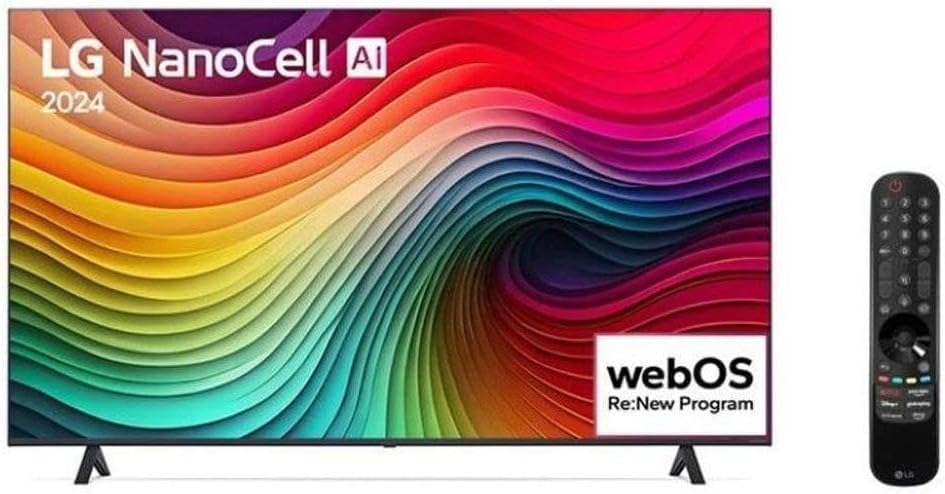
Figure 3.1: TV with Smart Magic Remote.
3.2 Navigating webOS
The webOS operating system provides a user-friendly interface. Press the Home button on your remote to access the Launcher Bar, which displays your favorite apps, inputs, and settings. Use the remote's pointer or directional buttons to navigate.

Figure 3.2: webOS Smart TV interface.
3.3 Smart Features
- LG ThinQ AI: Access personalized recommendations, control smart home devices, and optimize TV settings through the ThinQ AI dashboard.
- Amazon Alexa: Use voice commands via the remote to search for content, control playback, check weather, and manage smart home devices.
- Chromecast Built-in: Cast content from your compatible smartphone or tablet directly to the TV screen.
3.4 Network Connection
To access smart features and online content, connect your TV to the internet. You can connect via Wi-Fi (Wireless) or Ethernet (Wired). Navigate to Settings > Network to configure your connection.
3.5 Using External Devices
Select the appropriate HDMI input from the Home dashboard or by pressing the Input button on your remote to switch between connected devices. USB devices can be connected to play media files directly on the TV.
3.6 Gaming Features
The TV supports features designed to enhance your gaming experience, including Auto Low Latency Mode (ALLM) for reduced input lag, eARC (Enhanced Audio Return Channel) for high-quality audio transmission, and HGiG (HDR Gaming Interest Group) for optimized HDR gaming.

Figure 3.3: Gaming features on the LG 50NANO80TSA TV.
4. Maintenance
4.1 Cleaning the Screen
To clean the screen, gently wipe it with a soft, dry microfiber cloth. For stubborn marks, lightly dampen the cloth with water or a specialized screen cleaner. Avoid using harsh chemicals, abrasive materials, or spraying liquid directly onto the screen.
4.2 General Care
- Keep the TV away from direct sunlight and heat sources.
- Ensure adequate ventilation around the TV to prevent overheating.
- Unplug the TV during lightning storms or when it will be unused for extended periods.
- Do not block ventilation openings.
5. Troubleshooting
If you encounter issues with your TV, refer to the following common problems and solutions before contacting support.
5.1 No Power
- Check if the power cord is securely plugged into both the TV and the electrical outlet.
- Verify that the outlet is functioning by plugging in another device.
- Press the power button on the TV itself, not just the remote, to rule out a remote issue.
5.2 No Picture or Distorted Picture
- Ensure the correct input source is selected (e.g., HDMI 1, HDMI 2).
- Check all cable connections (HDMI, antenna) for looseness or damage.
- Try restarting the TV and any connected devices.
- If using an external device, test it with another display if possible.
5.3 No Sound or Distorted Sound
- Check the volume level and ensure the TV is not muted.
- Verify audio output settings in the TV menu (e.g., internal speakers, external soundbar).
- If using external speakers, check their power and connections.
5.4 Remote Control Not Responding
- Replace the batteries in the remote control.
- Ensure there are no obstructions between the remote and the TV's sensor.
- Re-pair the Smart Magic Remote if necessary (refer to the TV's on-screen guide for pairing instructions).
5.5 Network Connectivity Issues
- Check your Wi-Fi password and ensure it is entered correctly.
- Restart your router and modem.
- Try connecting the TV via an Ethernet cable if Wi-Fi is unstable.
- Ensure the TV's software is up to date.
6. Technical Specifications
| Feature | Specification |
|---|---|
| Brand | LG |
| Model | 50NANO80TSA |
| Screen Size | 50 inches |
| Resolution | 3840 x 2160 (4K UHD) |
| Display Technology | NanoCell LED |
| Operating System | webOS |
| Processor | α5 Gen7 AI Processor 4K |
| Refresh Rate | 60 Hz |
| HDMI Ports | Multiple (Specific number not provided, typically 3-4) |
| USB Ports | 2 |
| Connectivity | Bluetooth, Ethernet, HDMI, USB, Wi-Fi |
| Dimensions (W x H x D) | 123.5 x 71.5 x 5.75 cm (without stand) |
| Weight | 14.4 kg |
| Energy Efficiency Class | A+ |
| Included Components | Stand Bases, Detachable Power Cable, Smart Magic Remote (MR 24Y) |

Figure 6.1: Energy Efficiency Label.
7. Warranty and Support
7.1 Warranty Information
This LG 50NANO80TSA TV comes with a 12-month manufacturer's warranty. Please retain your proof of purchase for warranty claims. The warranty covers defects in materials and workmanship under normal use. It does not cover damage caused by misuse, accidents, unauthorized repairs, or normal wear and tear.
7.2 Customer Support
For technical assistance, troubleshooting beyond this manual, or warranty service, please contact LG Customer Support. Visit the official LG website for contact information, service center locations, and additional resources.
LG Official Website: www.lg.com


