
1. Introduction
This manual provides instructions for the safe and effective use of your DAKDAP Neck Face Massager. This 7-in-1 device is designed for skin care, suitable for massaging the face, neck, arms, shoulders, and other body parts to support skin tightening and muscle relaxation. Please read this manual thoroughly before initial use and retain it for future reference.

Image 1.1: DAKDAP Neck Face Massager. This image displays the overall design of the white massager, highlighting its ergonomic shape for facial and neck application.
2. Safety Information
- Do not use the device on broken, irritated, or infected skin.
- Consult a physician before use if you have any skin conditions, allergies, or are pregnant.
- Keep the device away from water and do not immerse it in liquids.
- Do not use the device while charging.
- Keep out of reach of children.
- Discontinue use if you experience any discomfort or adverse reactions.
- Use only the provided charging cable.
3. Product Overview
3.1 Components
- Rejuvenation Device Head
- 7 Color LED Light
- Gear Indicator Light
- Function Indicator Light
- Function Regulation On/Off Button
- USB Charging Interface

Image 3.1: Product Details. This diagram labels the key components of the massager, including the head, LED lights, indicators, power button, and charging port.
3.2 Features
The DAKDAP Neck Face Massager incorporates advanced features for comprehensive skin care:
- 7 LED Light Colors: Equipped with 7 distinct LED light colors, each offering specific skin care functions.
- 3 Massage Modes: Features three vibration massage modes (CLEAN, EMS, HOT) to address various skin needs.
- Rechargeable & Portable: Designed for convenience with USB recharging and a compact size for travel.
- Human Body Induction Switch: The device activates upon contact with skin when holding the sensing rings.
LED Light Functions:

Image 3.2: 7 Colors LED Lights. This image illustrates the seven different LED light colors and their corresponding wavelengths available on the device.
- Red Light (630nm): Supports skin rejuvenation.
- Blue Light (415nm): Assists in skin purification.
- Green Light (525nm): Helps balance skin tone.
- Purple Light (390nm): Combines benefits of red and blue light.
- White Light (mix): Comprehensive skin support.
- Cyan Light (490nm): Promotes skin soothing.
- Yellow Light (590nm): Enhances skin radiance.
Massage Modes:

Image 3.3: 3 Vibration Massage Modes. This image details the function of each of the three massage modes: CLEAN, EMS, and HOT.
- CLEAN Mode: Designed to assist in clearing pores and maintaining skin clarity.
- EMS Mode: Intended to relax the skin and facilitate the absorption of skin care products.
- HOT Mode: Utilizes heat to soothe the skin, aiming to tighten sagging skin and promote collagen production.
4. Setup
4.1 Charging the Device
- Connect the provided USB charging cable to the USB charging interface on the device.
- Plug the other end of the USB cable into a compatible USB power adapter (not included) or a computer USB port.
- The indicator light will show charging status. Ensure the device is fully charged before first use.
4.2 Initial Preparation
Before using the device for the first time, or after charging:
- Remove the protective cap from the device head.
- Ensure the device head is clean.
5. Operating Instructions
Follow these steps for optimal use of your DAKDAP Neck Face Massager:
- Apply Skincare Products: Evenly apply your preferred skincare products (e.g., serum, cream) to the area you intend to massage (face, neck, etc.).
- Power On: Press and hold the power button for 2 seconds to turn on the device.
- Select Mode: Briefly press the power button to cycle through the available massage modes (CLEAN, EMS, HOT). The corresponding indicator light will illuminate.
- Begin Massage: While holding the device, ensure your hand touches the sensing rings. Allow the massage head to make contact with your skin. The device will begin to vibrate.
- Massage Technique: Gently glide the device from the bottom to the top of the desired area.

Image 5.1: 4 Easy Steps to Use. This visual guide demonstrates the four primary steps for operating the massager.
5.1 Application Areas
The device is suitable for various areas:
- Chin
- Neck
- Forehead
- Cheek
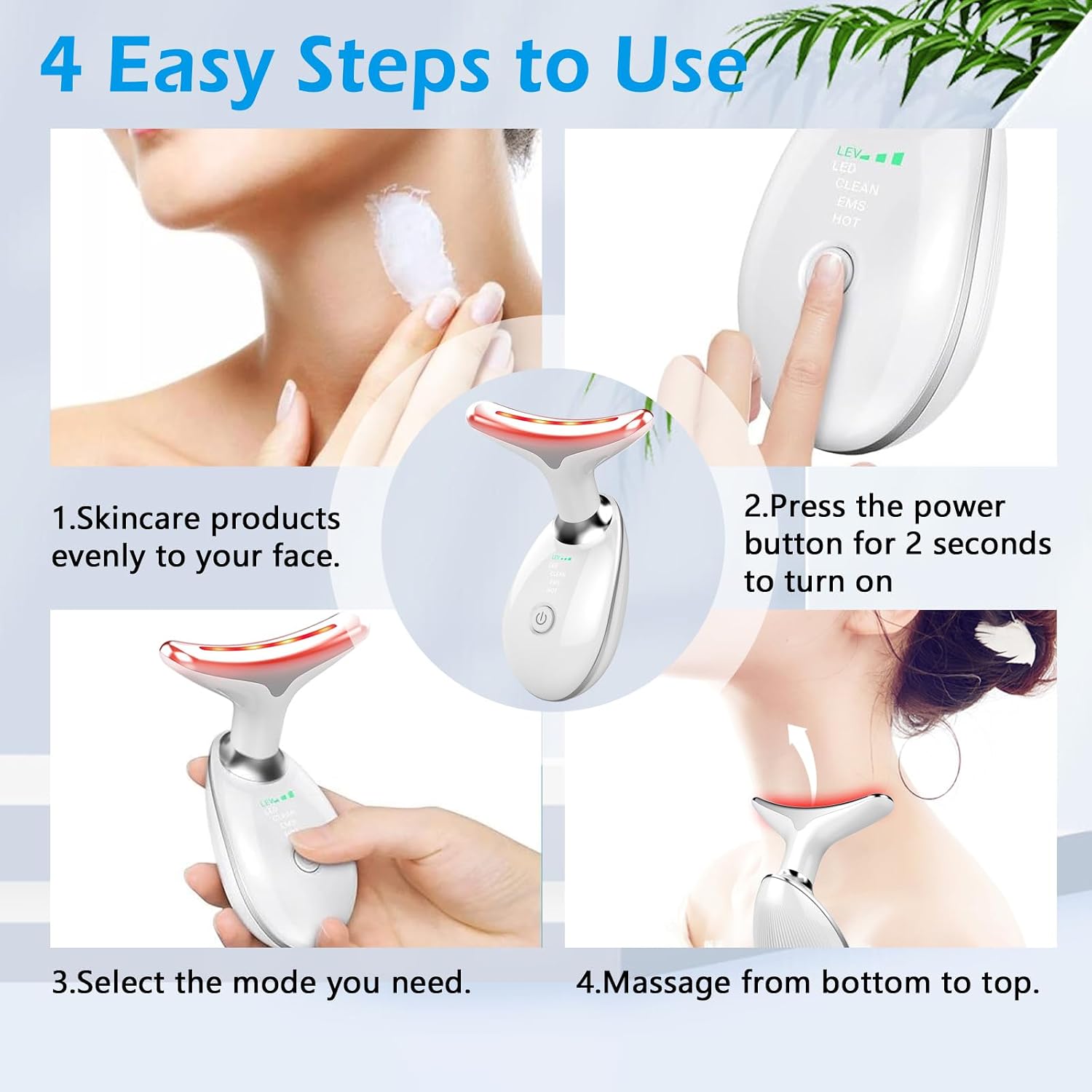
Image 5.2: Multiple Parts, Visible Results. This image highlights the versatility of the massager for different facial and neck areas.
6. Maintenance
6.1 Cleaning
- After each use, gently wipe the device head with a soft, damp cloth.
- Do not use abrasive cleaners, alcohol, or harsh chemicals.
- Ensure the device is completely dry before storing.
6.2 Storage
- Store the device in a cool, dry place, away from direct sunlight and extreme temperatures.
- Keep the device in its original packaging or a protective case when not in use.
7. Troubleshooting
- Device not turning on: Ensure the device is fully charged. Press and hold the power button for 2 seconds.
- Device not vibrating: Ensure your hand is touching the sensing rings while the massage head is in contact with your skin.
- Indicator lights not working: Check if the device is powered on and charged. If issues persist, contact customer support.
8. Specifications
| Attribute | Value |
|---|---|
| Brand | DAKDAP |
| Model | B0D3HYY6R9 |
| Colour | White |
| Style | Modern |
| Power Source | Battery Powered |
| Included Components | Charging Cable, Face Massager, Manual |
| UPC | 763971503269 |
| Manufacturer | DAKDAP |
8.1 Dimensions
- Length: Approximately 12 cm (4.72 inches)
- Width (Head): Approximately 8.9 cm (3.5 inches)
- Width (Base): Approximately 4.7 cm (1.85 inches)

Image 8.1: Product Dimensions. This image provides a visual representation of the massager's physical measurements.
9. Warranty and Support
Warranty information for the DAKDAP Neck Face Massager is typically included with the product packaging or can be obtained directly from the manufacturer or authorized retailer. For technical support, product inquiries, or warranty claims, please refer to the contact information provided at the point of purchase or on the official DAKDAP website.