
1. Introduction
This manual provides essential instructions for the safe and efficient operation, setup, and maintenance of your BDJSN 1500W Bubble Fog Machine. This versatile machine combines fog, bubbles, and color-changing LED lights to enhance various events and performances. Please read this manual thoroughly before initial use and retain it for future reference.

Figure 1: The BDJSN 1500W Bubble Fog Machine is suitable for a variety of applications, including DJ clubs, weddings, dance events, stage performances, parties, and Halloween celebrations.
2. Important Safety Instructions
- Always connect the machine to a grounded power outlet.
- Do not operate the machine if the power cord is damaged.
- Ensure the machine is placed on a stable, level surface to prevent tipping.
- Keep the machine away from flammable materials, heat sources, and water.
- Use only manufacturer-recommended bubble and fog fluid. Using other fluids may damage the machine or create health hazards.
- Do not touch the nozzle during operation or immediately after use, as it may be hot.
- Ensure adequate ventilation around the machine during operation.
- Do not obstruct the fan or ventilation openings.
- Keep out of reach of children and unauthorized personnel.
- Disconnect from power before cleaning or servicing.
3. Package Contents
Verify that all items are present and in good condition upon unpacking:
- BDJSN 1500W Bubble Fog Machine
- Power Cable
- Remote Control
- User Manual
4. Specifications
| Feature | Detail |
|---|---|
| Product Name | Smoke Bubble Machine |
| Dimensions (L x W x H) | 60cm x 30cm x 35cm |
| Power | 1500W |
| Net Weight | 14 KG |
| Gross Weight | 15 KG |
| Warm-up Time | 5 minutes |
| Voltage | AC110/240V 50-60HZ |
| Smoke Height | 6 meters |
| Bubble Height | 4 meters |
| Control Methods | LCD Control Panel, Remote Control, DMX512 Control |
| LED Lights | 4-color (Red, Green, Blue, Mixed), 18 lamp beads |
| Features | Double flow bubbles, LED color changing, Superimposed smoke effect |
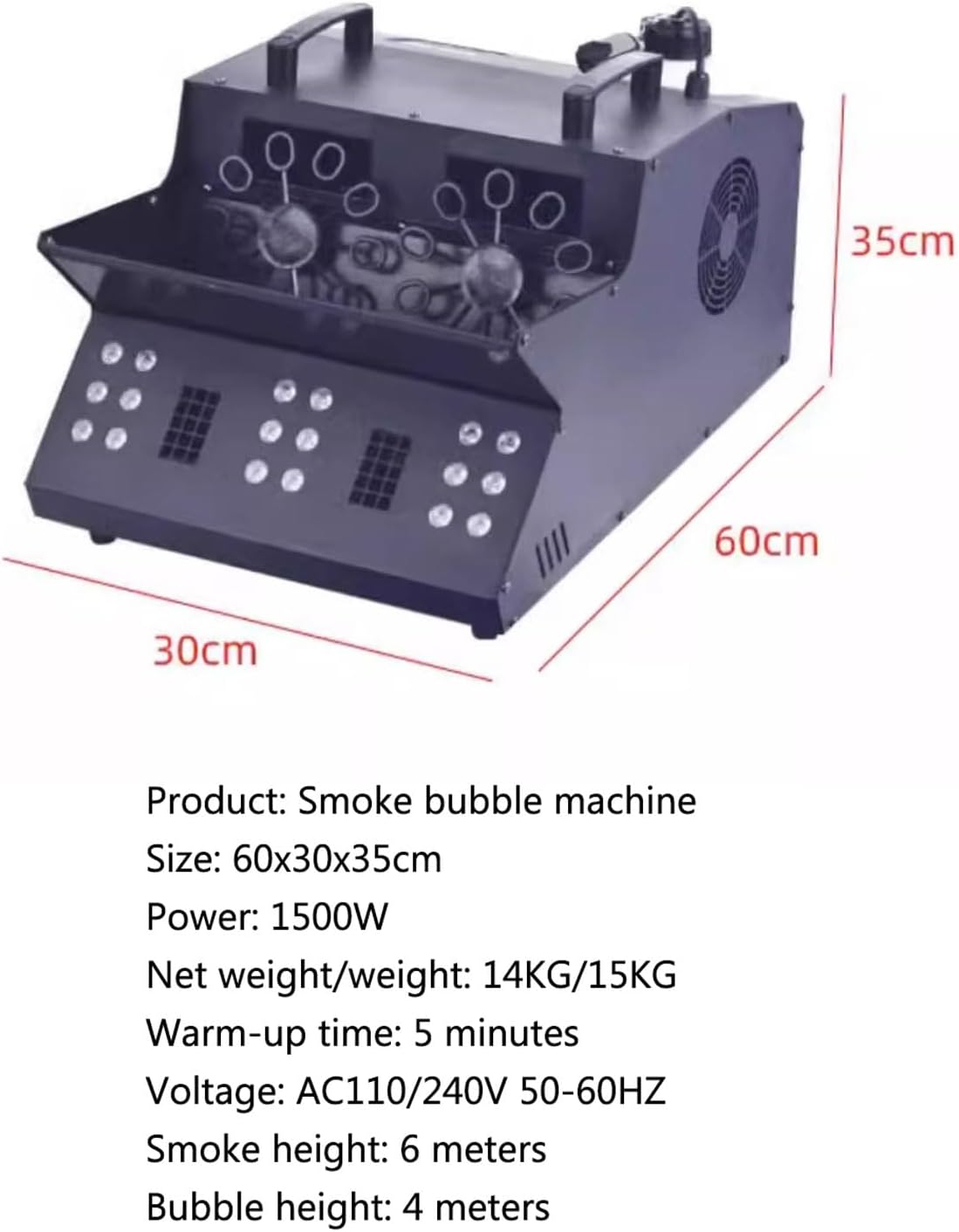
Figure 2: Physical dimensions of the BDJSN 1500W Bubble Fog Machine.
5. Product Features
The BDJSN 1500W Bubble Fog Machine incorporates several design elements for enhanced performance and user convenience:

Figure 3: The machine features 18 LED lamp beads for colorful effects and a super cooling fan to protect internal components.

Figure 4: Ergonomic handles provide easy portability, and a pot wheel fan ensures efficient heat dissipation.
6. Setup
6.1 Unpacking and Inspection
Carefully remove the machine from its packaging. Inspect for any signs of damage during transit. If damage is found, do not operate the machine and contact your retailer.
6.2 Placement
Place the machine on a flat, stable, and non-combustible surface. Ensure there is sufficient space around the unit for proper ventilation (at least 20 cm on all sides). Keep the output nozzle clear of obstructions and direct the output away from people and sensitive equipment.
6.3 Fluid Filling
- Locate the fluid reservoir cap on the machine.
- Unscrew the cap and carefully pour the appropriate bubble fog fluid into the reservoir. Do not overfill.
- Securely replace the reservoir cap to prevent spills.
- Note: Use only high-quality, water-based bubble fog fluid specifically designed for combined bubble and fog machines. Using incorrect fluid can cause damage or poor performance.
6.4 Power Connection
Connect the provided power cable to the machine's power inlet and then to a grounded AC110/240V 50-60HZ power outlet. Ensure the power switch on the machine is in the OFF position before connecting.
7. Operation

Figure 5: The machine in operation, generating both smoke and bubbles.
7.1 Power On and Warm-up
- Ensure the fluid reservoir is adequately filled.
- Flip the power switch to the ON position. The machine will begin its warm-up cycle.
- The LCD control panel will display the warm-up status. The machine typically takes approximately 5 minutes to reach operating temperature.
- Once warmed up, the machine is ready for use.
7.2 Control Methods
The BDJSN 1500W Bubble Fog Machine offers three control options:
- LCD Control Panel: Use the buttons on the integrated LCD panel to navigate menus, adjust settings, and manually trigger effects. Refer to the on-screen prompts for specific functions.
- Remote Control: The included wireless remote control allows for convenient activation of fog, bubbles, and LED effects from a distance. Follow the instructions provided with the remote for pairing and operation.
- DMX512 Control: For professional setups, connect the machine to a DMX512 controller using a standard DMX cable. Consult the DMX channel chart (usually found in a separate DMX guide or on the product's official website) to program and control the machine's various functions, including fog output, bubble generation, and LED color/mode.
7.3 Activating Effects
Once warmed up, use your chosen control method to activate the desired effects. The machine can produce continuous bubbles and smoke, with LED lights providing color-changing effects. Adjust the output intensity and LED modes as needed for your event.
8. Maintenance
8.1 Cleaning
- After Each Use: Drain any remaining fluid from the reservoir. Run a small amount of distilled water through the machine for a few minutes to flush the internal pump and heater. This helps prevent clogs.
- Exterior: Wipe the exterior of the machine with a soft, damp cloth. Do not use abrasive cleaners or solvents.
- Nozzle: Ensure the output nozzle is clear of any residue. Use a small brush if necessary.
8.2 Fluid Type
Always use high-quality, water-based bubble fog fluid. Using oil-based fluids or other unauthorized liquids will damage the machine and void the warranty.
8.3 Storage
Store the machine in a cool, dry place, away from direct sunlight and extreme temperatures. Ensure the fluid reservoir is empty and clean before long-term storage.
9. Troubleshooting
| Problem | Possible Cause | Solution |
|---|---|---|
| Machine does not power on | No power supply; Power cable damaged; Power switch off | Check power connection and outlet; Inspect power cable; Ensure power switch is ON |
| No fog/bubbles produced | No fluid in reservoir; Incorrect fluid type; Machine not warmed up; Clogged nozzle/pump | Fill reservoir; Use correct fluid; Wait for warm-up; Perform cleaning procedure |
| Weak fog/bubble output | Low fluid level; Insufficient warm-up; Partial clog; Fan obstruction | Refill fluid; Allow full warm-up; Clean machine; Ensure fan is clear |
| LED lights not working | LED mode off; Connection issue | Check control panel/remote settings; Contact support if issue persists |
10. Warranty and Support
For warranty information, technical support, or service inquiries, please refer to the warranty card included with your product or contact the manufacturer directly through their official website or customer service channels. Do not attempt to repair the machine yourself, as this may void your warranty and pose safety risks.