
Introduction
Welcome to the MAGICYOYO V11 FINGEROTA Professional Finger Spin Yoyo instruction manual. This yoyo is designed for both intermediate and advanced players, offering a unique dual-purpose system that allows seamless switching between responsive and unresponsive play. Its specialized finger dimple enhances finger spin tricks, providing a stable and balanced experience. Please read this manual thoroughly to understand the features, setup, operation, and maintenance of your new yoyo.
What's in the Box
Your MAGICYOYO V11 FINGEROTA package includes the following items:
- 1 x Unresponsive Yoyo V11 (Black)
- 1 x Flat Bearing Kit (for responsive play)
- 12 x Yoyo Strings
- 1 x Yoyo Glove
- 1 x Yoyo Storage Bag

Image: All components included in the MAGICYOYO V11 FINGEROTA package.
Key Features
- Finger Spin Design: Unique top finger hole and embedded plastic PC finger spin dimple for extended horizontal finger spins.
- Dual Purpose System: Easily switch between responsive and unresponsive play modes using the included bearing and axle.
- High-Quality Construction: Made from durable Aluminum Alloy with a plastic finger dimple, ensuring stability and longevity.
- Balanced Performance: Engineered for stable and smooth spins, suitable for complex tricks.
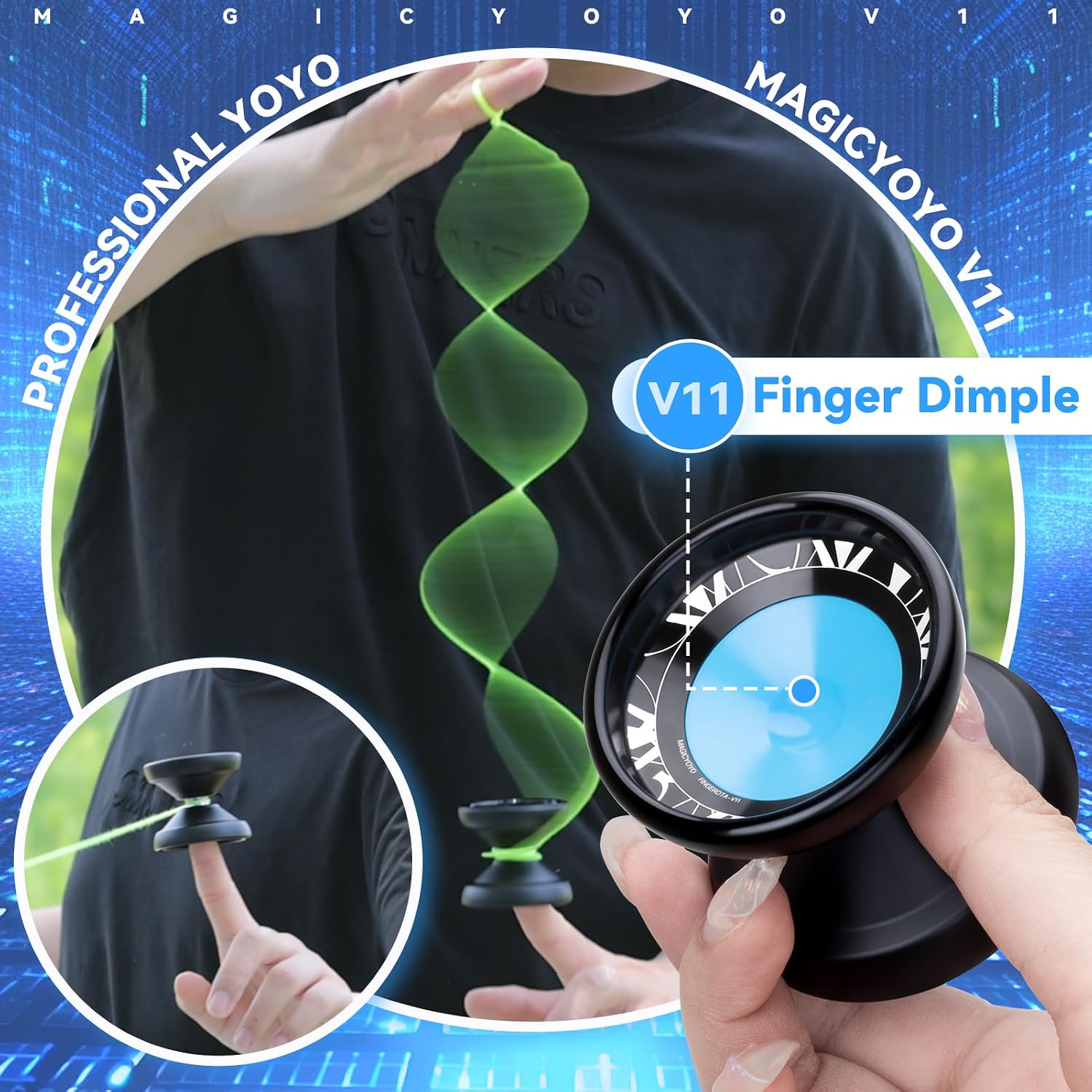
Image: The V11 yoyo showcasing its finger dimple, designed for advanced finger spin tricks.

Image: Comparison of responsive (beginner) and unresponsive (advanced) yoyo play, highlighting the different bearing types.
Safety Information
Choke Hazard! Small parts are included. Not suitable for children under 3 years old.
Setup
Stringing the Yoyo
- Uncoil one of the provided yoyo strings.
- Create a slip knot at one end of the string.
- Place the slip knot over your middle finger.
- Unscrew the yoyo halves.
- Feed the unknotted end of the string through the gap of the yoyo and around the bearing.
- Screw the yoyo halves back together tightly.
Switching Between Responsive and Unresponsive Modes
The MAGICYOYO V11 comes with a dual-bearing system. It is typically set up for unresponsive play out of the box. To switch to responsive play, you will need to replace the unresponsive bearing with the included flat (slim) bearing.
- Carefully unscrew the yoyo halves.
- Use the included bearing removal tool to gently pry off the current bearing from the axle.
- Place the desired bearing (flat for responsive, U-type for unresponsive) onto the axle. Ensure it sits securely.
- Re-assemble the yoyo halves, screwing them together firmly.

Image: Visual guide for swapping between responsive and unresponsive bearings.
Operating Instructions
Basic Responsive Play (for beginners)
If your yoyo is set to responsive mode:
- Place the slip knot on your middle finger.
- Wind the string tightly around the yoyo.
- Throw the yoyo downwards with a strong, straight motion.
- When the yoyo reaches the end of the string, give a slight tug upwards to make it return to your hand.

Image: Steps for a responsive yoyo to return to the hand.
Unresponsive Play (for intermediate/advanced players)
If your yoyo is set to unresponsive mode, it will not return to your hand with a simple tug. You must perform a 'bind' trick to make it return.
- Throw the yoyo downwards to achieve a strong spin (sleeper).
- While the yoyo is spinning at the end of the string, bring your throw hand forward slightly.
- With your non-throw hand, pinch the string about 1-2 inches from the yoyo.
- Push the pinched string into the gap of the yoyo, causing the string to catch and wind, bringing the yoyo back to your hand.
Finger Spin Tricks
The V11 FINGEROTA is designed for finger spins. The central dimple allows for stable and long-lasting horizontal spins.
- Perform a strong sleeper throw.
- Carefully place your finger into the central dimple of the spinning yoyo.
- Maintain balance and control to keep the yoyo spinning on your finger.

Image: Demonstrating a finger spin trick using the V11's specialized dimple.
Maintenance
- String Replacement: Yoyo strings wear out over time. Replace your string regularly (e.g., every few hours of play or when it frays) to ensure optimal performance and safety.
- Bearing Care: Keep the bearing clean and free of dust or debris. If the bearing becomes noisy or spins poorly, it may need cleaning with a specialized bearing cleaner or replacement.
- Storage: Store your yoyo in the provided storage bag to protect it from scratches and impacts when not in use.
- Cleaning: Wipe the yoyo body with a soft, dry cloth to remove dirt or fingerprints. Avoid using harsh chemicals.
Troubleshooting
| Problem | Possible Cause | Solution |
|---|---|---|
| Yoyo not returning (responsive mode) | String too loose on bearing, worn string, bearing needs cleaning. | Re-wind string tightly, replace string, clean bearing. |
| Excessive vibration during spin | Loose axle, bent axle, dirty bearing, dinged yoyo body. | Tighten axle, clean bearing, inspect yoyo for damage. |
| String tangles easily | Improper winding, worn string, throwing technique. | Ensure smooth winding, replace string, practice consistent throws. |
Specifications
- Model: V11 FINGEROTA
- Brand: MAGICYOYO
- Material: Aluminum Alloy with Plastic Finger Dimple
- Weight: 65.1 Grams (approx. 2.3 ounces)
- Dimensions: 2.16"L x 1.96"W (55mm Diameter x 50mm Width)
- Skill Level: Intermediate
- Recommended Age: 14 years and up
- Bearing System: Dual (Responsive / Unresponsive)

Image: Detailed specifications including weight, diameter, and width of the V11 yoyo.
Warranty and Support
For any questions, concerns, or support needs regarding your MAGICYOYO V11 FINGEROTA, please contact the manufacturer directly through their official website or the retailer where the product was purchased. Keep your proof of purchase for any warranty claims.