
Introduction
The GSJING T10 Intelligent Voice Translator is a versatile device designed to facilitate communication across language barriers. It supports a wide range of languages for both online and offline translation, including voice and photo translation capabilities. With its intuitive interface and long-lasting battery, it is an ideal companion for travel, business, and learning.
Key Features
- Extensive Language Support: Supports 138 languages for voice translation and 50 languages for photo translation.
- High Accuracy & Speed: Achieves up to 96% accuracy with a 0.5-second response time, powered by leading online and iFLYTEK offline translation engines.
- Offline Translation: Includes 18 pairs of offline language packs for use without an internet connection.
- Global Mobile Data: Built-in 2-year global mobile data, eliminating the need for additional data purchases or SIM cards.
- Long Battery Life: Equipped with a 1500mAh battery, providing up to 6 hours of continuous translation and 10 days of standby time.
- Dual Microphones: Enhances voice recognition clarity.
- One-Click Operation: Simplifies the translation process.

Figure 1: Overview of T10 Translator's core features including language support, connectivity, and input methods.
Setup
Charging the Device
Before first use, fully charge the T10 translator. Connect the device to a power source using the provided USB cable. The device can be fully charged in approximately 90 minutes.
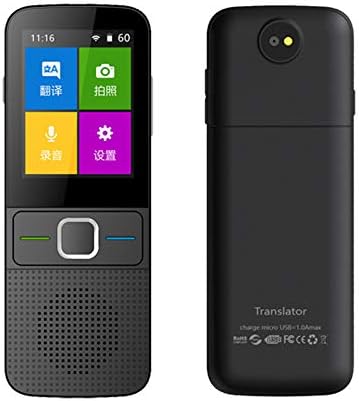
Figure 2: Front and back view of the T10 Intelligent Voice Translator.
Powering On/Off
- To Power On: Press and hold the power button (usually located on the side) until the screen illuminates.
- To Power Off: Press and hold the power button until a power-off option appears on the screen, then confirm.
Connecting to Wi-Fi
For online translation, connect the device to a Wi-Fi network:
- From the home screen, tap the "Settings" icon (gear symbol).
- Select "Wi-Fi" from the menu.
- Toggle Wi-Fi to "On".
- Select your desired network from the list and enter the password if prompted.
- Once connected, the Wi-Fi icon will appear on the status bar.

Figure 3: Wi-Fi connection interface on the T10 Translator.
Operating Instructions
Voice Translation
The T10 translator supports real-time voice translation between 138 languages. Follow these steps:
- From the home screen, tap the "Translation" icon.
- Select the source language (Language A) and target language (Language B) from the displayed options.
- To translate from Language A to Language B: Press and hold the green button on the device. Speak clearly into the microphone. Release the button when you finish speaking. The translated text will appear on the screen and be spoken aloud in Language B.
- To translate from Language B to Language A: Press and hold the blue button on the device. Speak clearly into the microphone. Release the button when you finish speaking. The translated text will appear on the screen and be spoken aloud in Language A.
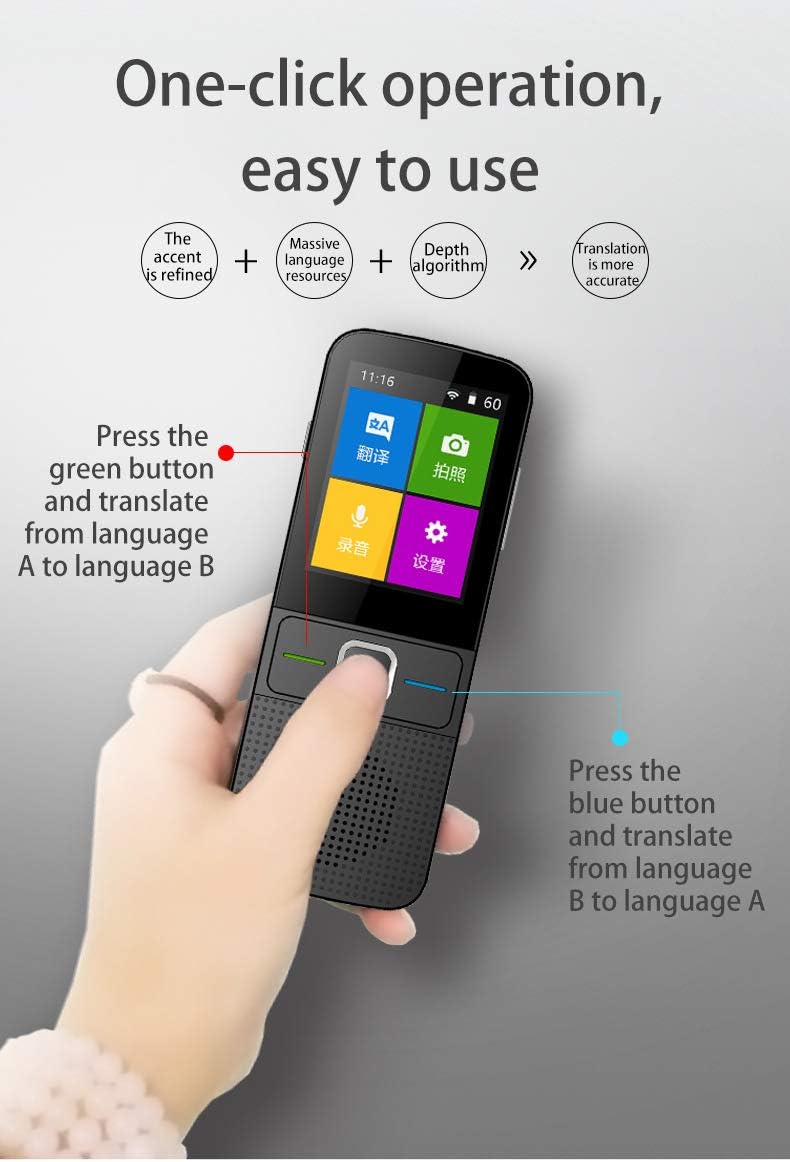
Figure 4: One-click operation for voice translation.
Photo Translation
The T10 can translate text from images, supporting 50 languages. This is useful for menus, signs, and documents.
- From the home screen, tap the "Photo Translation" icon (camera symbol).
- Position the device so the text you wish to translate is clearly visible within the camera frame on the screen.
- Tap the capture button to take a picture.
- The device will process the image and display the translated text.
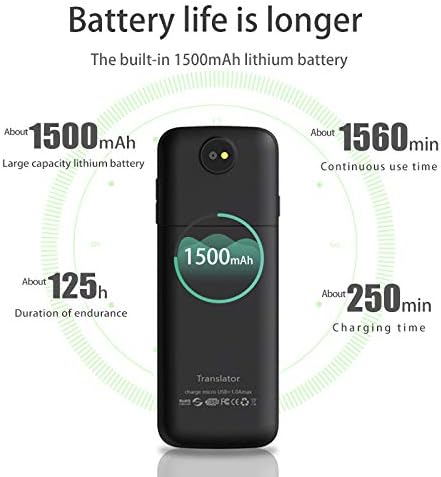
Figure 5: Photo translation in action, showing a menu translated instantly.
Offline Translation
The T10 comes with 18 pairs of offline language packs, allowing translation without an internet connection. Ensure the required language packs are downloaded in advance via the settings menu when connected to Wi-Fi.
- To use offline translation, navigate to the "Offline Translation" section in the settings.
- Select the desired offline language pair.
- Proceed with voice translation as described above.
Battery and Charging
The T10 translator is equipped with a 1500mAh lithium battery, providing reliable power for extended use.
- Battery Capacity: 1500mAh
- Continuous Use Time: Approximately 6 hours (360 minutes)
- Standby Time: Approximately 10 days (240 hours)
- Charging Time: Approximately 90 minutes for a full charge.
To charge, connect the device to a standard USB power adapter (not included) or a computer USB port using the provided charging cable. The battery indicator on the screen will show charging status.
Figure 6: Battery specifications and charging information.
Maintenance
- Cleaning: Use a soft, dry cloth to clean the device. Do not use liquid cleaners or aerosols.
- Storage: Store the device in a cool, dry place away from direct sunlight and extreme temperatures.
- Avoid Water: The device is not waterproof. Avoid exposure to water or high humidity.
- Software Updates: Periodically check for software updates via the settings menu to ensure optimal performance and access to new features.
Troubleshooting
| Problem | Possible Cause | Solution |
|---|---|---|
| Device does not power on. | Low battery; device frozen. | Charge the device for at least 30 minutes. If still unresponsive, perform a hard reset (refer to manual for specific button combination, usually holding power button for 10+ seconds). |
| Translation is inaccurate or slow. | Poor internet connection; unclear speech; background noise; outdated software. | Ensure a stable Wi-Fi connection. Speak clearly and directly into the microphone. Reduce background noise. Check for and install software updates. |
| Cannot connect to Wi-Fi. | Incorrect password; out of range; network issue. | Double-check the Wi-Fi password. Move closer to the Wi-Fi router. Restart the device and the router. |
| Photo translation not working. | Poor lighting; blurry image; text too small/complex. | Ensure adequate lighting. Hold the device steady to avoid blur. Ensure text is clear and large enough for the camera to capture. |
Specifications
| Model | T10 |
| Brand | GSJING |
| Voice Translation Languages | 138 |
| Photo Translation Languages | 50 |
| Offline Language Pairs | 18 |
| Battery Capacity | 1500mAh |
| Continuous Use Time | Up to 6 hours |
| Standby Time | Up to 10 days |
| Charging Time | Approx. 90 minutes |
| Connectivity | Wi-Fi, Built-in Global Mobile Data (2 years) |
| Manufacturer | GSJING |
| Country of Origin | China |
Warranty and Support
For warranty information and technical support, please refer to the documentation included with your purchase or contact GSJING customer service directly. Contact details can typically be found on the manufacturer's official website or on the product packaging.
Please retain your proof of purchase for warranty claims.