1. Introduction
This manual provides instructions for the MUGLFPT Lift-Away Vacuum Power Switch, a replacement component designed for various Shark Navigator Lift-Away upright vacuum cleaners. This switch is intended to resolve common issues such as the vacuum not powering on or the brushroll not spinning.
Compatible Models:
- Shark Navigator Lift-Away upright vacuum cleaners, including NV22, NV22L, NV26, NV350, NV351, NV352, NV355, NV356, NV356E, NV357, NV360, NV370, NV60, NV70, NV95, UV400, UV410, UV420, UV440, UV540, and UV650.

Figure 1: Compatible Shark Navigator Lift-Away Vacuum Models with the MUGLFPT Power Switch.
2. Installation Instructions
Follow these steps carefully to replace the power switch in your Shark Navigator Lift-Away vacuum cleaner. Ensure the vacuum is disconnected from the power source before beginning.
- Disconnect Power: Before starting any replacement, ensure the vacuum cleaner is unplugged from the electrical outlet.
- Access Switch Area: Use a screwdriver to carefully open the handle section of your vacuum cleaner where the power switch is located.
- Remove Old Switch: Gently remove the old power switch from its housing. Note the position and connection of each wire.
- Connect New Switch: Connect the wires from the vacuum to the new MUGLFPT power switch, ensuring they are attached to the correct terminals as the old switch.
- Reassemble: Place the new switch into the housing and reassemble the handle section of the vacuum cleaner.
- Test Functionality: Plug in the vacuum cleaner and test the new switch to ensure proper operation.
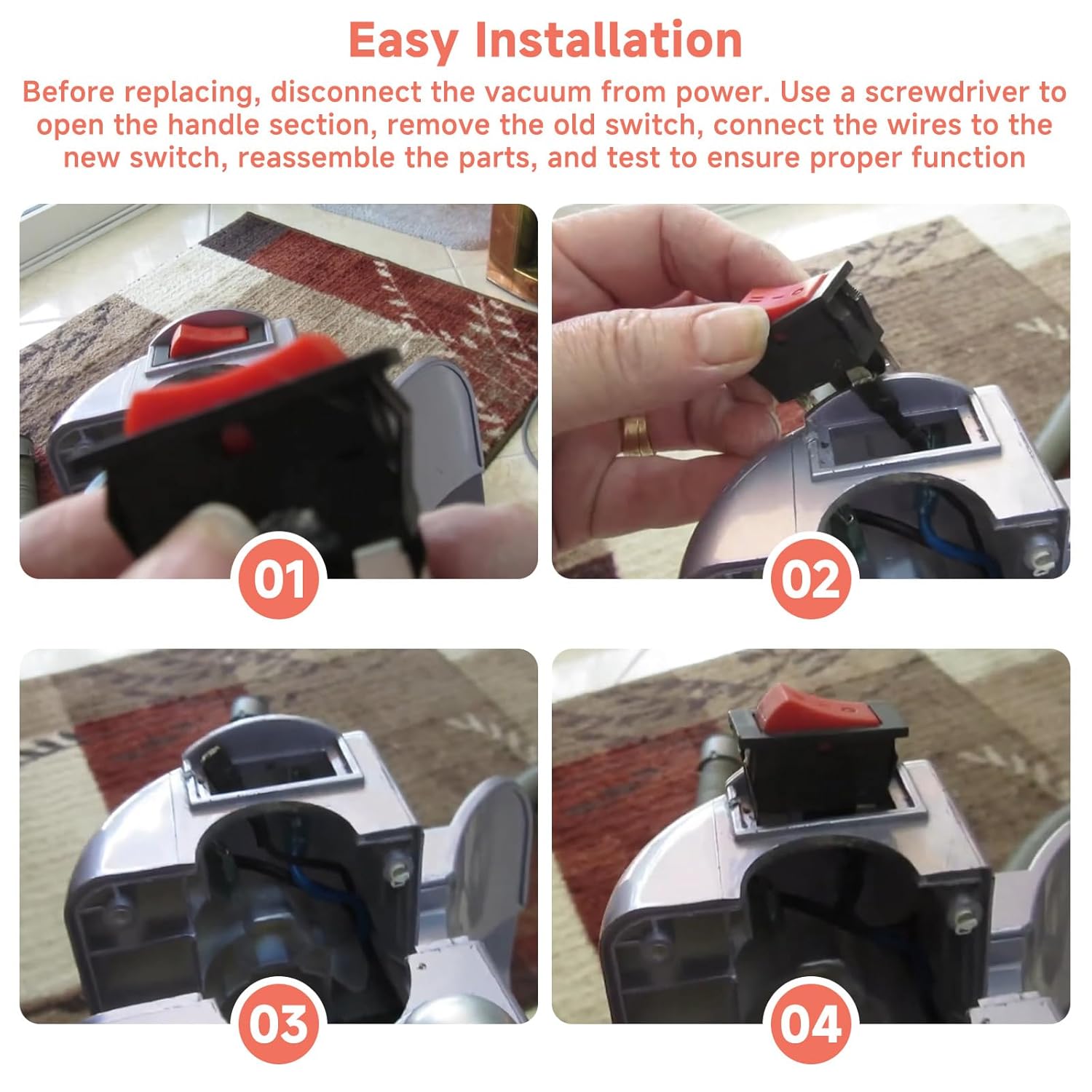
Figure 2: Step-by-step guide for replacing the vacuum power switch.
3. Operating the 3-Speed Control Function
The replacement power switch features a 3-speed control function, allowing you to select the appropriate cleaning mode for different surfaces.
- OFF: The vacuum cleaner is powered off.
- Speed I (Suction Only): This mode activates suction without engaging the brushroll. It is suitable for cleaning hard floors, wood surfaces, and low-pile carpets where a rotating brushroll is not required or could cause damage.
- Speed II (Suction and Brushroll): This mode engages both suction and the brushroll. It is ideal for deep cleaning carpets and removing embedded dirt and debris.
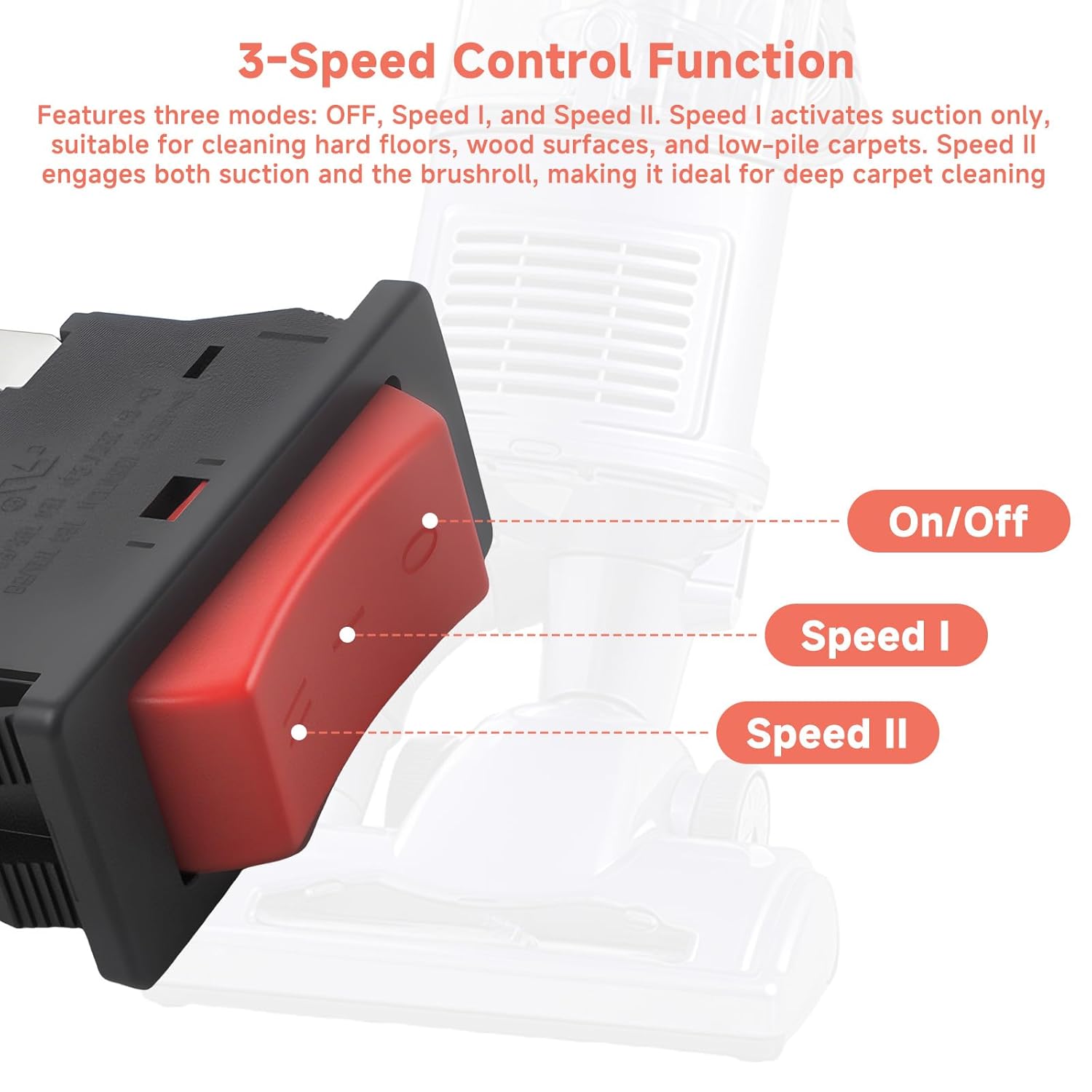
Figure 3: Explanation of the 3-speed control settings on the power switch.
4. Maintenance
The MUGLFPT Lift-Away Vacuum Power Switch itself requires no specific maintenance. However, regular maintenance of your Shark Navigator Lift-Away vacuum cleaner, as outlined in its original user manual, is recommended to ensure optimal performance and longevity of all components, including the power switch.
Ensure the vacuum is kept clean and free of debris, especially around electrical components, to prevent overheating or malfunction.
5. Troubleshooting
This replacement power switch is designed to address common operational issues. If you experience the following, replacing the power switch may resolve the problem:
- The vacuum cleaner does not power on when the switch is moved to Speed I or Speed II.
- The brushroll does not spin when the switch is set to Speed II, but suction is present.
- The switch feels loose or does not click firmly into position.
If these issues persist after proper installation of the new switch, consult the original vacuum cleaner manual for further troubleshooting steps or contact a qualified technician.
6. Specifications
Detailed specifications for the MUGLFPT Lift-Away Vacuum Power Switch are provided below:
| Feature | Specification |
|---|---|
| Model Number | vacuum cleaner power switch |
| Operation Mode | ON-ON-OFF (3-speed control) |
| Current Rating | 16 Amps |
| Operating Voltage | 125 Volts |
| Electrical Ratings Supported | 8A 250VAC and 16A 125VAC |
| Contact Type | Normally Closed |
| Connector Type | Vacuum Cleaner Power Switch |
| Terminal Type | Screw |
| Circuit Type | 3-way |
| Actuator Type | Hinge Lever |
| Product Dimensions (L x W x H) | 0.1 x 0.1 x 0.1 inches (approx. 2.5 x 2.5 x 2.5 mm) |
| Weight | 0.63 ounces (approx. 17.8 grams) |
| Materials | Sturdy plastic housing, copper terminals |

Figure 4: Physical dimensions of the power switch.

Figure 5: Electrical ratings of the power switch.

Figure 6: Durable materials used in the power switch construction.
7. Warranty Information
Specific warranty details for the MUGLFPT Lift-Away Vacuum Power Switch are not provided in this manual. For warranty inquiries, please refer to the product packaging or contact the manufacturer directly.
8. Support
If you require further assistance with installation, operation, or troubleshooting beyond the scope of this manual, please contact the seller or manufacturer for support.