
Samshow 382
Samshow Digital Kitchen Timer Instruction Manual
Model: 382
Introduction
Thank you for choosing the Samshow Digital Kitchen Timer. This versatile device is designed to assist you with precise timing for various activities, including cooking, studying, sports, and more. Featuring a large LCD display and the ability to manage up to three timers simultaneously, it offers convenience and efficiency for your daily tasks.

Image: Two Samshow Digital Kitchen Timers. These timers feature a white body with a black display area, showing three distinct timer channels. The large LCD ensures clear visibility of the time remaining or elapsed.
Setup
Battery Installation
The Samshow Digital Kitchen Timer requires two AAA batteries (included). To install:
- Locate the battery compartment on the back of the timer.
- Slide open the battery cover.
- Insert two AAA batteries, ensuring correct polarity (+/-).
- Close the battery cover securely.
Power On/Off
The timer features an ON/OFF switch to conserve battery life. Locate the "ON/OFF" button on the top right side of the timer's display. Press this button to turn the device on or off. When turned on, the timer will automatically recall the last set memory time.

Image: Rear view of the Samshow Digital Kitchen Timer. This image highlights the battery compartment, the two magnets for mounting, the retractable stand, and the volume adjustment switch located on the side.
Operating Instructions
Setting a Timer (Countdown Mode)
The timer supports three independent channels (Timer 1, Timer 2, Timer 3) for simultaneous countdowns.
- Select Timer Channel: Press the corresponding "TIMER 1", "TIMER 2", or "TIMER 3" button on the top of the timer to select the desired channel. The selected channel will be highlighted or indicated on the display.
- Set Time: Use the "HR" (Hour), "MIN" (Minute), and "SEC" (Second) buttons to set the desired countdown time for the selected channel. The maximum setting is 99 hours, 59 minutes, and 59 seconds.
- Clear Time: To clear the time for the selected channel, press the "CLEAR" button.
- Start/Stop: Press the "ST/SP" (Start/Stop) button to begin the countdown. Press it again to pause the timer.
- Alarm: When the countdown reaches zero, the timer will beep and flash. It will then automatically begin counting up, indicating the elapsed time since the alarm. Press any button to stop the alarm.
Count Up (Stopwatch Mode)
To use the timer as a stopwatch:
- Ensure the selected timer channel is set to "0:00:00". If not, clear it using the "CLEAR" button.
- Press the "ST/SP" button. The timer will begin counting up from "0:00:00".
- Press "ST/SP" again to pause the stopwatch. Press "CLEAR" to reset it to zero.
Volume Adjustment
The timer offers adjustable alarm volume settings: High, Low, and Off. A switch located on the side of the timer allows you to select your preferred volume level.
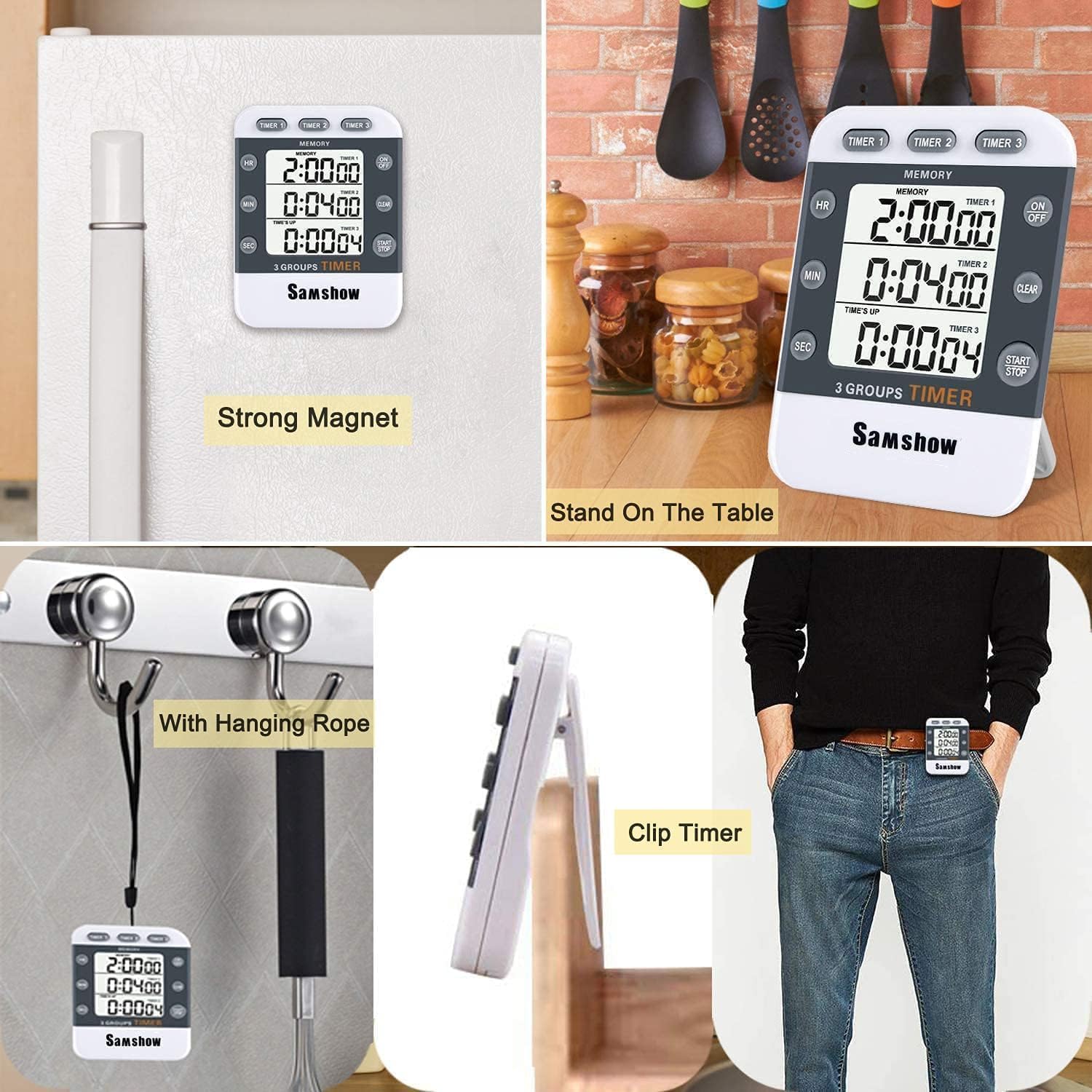
Image: Close-up of the Samshow Digital Kitchen Timer's front panel. Labels indicate the Hour, Minute, and Second buttons, the ON/OFF switch, Clear button, and Start/Stop button, along with the three timer selection buttons.
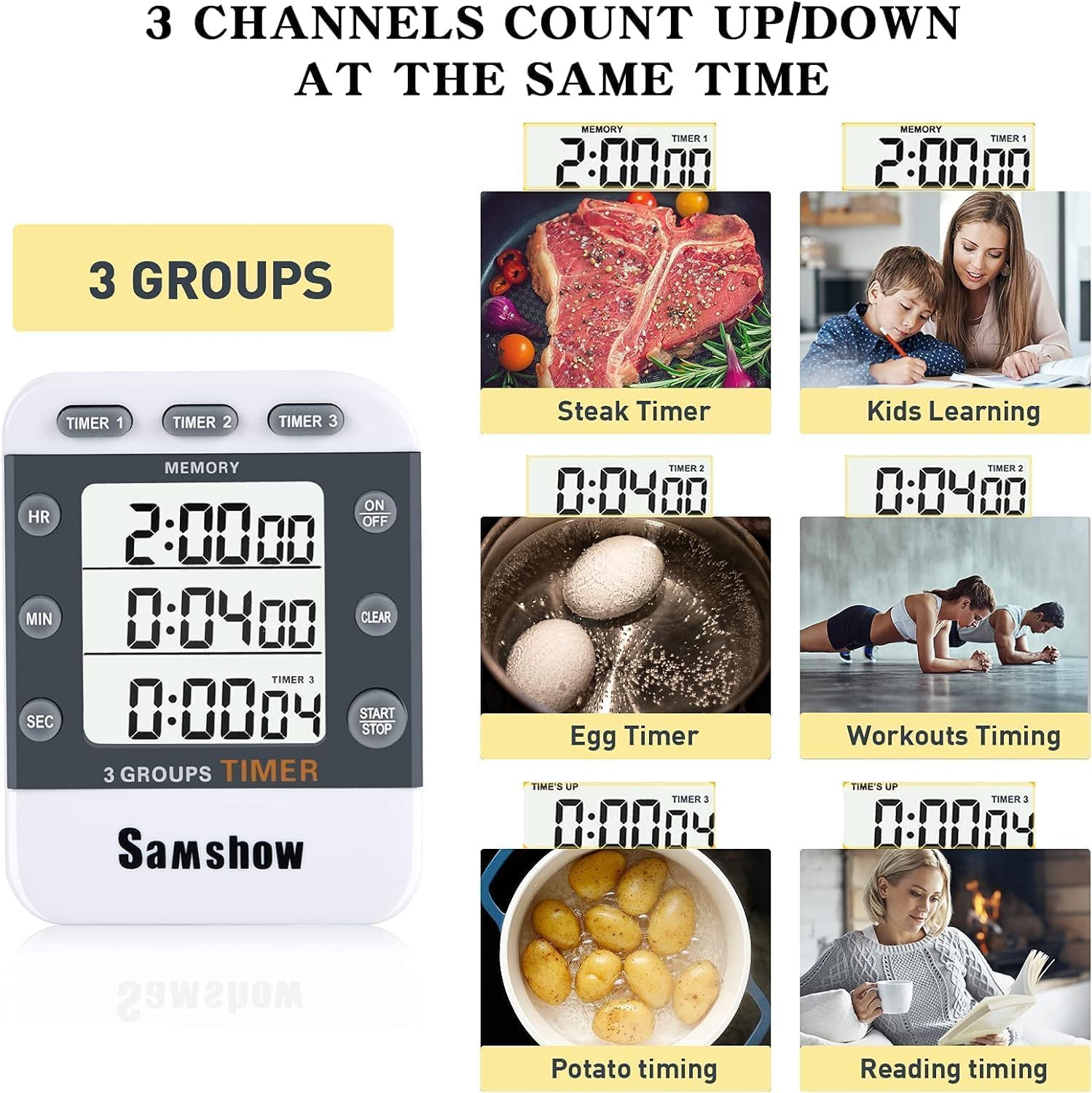
Image: The Samshow Digital Kitchen Timer displaying three active countdowns for different activities: steak, eggs, and potatoes. This illustrates its multi-channel capability for managing various tasks concurrently.
Features
- Triple Timer Functionality: Manage up to three independent countdowns or count-ups simultaneously.
- Large LCD Display: Clear and easy-to-read digits for all three timer channels.
- Memory Function: The timer retains the last set time for each channel, making it convenient for repetitive tasks.
- Adjustable Volume: Choose between high, low, or silent alarm settings.
- Multiple Placement Options:
- Magnetic Back: Strong magnets allow attachment to metal surfaces like refrigerators.
- Retractable Stand: Fold-out stand for tabletop use.
- Hanging Hook: Integrated hook for hanging the timer.

Image: The Samshow Digital Kitchen Timer displayed in various positions, showcasing its strong magnetic back for refrigerator attachment, retractable stand for tabletop use, and a hanging hole for alternative placement.
Maintenance
To ensure the longevity and optimal performance of your Samshow Digital Kitchen Timer:
- Clean the timer with a soft, dry cloth. Do not use abrasive cleaners or immerse the device in water.
- Avoid exposing the timer to extreme temperatures or direct sunlight for prolonged periods.
- If the timer will not be used for an extended period, remove the batteries to prevent leakage.
Troubleshooting
| Problem | Possible Cause | Solution |
|---|---|---|
| Display is dim or blank. | Low or dead batteries. | Replace the two AAA batteries. Ensure correct polarity. |
| Timer does not respond to button presses. | Timer is off or batteries are low. | Turn the timer ON using the ON/OFF switch. Replace batteries if needed. |
| Cannot clear timer to zero. | Incorrect button sequence. | Ensure the desired timer channel is selected. Press the "CLEAR" button to reset the selected timer to "0:00:00". For some models, pressing "HR" and "MIN" simultaneously might clear the selected timer. |
| Alarm sound is too low or not audible. | Volume setting is on Low or Off. | Adjust the volume switch on the side of the timer to the "High" setting. |
Specifications
- Brand: Samshow
- Model: 382
- Color: White
- Material: Plastic
- Product Dimensions: 5"D x 4"W x 4"H (approximate)
- Item Weight: 6.4 ounces
- Number of Timer Channels: 3
- Screen Size: 4 Inches
- Max Time Setting: 99 Hours, 59 Minutes, 59 Seconds
- Power Source: 2 x AAA Batteries (included)
Warranty & Support
For warranty information or technical support, please contact Samshow customer service through the retailer where the product was purchased or visit the official Samshow website. Please retain your proof of purchase for warranty claims.
Ask a question about this manual
Ask about setup, troubleshooting, compatibility, parts, safety, or missing instructions. Manuals+ will review the question and use this page’s manual context to help answer it.