
AODK B02022001007UUKHADDC56447
AODK 61" L Shaped Desk User Manual
Model: 6107 | Brand: AODK
Product Overview
The AODK 61" L Shaped Desk is designed for both home office and gaming setups, offering a versatile and functional workspace. It features ample storage with seven file drawers, an integrated power outlet with USB charging ports, and a cool LED light strip for customizable ambiance. The desk also includes an adjustable monitor stand and a movable CPU stand, ensuring ergonomic comfort and efficient space utilization. Its reversible design allows for flexible installation to suit various room layouts, while the sturdy steel frame provides durability and stability.

Figure 1: Overview of the AODK 61" L Shaped Desk, showcasing its features including LED lighting, power outlet, and storage drawers.
Setup Instructions
Unpacking
Carefully unpack all components from the packaging. It is recommended to lay out all parts on a clean, soft surface to prevent scratches and to verify all components are present before beginning assembly.
Component Checklist
Before assembly, ensure all parts listed in the instruction manual are accounted for. Refer to the included assembly guide for a detailed list of hardware and desk components.
Assembly Steps
Follow the step-by-step instructions provided in the assembly manual included with your desk. Pay close attention to the orientation of parts and the type of fasteners used for each step. The desk features a reversible design, allowing the L-shape configuration to be set up on either the left or right side to best fit your space.
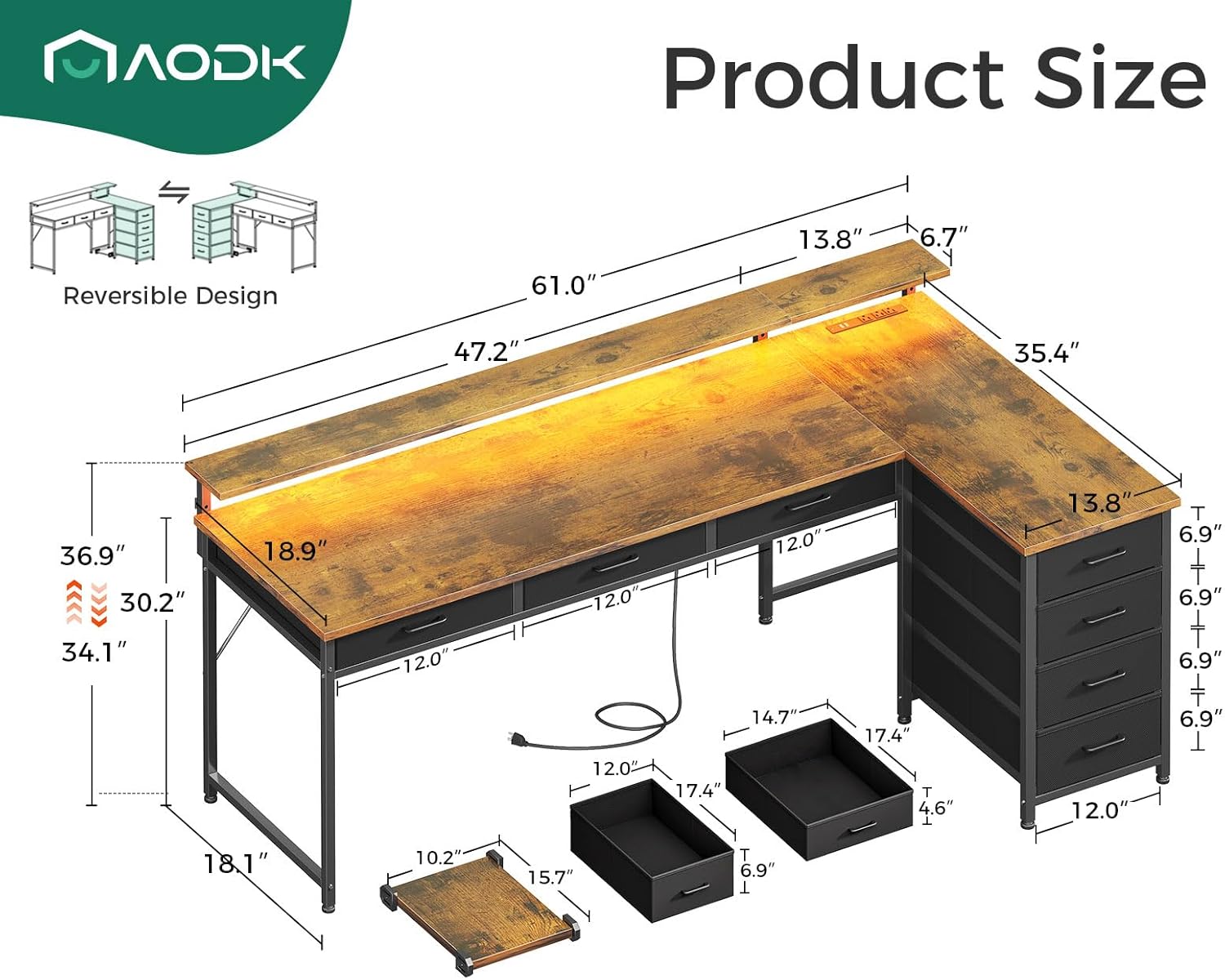
Figure 2: Detailed dimensions and reversible design illustration for the AODK L Shaped Desk, aiding in assembly and placement.
Assembly tools are included with the product. It is recommended to have a Phillips head screwdriver and possibly a rubber mallet for certain steps, though not strictly required.
Operating Instructions
LED Light Operation
The integrated LED light strip offers 10 colors and 10 lighting modes. Connect the LED light strip to a USB power source. Use the inline controller to cycle through colors, modes, and adjust brightness. This feature enhances the aesthetic and can reduce eye strain during extended use.
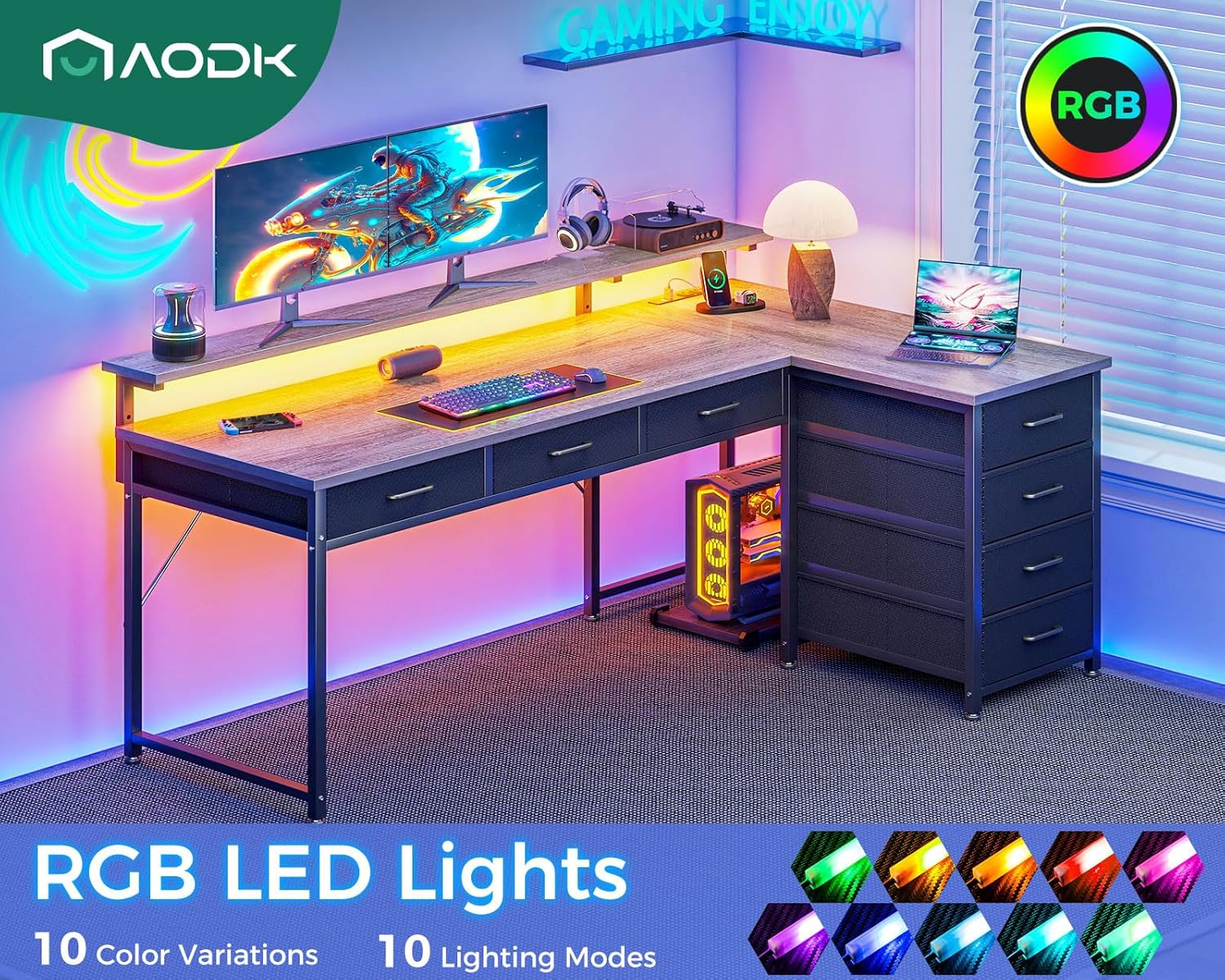
Figure 3: Illustration of the RGB LED lights with various color and mode options.
Power Outlet and USB Charging Ports
The desk includes a built-in power strip with 3 AC outlets and 2 USB ports. Plug the desk's power cord into a standard wall outlet. You can then connect your devices directly to the desk for convenient charging and power access, keeping your workspace tidy.

Figure 4: Close-up view of the recessed power outlet and USB ports, along with the adjustable monitor shelf.
Adjustable Monitor Stand
The monitor stand can be adjusted to 3 different heights (3.9", 5.2", 6.6") to optimize your viewing angle and promote ergonomic posture. Adjust the stand by loosening the securing screws, setting it to the desired height, and then re-tightening the screws firmly.
Using File Drawers
The desk is equipped with seven fabric file drawers (three under-desk and four in the side cabinet) for organizing documents, office supplies, and personal items. These drawers provide ample storage space and are designed for easy access.

Figure 5: View of the 4-tier fabric drawers, highlighting their storage capacity.
Movable CPU Stand
A movable CPU stand is included to keep your computer tower off the floor, protecting it from dust and moisture. Its mobility allows you to position your CPU conveniently wherever needed under the desk.
Figure 6: Illustration of the movable CPU stand, demonstrating its flexibility in placement.
Care and Maintenance
- Cleaning: The desk board is waterproof and dust-resistant. Wipe surfaces with a soft, damp cloth. Avoid harsh chemicals or abrasive cleaners that could damage the finish.
- Stability: Periodically check all screws and fasteners to ensure they are tight. The desk features enhanced X brackets and adjustable feet pads to maintain stability on uneven floors.
- Fabric Drawers: For the fabric drawers, spot clean with a mild detergent and allow to air dry. Do not machine wash.

Figure 7: Features like waterproof desk board, enhanced X brackets, and adjustable feet pads for durability and stability.
Troubleshooting
| Problem | Possible Cause | Solution |
|---|---|---|
| Desk wobbles or is unstable. | Uneven floor; loose fasteners. | Adjust the leg pads at the bottom of the desk to level it. Tighten all assembly screws. |
| LED lights not working. | Not properly connected to power; faulty connection. | Ensure the USB plug for the LED strip is securely connected to a working USB port. Check the inline controller for damage. |
| Power outlets/USB ports not functioning. | Desk power cord not plugged in; circuit breaker tripped. | Verify the desk's main power cord is securely plugged into a live wall outlet. Check your home's circuit breaker. |
| Drawers are difficult to open/close. | Overloaded; misaligned. | Reduce the weight in the drawers. Ensure the fabric drawers are inserted correctly and not jammed. |
Product Specifications
| Feature | Detail |
|---|---|
| Brand | AODK |
| Model Name | 6107 |
| Product Dimensions | 35.4"D x 61"W x 37"H |
| Color | Vintage |
| Material | Engineered Wood (Top), Alloy Steel (Base/Frame) |
| Item Weight | 54.67 Pounds |
| Special Features | Reversible Design, Built-in Power Outlet (3 AC, 2 USB), LED Light Strip (10 colors, 10 modes), Adjustable Monitor Stand (3 heights), Movable CPU Stand, 7 File Drawers (fabric) |
| Assembly Required | Yes (Tools Included) |
| UPC | 850061908872 |
Warranty and Support
This AODK product comes with a Limited Warranty. Please refer to the warranty card included in your product packaging for specific terms and conditions, including coverage duration and what is covered.
For technical support, assembly assistance, or warranty claims, please contact AODK customer service. Contact information can typically be found on the product packaging or on the official AODK website. Please have your model number (6107) and purchase date ready when contacting support.
You can also visit the AODK Store on Amazon for additional product information and support resources.
Related Documents - B02022001007UUKHADDC56447
 |
AODK Desk with Single-Side Shelf and Keyboard Tray - User Manual & Assembly Guide Detailed user manual and assembly guide for the AODK Desk with Single-Side Shelf and Keyboard Tray. Includes a comprehensive parts list, step-by-step assembly instructions, important safety precautions, and customer service information. |
Ask a question about this manual
Ask about setup, troubleshooting, compatibility, parts, safety, or missing instructions. Manuals+ will review the question and use this page’s manual context to help answer it.