Introduction
This manual provides essential information for the proper use and maintenance of your Lerdisk 32GB Micro SD Card. Designed for high-performance applications, this U3 A1 V30 Class 10 card offers fast read and write speeds, making it ideal for 4K video recording, game consoles, drones, and various other devices. Please read this manual thoroughly before use.

Image: The Lerdisk 32GB Micro SD card, black with white lettering, showing its capacity, class, and brand.
Universal Compatibility
The Lerdisk Micro SD card is designed for broad compatibility with a variety of electronic devices. It is suitable for expanding storage in 4K cameras, game consoles, drones, and Android phones. Always check your device's maximum supported capacity to ensure full compatibility.

Image: A collage demonstrating the Micro SD card's compatibility with various devices, including cameras, laptops, CCTV systems, drones, and smartphones.
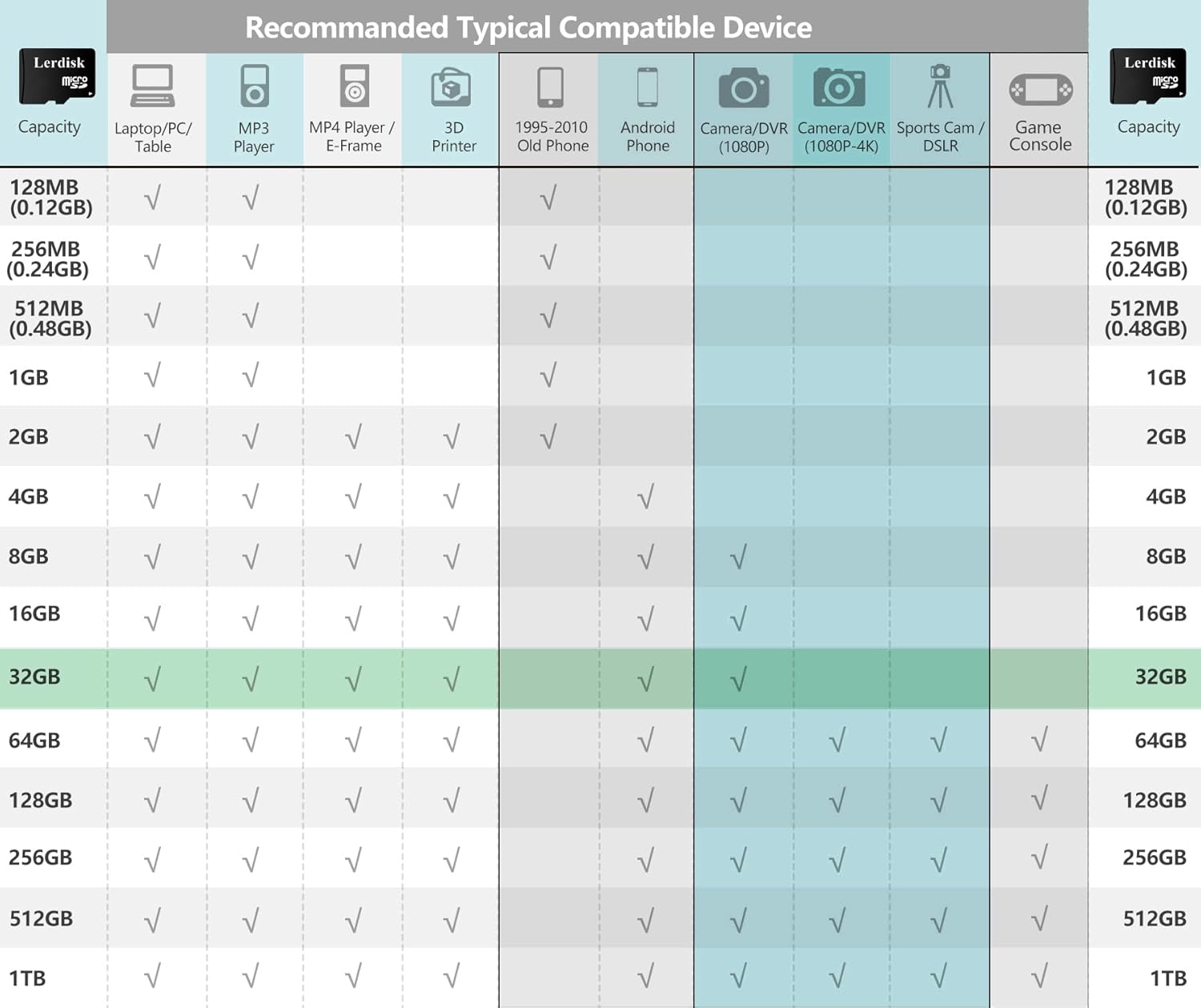
Image: A detailed chart showing typical compatible devices for different Micro SD card capacities, including laptops, MP3 players, cameras, and game consoles.
Setup and Installation
- Identify the Micro SD Slot: Locate the Micro SD card slot on your device (e.g., camera, phone, drone, game console). This slot is typically small and may be covered by a protective flap.
- Insert the Card: Gently insert the Lerdisk Micro SD card into the slot with the gold contacts facing down or as indicated by your device's manual. Push until it clicks into place. Do not force the card.
- Format the Card (if necessary): For optimal performance and to ensure compatibility with your specific device, it is recommended to format the Micro SD card upon first use. This can usually be done through your device's settings menu. Formatting will erase all data on the card, so ensure it is empty or back up any necessary files before proceeding.
- Verify Recognition: After insertion and formatting, check your device's storage settings to confirm that the Micro SD card is recognized and its capacity is displayed correctly.

Image: The Lerdisk Micro SD card placed inside a clear plastic protective storage case.
Operating Instructions
Once installed and formatted, your Lerdisk Micro SD card functions as an extended storage medium for your device. Its high-speed capabilities support demanding applications.
- Data Storage: Use the card to store photos, videos (including 4K), music, documents, and applications.
- High-Speed Performance: With U3/V30/A1 Class 10 rating, the card delivers 80+MB/s read and 50+MB/s write speeds. This ensures smooth recording of 4K videos, efficient game loading on consoles, and quick backup of CCTV footage.
- File Transfer: To transfer files to or from a computer, you can either connect your device directly to the computer or use an SD card adapter (often included) with a card reader.

Image: A chart illustrating the typical read and write speeds for various Lerdisk Micro SD card capacities, highlighting the high-speed performance.
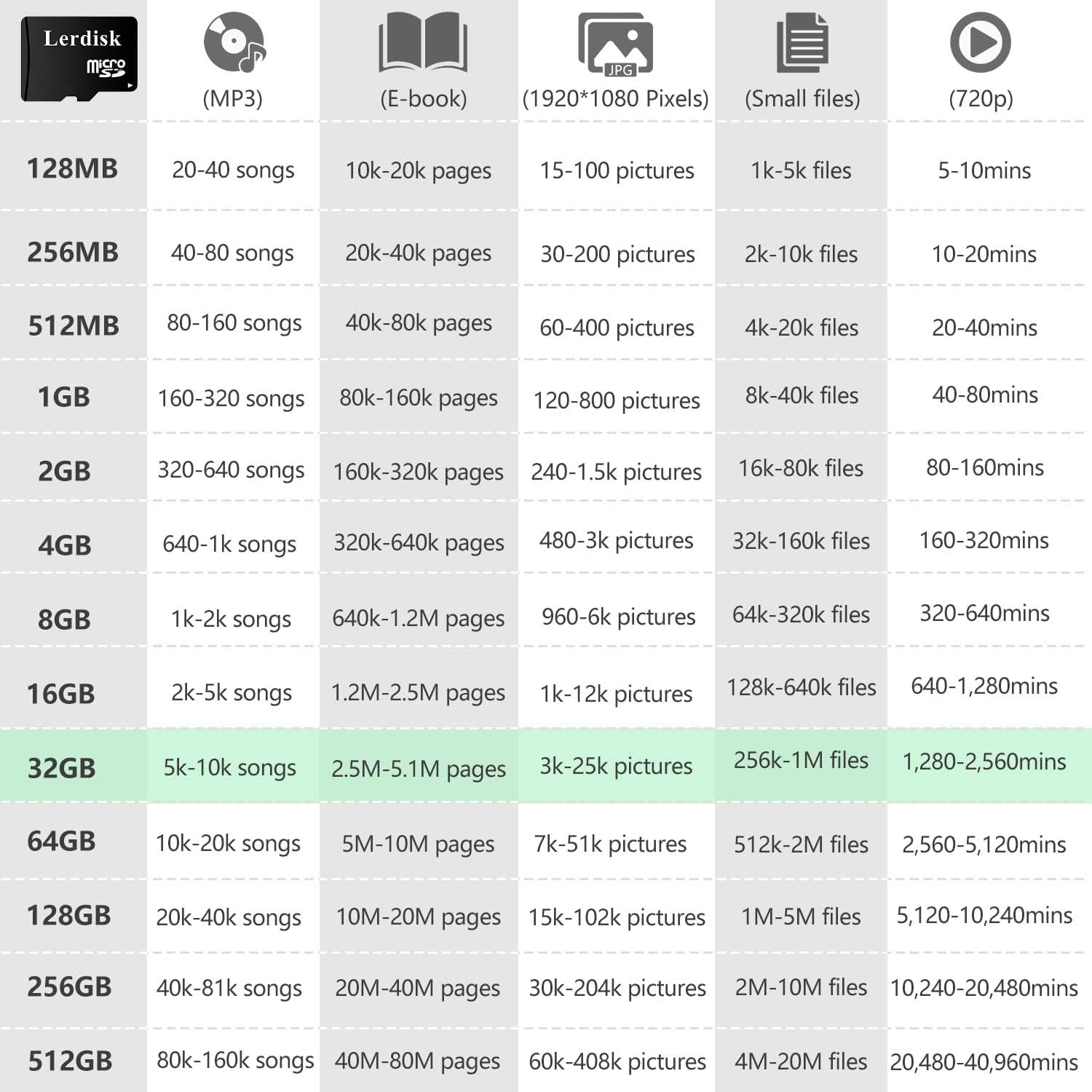
Image: A table showing estimated storage capacities for different media types (MP3s, E-books, pictures, small files, video) across various Micro SD card sizes.
Maintenance and Care
To ensure the longevity and reliable performance of your Lerdisk Micro SD card, follow these maintenance guidelines:
- Safe Removal: Always safely eject the Micro SD card from your device before physically removing it. This prevents data corruption.
- Regular Backups: Periodically back up important data from your Micro SD card to another storage device (e.g., computer hard drive, cloud storage) to prevent data loss.
- Avoid Physical Damage: While the card is designed to be durable (waterproof, shockproof, temperature-resistant), avoid excessive force, bending, or exposure to extreme conditions beyond its specified operating range (-25°C to 75°C).
- Keep Contacts Clean: If necessary, gently clean the gold contacts with a soft, dry, lint-free cloth. Avoid touching the contacts directly with your fingers.
- Storage: When not in use, store the Micro SD card in its protective case to prevent dust and static damage.
Troubleshooting
- Card Not Recognized:
- Ensure the card is fully inserted into the slot.
- Restart your device.
- Try the card in another compatible device or a different card reader to determine if the issue is with the card or the device.
- Check if your device supports the card's capacity (32GB).
- If using an adapter, ensure the adapter is functioning correctly.
- Slow Performance:
- Ensure your device supports the card's speed class (U3/V30/A1 Class 10). Older devices may not fully utilize high-speed cards.
- Check if the card is nearly full. Performance can degrade when storage is almost exhausted.
- Format the card (after backing up data) to resolve potential fragmentation issues.
- Data Corruption/Errors:
- Always safely eject the card before removal.
- Run a disk check utility on a computer to scan for and repair errors.
- If errors persist, the card may be faulty. Contact customer support.
Specifications
| Feature | Detail |
|---|---|
| Brand | Lerdisk |
| Model Name | MicroSD |
| Flash Memory Type | Micro SDHC |
| Memory Storage Capacity | 32 GB |
| Speed Class | U3, A1, V30, Class 10 |
| Read Speed | 80+ MB/s |
| Write Speed | 50+ MB/s |
| Durability | Waterproof, Shockproof, Temperature-resistant (-25°C to 75°C) |
| Certifications | FCC/RoHS compliant |
| Dimensions | Standard Micro SD card size |
Warranty and Support
Lerdisk products are rigorously tested for reliability. The Micro SD card is tested for 10,000+ read/write cycles to ensure no risk of data loss.
For any questions, technical assistance, or warranty claims, please contact Lerdisk customer support. Refer to the product packaging or the official Lerdisk website for the most current contact information.
The product comes with a limited warranty. Please retain your proof of purchase for warranty service.