
1. Product Overview
This manual provides instructions for the SymWell replacement remote control, designed to operate various air conditioner units. This remote is a direct replacement for several original models, offering essential functions for temperature control, mode selection, fan speed, and more.
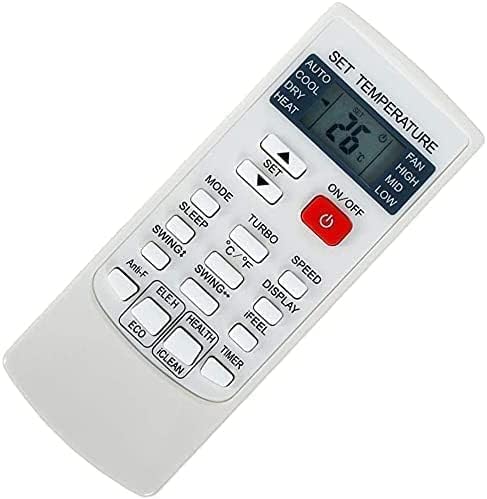
Figure 1: SymWell Replacement Remote Control. This image displays the white remote control unit with various buttons for functions such as power, mode, temperature adjustment, fan speed, and special features like Sleep, Turbo, and Health.
2. Key Features
- Direct replacement compatibility for YKR-H/101E, YKR-H/102E, YKR-H/002E, YKR-H/006E, YKR-H/103E, and other specified models.
- Intuitive button layout for easy operation.
- Supports essential air conditioner functions including AUTO, COOL, DRY, HEAT modes.
- Temperature display in Celsius only.
- Ergonomic design for comfortable handling.
3. Setup
3.1. Battery Installation
- Locate the battery compartment on the back of the remote control.
- Slide open the battery cover.
- Insert two AAA batteries (not included), ensuring the correct polarity (+ and -) as indicated inside the compartment.
- Close the battery cover securely.
The remote control does not require programming for compatible air conditioner models. Simply insert batteries, and it is ready for use.
4. Operating Instructions
Point the remote control directly at the air conditioner's receiver. Ensure there are no obstructions between the remote and the unit.
4.1. Basic Operation
- Power ON/OFF: Press the ON/OFF button (red button with power symbol) to turn the air conditioner on or off.
- Mode Selection: Press the MODE button repeatedly to cycle through available operating modes: AUTO, COOL, DRY, HEAT.
- Temperature Adjustment: Use the SET ▲ (Up) and SET ▼ (Down) buttons to increase or decrease the desired temperature. The display shows temperature in Celsius.
- Fan Speed: Press the FAN button to cycle through fan speeds: AUTO, HIGH, MID, LOW.
5. Button Functions (Detailed)
| Button Name | Function |
|---|---|
| ON/OFF | Turns the air conditioner unit on or off. |
| MODE | Cycles through operating modes: AUTO, COOL, DRY, HEAT. |
| SET ▲ / ▼ | Adjusts the set temperature up or down. |
| FAN | Selects fan speed: AUTO, HIGH, MID, LOW. |
| SLEEP | Activates or deactivates the sleep mode, which adjusts temperature for comfortable sleep. |
| TURBO | Engages maximum fan speed for rapid cooling or heating. |
| °C/°F | Note: This remote reads Celsius only. This button may not change the display to Fahrenheit. |
| SPEED | Alternative button for fan speed adjustment. |
| DISPLAY | Controls the display on the air conditioner unit (e.g., turns display lights on/off). |
| SWING ▲ | Controls the vertical swing of the air deflector. |
| SWING ▼ | Controls the horizontal swing of the air deflector. |
| iFEEL | Activates the iFEEL function, which senses the temperature at the remote's location for more precise control. |
| Anti-F | Activates anti-fungus or anti-mildew function (if supported by AC unit). |
| ELE.H | Likely activates electric heating element (if supported by AC unit). |
| HEALTH | Activates air purification or health-related functions (if supported by AC unit). |
| TIMER | Sets a timer for the air conditioner to turn on or off automatically. Refer to your AC unit's manual for specific timer settings. |
| ECO | Activates energy-saving mode. |
| iCLEAN | Initiates a self-cleaning function for the indoor unit (if supported by AC unit). |
6. Maintenance
6.1. Battery Replacement
Replace batteries when the remote's response becomes sluggish or the display fades. Always replace both batteries at the same time with new AAA batteries. Do not mix old and new batteries, or different types of batteries.
6.2. Cleaning
Wipe the remote control with a soft, dry cloth. Do not use liquid cleaners, abrasive cleaners, or chemical solvents, as these may damage the remote's surface or internal components.
7. Troubleshooting
| Problem | Possible Cause / Solution |
|---|---|
| Remote not responding. |
|
| Display is dim or blank. | Batteries are low. Replace with new batteries. |
| Some functions do not work. |
|
8. Specifications
- Brand: SymWell
- Connectivity Technology: Infrared
- Compatible Devices: Air Conditioner units (specific models listed in product description)
- Power Source: 2 x AAA Batteries (not included)
- Item Weight: 0.32 ounces (approximately 9 grams)
- Dimensions: 2 x 1 x 0.2 inches (approximately 5.08 x 2.54 x 0.51 cm)
- Special Feature: Ergonomic design
9. Warranty and Support
This product is a replacement remote control. For specific warranty information, please refer to the seller's return policy or contact the seller directly. For technical support regarding your air conditioner unit, please consult its original manufacturer's manual or support channels.