
Introduction
This manual provides essential information for the safe and effective operation, maintenance, and troubleshooting of your Greenworks 24V Cordless Rotary Tool Kit. Please read this manual thoroughly before first use and retain it for future reference. Understanding and following these instructions will ensure optimal performance and extend the lifespan of your tool.
Safety Instructions
General Safety Warnings
- Always wear appropriate personal protective equipment, including eye protection, hearing protection, and gloves, when operating the tool.
- Keep your work area clean and well-lit to prevent accidents.
- Do not operate power tools in explosive atmospheres, such as in the presence of flammable liquids, gases, or dust.
- Keep children and bystanders away from the operating area. Distractions can cause you to lose control.
- Avoid accidental starting. Ensure the switch is in the off-position before connecting to a battery pack, picking up, or carrying the tool.
- Disconnect the battery pack from the tool before making any adjustments, changing accessories, or storing the tool.
- Use the correct tool for your application. Do not force a small tool or attachment to do the job of a heavy-duty power tool.
- Maintain tools with care. Check for misalignment or binding of moving parts, breakage of parts, and any other condition that may affect the tool's operation.
- Use only accessories that are specified by the manufacturer for your specific tool model.
- Store idle tools out of the reach of children and untrained persons.
Battery Safety
- Use only Greenworks 24V batteries and chargers specifically designed for this tool.
- Do not expose battery packs to water or rain.
- Do not short-circuit the battery terminals.
- Do not store the tool or battery pack where the temperature may reach or exceed 104°F (40°C).
- Dispose of batteries properly according to local regulations. Do not incinerate.
Product Overview
The Greenworks 24V Cordless Rotary Tool Kit (Model HT350K) is a versatile tool designed for a wide range of applications including cutting, sanding, engraving, carving, drilling, and polishing. It features a powerful brushless motor, five adjustable speed settings, and comes complete with 52 diverse accessories to suit various tasks.
Components
- Greenworks 24V Cordless Rotary Tool
- 2.0Ah Lithium-Ion Battery
- Battery Charger
- 52 Assorted Accessories (including grinding stones, sanding bands, carving bits, cutting wheels, polishing pads, drill bits, and cleaning brushes)
Key Features
- Powerful Brushless Motor: Delivers superior power, extended durability, and greater efficiency for demanding tasks.
- 5 Speed Settings: Adjustable speeds ranging from 6,500 RPM to 35,000 RPM provide precision and control for various applications.
- Ergonomic Soft-Grip Handle: Designed for maximum comfort and control, reducing hand fatigue and vibration during extended use.
- On-Board Accessory Storage: Conveniently holds a selection of accessories directly on the tool for easy access.
- Quick Change Collet System: Allows for seamless and secure bit changes, minimizing downtime between tasks.

Image: The Greenworks 24V Cordless Rotary Tool Kit, including the tool, battery, charger, and a comprehensive set of 52 accessories.

Image: A detailed diagram pointing out the 5 speed settings, ergonomic soft-grip handle, powerful brushless motor, quick change collet, and on-board accessory storage.

Image: A categorized display of the 52 accessories, including grinding, sanding, carving, cutting, polishing, drilling, and cleaning bits.
Setup
Charging the Battery
- Connect the battery charger to a standard 120V AC power outlet.
- Slide the 2.0Ah lithium-ion battery pack into the charger until it clicks securely into place.
- Observe the charger indicator lights. A solid green light typically indicates a full charge. Charging time for a fully depleted 2.0Ah battery is approximately 60 minutes.
- Once fully charged, remove the battery from the charger by pressing the release tab and sliding it out.

Image: The 2.0Ah lithium-ion battery and its dedicated charger, ready for connection.
Attaching Accessories
- Ensure the rotary tool is turned off and the battery is removed before changing accessories.
- Locate the spindle lock button on the tool. Press and hold this button.
- While holding the spindle lock button, loosen the collet nut by turning it counter-clockwise.
- Insert the shank of the desired accessory fully into the collet.
- Continue holding the spindle lock button and securely tighten the collet nut clockwise until the accessory is firmly gripped.
- Release the spindle lock button. Gently pull on the accessory to confirm it is securely fastened.

Image: A visual guide demonstrating the three steps for fast accessory changes: pressing the spindle lock, inserting the accessory, and tightening the collet nut.
Operating Instructions
Powering On and Speed Selection
- Ensure a fully charged battery is securely inserted into the tool.
- Press the power button to turn on the tool. The tool will activate at a default speed setting.
- Use the speed adjustment buttons (typically '+' and '-' or a dial) to cycle through the 5 available speed settings, ranging from 6,500 RPM to 35,000 RPM. Select the appropriate speed for your task and material.

Image: The rotary tool's control panel showing the five distinct speed settings and their corresponding RPMs, from 6500 to 35000 RPM.
General Usage Tips
- Always test the tool and accessory on a scrap piece of material before beginning your main project to ensure the correct speed and technique.
- Apply light, consistent pressure. Allow the tool and accessory to do the work. Excessive pressure can lead to accessory wear, tool overheating, and reduced control.
- Keep the tool moving across the workpiece to prevent burning, gouging, or uneven material removal.
- For delicate tasks requiring fine detail, use lower speed settings. For heavier material removal or cutting, higher speeds may be more effective.
- Ensure your workspace is well-ventilated, especially when working with materials that produce fine dust or fumes.
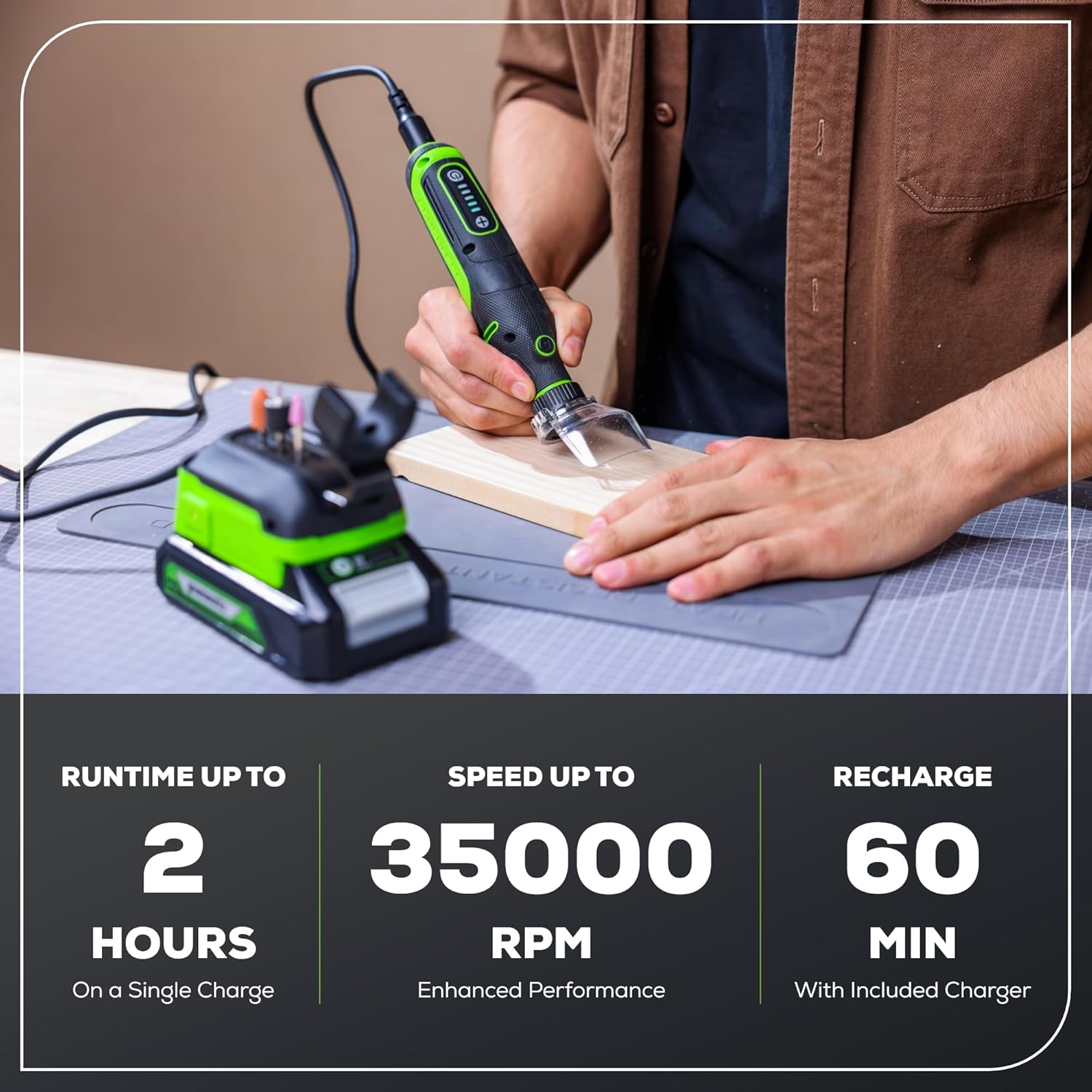
Image: A user demonstrating the precise control of the Greenworks rotary tool while working on a wooden surface.
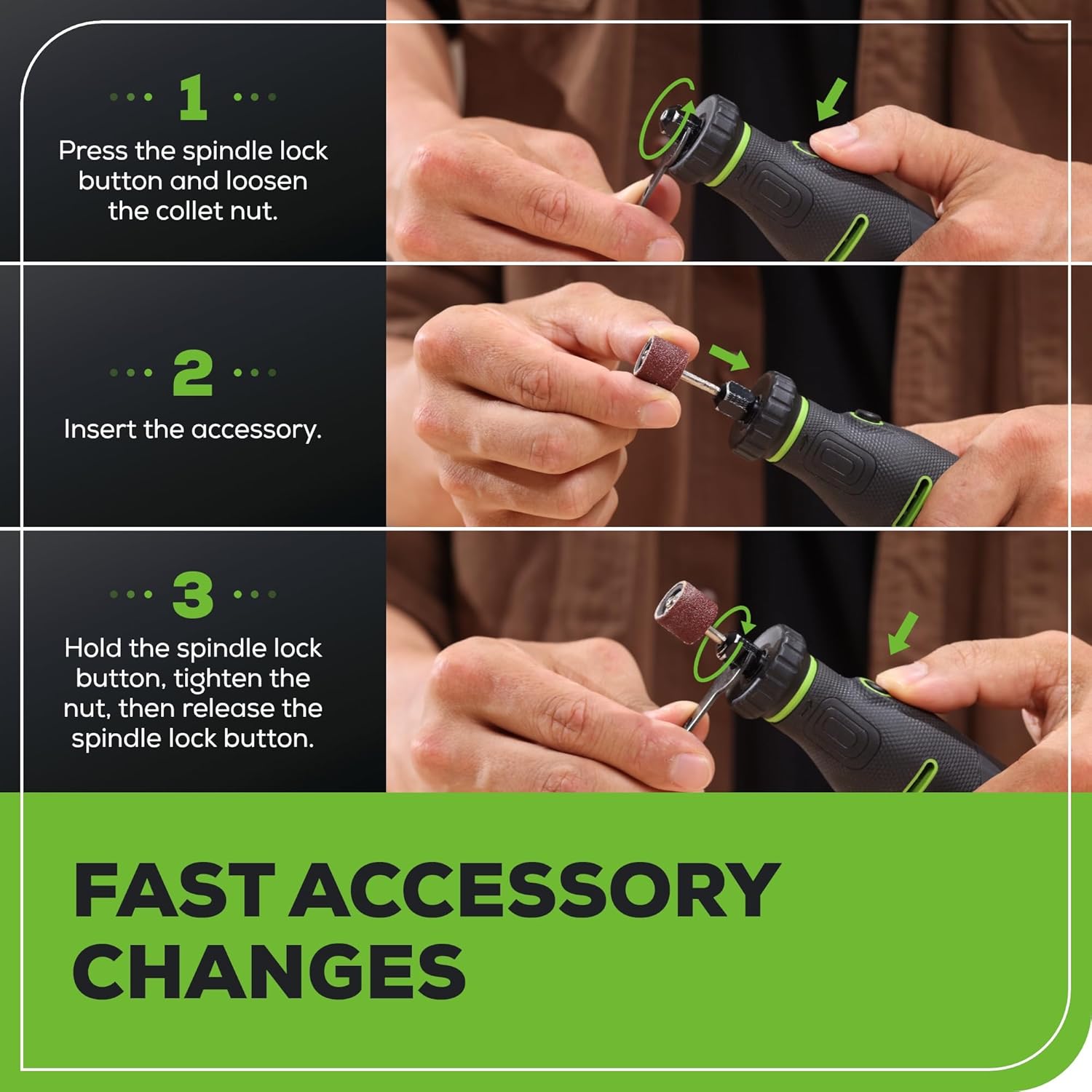
Image: A close-up view of the ergonomic overmold grip, highlighting its design for maximum control and reduced vibration during operation.
Maintenance
Cleaning
- Always disconnect the battery pack from the tool before performing any cleaning or maintenance.
- Use a soft, damp cloth to wipe down the exterior surfaces of the tool. Do not use harsh chemicals or abrasive cleaners.
- Use a brush or compressed air to clear dust and debris from the tool's ventilation openings to ensure proper cooling.
- Clean accessories after each use to maintain their effectiveness and prolong their lifespan. Remove any accumulated material from grinding stones, sanding bands, or cutting wheels.
Storage
- Store the rotary tool, battery, and accessories in a dry, secure location, away from direct sunlight, moisture, and extreme temperatures.
- For long-term storage, ensure the battery is partially charged (approximately 50%) rather than fully depleted or fully charged.
- Keep the tool and its components out of the reach of children and unauthorized individuals.
Troubleshooting
This section addresses common issues you might encounter with your Greenworks 24V Cordless Rotary Tool. If the problem persists after attempting these solutions, please contact customer support.
| Problem | Possible Cause | Solution |
|---|---|---|
| Tool does not turn on | Battery not charged | Charge the battery fully. |
| Tool does not turn on | Battery not properly inserted | Remove and reinsert the battery securely until it clicks. |
| Accessory wobbles or falls out | Collet nut not tightened sufficiently | Ensure the collet nut is securely tightened while holding the spindle lock button. |
| Reduced performance or power loss | Battery charge is low | Recharge the battery. |
| Reduced performance or poor results | Worn or dull accessory | Replace the accessory with a new, sharp one. |
| Tool overheats during use | Excessive pressure or prolonged continuous use | Reduce pressure on the workpiece and allow the tool to cool down periodically. Ensure ventilation slots are clear. |
If you encounter issues not listed here or if the suggested solutions do not resolve the problem, please contact Greenworks customer support for further assistance.
Specifications
- Model: HT350K
- Voltage: 24V DC
- Motor Type: Brushless
- Speed Settings: 5 (6,500 RPM, 13,500 RPM, 20,500 RPM, 27,500 RPM, 35,000 RPM)
- Power Source: Battery Powered
- Wattage: 180 watts
- Item Weight (Tool Only): Approximately 0.59 Pounds (9.4 ounces)
- Product Dimensions (L x W x H): 7.63 x 1.57 x 1.57 inches
- Battery Type: Lithium Ion (1 x 2.0Ah battery included)
- Charger: Included
- Accessories Included: 52 pieces
- UPC: 195526173816
Warranty and Support
Your Greenworks 24V Cordless Rotary Tool Kit (Model HT350K) is backed by a 3-Year Tool & Battery Warranty. This warranty covers defects in materials and workmanship under normal use.
For warranty claims, technical assistance, or to inquire about replacement parts, please contact Greenworks customer service directly.
- Online Support: Visit the official Greenworks website for FAQs, product registration, and support resources.
- Phone Support: Refer to your product packaging or the Greenworks website for the most current customer service contact numbers.
When contacting support, please have your product model number (HT350K) and proof of purchase readily available to expedite the service process.


