1. Introduction
This manual provides essential information for the safe operation, maintenance, and troubleshooting of your Greenworks 24V Brushless Cordless 1/2-inch Drill/Driver Kit, Model DDB5300K. Please read this manual thoroughly before using the tool to ensure proper function and to prevent injury.
The Greenworks 24V platform offers a versatile range of tools. This drill/driver features a brushless motor for enhanced power and efficiency, a 1/2-inch keyless ratcheting metal chuck, and a 2-speed gearbox for various applications.
2. Safety Information
WARNING: Read all safety warnings, instructions, illustrations, and specifications provided with this power tool. Failure to follow all instructions may result in electric shock, fire, and/or serious injury.
2.1 General Power Tool Safety
- Work Area Safety: Keep your work area clean and well-lit. Cluttered or dark areas invite accidents. Do not operate power tools in explosive atmospheres, such as in the presence of flammable liquids, gases, or dust.
- Electrical Safety: Avoid body contact with earthed or grounded surfaces such as pipes, radiators, ranges, and refrigerators. There is an increased risk of electric shock if your body is earthed or grounded.
- Personal Safety: Always wear eye protection. Use appropriate personal protective equipment such as dust masks, non-skid safety shoes, hard hats, or hearing protection when necessary. Stay alert, watch what you are doing, and use common sense when operating a power tool.
- Tool Use and Care: Do not force the power tool. Use the correct power tool for your application. The correct power tool will do the job better and safer at the rate for which it was designed. Disconnect the battery pack from the power tool before making any adjustments, changing accessories, or storing power tools.
2.2 Battery Tool Use and Care
- Recharge only with the charger specified by the manufacturer. A charger that is suitable for one type of battery pack may create a risk of fire when used with another battery pack.
- Use power tools only with specifically designated battery packs. Use of any other battery packs may create a risk of injury and fire.
- When battery pack is not in use, keep it away from other metal objects, like paper clips, coins, keys, nails, screws or other small metal objects, that can make a connection from one terminal to another. Shorting the battery terminals together may cause burns or a fire.
- Under abusive conditions, liquid may be ejected from the battery; avoid contact. If contact accidentally occurs, flush with water. If liquid contacts eyes, additionally seek medical help. Liquid ejected from the battery may cause irritation or burns.
3. Package Contents
Verify that all items are present and in good condition upon unpacking.
- 1 × Greenworks 24V Brushless Cordless 1/2-inch Drill/Driver
- 2 × 2Ah Lithium-Ion Batteries
- 1 × 2A Charger
- 1 × Belt Buckle
- 1 × Screwdriver Bit

Image 1: Complete Greenworks 24V Drill/Driver Kit contents.
4. Product Features
The Greenworks 24V Brushless Cordless 1/2-inch Drill/Driver is engineered for performance and durability.
- 1/2-inch Keyless Ratcheting Metal Chuck: Allows for quick and secure bit changes.
- Brushless Motor Technology: Delivers increased power, torque, extended runtime, and longer motor life compared to brushed motors.
- 2-Speed Gearbox: Provides optimal speed and torque for various drilling and driving applications (0-500 RPM for low speed/high torque, 0-2000 RPM for high speed/low torque).
- 21+1 Position Clutch: Offers precise torque control for driving screws and a dedicated drill setting for drilling tasks.
- Built-In LED Light: Illuminates the work area for improved visibility, activating for up to 10 seconds after the trigger is released.
- Compact and Lightweight Design: Facilitates use in confined spaces and reduces user fatigue.
- 24V Lithium-Ion Battery System: Provides fade-free power and no memory loss after charging, offering 20% more power and 35% longer run-time compared to 20V products.
- Overmold Cushioned Grip: Enhances comfort and reduces vibration during operation.
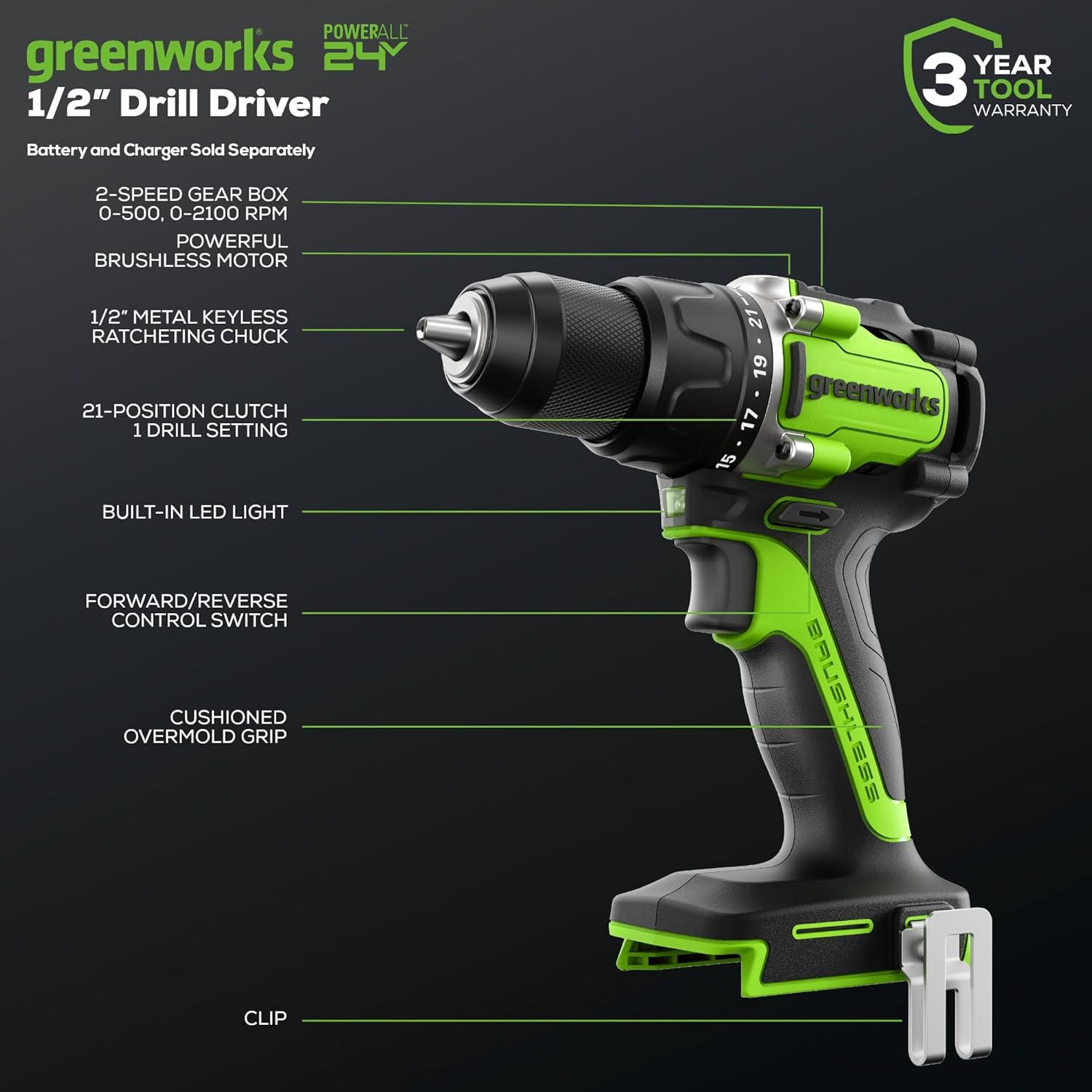
Image 2: Key features of the Greenworks 24V Drill/Driver.

Image 3: Performance metrics of the drill driver in action.

Image 4: Illustration of the brushless motor technology.
5. Setup
5.1 Charging the Battery
- Connect the charger to a standard 120V AC outlet.
- Slide the battery pack onto the charger until it clicks into place.
- The charger's LED indicator will show the charging status. Refer to the charger manual for specific light patterns.
- Once fully charged, remove the battery pack from the charger.
5.2 Installing/Removing the Battery Pack
- To Install: Align the battery pack with the battery port on the tool and slide it in until it locks securely.
- To Remove: Press the battery release button (usually located on the front or sides of the battery) and slide the battery pack out.
5.3 Installing/Removing Drill Bits
- Ensure the tool is off and the battery pack is removed.
- Grip the rear half of the chuck and rotate the front half counter-clockwise to open the chuck jaws.
- Insert the drill bit or screwdriver bit into the chuck jaws. Ensure the bit is centered.
- Rotate the front half of the chuck clockwise to tighten the jaws securely around the bit. A ratcheting sound indicates it is fully tightened.
- To Remove: Rotate the front half of the chuck counter-clockwise to loosen the jaws and pull the bit out.
6. Operating Instructions
6.1 Variable Speed Trigger
The tool features a variable speed trigger. Pressing the trigger further increases the speed. Releasing the trigger turns the tool off.
6.2 Forward/Reverse Control Switch
Located above the trigger, this switch controls the direction of rotation. Push the switch to the left for forward rotation (drilling/driving screws in) and to the right for reverse rotation (removing screws). Center position locks the trigger for safety.
6.3 Gear Selection
The drill/driver has a 2-speed gearbox. The gear selector switch is located on top of the tool.
- Position 1 (Low Speed): 0-500 RPM. Provides higher torque for heavy-duty drilling and driving large fasteners.
- Position 2 (High Speed): 0-2000 RPM. Provides higher speed for fast drilling and driving smaller fasteners.

Image 5: Gear selector for 2-variable speed ranges.
6.4 Torque Clutch Settings
The torque clutch ring, located behind the chuck, allows you to adjust the amount of torque applied. This prevents over-driving screws or damaging materials.
- Settings 1-21: For driving screws. Start with a lower setting and increase as needed until the desired depth is achieved without stripping the screw head or damaging the material.
- Drill Symbol Setting: For drilling applications. This setting bypasses the clutch for maximum torque.
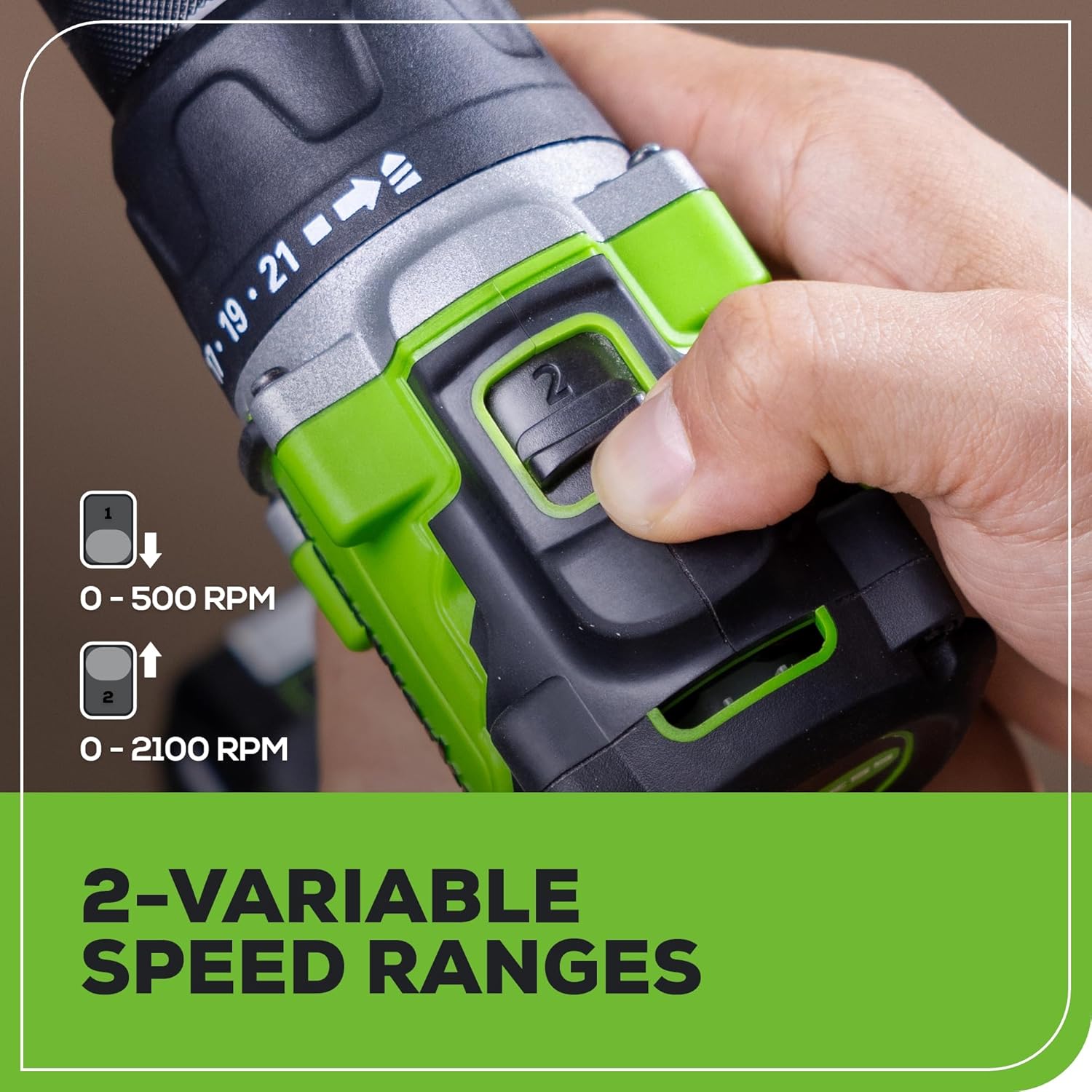
Image 6: Adjusting the torque clutch for precision control.
6.5 Using the LED Light
The built-in LED light automatically illuminates the work area when the trigger is pressed, providing better visibility in dimly lit conditions. It remains on for approximately 10 seconds after the trigger is released.

Image 7: The built-in LED light illuminating a workspace.
7. Maintenance
7.1 Cleaning
- Always remove the battery pack before cleaning.
- Use a clean, dry cloth to wipe dirt, dust, oil, grease, and other debris from the tool.
- Do not use solvents or harsh chemicals, as these can damage plastic parts.
- Keep the ventilation openings clear to prevent overheating.
7.2 Storage
- Store the tool and battery pack in a cool, dry place, away from direct sunlight and moisture.
- Ensure the battery pack is partially charged (around 50%) before long-term storage.
- Store out of reach of children.
7.3 Battery Care
- Do not store batteries in discharged condition.
- Avoid exposing batteries to extreme temperatures.
- Periodically charge batteries if stored for extended periods to maintain optimal performance.
8. Troubleshooting
| Problem | Possible Cause | Solution |
|---|---|---|
| Tool does not start | Battery not installed correctly Battery discharged Forward/Reverse switch in center (locked) position | Reinstall battery securely Charge battery Move switch to forward or reverse position |
| Loss of power during operation | Battery low Overload | Recharge battery Reduce pressure on tool; use appropriate speed/torque setting |
| Chuck not holding bit securely | Chuck not tightened enough Bit shank is dirty or damaged | Tighten chuck firmly until ratcheting sound Clean or replace bit |
| Tool overheating | Continuous heavy use Blocked ventilation slots | Allow tool to cool down Clear ventilation slots |
9. Specifications
| Feature | Specification |
|---|---|
| Model Number | DDB5300K |
| Voltage | 24 Volts |
| Chuck Size | 1/2 inch (Keyless Ratcheting Metal Chuck) |
| Maximum Torque | 530 in-lbs |
| No-Load Speed (Gear 1) | 0-500 RPM |
| No-Load Speed (Gear 2) | 0-2000 RPM |
| Clutch Positions | 21 + 1 (Drill) |
| Motor Type | Brushless |
| Weight (Tool only) | 2.4 Pounds (approx.) |
| Battery Type | Lithium-Ion |
| Included Batteries | 2 x 2Ah |
| Charger Output | 2A |
| UPC | 195526057079 |
10. Warranty
Greenworks provides a 3-year tool and battery warranty for this product. This warranty covers defects in materials and workmanship. Please retain your proof of purchase for warranty claims. For full warranty terms and conditions, please refer to the official Greenworks website or contact customer support.

Image 8: Greenworks 3-Year Tool Warranty.
11. Support
For technical assistance, replacement parts, or further information regarding your Greenworks 24V Brushless Cordless 1/2-inch Drill/Driver Kit, please visit the official Greenworks website or contact their customer service department. Contact information can typically be found on the product packaging or the Greenworks website.
You can also visit the Greenworks Store on Amazon for additional products and support resources.