
1. Introduction
This manual provides detailed instructions for the setup, operation, and maintenance of your SEETEC P133 PRO 13.3 Inch Broadcast Monitor. Please read this manual thoroughly before using the product to ensure proper functionality and to prevent damage.
The SEETEC P133 PRO is a high-brightness broadcast monitor designed for professional video production environments, offering advanced features for accurate monitoring and control.
2. Setup
2.1. Unboxing and Package Contents
Carefully unpack the monitor and verify all contents against the list below:
- 1x SEETEC P133 PRO Monitor
- 1x 3A Power Adapter
- 1x Tally Kit
- 1x V-mount Battery Plate (default to mount on device)
- 1x Mini HDMI Cable
- 1x HDMI Cable
- 1x SDI Cable
- 1x User Manual

Image: All items included in the SEETEC P133 PRO package.
2.2. Physical Setup
The monitor comes with a pre-mounted V-mount battery plate for portable power solutions. Desktop stand feet are also included for stable placement on flat surfaces.

Image: Rear panel of the monitor highlighting VESA mount points and input/output ports.
2.3. Connecting Power
The P133 PRO supports multiple power supply modes:
- DC 12V Input: Connect the provided 3A Power Adapter to the DC IN port.
- V-mount Battery: Attach a compatible V-mount battery to the pre-installed V-mount battery plate.
- XLR Connector: An optional Anton Bauer Battery Plate can be used with an XLR power connector.

Image: Power input options for the SEETEC P133 PRO monitor.
2.4. Video Connections
The monitor offers extensive input and output options:
- HDMI Input: 2x HDMI inputs supporting up to 4K at 60Hz.
- HDMI Output: 1x HDMI output.
- SDI Input: 2x SDI inputs.
- SDI Output: 2x SDI outputs.
- DVI Input: 1x DVI input.
Use the provided HDMI and SDI cables to connect your camera or video source to the monitor. Ensure cables are securely connected.

Image: Detailed view of the monitor's input and output ports.
3. Operating Instructions
3.1. Power On/Off
Locate the 'ON/OFF' switch on the front panel of the monitor. Flip the switch to the 'ON' position to power on the device. Flip to 'OFF' to power down.

Image: Front panel of the monitor with control buttons and power switch.
3.2. Menu Navigation
Use the physical buttons on the front panel to navigate the monitor's menu system:
- MENU: Press to enter the main menu.
- Arrow Buttons (< / >): Use to navigate through menu options.
- EXIT: Press to exit the current menu or confirm a selection.
- F1-F4: Customizable function buttons for quick access to frequently used features.
Video: An operation guide demonstrating menu navigation and basic functions of the SEETEC P133 PRO monitor.
3.3. Key Features
- Daylight Viewable (1000nit): The high brightness display ensures clear visibility even in bright outdoor conditions.
- HDR Monitoring: Provides a wider range of colors and contrast, ensuring accurate representation of your footage.
- Waveform Monitoring: Built-in waveform monitoring assists in achieving accurate exposure levels.
- 3D LUT Support: Upload up to 32 custom 3D LUTs to preview filming looks directly on set.
- Tally Light: The 3-color TALLY light indicates which signal is live, enhancing team coordination during broadcasts.
- 4K 60Hz HDMI Support: Ensures smoother visuals and maintains high-frame-rate dynamic images from cameras.

Image: The monitor's 1000nit brightness allows for clear viewing in daylight conditions.

Image: Demonstration of custom 3D LUT loading for on-set color grading preview.
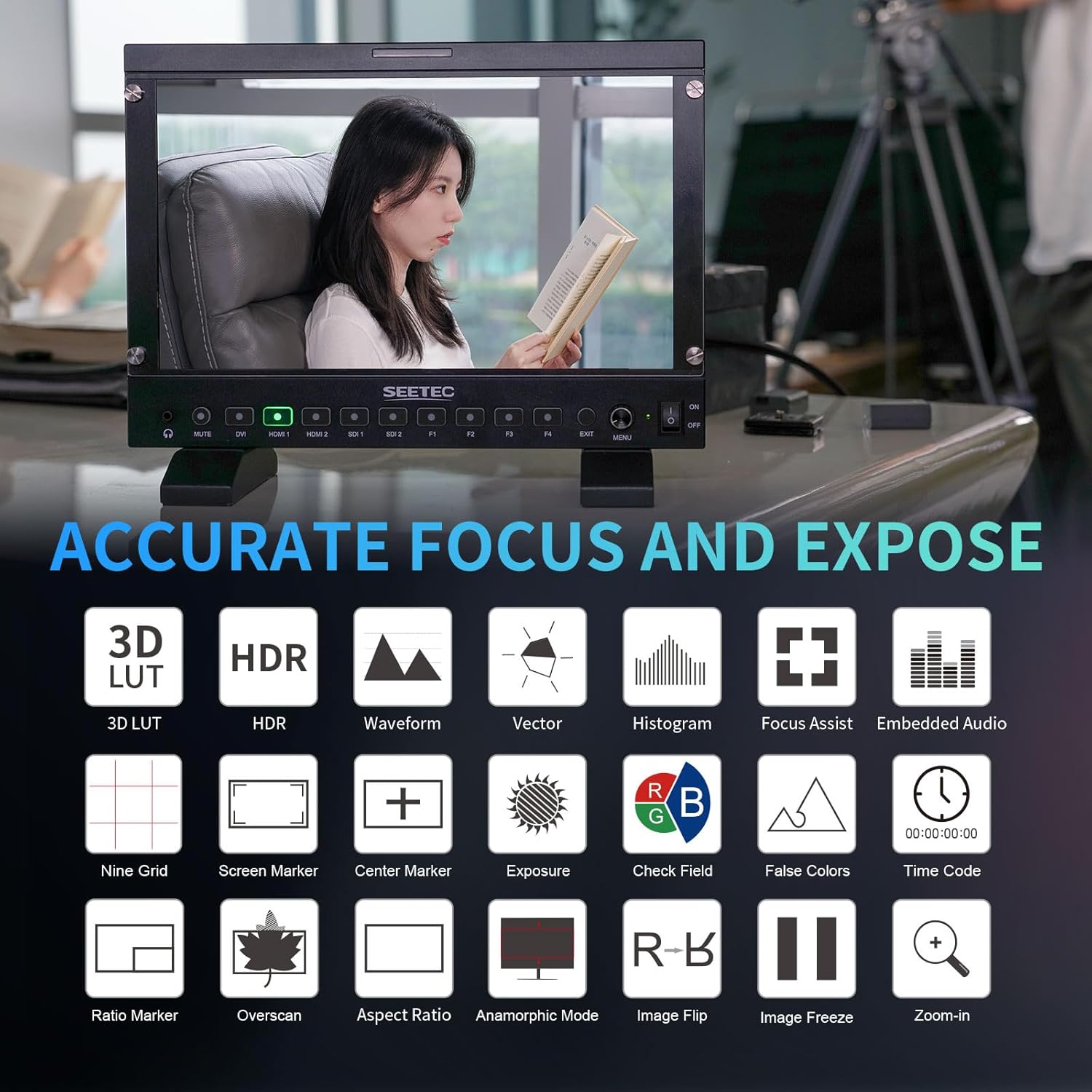
Image: Overview of accurate focus and exposure tools available on the monitor.
Video: A brief overview of the SEETEC P133 PRO monitor's features, including 1000nit brightness and 3D LUT capabilities.
4. Maintenance
- Cleaning: Use a soft, dry cloth to clean the monitor's screen and body. For stubborn smudges, lightly dampen the cloth with a screen-safe cleaning solution. Avoid harsh chemicals.
- Storage: When not in use, store the monitor in a cool, dry place away from direct sunlight and extreme temperatures. Use the original packaging or a protective case to prevent dust and physical damage.
- Handling: Always handle the monitor with care. Avoid dropping it or subjecting it to strong impacts.
5. Troubleshooting
- No Power: Ensure the power adapter is securely connected and the power switch is in the 'ON' position. If using a battery, check its charge level.
- No Video Signal: Verify that the video source (camera, etc.) is powered on and outputting a signal. Check all HDMI/SDI cable connections. Ensure the correct input source is selected on the monitor.
- Image Distortion/Poor Quality: Check the resolution and frame rate settings of your video source to ensure compatibility with the monitor. Try a different cable.
- Buttons Unresponsive: Power cycle the monitor. If the issue persists, contact customer support.
6. Specifications
| Feature | Description |
|---|---|
| Product Dimensions | 13.03 x 9.09 x 1.22 inches |
| Item Weight | 4.55 pounds |
| Manufacturer | SEETEC |
| Item Model Number | P133 PRO |
| Standing Screen Display Size | 13.3 Inches |
| Aspect Ratio | 16:9 |
| Resolution | 1920 x 1080 (FHD 1080p) |
| Image Brightness | 1000 nits |
| Screen Surface Description | Glossy |
7. Warranty and Support
For warranty information and technical support, please refer to the official SEETEC website or contact your local distributor. Keep your purchase receipt as proof of purchase for warranty claims.
Official Product Videos:
-
Video: A promotional video showcasing the SEETEC P133 PRO 13.3" 1000nit Broadcast Monitor with 3D LUT features.